In Part 1, we learned how virtual addresses are translated into physical addresses.
In Part 2, we looked at page faults, demand paging, memory protection, shared memory, and copy-on-write.
Now we can step back and look at something programmers see every day:
the virtual address space of a running process.
A process does not see physical RAM directly.
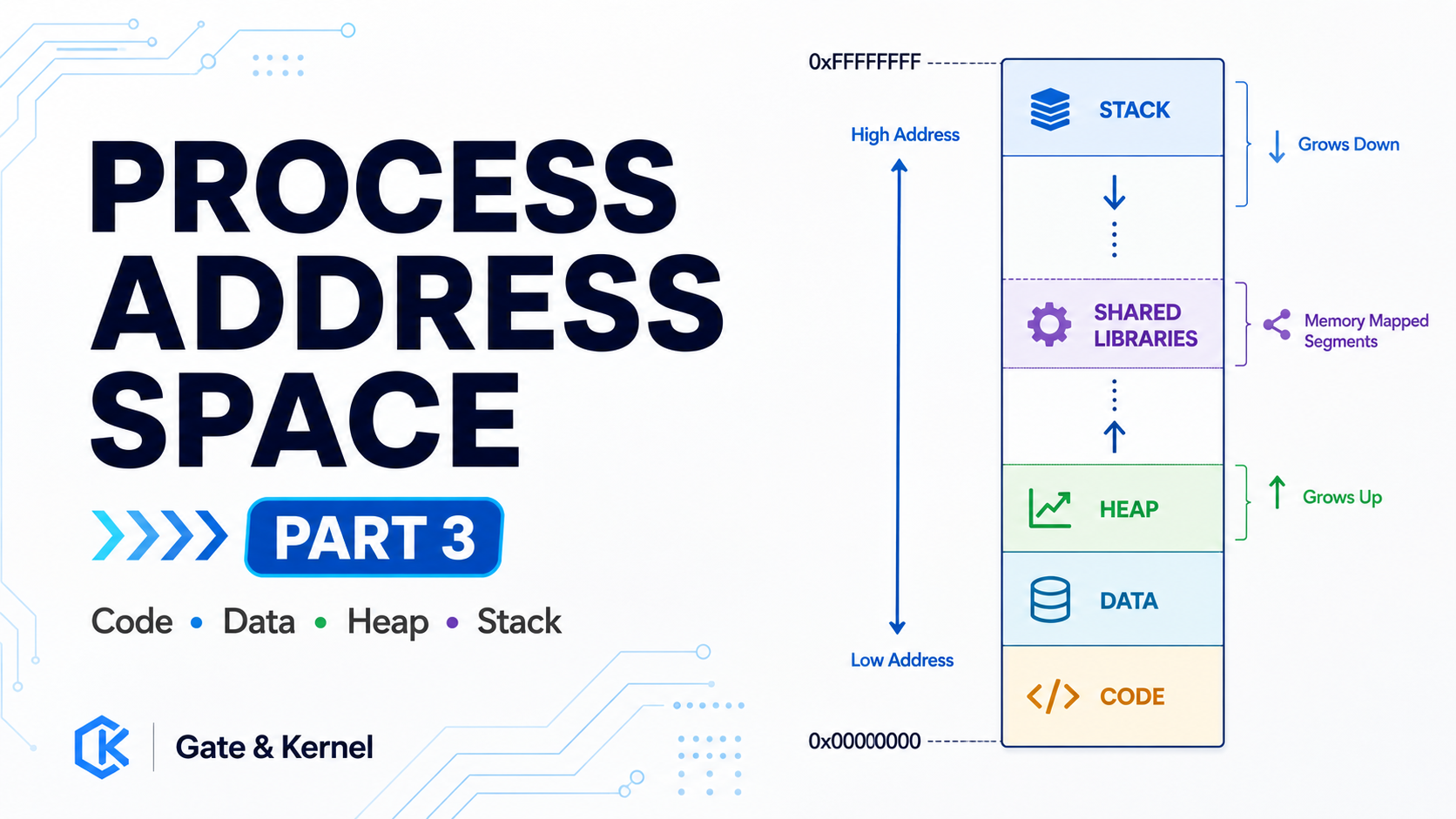
Instead, the operating system gives it an organized virtual address space containing different regions for program code, data, the heap, the stack, shared libraries, and other mappings.
Understanding this layout helps connect programs, operating systems, and virtual memory.
1. Every Process Gets Its Own Virtual Address Space
When a program starts, the operating system creates a process.
That process receives its own virtual address space.
Conceptually:
Process A
Virtual Address Space

Process B
Virtual Address Space
Both processes may use the same virtual addresses.
But those addresses can map to completely different physical memory.
For example:
Process A
Virtual Address 0x400000
        ↓
Physical Memory A

Process B
Virtual Address 0x400000
        ↓
Physical Memory B
This is one of the foundations of process isolation.
Each process behaves as if it has its own private memory.
2. A Process Address Space Is Divided Into Regions
A process does not usually treat its entire virtual address space as one large block.
Different regions serve different purposes.
A simplified layout might look like this:
High Addresses

+----------------------+
|        Stack         |
+----------------------+
|                      |
|   Shared Libraries   |
|                      |
+----------------------+
|        Heap          |
+----------------------+
|        Data          |
+----------------------+
|        Code          |
+----------------------+

Low Addresses
Real systems are more complicated.
But this simplified structure is useful for understanding the main idea.
3. The Code Region
The code region contains the machine instructions of the program.
For example, after compilation, instructions such as:
load
add
compare
branch
store
must exist somewhere in memory.
The CPU fetches these instructions from virtual addresses.
The operating system maps those virtual pages to the physical pages containing the program’s executable code.
Code pages are normally protected against modification.
Conceptually:
Program Code

Read:     Yes
Write:    No
Execute:  Yes
This helps prevent a program from accidentally overwriting its own instructions.
4. The Data Region
Programs also need memory for data that exists for much of the program’s lifetime.
This can include initialized global data and other long-lived program information.
Conceptually:
Code
   ↓
Data
Unlike program instructions, data normally needs to be writable.
A typical data page might therefore have permissions such as:
Read:     Yes
Write:    Yes
Execute:  No
The exact organization depends on the executable format and operating system.
But the important idea is that code and data can have different memory permissions.
5. The Heap
Programs often need memory whose size is not known when the program starts.
This dynamic memory is commonly associated with the heap.
Conceptually:
+----------------------+
|        Heap          |
|                      |
|   Dynamic Memory     |
|                      |
+----------------------+
The heap can grow as the program needs more memory.
At this stage, the most important thing to understand is not exactly which system call creates that memory.
The important idea is:
the heap is part of the process’s virtual address space.
The operating system can map heap pages to physical memory as they are needed.
6. The Stack
Another important region is the stack.
The stack is closely connected to function calls.
It can contain information such as:
local variables
function arguments
saved registers
return addresses
temporary values
Conceptually:
Function A
   ↓
Function B
   ↓
Function C
Each function call can create a new stack frame.
When the function returns, that frame is no longer needed.
The stack is also part of virtual memory.
Its pages are protected and managed by the operating system just like other memory regions.
7. The Heap and Stack Are Not Different Types of RAM
Beginners sometimes imagine that the heap and stack are physically different kinds of memory.
They are not.
Both ultimately use ordinary physical RAM.
The difference is how the virtual memory is organized and used.
Conceptually:
Heap Virtual Pages ──┐
                     ├── Physical RAM
Stack Virtual Pages ─┘
The CPU does not have special “heap RAM” or “stack RAM.”
It simply works with addresses.
The page tables determine where those addresses lead.
8. Shared Libraries Also Appear in Virtual Memory
Modern programs rarely contain every function they need inside one executable.
They often use shared libraries.
On Linux, for example, many programs use libraries containing common system functions.
The operating system can map those libraries into the process’s virtual address space.
Conceptually:
Process Address Space

+----------------------+
| Stack                |
+----------------------+
| Shared Library       |
+----------------------+
| Shared Library       |
+----------------------+
| Heap                 |
+----------------------+
| Program Data         |
+----------------------+
| Program Code         |
+----------------------+
Several processes can use the same library at the same time.
And as we saw in Part 2, read-only library pages can sometimes share the same physical memory.
9. Virtual Memory Makes Sharing Possible
Suppose three programs use the same library code.
Their virtual addresses do not necessarily have to be identical.
But their page tables can point to the same physical page.
Process A ──┐
Process B ──┼── Shared Physical Page
Process C ──┘
This saves physical memory.
At the same time, each process still has its own independent virtual address space.
Virtual memory therefore provides both:
isolation
and
controlled sharing
These may sound like opposite goals, but page tables make both possible.
10. Not Every Virtual Page Is Always in RAM
A process may have a large virtual address space.
But only some of its pages may currently exist in physical RAM.
For example:
Virtual Address Space

Page 1 → RAM
Page 2 → RAM
Page 3 → Not Present
Page 4 → RAM
Page 5 → Not Present
If the process accesses a page that is valid but not currently present, the CPU may generate a page fault.
The operating system can then provide the required page.
This is the demand-paging mechanism we discussed in Part 2.
So the process layout describes what memory the process is allowed to use.
It does not necessarily describe exactly what is physically inside RAM at this moment.
11. The Same Process Layout Can Change While the Program Runs
A process’s virtual address space is not completely fixed.
As the program runs:
the stack may grow
the heap may grow
libraries may be loaded
memory regions may be created
memory regions may disappear
The operating system continuously manages these mappings.
Behind the scenes, page-table entries can be created, changed, or removed.
But the program normally works with a much simpler view:
Code
Data
Heap
Stack
Libraries
This abstraction hides much of the complexity of physical memory management.
12. Putting Everything Together
We can now connect the whole virtual-memory series.
A program runs inside a virtual address space.
That address space contains regions such as:
Code
Data
Heap
Stack
Shared Libraries
When the CPU accesses memory, it produces a virtual address.
The MMU translates that virtual address using page tables.
The TLB can cache recent translations.
If the page exists and permissions allow the access:
Virtual Address
      ↓
TLB / Page Table
      ↓
Physical Address
      ↓
RAM
If the required page is not currently available:
Virtual Address
      ↓
Page Fault
      ↓
Operating System
      ↓
Page becomes available
      ↓
Instruction continues
This is how the operating system creates the illusion that every process owns a large, organized, private memory space.
Conclusion
A running process does not see physical RAM directly.
It sees a virtual address space.
Inside that space are different regions for different purposes.
Program instructions live in code regions.
Long-lived program information lives in data regions.
Dynamic memory is associated with the heap.
Function calls use the stack.
Shared libraries can be mapped into the same address space.
But underneath all of these regions is the same basic mechanism:
virtual pages mapped to physical page frames through page tables.
The heap is not special physical memory.
The stack is not special physical memory.
A shared library is not automatically a separate physical copy.
They are all virtual-memory mappings managed by the operating system.
That is the power of virtual memory.
It lets software see a simple, organized address space while the operating system and hardware manage the much more complicated reality underneath.
In Part 4, we can follow one memory access from the program all the way through the MMU, page table, page fault handler, and physical RAM.
Gate & Kernel — understanding computing from software all the way down to the hardware.