Architecture of Linux
Linux is not just a single program. It is a complete operating system environment made of several layers that work together. Each layer has a different job. Applications run at the top. Hardware stays at the bottom. Between them, Linux uses shells, system libraries, utilities, and the kernel to control the whole computer.
A simple Linux architecture can be shown like this:
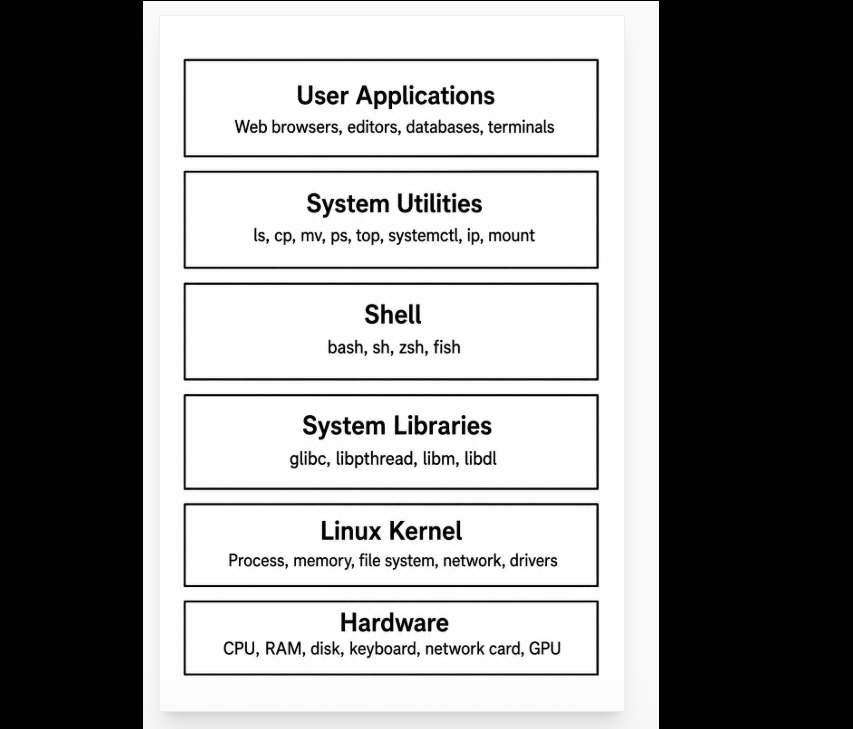
1. User Applications
User applications are the programs that users directly interact with. These can be graphical applications, command-line tools, background services, or server programs.
Examples include web browsers, text editors, compilers, databases, web servers, media players, and programming tools.
Applications do not directly control the CPU, memory, disk, or network card. If every application could access hardware directly, the system would become unsafe and unstable. One program could overwrite another program’s memory, damage files, or take control of the whole machine.
Instead, applications must ask the operating system for help. They do this through system libraries and system calls.
For example, when a text editor saves a file, it does not directly write electrical signals to the disk. It asks the Linux kernel to write data to a file. The kernel then talks to the file system and device driver, and the driver communicates with the actual storage device.
2. Shell
The shell is a command interpreter. It allows users to type commands and run programs.
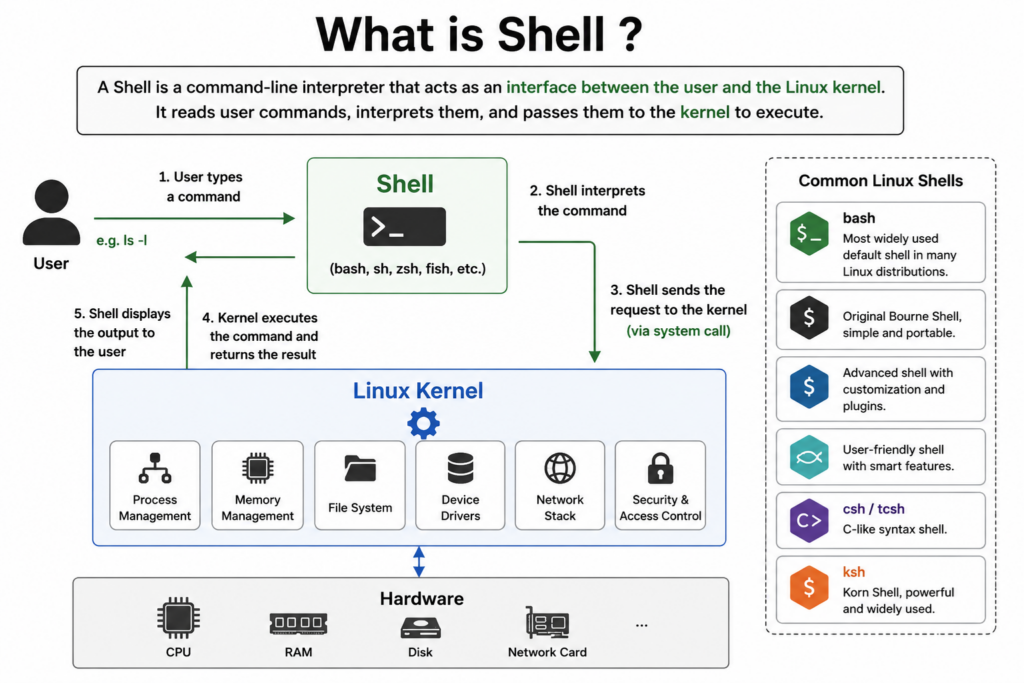
For example:
ls
cd /home
mkdir test
cp file1.txt file2.txt
When you type a command, the shell reads it, understands it, and starts the correct program. The shell itself does not perform every operation. Instead, it launches programs and asks the kernel to manage them.
For example, when you type:
ls
The shell finds the ls program, starts it as a process, and the kernel gives that process CPU time and access to the file system.
Common Linux shells include:
| Shell | Description |
|---|---|
| sh | Original Unix shell, simple and portable |
| bash | Most common Linux shell |
| zsh | Powerful shell with plugins and customization |
| fish | Friendly interactive shell |
| ksh | Korn shell, common in enterprise Unix systems |
For beginners, Bash is the most important shell to learn because it is the default shell on many Linux distributions.
3. System Utilities
System utilities are small programs used to manage and inspect the system. Many Linux commands are actually system utilities.
Examples include:
| Utility | Purpose |
|---|---|
ls | List files |
cp | Copy files |
mv | Move or rename files |
rm | Remove files |
ps | Show running processes |
top | Monitor CPU and memory usage |
df | Show disk usage |
mount | Attach file systems |
ip | Configure network interfaces |
systemctl | Manage system services |
These tools make Linux powerful for system administration. Instead of clicking through many menus, users can control almost everything with commands.
System utilities usually run in user space, just like normal applications. But when they need to perform privileged operations, they request help from the kernel.
For example, the mount command asks the kernel to attach a file system to the Linux directory tree.
4. System Libraries
System libraries provide reusable functions for applications. They act as a bridge between applications and the kernel.
A program usually does not call the kernel directly. Instead, it calls library functions.
For example, a C program may use:
printf("Hello Linux\n");
fopen("data.txt", "r");
malloc(1024);
These functions are provided by libraries. Some of them may eventually use system calls to request services from the kernel.
Important system libraries include:
| Library | Purpose |
|---|---|
| glibc | Standard C library used by most Linux programs |
| libpthread | Thread support |
| libm | Math functions |
| libdl | Dynamic library loading |
| libstdc++ | C++ standard library |
The GNU C Library, usually called glibc, is especially important. It provides many basic functions that Linux programs depend on.
System libraries make Linux programming easier because developers do not need to write low-level system call code every time.
5. Kernel
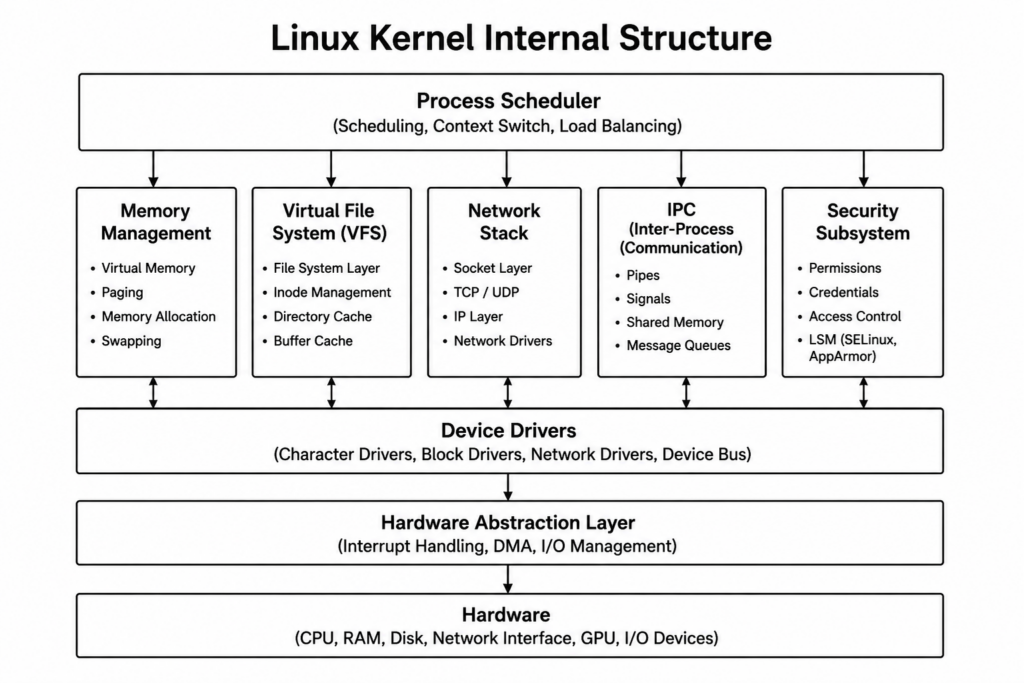
The kernel is the core of the Linux operating system. It controls hardware resources and provides safe access to them.
The Linux kernel runs in kernel space, which is a protected area of memory. Normal applications run in user space. This separation is very important for security and stability.
If an application crashes, it usually does not crash the whole system. But if the kernel fails, the whole operating system may stop working.
The kernel manages several major areas. Above diagram shows the major subsystems inside the Linux kernel.
Each subsystem has a specific job and works together to manage the entire operating system.
5.1. Process Scheduler
The Process Scheduler controls how CPU time is shared between running programs.
Its responsibilities include:
- Selecting which process runs next
- Switching between tasks
- Balancing CPU usage
This allows Linux to run many programs at the same time.
5.2. Memory Management
The Memory Management subsystem controls system memory.
It handles:
- Virtual memory
- Memory allocation
- Paging and swapping
- RAM protection
This helps Linux run programs safely and efficiently.
5.3. Virtual File System (VFS)
The Virtual File System provides a common interface for different file systems.
Linux supports many file systems, including:
- ext4
- XFS
- Btrfs
- NTFS
Applications can access files without knowing the underlying file system type.
5.4. Network Stack
The Network Stack manages network communication.
It handles:
- TCP/IP
- UDP
- Sockets
- Packet transmission
This subsystem allows Linux to communicate over networks and the Internet.
5.5. IPC (Inter-Process Communication)
IPC allows processes to communicate with each other.
Common IPC mechanisms include:
- Pipes
- Signals
- Shared memory
- Message queues
IPC is important for multitasking and system coordination.
5.6. Security Subsystem
The Security Subsystem controls access and permissions.
It provides:
- User permissions
- Access control
- Process isolation
- Security policies
Linux security systems such as SELinux and AppArmor are part of this layer.
5.7. Device Drivers
Device Drivers allow the kernel to communicate with hardware devices.
Examples include drivers for:
- Disk drives
- Network cards
- GPUs
- USB devices
Drivers hide hardware complexity from applications.
5.8. Hardware Abstraction Layer
This layer helps standardize communication between the kernel and hardware.
It manages:
- Interrupts
- DMA
- Low-level I/O operations
This allows Linux to support many different hardware platforms.
5.9. Hardware
The hardware layer includes the physical components of the computer:
- CPU
- RAM
- Storage devices
- Network interfaces
- Graphics cards
The Linux kernel controls these devices through drivers and kernel subsystems.
6. Process Management
A process is a running program.
For example, when you open a terminal, run a browser, or start a web server, each running program becomes one or more processes.
The kernel is responsible for creating, scheduling, pausing, resuming, and terminating processes.
Linux can run many processes at the same time. But most CPUs cannot literally run unlimited programs at once. The kernel’s scheduler divides CPU time among processes very quickly.
This creates the illusion that many programs are running simultaneously.
For example:
ps aux
top
htop
These commands show running processes.
The scheduler decides:
- Which process runs next
- How long it runs
- Which CPU core it runs on
- How to balance performance and fairness
7. Memory Management
Memory management is another major responsibility of the kernel.
Every process needs memory to store code, variables, data, stack, heap, and shared libraries. The kernel controls how memory is allocated and protected.
Linux uses virtual memory. This means each process sees its own private memory space.
This design has several advantages:
- One process cannot easily damage another process’s memory
- Programs can use memory more safely
- The system can move data between RAM and disk when needed
- Large programs can run more efficiently
For example, two programs may both think they are using the same memory address, but the kernel maps those virtual addresses to different physical locations in RAM.
This is one of the most important ideas in modern operating systems.
8. File System Management
Linux treats many things as files. Regular files, directories, devices, sockets, and pipes can all appear as file-like objects.
The kernel provides a Virtual File System, often called VFS. The VFS gives applications a common interface for many different file systems.
For example, Linux can work with:
- ext4
- XFS
- Btrfs
- FAT32
- NTFS
- tmpfs
- procfs
- sysfs
Applications do not need to know the exact file system type. They can use common operations such as open, read, write, and close.
For example:
cat /etc/passwd
ls /home
df -h
These commands all rely on file system services provided by the kernel.
9. Device Drivers
Hardware devices are controlled through device drivers.
A device driver is software that knows how to communicate with a specific type of hardware.
Examples include drivers for:
- Disk controllers
- Network cards
- USB devices
- Graphics cards
- Sound cards
- Keyboards
- Mice
Applications do not need to know the details of each hardware device. They ask the kernel to perform an operation, and the kernel uses the correct driver.
For example, when a program sends data over the network, it does not directly control the network card. The kernel networking stack and the network driver handle the details.
10. Networking Subsystem
Linux has a powerful networking subsystem. This is one reason Linux is widely used on servers, routers, cloud platforms, and data centers.
The networking subsystem handles:
- IP addresses
- Routing
- TCP and UDP
- Sockets
- Firewalls
- Packet filtering
- Network interfaces
Common networking commands include:
ip addr
ping google.com
ss -tulnp
curl example.com
When an application sends data over the internet, the request flows through system libraries, system calls, the kernel networking stack, the network driver, and finally the network hardware.
11. Security and Permissions
Linux has a strong security model based on users, groups, permissions, and kernel-level access control.
Every file has permissions for:
- Owner
- Group
- Others
For example:
-rw-r--r--
This means the owner can read and write, while the group and others can only read.
Linux also supports advanced security systems such as:
- SELinux
- AppArmor
- capabilities
- namespaces
- cgroups
These mechanisms are very important in servers, containers, and cloud environments.
For example, Docker uses Linux kernel features such as namespaces and cgroups to isolate containers.
12. User Space and Kernel Space
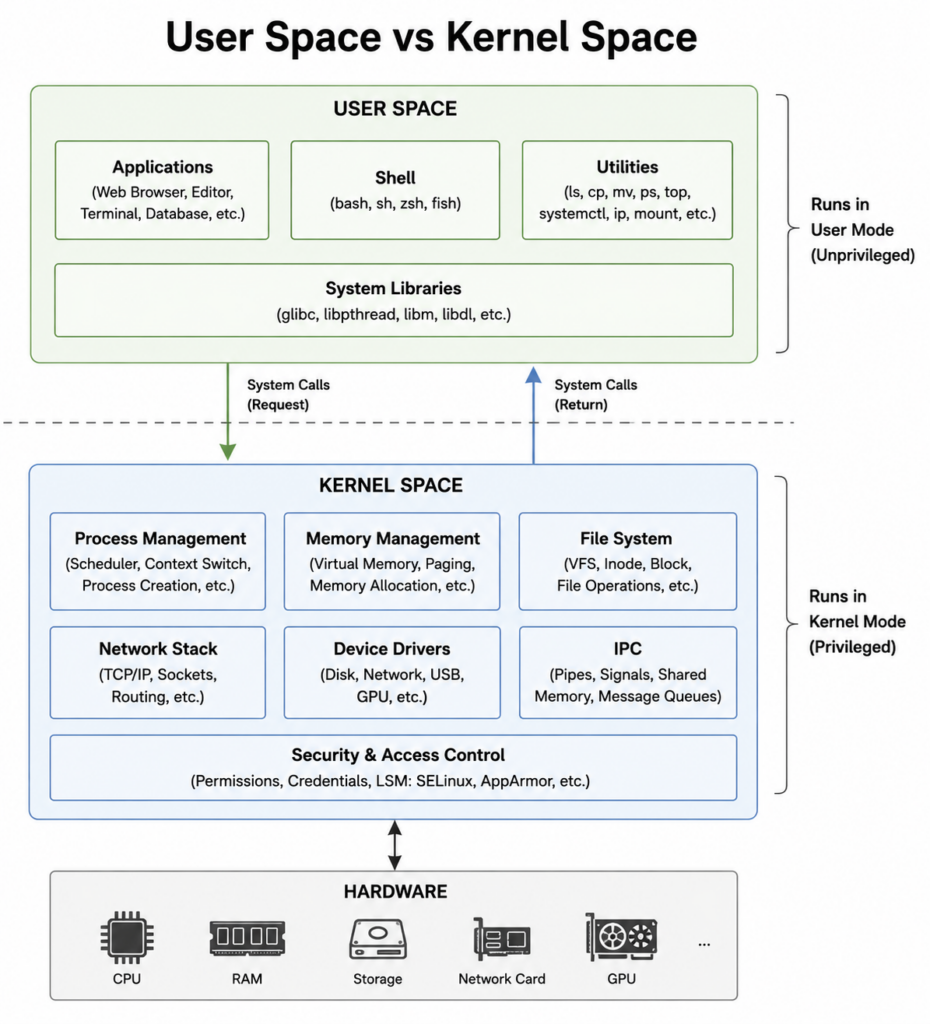
A key concept in Linux architecture is the separation between user space and kernel space.
User space includes:
- Applications
- Shells
- System utilities
- Most libraries
Kernel space includes:
- Linux kernel
- Device drivers
- Kernel modules
- Core system management code
This separation protects the system.
Applications cannot freely access hardware or kernel memory. They must request services through system calls.
This makes Linux more stable and secure.
13. System Calls
System calls are the official interface between user space and the kernel.
When a program needs a kernel service, it uses a system call.
Common system calls include:
| System Call | Purpose |
|---|---|
open() | Open a file |
read() | Read data |
write() | Write data |
fork() | Create a process |
exec() | Run a program |
wait() | Wait for a process |
socket() | Create a network socket |
For example, when a program reads a file, the process may look like this:
Application → glibc → system call → kernel → file system → disk driver → hardware
The result then returns in the opposite direction.
14. Hardware Layer
The hardware layer is the lowest layer of the system.
It includes:
- CPU
- RAM
- SSD or hard disk
- GPU
- Network card
- USB controller
- Keyboard
- Mouse
- Display
The Linux kernel manages hardware through drivers and hardware abstraction.
This means applications do not need to understand the exact details of each device.
For example, a program can write to a file without knowing whether the file is stored on an SSD, USB drive, network disk, or memory-based file system.
15. Example: What Happens When You Run ls
Let’s follow a simple command:
ls /home
Step by step:
- The user types
ls /homein the shell. - The shell parses the command.
- The shell finds the
lsprogram. - The shell asks the kernel to create a new process.
- The kernel loads the
lsprogram into memory. - The
lsprogram requests directory information. - The request goes through system libraries.
- The kernel uses the VFS to access the directory.
- The file system returns the list of files.
- The output is printed back to the terminal.
This simple command uses many parts of Linux architecture.
16. Example: What Happens When You Open a Website
When you open a website in a browser:
Browser → System Libraries → Kernel Networking Stack → Network Driver → Network Card → Internet
The browser creates a network request. The kernel handles TCP/IP communication. The network driver sends packets through the hardware. When the response comes back, the data travels back through the same layers.
This layered design makes Linux flexible and powerful.
17. Why Linux Uses a Layered Architecture
Linux uses a layered architecture because it improves:
- Stability
- Security
- Portability
- Performance
- Maintainability
- Hardware support
Each layer has a clear job. Applications focus on user tasks. Libraries provide reusable interfaces. The kernel manages resources. Drivers control hardware.
This separation allows Linux to run on many types of machines, from small embedded boards to large supercomputers.
Conclusion
The architecture of Linux is built around a clear separation between user space, kernel space, and hardware. Applications and utilities run in user space. The kernel runs in kernel space and manages processes, memory, file systems, devices, networking, and security. Hardware sits at the bottom and is controlled through device drivers.
This architecture is the reason Linux is powerful, stable, secure, and flexible.
Linux can run on personal computers, servers, smartphones, routers, embedded systems, cloud platforms, and supercomputers because its design separates high-level software from low-level hardware control.