How Virtual Memory Really Works, Part 2: Page Faults, Demand Paging, Memory Protection, Shared Memory, and Copy-on-Write
In Part 1, we followed the path from a virtual address to a physical address.
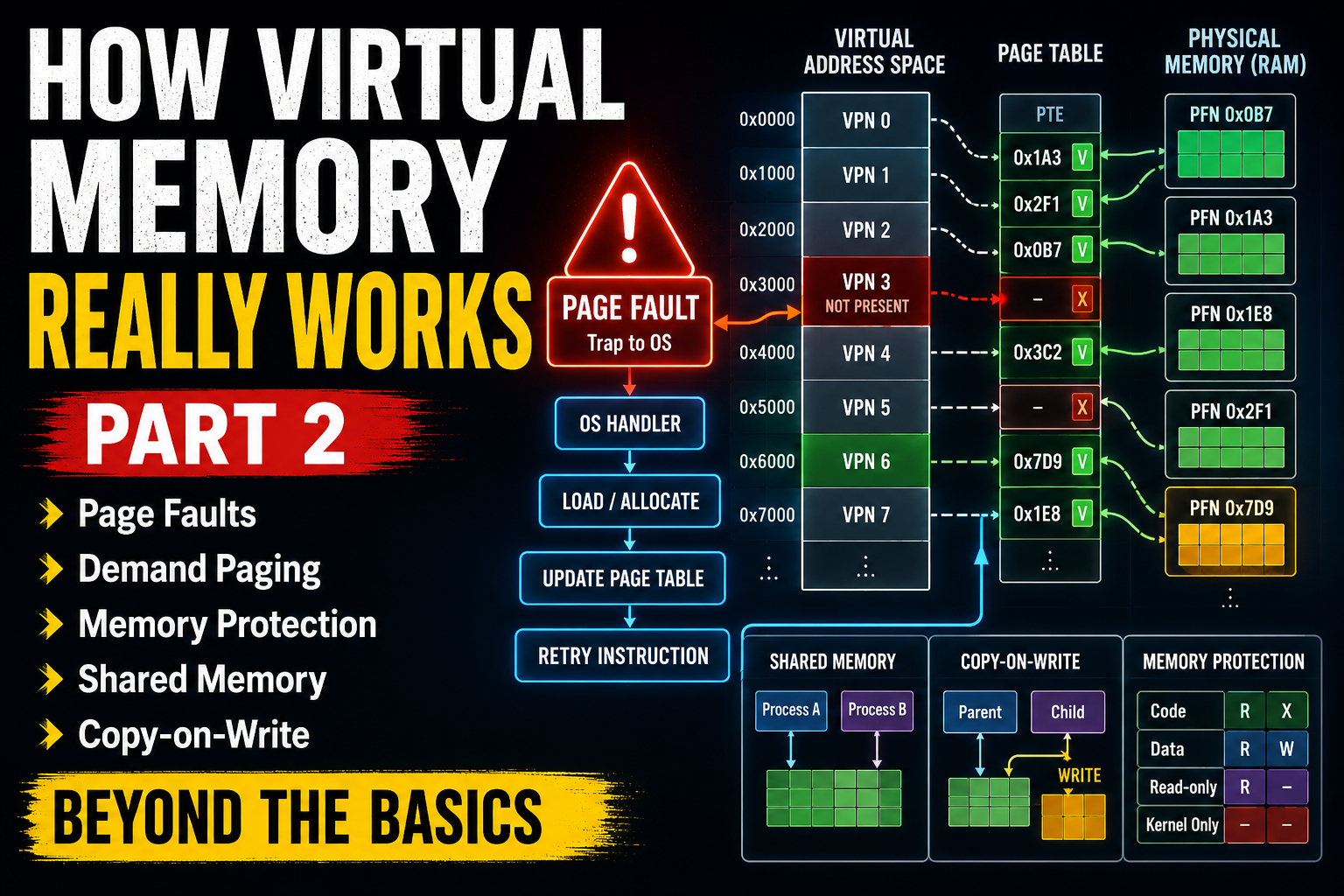
We saw how a process generates a virtual address, how the CPU’s Memory Management Unit, or MMU, translates that address, how page tables describe the mapping, and how the Translation Lookaside Buffer, or TLB, speeds up the process.
The basic path looked something like this:
Virtual Address → TLB → MMU → Page Table → Physical Address → Cache / RAM
But that raises an important question.
What happens if the virtual page does not currently have a valid mapping to physical memory?
That is where virtual memory becomes much more interesting.
Modern operating systems do not simply translate addresses.
They dynamically decide:
- which pages should be in RAM,
- which pages can be loaded later,
- which memory belongs to which process,
- which pages may be shared,
- which pages may be modified,
- and what should happen when a process accesses memory that is not currently available.
To understand these mechanisms, we need to look at page faults, demand paging, memory protection, shared memory, and copy-on-write.
1. A Virtual Address Does Not Guarantee Physical Memory Exists
A process may have a large virtual address space.
But that does not mean every virtual page has a physical page frame in RAM.
Suppose a process believes that it owns a virtual page at:
Virtual Page 0x1234
The page table might contain a mapping such as:
Virtual Page 0x1234
        ↓
Physical Frame 0x08A7
In that case, the MMU can perform the translation normally.
But the page table can also indicate that the page is currently not present in physical memory.
Conceptually:
Virtual Page 0x1234
        ↓
Page Table Entry
        ↓
Present = 0
The CPU cannot simply continue.
Instead, it raises an exception.
This event is called a page fault.
2. What Is a Page Fault?
A page fault occurs when a process accesses a virtual page that cannot currently be translated in the normal way.
The CPU detects the problem during address translation.
Instead of completing the memory access, it transfers control to the operating system.
The general sequence looks like this:
Program accesses virtual address
        ↓
MMU checks translation
        ↓
Required page is unavailable
        ↓
CPU raises page fault
        ↓
Operating system takes control
A page fault is not automatically an error.
This is one of the most important ideas in virtual memory.
Many page faults are completely normal.
The operating system intentionally uses page faults as part of its memory-management strategy.
3. Not Every Page Fault Means the Program Crashed
When the operating system receives a page fault, it must determine why the fault occurred.
There are several possibilities.
The page may be valid but simply not loaded into RAM yet.
The process may be trying to access memory that it is not allowed to access.
The process may be trying to write to a read-only page.
Or the operating system may be using a technique such as copy-on-write.
So the operating system must inspect the faulting address and the relevant page-table information.
Conceptually:
Page Fault
    ↓
Is this address valid?
    ↓
Yes ---------------- No
 |                    |
Handle fault       Terminate or signal process
This distinction is critical.
A page fault is a hardware event.
What happens next is a policy decision made by the operating system.
4. Demand Paging: Load Memory Only When It Is Needed
One of the most important uses of page faults is demand paging.
Demand paging means that the operating system does not necessarily load every page of a program into RAM when the program starts.
Instead, pages can be loaded only when they are actually accessed.
Consider a large application.
Its executable may contain:
startup code
user interface code
networking code
printing code
error-handling code
rarely used functions
libraries
data
The process may never use many of these pages during a particular run.
Loading all of them immediately would waste time and memory.
Instead, the operating system can initially leave many pages unmapped.
When the program finally accesses one of them:
CPU accesses page
        ↓
Page is not present
        ↓
Page fault
        ↓
OS loads the required page
        ↓
Page table updated
        ↓
Instruction restarted
The program usually does not know that any of this happened.
5. What Happens During a Demand-Paging Page Fault?
Suppose a program accesses a page that belongs to its executable file but has not yet been loaded into RAM.
A simplified sequence might look like this.
First, the CPU attempts to access the virtual address.
The MMU discovers that the page-table entry is not currently present.
The CPU raises a page fault and enters the operating-system kernel.
The operating system then determines whether the address is valid.
If it is valid, the operating system finds a free physical page frame.
It then loads the required data from storage into that frame.
Next, the operating system updates the page table.
Conceptually:
Virtual Page 42
        ↓
Physical Frame 891
The page-table entry is marked as present.
The operating system then returns to the interrupted program.
The CPU retries the instruction.
This time, the translation succeeds.
6. Why Demand Paging Is Useful
Demand paging provides several major advantages.
Faster program startup
The operating system does not have to load the entire executable before execution begins.
Only immediately needed pages must be available.
Lower RAM usage
Unused parts of programs do not need to occupy physical memory.
More processes can run
Because each process may use only part of its virtual address space at any moment, physical RAM can be shared among more active programs.
Large virtual address spaces become practical
A process can have a virtual address space much larger than the amount of physical RAM currently assigned to it.
This separation between virtual memory and physical memory is one of the foundations of modern operating systems.
7. What If RAM Is Full?
Demand paging works easily when free physical page frames are available.
But what happens when RAM becomes heavily used?
The operating system may need to free a physical frame.
To do this, it can choose an existing page as a victim.
Conceptually:
RAM is full
   ↓
Choose a page
   ↓
Can it be discarded?
   ↓
Reuse its physical frame
If the page contains data that can be recreated from a file, the operating system may simply discard it.
For example, an unchanged executable-code page can often be read again from the executable file later.
If the page contains modified anonymous memory, the operating system may need another place to preserve its contents.
Historically and on many systems, this may involve swap space.
8. Swap Space and Page Eviction
Swap is storage that can be used to hold memory pages that are temporarily removed from RAM.
A simplified sequence is:
RAM page
   ↓
Evicted
   ↓
Swap storage
Later, if the process accesses that page again:
Process accesses page
        ↓
Page fault
        ↓
OS reads page from swap
        ↓
Page returned to RAM
Storage is much slower than RAM.
Therefore, excessive paging can severely reduce performance.
If a system repeatedly moves pages between RAM and storage because physical memory is insufficient for the active workload, it may enter a condition known as thrashing.
In that situation, the computer spends a large amount of time managing page movement instead of doing useful work.
9. Page Tables Also Enforce Memory Protection
Page tables do more than translate addresses.
A page-table entry normally contains control information describing how a page may be accessed.
Depending on the architecture, these permissions can include concepts such as:
Present
Readable
Writable
Executable
User accessible
Kernel only
The exact bits differ between processor architectures.
But the principle is the same.
The MMU checks these permissions while performing memory accesses.
That means virtual memory is also a hardware-supported security mechanism.
10. Read, Write, and Execute Permissions
Suppose a page contains program instructions.
The operating system might configure it as:
Read = Yes
Write = No
Execute = Yes
A data page might instead be:
Read = Yes
Write = Yes
Execute = No
If a program tries to perform a forbidden operation, the CPU generates a fault.
For example:
Program attempts write
        ↓
Page is read-only
        ↓
Protection fault
        ↓
Operating system takes control
The operating system can then decide how to respond.
On Unix-like systems, an invalid memory access may eventually cause a signal such as SIGSEGV, commonly associated with a segmentation fault.
11. Virtual Memory Separates Processes
Imagine two processes:
Process A
Process B
Both may use the same virtual address:
0x0000000040001000
But the page tables for the two processes can map that virtual address to completely different physical page frames.
For example:
Process A:
Virtual Page 100
        ↓
Physical Frame 500

Process B:
Virtual Page 100
        ↓
Physical Frame 900
The virtual address is the same.
The physical memory is different.
This is one of the reasons processes can be isolated from each other.
Process A normally cannot simply create an arbitrary pointer to Process B’s private memory and read it.
Its page tables do not provide that mapping.
12. The Kernel Has Its Own Protected Memory
The operating-system kernel also needs memory.
But ordinary applications must not be allowed to modify arbitrary kernel data structures.
Page-table permissions help enforce this boundary.
A page can be marked as accessible only while the CPU is executing with sufficient privilege.
Conceptually:
User Process
     |
     X
     |
Kernel Memory
This separation protects important structures such as:
process information
page tables
device state
filesystem structures
kernel code
security information
Without hardware-supported memory protection, one broken application could easily corrupt the operating system.
13. Shared Memory: Different Processes Can Map the Same Physical Page
Process isolation is useful.
But sometimes processes intentionally need to share memory.
Virtual memory makes this possible too.
Suppose two processes have different virtual addresses:
Process A Virtual Page
Process B Virtual Page
The operating system can configure both page tables so that they point to the same physical frame.
Process A Virtual Page ──┐
                         ├── Physical Frame 700
Process B Virtual Page ──┘
Now both processes can access the same underlying physical memory.
This is shared memory.
Shared memory can provide very fast communication because data does not always need to be copied through a separate communication channel.
14. Shared Libraries Can Also Share Physical Memory
Shared memory is not limited to explicit interprocess communication.
Consider a shared library used by many processes.
If ten programs use the same read-only library code, the operating system does not necessarily need ten independent physical copies of that code.
Instead, the virtual address spaces of multiple processes can map their library pages to the same physical page frames.
Conceptually:
Process A ──┐
Process B ──┤
Process C ──┼── Shared Library Code in RAM
Process D ──┤
Process E ──┘
As long as the pages are not modified, sharing them can save substantial amounts of physical memory.
Again, virtual addresses may differ while the underlying physical page is the same.
15. Copy-on-Write: Share First, Copy Only When Necessary
Another powerful virtual-memory technique is copy-on-write, often abbreviated as COW.
The basic idea is simple:
Do not copy memory until somebody actually tries to modify it.
Suppose two processes initially contain identical memory pages.
Instead of immediately creating two physical copies, the operating system can let both processes map the same physical page.
But the mapping is temporarily protected against writing.
Process A ──┐
            ├── Shared Physical Page
Process B ──┘
As long as both processes only read the page, no copy is necessary.
16. What Happens When Copy-on-Write Is Triggered?
Suppose Process A now tries to modify the shared page.
The page is marked read-only for copy-on-write purposes.
So the write cannot proceed directly.
The CPU generates a fault.
The operating system recognizes that this is a copy-on-write page.
It then creates a new physical page and copies the original contents into it.
After that:
Process A
   ↓
New Physical Page

Process B
   ↓
Original Physical Page
The operating system changes Process A’s page-table entry so that its new page is writable.
The instruction is retried.
Process A can now modify its private copy.
Process B continues to see the original page.
The expensive copy happens only when it is actually necessary.
17. Why fork() Benefits from Copy-on-Write
Copy-on-write is especially important in Unix-like operating systems.
Consider the fork() system call.
Traditionally, fork() creates a new process whose memory initially appears almost identical to the parent process.
A naive implementation could copy the parent’s entire memory immediately.
That could be extremely expensive.
Instead, modern systems can initially let the parent and child share many of the same physical pages.
Conceptually:
Parent ──┐
         ├── Shared Pages
Child ───┘
The pages are protected using copy-on-write.
If neither process modifies a page, the page can remain shared.
If one process writes to it, the operating system creates a private copy for that process.
This makes process creation much more efficient.
It is particularly useful when fork() is quickly followed by a system call such as exec(), because the child may replace most of its address space before many pages ever need to be copied.
18. A Complete Page-Fault Example
Now we can combine the mechanisms.
Suppose a program executes an instruction that accesses a virtual address.
The CPU generates:
Virtual Address
The TLB is checked.
If the translation is cached and valid, memory access can continue quickly.
If there is a TLB miss, the system must obtain the page-table translation.
But suppose the page-table entry indicates that the page is not currently present.
The CPU raises a page fault.
The operating system then asks:
Is the virtual address valid?
If not, the process may receive an error or be terminated.
If the address is valid, the operating system determines the reason for the fault.
Perhaps the page belongs to an executable file and must be loaded.
Perhaps the page was previously swapped out.
Perhaps this is the first access to a newly allocated page.
Perhaps the process is triggering copy-on-write.
The operating system handles the appropriate case, modifies the page table, and returns from the exception.
The original instruction can then be attempted again.
This time, the memory access succeeds.
19. The Hardware and Operating System Work Together
Virtual memory is not implemented entirely by hardware.
And it is not implemented entirely by software.
It is a cooperation between the CPU and the operating system.
The hardware provides mechanisms such as:
MMU
page-table support
TLB
permission checking
exceptions
privilege levels
The operating system provides policies such as:
which pages exist
which pages are loaded
which physical frames are used
which pages may be shared
which pages may be written
how page faults are handled
which pages may be evicted
The CPU detects memory conditions quickly.
The operating system decides what those conditions mean and what should happen next.
20. Virtual Memory Is More Than “Using Disk as RAM”
Virtual memory is sometimes explained as:
Using the disk when RAM runs out.
That description is incomplete.
Swap can be part of a virtual-memory system, but virtual memory is much broader.
Virtual memory provides:
address translation
process isolation
memory protection
demand paging
shared memory
shared libraries
copy-on-write
memory-mapped files
flexible memory allocation
Its most important purpose is not simply to make storage pretend to be RAM.
Its deeper purpose is to give software a controlled, protected, flexible virtual address space that the operating system can map onto real hardware resources.
21. From a Pointer to Physical Hardware
A pointer in a program may look simple:
int *ptr;
But when the CPU actually accesses the address stored in that pointer, an extraordinary amount of machinery may become involved.
The path can include:
Program Pointer
      ↓
Virtual Address
      ↓
TLB
      ↓
MMU
      ↓
Page Table
      ↓
Permission Check
      ↓
Page Fault if necessary
      ↓
Operating System
      ↓
Physical Page Frame
      ↓
CPU Cache
      ↓
RAM
And if the page is not currently available, the operating system may need to load data, allocate memory, copy a page, or change the mapping before the instruction can continue.
What appears to the programmer as a simple memory access is actually a carefully controlled interaction between software and hardware.
Conclusion
Virtual memory creates an abstraction.
Programs work with virtual addresses.
Physical RAM contains page frames.
Page tables connect the two.
The MMU performs address translation.
The TLB makes common translations faster.
But the system becomes much more powerful when a translation is missing.
A page fault allows the operating system to intervene.
Through page faults, the operating system can implement demand paging.
It can load pages only when they are needed.
It can remove pages from RAM when memory becomes scarce.
It can enforce read, write, execute, user, and kernel permissions.
It can isolate one process from another.
It can deliberately map multiple processes to the same physical memory.
And with copy-on-write, it can allow memory to remain shared until one process actually needs to modify it.
So the complete idea of virtual memory is not simply:
Virtual Address → Physical Address
It is closer to:
Virtual Address → Translation → Protection → Operating-System Policy → Physical Memory
That combination of hardware translation and operating-system control is one of the fundamental mechanisms that makes modern multitasking computers possible.
In the next part, we can go even deeper into how operating systems manage memory in practice:
mmap, memory-mapped files, the heap and stack, anonymous memory, page allocation, swapping, and what Linux actually does when a process requests memory.
Gate & Kernel — understanding computing from software all the way down to the hardware.