1. What Is a GPU?
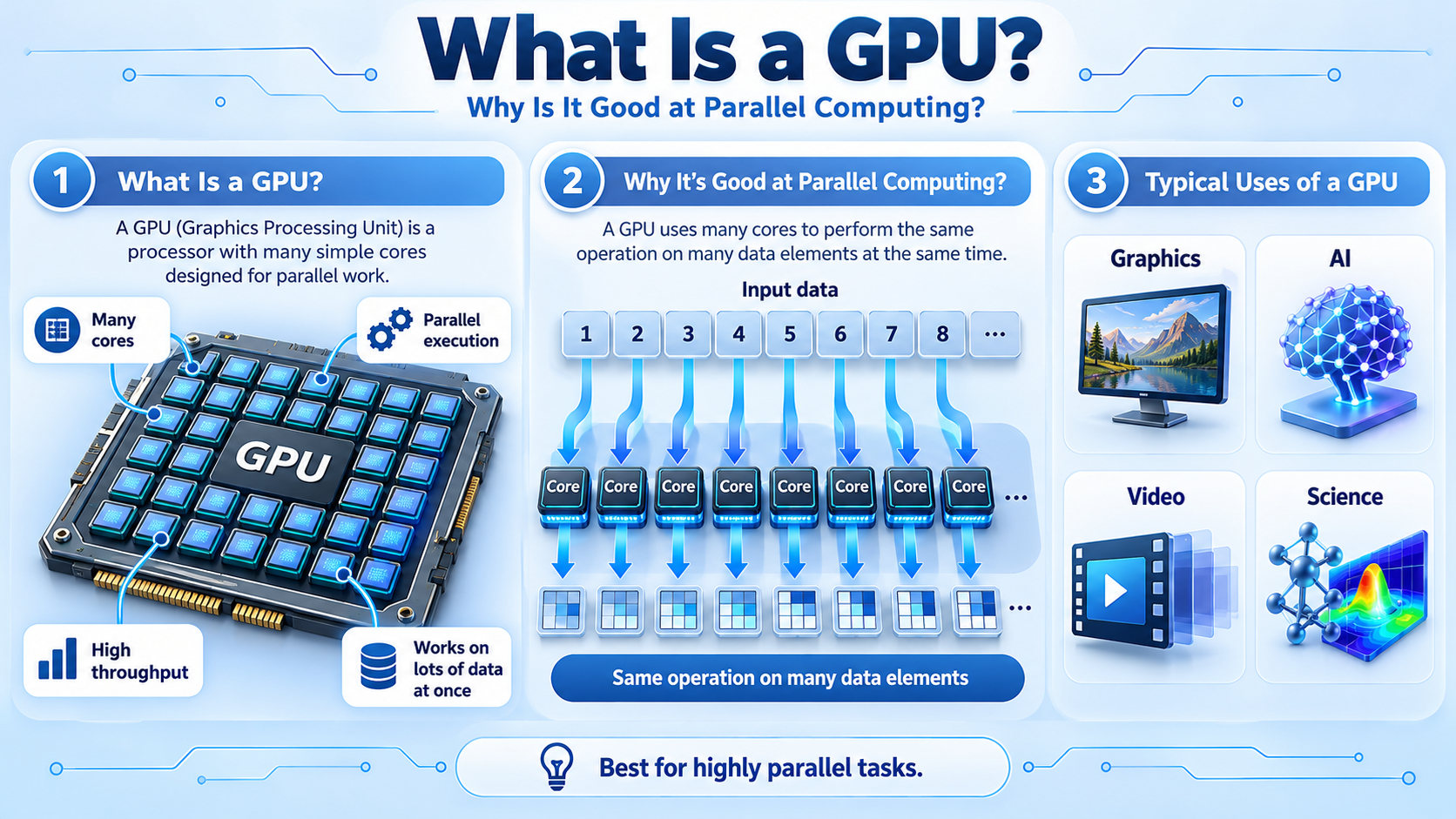
A GPU, or Graphics Processing Unit, is a specialized processor designed to perform large numbers of calculations in parallel.
GPUs were originally developed to accelerate computer graphics, but they are now widely used in artificial intelligence, scientific computing, video processing, and other computationally intensive applications.
A modern GPU contains billions of transistors organized into arithmetic units, registers, caches, control circuits, and specialized processing hardware.
Its architecture allows many operations to execute concurrently, making it particularly effective for workloads involving large collections of data.
For example, when rendering a three-dimensional scene, a GPU can process many vertices, pixels, and shading calculations in parallel.
When running an artificial intelligence model, the same general-purpose parallel processing capabilities can accelerate matrix multiplication and other numerical operations.
The main advantage of a GPU is not that it performs every individual operation faster than a CPU.
Instead, it can complete large amounts of suitable computational work simultaneously.
2. Why Were GPUs Developed?
Early computer graphics required the CPU to perform many rendering calculations.
As graphics became more complex, these operations consumed substantial processing resources.
Graphics workloads naturally contain parallel operations.
For example, many pixels can be processed independently, and large collections of vertices require similar mathematical transformations.
GPU architectures were developed to handle these calculations efficiently.
Over time, GPUs evolved from relatively specialized graphics processors into highly programmable computing devices.
Modern GPUs support graphics rendering, scientific simulations, artificial intelligence, and other data-parallel applications.
However, GPUs do not replace CPUs.
Most conventional computers use the CPU to manage general-purpose software execution while the GPU accelerates suitable parallel workloads.
3. How Does a GPU Work?
A GPU operates by distributing computational work across many execution resources.
Its internal architecture contains groups of processing units designed to execute large numbers of threads.
Different manufacturers use different terminology.
NVIDIA uses Streaming Multiprocessors, or SMs, while AMD uses Compute Units, or CUs, and other architecture-specific structures.
Each processing group contains arithmetic resources, registers, control circuitry, and access to memory.
When an application submits a suitable workload, the GPU divides the computation into smaller tasks.
For example, a program may request that one million numbers be multiplied by two.
Different GPU threads can process different elements of the array.
The GPU schedules these threads across available processing resources, allowing many calculations to proceed concurrently.
However, the exact execution behavior depends on the GPU architecture and programming model.
4. What Is Parallel Computing?
Parallel computing means performing multiple computational operations during overlapping periods of time.
Consider a program that needs to add two arrays containing one million numbers.
A simple sequential implementation processes each pair of numbers in order.
A parallel implementation divides the work into many independent calculations.
Because each output element can be computed separately, multiple processing resources can work on different elements simultaneously.
Modern CPUs also support parallel computing through multiple cores and vector instructions.
GPUs, however, generally provide much greater arithmetic throughput for suitable massively parallel workloads.
The benefit depends on whether the computation can be divided into enough independent tasks.
If every operation must wait for the previous result, additional processing resources may provide limited acceleration.
5. Why Are GPUs Good at Parallel Computing?
GPUs are effective at parallel computing because their architecture emphasizes throughput rather than minimizing the latency of every individual instruction.
A modern CPU core often contains sophisticated branch prediction, instruction scheduling, large caches, and other mechanisms designed to execute complex instruction streams efficiently.
A GPU allocates substantial hardware resources to parallel arithmetic execution and maintains many active threads.
When some GPU threads are waiting for memory, the hardware can often execute other ready threads.
This technique helps hide memory latency through concurrency.
For example, image processing frequently applies the same operation to millions of pixels.
A GPU can distribute these calculations across many threads rather than processing them one at a time.
However, GPUs are not automatically faster for every task.
Their performance depends on available parallelism, memory access patterns, branching, data movement, and software optimization.
6. CPU vs. GPU: What Is the Difference?
The CPU and GPU are both programmable processors, but they are optimized for different workloads.
A CPU is designed for flexible, general-purpose instruction execution.
It is particularly effective at complex control flow, low-latency operations, operating system tasks, and applications involving irregular dependencies.
A GPU is designed for high-throughput parallel computation. It is particularly effective when many data elements require similar operations.
For example, the CPU may execute a program that prepares an image for processing. The GPU can then apply a mathematical filter to millions of pixels.
The CPU manages much of the application logic and coordination, while the GPU accelerates the parallel operation.
CPU and GPU core counts should not be compared directly. A GPU arithmetic lane is not equivalent to a complete CPU core.
In modern computers, CPUs and GPUs usually complement each other rather than compete as direct replacements.
7. What Are GPU Cores?
The term GPU core is commonly used to describe arithmetic processing resources inside a GPU.
For example, NVIDIA uses the term CUDA Core for certain arithmetic execution resources.
A GPU may contain thousands of these resources, depending on its architecture.
However, these are not equivalent to thousands of complete CPU cores.
A CPU core typically includes extensive instruction processing and control circuitry.
GPU execution resources are organized into groups that share scheduling and other supporting hardware.
This design allows GPUs to achieve high throughput on suitable workloads.
Modern GPUs may also contain specialized units for matrix multiplication, ray tracing, and video processing.
The number of GPU cores alone does not determine performance.
Memory bandwidth, architecture, operating frequency, and software efficiency also matter.
8. What Is GPU Memory?
GPUs need memory to store the data used during computation.
Discrete GPUs commonly use dedicated graphics memory, often called VRAM.
Modern graphics cards may use GDDR memory, while some high-performance computing and AI accelerators use High-Bandwidth Memory, or HBM.
GPU memory stores textures, frame buffers, numerical arrays, neural network parameters, and other data.
Because a GPU can perform many calculations concurrently, memory bandwidth is particularly important.
A GPU with powerful arithmetic hardware may still perform poorly if data cannot be supplied quickly enough.
Integrated GPUs often share physical system memory with the CPU instead of using separate dedicated VRAM.
GPU performance therefore depends on both computational resources and memory architecture.
9. Why Are GPUs Important for Artificial Intelligence?
Artificial intelligence applications frequently involve large mathematical operations, particularly matrix multiplication.
For example, neural networks use numerical calculations to transform input data into intermediate representations and final outputs.
Many of these calculations can execute in parallel.
GPUs are well suited to such workloads because they contain substantial parallel arithmetic resources.
Modern AI-oriented GPUs may also include specialized matrix acceleration hardware, such as NVIDIA Tensor Cores.
These units accelerate supported operations and numerical formats.
GPUs are widely used for both AI training and inference.
However, AI performance also depends on memory capacity, memory bandwidth, communication overhead, and software implementation.
A GPU with excellent arithmetic throughput may still be limited if a model does not fit into available memory.
10. Where Are GPUs Used?
GPUs are used in many applications beyond traditional computer graphics.
In gaming, they render three-dimensional scenes, process textures, and calculate visual effects.
In video editing, GPUs can accelerate color processing, visual effects, and other supported operations.
In scientific computing, they perform suitable parallel numerical calculations used in simulations and data analysis.
In artificial intelligence, GPUs accelerate neural network training and inference.
In engineering, GPUs may assist with visualization, numerical modeling, and specialized computation.
However, not every application benefits equally from GPU acceleration.
Software must be designed to use the GPU effectively, and some workloads are better suited to CPU execution.
11. Why Can’t a GPU Replace a CPU?
A GPU can perform general-purpose computations, but its architecture is not optimized for every type of software.
Operating systems and many applications require flexible instruction execution, complex control flow, low-latency responses, and coordination with hardware devices.
CPUs are designed to handle these tasks efficiently.
A GPU is most effective when substantial parallel work is available.
For example, a small calculation with many dependencies may execute faster on a CPU because transferring work to a discrete GPU introduces additional overhead.
A GPU can also perform poorly when its processing resources are underutilized.
Modern computer systems therefore use heterogeneous computing, where CPUs, GPUs, and sometimes other accelerators perform different parts of the workload.
The objective is to use each processor where its architecture provides the greatest benefit.
12. How Can You Check GPU Usage in Windows?
Windows provides a simple way to observe GPU activity using Task Manager.
Press Ctrl + Shift + Esc to open Task Manager.
Select the Performance section and choose GPU.
Depending on the installed hardware and graphics driver, Windows may display GPU utilization, memory usage, temperature, and activity associated with different processing engines.
For example, playing a video may activate a video decoding engine.
Running a three-dimensional application may increase graphics engine utilization.
A GPU computing application may activate compute-related resources.
You can compare these measurements with CPU activity while running different applications.
However, utilization alone does not fully explain performance.
A workload may be limited by memory bandwidth, synchronization, or another resource even when overall GPU utilization appears relatively low.
13. Common Misunderstandings About GPUs
One common misunderstanding is that a GPU is simply a CPU with more cores.
In reality, GPU execution resources are organized differently, and GPU core counts are not directly comparable with CPU core counts.
Another misconception is that GPUs are always faster than CPUs.
A GPU can provide much higher throughput for suitable parallel workloads, but small or heavily dependent tasks may run more efficiently on a CPU.
Some people assume that GPUs are used only for graphics.
Modern GPUs are widely used in AI, scientific computing, engineering, and other applications.
It is also incorrect to assume that more VRAM automatically means higher performance.
Memory capacity and bandwidth are important, but computational architecture and software efficiency also matter.
Finally, a GPU cannot automatically accelerate any program.
Applications must use appropriate programming interfaces, libraries, or other software mechanisms to take advantage of GPU processing.
14. Conclusion: Why Are GPUs So Good at Parallel Computing?
A GPU is a specialized processor designed to execute large amounts of suitable parallel computation efficiently.
Its architecture contains substantial arithmetic resources organized to process many threads concurrently.
Unlike a CPU, which emphasizes flexible instruction execution and low-latency performance, a GPU emphasizes high computational throughput.
This makes GPUs particularly effective for graphics rendering, image processing, scientific simulations, matrix multiplication, and many artificial intelligence workloads.
However, GPU performance depends on workload parallelism, memory bandwidth, available memory, and software optimization.
Modern CPUs also support parallel computing, and GPUs can execute complex programs. Their differences come primarily from architectural design priorities.
The most important principle is simple: a CPU is optimized to execute a wide variety of tasks efficiently, while a GPU is optimized to process many similar calculations in parallel.
This is why GPUs have become essential not only for modern graphics but also for artificial intelligence and high-performance computing.