Introduction
Your processor can execute billions of clock cycles every second. But when the data it needs is not ready, it has to wait. That is why computer memory keeps evolving.
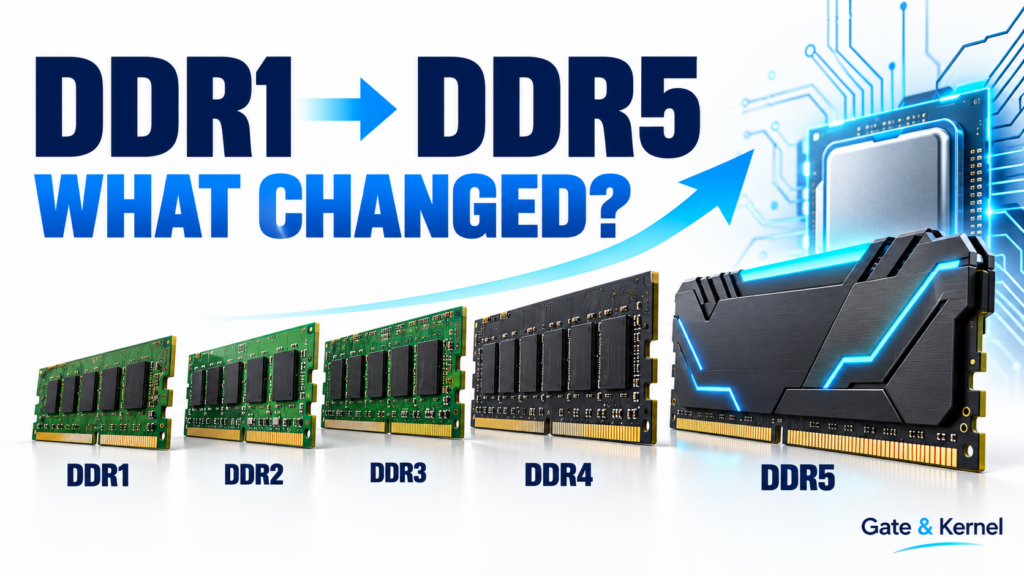
But what actually changed between DDR1 and DDR5? Why can a newer memory kit offer much more bandwidth without making every program dramatically faster? And why can you not simply install DDR5 in a DDR4 motherboard?
Let us begin with the computer in front of us. On a Windows computer, right-click the Start button and open Task Manager. Select Performance, and then select Memory.
Look at the total installed capacity near the top of the window and the speed information below the graph. These describe different things. Capacity tells us how much information memory can hold. The displayed speed describes its operating transfer rate.
Your version of Task Manager may show different labels or units. It may also leave out the DDR generation, so this screen does not tell us everything about the installed memory.
The memory usage graph shows how much memory is currently being used. It does not directly show memory bandwidth or access latency.
Already, we have three different questions: How much memory do we have? How quickly can data move? And how long does an access take? Keep those questions in mind as we explore the generations.
Chapter 1. What DDR Actually Means
RAM stands for Random Access Memory. It is the working space where your computer keeps programs and data that are actively being used.
An SSD stores information when the power is off. Ordinary system RAM does not. It needs power to retain its contents.
Most computer main memory uses DRAM, which stands for Dynamic Random Access Memory. Its memory cells store tiny electrical charges. Those charges gradually leak away, so the memory must refresh them.
SDRAM means Synchronous Dynamic Random Access Memory. Its operation is coordinated with a clock. DDR is a type of SDRAM. The letters stand for Double Data Rate.
Earlier single data rate SDRAM transferred data once per clock cycle. DDR transfers data on both the rising and falling edges of the interface clock.
Imagine a clock signal moving up and down. Single data rate uses one edge. Double data rate uses both. At the same interface clock frequency and data width, that allows twice as many data transfers.
But every DDR generation uses this basic idea. DDR5 does not mean five transfers per clock cycle. The generation number identifies a newer design.
Chapter 2. DDR1 and DDR2
The first generation is officially called DDR, although people often call it DDR1. It became familiar in personal computers around the turn of the millennium.
Common transfer rates included 200, 266, 333, and 400 megatransfers per second. Its nominal operating voltage was about 2.5 volts. The big change was using both clock edges to move data.
DDR2 followed in the early 2000s. It increased transfer rates and reduced nominal operating voltage to about 1.8 volts.
But the improvement involved more than turning up a clock. DDR1 used a 2n-prefetch design. DDR2 increased that to 4n.
In simple terms, prefetch describes how much data the internal memory circuitry prepares for the external interface. Preparing larger groups of data helps the interface transmit faster without requiring the storage array to speed up by the same proportion.
Think of a warehouse preparing several packages together before sending them onto a faster conveyor belt.
DDR2 also required different electrical signaling and compatible hardware. You could not upgrade an existing DDR system simply by pushing a DDR2 module into the old slot.
Chapter 3. DDR3 and the Dual-Channel Misunderstanding
DDR3 arrived in the late 2000s. It increased prefetch to 8n and reduced nominal voltage to about 1.5 volts. A lower-voltage version, called DDR3L, operated at 1.35 volts.
The combination of higher transfer rates, increasing capacity, and improved efficiency supported more demanding computers.
But here is an important correction to a common claim: DDR3 did not invent dual-channel memory. Dual-channel systems existed before DDR3.
A memory channel is a connection through which the memory controller communicates with memory. Using two channels gives the system additional data paths and can increase total available bandwidth.
This is especially useful when integrated graphics share system memory with the processor.
However, two memory sticks do not automatically guarantee the intended configuration. The modules must occupy the appropriate slots, and the platform must support that arrangement. The motherboard manual tells you which slots to use.
Chapter 4. DDR4 and the Difference Between Clock Speed and Transfer Rate
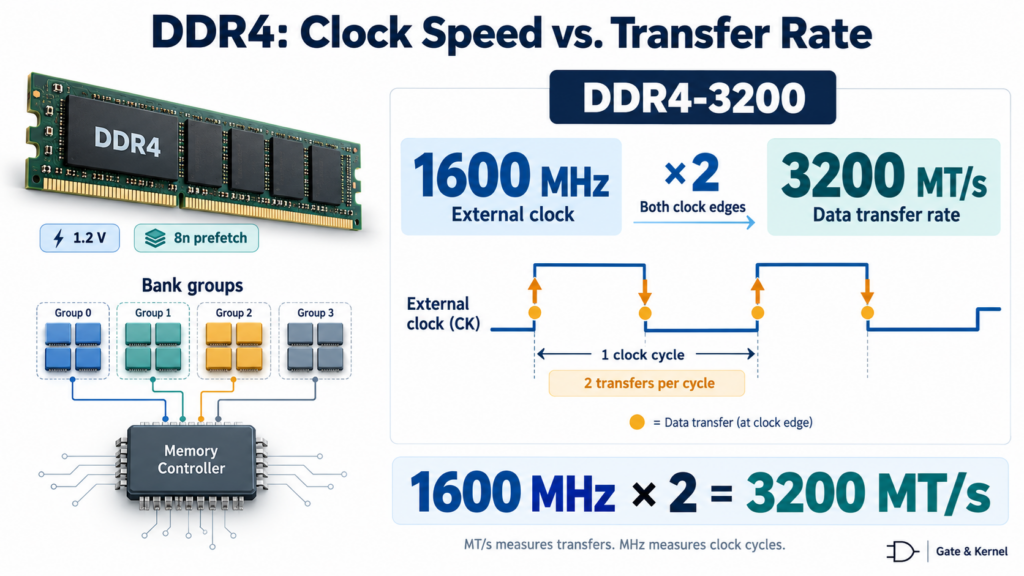
DDR4 became established in mainstream computers during the mid-2010s. Its nominal operating voltage dropped to about 1.2 volts.
It retained 8n prefetch, while introducing bank groups and other changes that helped support higher transfer rates.
Memory contains multiple internal banks. Organizing them into groups gives the controller more opportunities to schedule operations, although timing rules still limit which operations can happen together.
Megatransfers per Second and Megahertz
One of the most confusing memory specifications is the difference between clock speed and transfer rate.
Consider DDR4-3200. That number represents 3,200 megatransfers per second, or 3,200 MT/s. It does not mean that the external memory clock runs at 3,200 MHz.
Because data moves on both clock edges, the external clock is approximately 1,600 MHz.
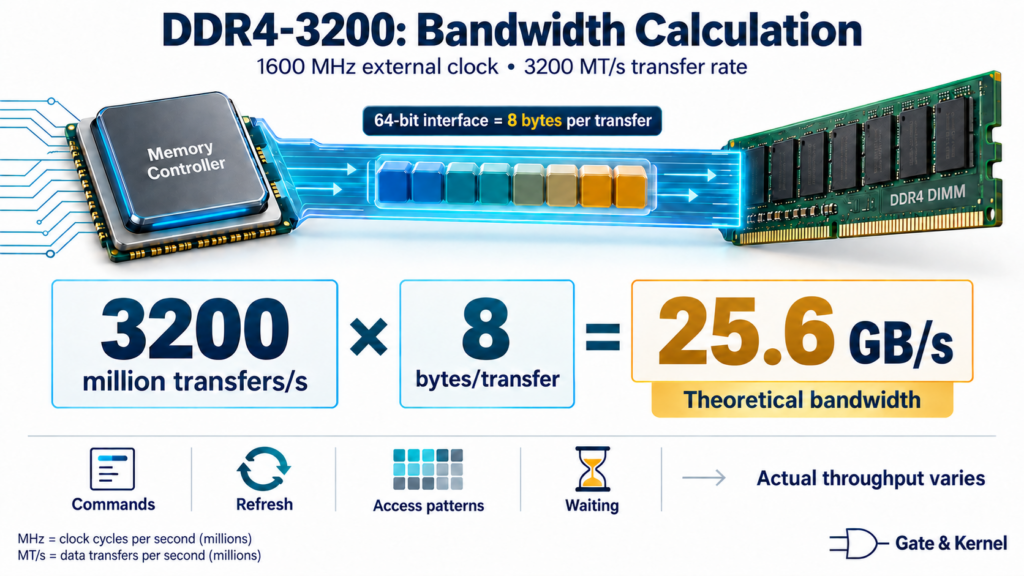
DDR4-3200: 3,200 MT/s at an external memory clock of approximately 1,600 MHz.
Bandwidth Calculation
A 64-bit data interface carries eight bytes per transfer. At 3,200 million transfers per second, multiplying by eight bytes gives 25.6 gigabytes per second.
3,200 million transfers per second × 8 bytes = 25.6 GB/s.
That is the theoretical bandwidth for that data width. It is not a guarantee that every program will move data at that rate. Commands, refresh operations, access patterns, and waiting time all affect actual performance.
Megahertz counts clock cycles. Megatransfers per second counts data transfers. They are related, but they are not interchangeable.
Chapter 5. DDR5 Changes How a Module Handles Data
The DDR5 standard was published in 2020. Its nominal DRAM operating voltage is approximately 1.1 volts, although performance profiles may specify higher values.
But DDR5 is more than a higher transfer rate.
A conventional non-ECC DDR4 module provides a 64-bit data interface. A conventional non-ECC DDR5 module divides that useful data width into two independent 32-bit subchannels. This gives the memory controller more flexibility to schedule traffic.
DDR5 also increases the normal burst length from eight transfers to sixteen. A 32-bit subchannel can therefore deliver a 64-byte block in one sixteen-transfer burst.
However, the two subchannels inside one DDR5 module are not the same thing as fully populating both channels on a typical dual-channel desktop processor. These describe different levels of the memory organization.
DDR5 DIMMs also include a power management integrated circuit, usually called a PMIC. This moves part of the voltage regulation function onto the module.
Together with changes to internal banking and refresh behavior, these features help DDR5 serve larger capacities and heavier traffic.
Chapter 6. DDR5 ECC Does Not Mean What You Might Think
DDR5 includes on-die error correction. On-die means inside the DRAM chip.
This mechanism corrects certain errors within the chip’s internal storage. But it does not, by itself, protect the entire path between the memory chips and the processor.
That is why on-die ECC is different from system-level ECC memory. System-level ECC requires compatible modules, additional check information, and support from the computing platform.
A consumer DDR5 module does not become equivalent to an ECC server module simply because its chips contain on-die error correction. The location and coverage of the protection matter.
Chapter 7. Capacity, Bandwidth, and Latency
Does newer memory always make a computer faster? Not by a fixed amount. The result depends on what limits the workload.
Capacity determines how much information can remain in memory. If there is not enough capacity, the operating system may repeatedly move data between RAM and storage.
Adding enough memory can make a substantial difference in that situation. But once a workload fits comfortably in RAM, unused extra capacity may provide little immediate benefit.
Bandwidth determines how much data can move each second. Latency describes how long an access takes.
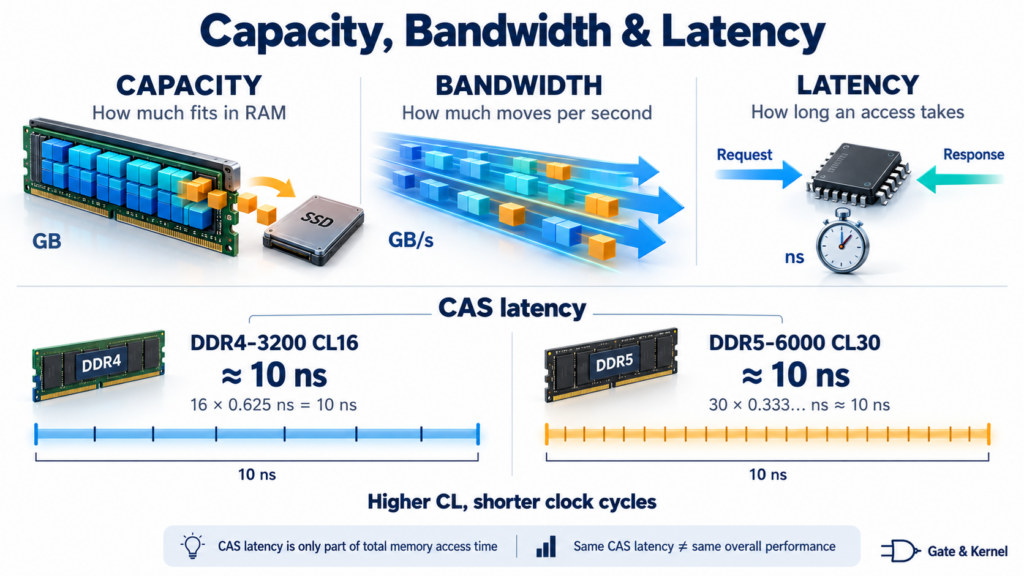
Capacity, Bandwidth, and Latency Are Different
Consider these two examples:
DDR4-3200 CL16: approximately 10 nanoseconds of CAS latency.
DDR5-6000 CL30: approximately 10 nanoseconds of CAS latency.
The CL number is higher in the second example, but each clock cycle is shorter.
This does not mean the complete memory systems have identical performance. DDR5 can offer more bandwidth, while total access latency also depends on the controller, other timings, and the state of the memory.
CAS timing is only part of the journey. That is why comparing a transfer rate alone, or a CL number alone, can produce the wrong conclusion.
Chapter 8. Compatibility and New DDR5 Module Designs
DDR generations are not interchangeable. Their electrical requirements, signaling, pin assignments, and timing differ.
DDR4 and DDR5 desktop modules both have 288 pins, but that does not make them compatible. Their keying and electrical designs are different.
The processor’s memory controller, motherboard, and firmware must support the installed memory. Even within one generation, desktop modules, laptop modules, and registered server modules have different requirements.
Advertised speed is also not an unconditional promise. The actual operating rate depends on the platform, module configuration, and selected settings.
New DDR5 designs include clocked unbuffered DIMMs, called CUDIMMs, and compact versions called CSODIMMs. These add a clock driver to help maintain clock signal quality at higher operating rates.
They still use DDR5, but appropriate platform support matters. Memory continues to evolve within a generation, through better signaling, different module designs, and increasing capacity.
Chapter 9. What About LPDDR, GDDR, and HBM?
Not every modern memory technology belongs on the same DDR desktop timeline.
LPDDR stands for Low Power Double Data Rate. It serves energy-sensitive systems such as phones, tablets, and many laptops.
GDDR is designed primarily around graphics bandwidth requirements and is commonly used on dedicated graphics cards.
HBM stands for High Bandwidth Memory. It uses stacked memory and a very wide interface, serving applications such as advanced accelerators and high-performance computing.
These are different memory families with different engineering priorities. Their generation numbers are not a universal ranking, and they are not interchangeable upgrades.
Conclusion. What Actually Improved?
From DDR1 to DDR5, the story is about moving more useful data while managing power, capacity, and complexity.
The original DDR design used both clock edges. DDR2 and DDR3 expanded prefetch and reduced operating voltage. DDR4 improved internal organization through bank groups. DDR5 added independent subchannels, longer bursts, on-module power management, and on-die error correction.
But a good memory system is a balance. You need enough capacity for the workload, enough bandwidth to supply the processors, suitable latency, and hardware that supports the configuration.
That is what the generation number alone cannot tell you.