1. What Is the Difference Between a CPU and a GPU?
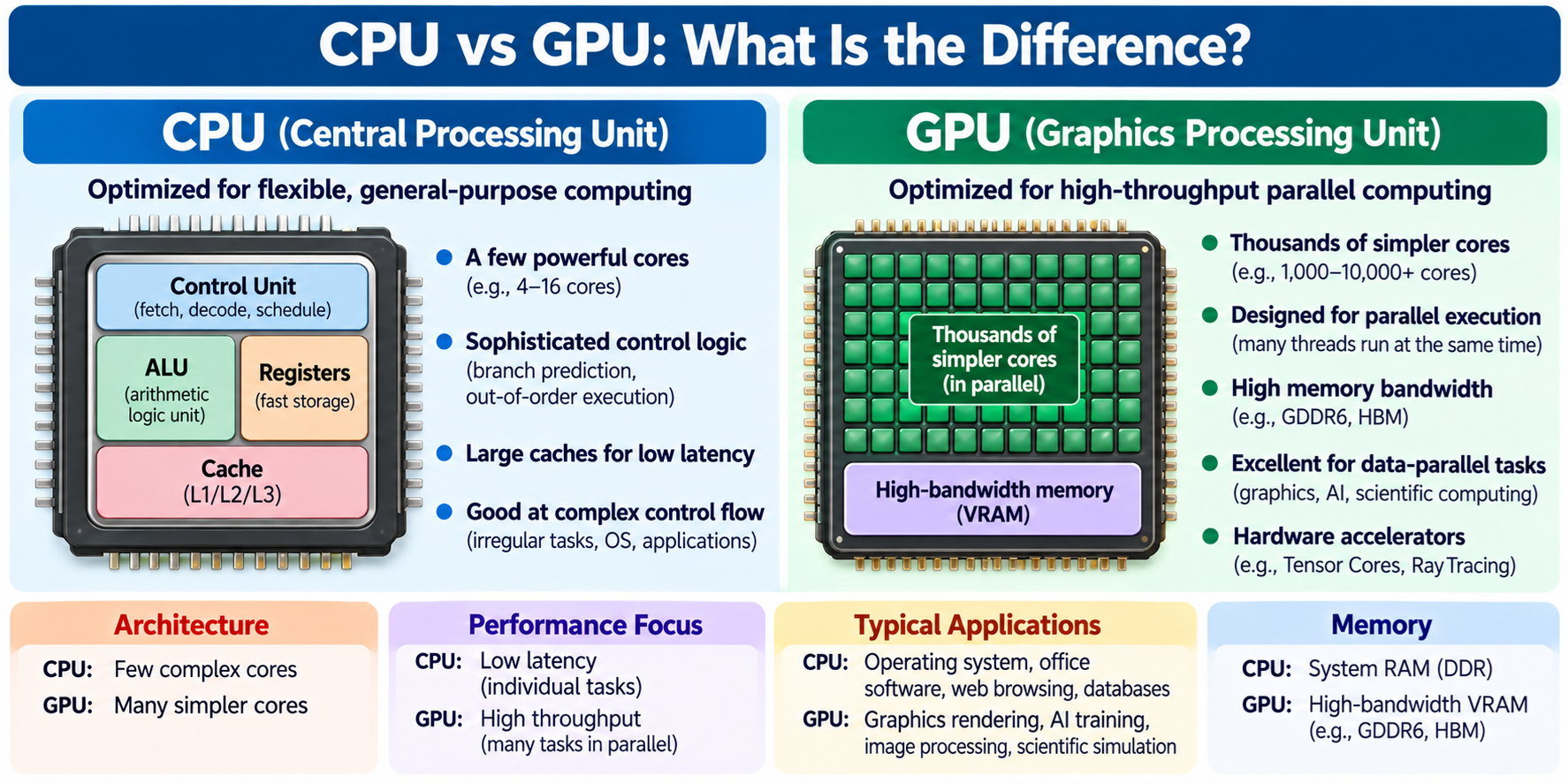
A CPU, or Central Processing Unit, is a general-purpose processor designed to execute a wide variety of program instructions, while a GPU, or Graphics Processing Unit, is a processor designed to perform large amounts of parallel computation efficiently.
Both are essential components of modern computers, but their architectures are optimized for different types of workloads.
A CPU is particularly effective at tasks requiring flexible instruction execution, complex control flow, low-latency responses, and coordination between different system components.
It runs operating systems, executes applications, manages software threads, and performs many general-purpose calculations.
A GPU is particularly effective when a computation can be divided into many similar operations that execute concurrently.
Examples include graphics rendering, image processing, matrix multiplication, scientific simulations, and many artificial intelligence workloads.
For example, when you open a web browser, the CPU executes application code, processes user input, manages memory, and coordinates other system activities.
The GPU may accelerate graphics rendering, compositing, animations, and other suitable operations.
Modern video games use CPUs and GPUs together.
The CPU handles gameplay logic, physics-related tasks, system operations, and command preparation, while the GPU performs much of the graphics rendering.
Artificial intelligence systems also frequently use both processors.
The CPU manages program execution, data preparation, scheduling, and other control tasks, while the GPU accelerates large numerical computations.
The most important distinction is not simply that a GPU has more cores.
CPUs and GPUs organize their execution resources, memory systems, and control circuitry differently.
Understanding these architectural differences explains why GPUs excel at parallel computation and why CPUs remain essential even in computers equipped with extremely powerful graphics processors.
2. What Is a CPU?
A CPU is a programmable processor designed to execute instructions defined by an instruction set architecture.
Examples of CPU instruction set architectures include x86, Arm, and RISC-V.
A CPU performs operations such as arithmetic, logical comparisons, memory access, branching, and control flow.
Modern CPUs commonly contain multiple processing cores. Each core includes instruction processing circuitry, registers, arithmetic units, caches, and control structures.
High-performance CPU cores may also use branch prediction, pipelining, out-of-order execution, and speculative execution to improve performance.
These mechanisms help the CPU execute programs containing irregular instruction sequences and complex dependencies.
For example, a database server may need to process requests, evaluate conditions, access memory, synchronize threads, and respond to network activity.
A CPU is well suited to coordinating these operations.
Although CPUs can perform parallel computation, their architecture generally emphasizes flexible general-purpose execution and strong performance for latency-sensitive tasks.
3. What Is a GPU?
A GPU is a processor designed to provide high computational throughput for graphics and other suitable parallel workloads.
GPUs originally became important because graphics rendering requires many similar calculations.
For example, displaying a three-dimensional scene involves processing geometry, evaluating shading calculations, sampling textures, and producing pixel values.
Many of these operations can be performed concurrently.
GPU architectures organize substantial arithmetic resources to process large groups of work efficiently.
Modern GPUs are also programmable computing devices.
They support general-purpose computation through technologies and programming interfaces such as CUDA, OpenCL, and other GPU computing frameworks.
For example, a GPU can perform matrix multiplication, image filtering, numerical simulation, or neural network computation.
However, GPUs are not restricted to performing simple operations.
They can execute sophisticated programs involving branching, synchronization, memory access, and complex algorithms.
Their advantage depends on how well the workload maps to the GPU’s execution and memory architecture.
4. Why Were CPUs and GPUs Designed Differently?
CPUs and GPUs developed around different performance requirements.
A general-purpose CPU must handle many types of software instructions, including complex control decisions, operating system activity, and irregular memory access patterns.
Its hardware often dedicates substantial resources to reducing instruction latency and improving the efficiency of relatively small numbers of execution threads.
For example, branch prediction and out-of-order execution help a CPU continue making progress when instruction dependencies or uncertain control flow would otherwise create delays.
A GPU faces a different challenge.
Graphics and many scientific computations involve large collections of data that can be processed using similar operations.
A GPU therefore dedicates substantial resources to executing many operations concurrently.
It typically uses wide parallel execution structures and hardware mechanisms that allow large numbers of threads to remain active.
When some GPU threads are waiting for memory, the hardware can often schedule other ready threads.
These architectural priorities produce different strengths.
The CPU is optimized for flexibility and low latency in general-purpose workloads, while the GPU emphasizes throughput for highly parallel workloads.
5. CPU vs GPU Architecture
The internal architecture is one of the most important differences between CPUs and GPUs.
A modern CPU core often contains sophisticated instruction decoding, branch prediction, scheduling, execution, and caching structures.
These components help the CPU execute complicated instruction streams efficiently.
For example, an out-of-order CPU can execute independent instructions while other instructions wait for required data.
A GPU contains many processing resources organized into larger execution structures.
Different GPU manufacturers use different terminology for these structures.
NVIDIA commonly uses Streaming Multiprocessors, or SMs.
AMD uses Compute Units, or CUs, and related architecture-specific execution structures.
Intel GPUs have their own execution-unit and processing-group organization, depending on the generation.
These structures manage multiple groups of GPU threads and provide access to arithmetic units, registers, caches, and other resources.
Modern GPUs may also include dedicated matrix acceleration hardware, ray tracing hardware, and media processing engines.
The differences are therefore architectural, not merely numerical.
A GPU processing element is not directly equivalent to a complete CPU core.
6. Why Does a GPU Have So Many Processing Units?
A GPU is designed to perform many calculations concurrently.
For example, consider an image containing millions of pixels.
If each pixel requires a similar mathematical operation, the work can be divided into many independent tasks.
A GPU can distribute these tasks across its available processing resources.
This allows many pixel calculations to proceed concurrently.
The same concept applies to matrix operations, scientific simulations, and certain AI workloads.
Rather than dedicating a large amount of hardware to accelerating one complex instruction stream, GPU architectures devote substantial resources to parallel execution.
However, the number of GPU arithmetic lanes does not directly indicate the number of fully independent CPU-like cores.
Different devices organize arithmetic execution differently.
GPU performance depends on execution units, clock behavior, instruction mix, memory bandwidth, thread scheduling, and the workload.
The phrase “thousands of GPU cores” is therefore a useful marketing description in some contexts, but it should not be interpreted as thousands of complete general-purpose CPU cores.
7. What Is Parallel Computing?
Parallel computing means performing multiple computational operations during overlapping periods of time.
For example, suppose a program must calculate the square of one million numbers.
One approach is to process the numbers sequentially.
The program calculates the first result, then the second, then the third, and continues until every number has been processed.
Another approach divides the numbers into groups that can be processed concurrently.
If the hardware contains sufficient execution resources, many calculations can proceed at the same time.
This is parallel computing.
CPUs and GPUs both support parallel execution.
A multicore CPU can execute multiple software threads, and CPU vector instructions can process several data elements using one instruction.
A GPU typically provides substantially more parallel execution resources for suitable workloads.
However, parallel computing is useful only when enough independent work exists.
Operations that depend heavily on previous results may be difficult to accelerate through parallelism.
8. Why Are GPUs So Good at Parallel Processing?
GPUs are effective at parallel processing because they combine large numbers of arithmetic resources with execution models designed to handle many concurrent threads.
A GPU workload is commonly divided into groups of threads.
The GPU schedules these groups across its processing units.
Many threads execute similar instructions on different data elements.
This execution model is well suited to tasks such as image processing and matrix operations.
For example, a GPU may process different image pixels using similar mathematical operations.
It can also perform many multiplication and addition operations required by neural networks.
GPU hardware often maintains many active threads so that other work can proceed while some threads wait for memory.
This technique helps hide certain memory delays through concurrency.
However, GPU parallelism is not unlimited.
Performance can be reduced by synchronization, irregular memory access, branching, insufficient available work, and resource constraints.
A GPU is most effective when the workload contains enough parallel computation to use its architecture efficiently.
9. What Is the Difference Between Latency and Throughput?
Latency and throughput are two different measures of computing performance.
Latency describes how long it takes to complete an individual operation or task.
Throughput describes how much work can be completed during a given period.
For example, a CPU may complete a small irregular calculation with low latency.
A GPU may have greater overhead for launching a computation, but it may process millions of similar calculations with high throughput.
Consider a hypothetical example involving numerical operations.
A CPU may be able to complete a small calculation quickly without transferring work to another processor.
A GPU may require additional setup and data movement before executing the operation.
For a tiny workload, that overhead can exceed the actual computation time.
For a large parallel workload, the GPU may perform enough calculations concurrently to overcome the overhead.
Therefore, choosing between CPU and GPU depends partly on whether the application prioritizes individual task latency or aggregate computational throughput.
10. A Simple Example: Processing One Million Numbers
Imagine a program that must multiply one million numbers by two.
The operation is mathematically simple.
Each result can be calculated independently.
A CPU can perform the calculation using an ordinary loop.
Modern CPUs may also use multiple cores and vector instructions to accelerate the operation.
A GPU can divide the same operation among many threads.
Each thread may process one or more elements.
This allows substantial parallel execution.
However, a GPU does not automatically complete every version of this task faster.
If the data already resides in system RAM and must be transferred to a discrete GPU, the transfer and kernel-launch overhead may be significant.
A highly optimized CPU implementation may be very competitive for smaller arrays.
If the data is already in GPU memory or the workload involves much more computation per element, GPU acceleration may become more attractive.
This example illustrates why workload size and data movement are essential considerations.
11. What Is SIMD in CPU Computing?
SIMD stands for Single Instruction, Multiple Data.
It is a technique that allows one instruction to operate on multiple data elements.
For example, a CPU vector instruction may add several numbers in parallel.
Modern CPU architectures support various SIMD and vector extensions.
Examples include SSE and AVX in the x86 ecosystem, NEON and SVE in Arm architectures, and vector extensions in RISC-V implementations.
The exact capabilities depend on the processor.
SIMD is useful for image processing, numerical computation, media processing, and many other workloads.
It demonstrates that CPUs are not limited to processing only one number at a time.
Modern CPUs can use multiple cores, vector units, and sophisticated execution mechanisms to perform substantial parallel work.
The difference between CPU and GPU is therefore not simply serial versus parallel computing.
Both are parallel processors, but they emphasize different forms and scales of parallelism.
12. What Is SIMT in GPU Computing?
SIMT stands for Single Instruction, Multiple Threads.
It is an execution model associated particularly with NVIDIA GPU programming.
Under SIMT, software expresses computation using many logical threads.
The hardware commonly executes groups of threads together while managing their individual state.
In NVIDIA GPUs, a group of threads called a warp typically contains 32 threads.
Other GPU architectures use related execution models with different grouping arrangements.
SIMT allows programmers to express independent work using thread-based code.
For example, individual threads may process different elements of an array.
However, threads that follow different control-flow paths can reduce execution efficiency.
This is especially relevant when groups of threads must execute divergent branches.
SIMT is a useful way to understand GPU execution, but the precise hardware behavior varies among architectures.
13. What Is GPU Warp Execution?
In NVIDIA GPU terminology, a warp is a group of threads scheduled together for execution.
A warp typically contains 32 threads.
The GPU issues instructions to the warp according to its execution architecture.
Threads may operate on different data while following a similar instruction sequence.
For example, each thread might multiply a different array element by a constant.
When the threads follow the same execution path, the hardware can process the group efficiently.
However, if some threads follow one branch and others follow another, additional execution work may be required.
Modern GPU architectures have sophisticated mechanisms for managing thread execution, but divergence can still affect efficiency.
The term warp is specific to NVIDIA’s programming and hardware terminology.
Other GPU manufacturers use different names and execution arrangements.
14. What Is Branch Divergence?
Branch divergence occurs when threads within a GPU execution group follow different control-flow paths.
For example, consider a program containing an if statement.
Some threads may satisfy the condition, while others do not.
If the hardware executes these threads as part of the same instruction group, different branch paths may need to be executed separately or otherwise managed.
This can reduce effective parallel utilization.
CPUs also face branch-related performance issues, but their execution structures often include sophisticated branch prediction and speculation mechanisms.
GPU programmers frequently try to organize algorithms so that nearby threads perform similar operations.
However, branching is not forbidden on GPUs.
Modern GPUs can execute complex conditional code.
The performance impact depends on the architecture, instruction mix, and pattern of divergence.
15. Why Are CPUs Better at Complex Control Flow?
CPUs are generally well suited to workloads involving unpredictable branches, irregular dependencies, and frequent changes in execution behavior.
Modern high-performance CPU cores commonly use branch prediction, speculative execution, out-of-order scheduling, and large cache structures.
These mechanisms help a relatively small number of execution threads make efficient progress.
For example, a database query may involve comparisons, pointer-based data structures, conditional decisions, and irregular memory accesses.
A CPU can handle such operations efficiently.
A GPU can also perform conditional operations, but workloads with substantial divergence or limited parallelism may not use its execution resources effectively.
The difference is one of architectural optimization.
A CPU is not inherently capable of understanding more complicated logic than a GPU.
Both execute instructions through electronic circuits.
The CPU simply devotes more resources to certain types of flexible, latency-sensitive execution.
16. CPU vs GPU Memory Architecture
CPUs and GPUs use memory systems designed for their respective workloads.
A CPU typically accesses a hierarchy containing registers, multiple cache levels, and main memory.
The cache hierarchy helps reduce latency for frequently accessed instructions and data.
A discrete GPU commonly has its own dedicated video memory, often called VRAM.
Many high-performance graphics cards use GDDR memory, while some computing accelerators use HBM.
GPU memory systems emphasize high data throughput and support large numbers of concurrent memory requests.
Integrated GPUs commonly share physical memory with the CPU.
This arrangement reduces the need for separate graphics memory devices, although memory bandwidth and power constraints still matter.
Both CPU and GPU architectures contain registers and caches.
The distinction is in how their memory resources are organized and optimized.
17. What Is CPU RAM?
RAM stands for Random Access Memory.
In a conventional computer, system RAM stores active program data and other information needed during execution.
The CPU accesses this memory through its memory subsystem.
Modern desktop and server systems commonly use DDR-family DRAM.
The processor typically includes or communicates with a memory controller that manages DRAM operations.
Main memory provides much greater capacity than processor registers or caches.
However, accessing DRAM generally takes longer than accessing nearby cache.
This difference influences CPU performance.
When a program accesses data that is already cached, it may execute quickly.
When it repeatedly accesses data requiring external memory operations, performance may become limited by memory latency or bandwidth.
18. What Is GPU VRAM?
VRAM stands for Video Random Access Memory.
In modern usage, it commonly refers to memory associated with a graphics processor.
A discrete GPU often includes dedicated memory devices connected through a wide, high-bandwidth interface.
For example, graphics cards may use GDDR memory.
Some data-center accelerators use HBM.
VRAM stores data such as textures, frame buffers, geometry information, compute arrays, and neural network parameters.
For AI applications, GPU memory may hold model weights, activations, and temporary computation buffers.
GPU memory capacity is important because a workload may require large amounts of data to remain accessible to the GPU.
However, having more VRAM does not automatically make a GPU faster.
Compute performance, memory bandwidth, cache behavior, and workload efficiency also matter.
19. What Is Memory Bandwidth?
Memory bandwidth describes the amount of data that can be transferred between memory and a processor during a given period.
It is commonly measured in gigabytes per second.
For example, a memory system with a theoretical bandwidth of 100 GB/s can transfer up to 100 gigabytes per second under the relevant theoretical conditions.
Actual sustained bandwidth may be lower.
GPUs often require high memory bandwidth because many processing resources consume data concurrently.
Graphics rendering, matrix calculations, and scientific simulations can involve substantial data movement.
High-performance GPUs therefore commonly use wide memory interfaces and specialized memory technologies.
However, bandwidth is not the same as latency.
A system may provide high bandwidth while individual memory requests still experience substantial delay.
Efficient GPU software must consider both data throughput and memory access patterns.
20. What Is Memory Latency?
Memory latency describes the delay between requesting data and receiving the required response.
For CPUs, low memory latency is important because many instructions depend on values produced or loaded by earlier instructions.
CPU caches reduce the average latency of many memory accesses.
GPUs often tolerate longer memory latency by maintaining many active threads.
When one group of threads is waiting for data, other ready threads can execute.
This is called latency hiding.
However, latency hiding works only when enough independent work and hardware resources are available.
If a GPU workload has long dependency chains or insufficient parallelism, memory delays can still limit performance.
This explains why GPU architecture emphasizes concurrency rather than simply attempting to make every individual memory access extremely fast.
21. What Is GPU Shared Memory?
The phrase shared memory can have different meanings in computing.
In CUDA programming, shared memory refers to a fast, programmer-managed on-chip memory space shared among threads within a thread block.
It can be used to store data that multiple threads need during a computation.
For example, matrix multiplication kernels often use shared memory to reuse data and reduce repeated accesses to device memory.
However, shared memory in this context is not the same as the system RAM shared by an integrated GPU and CPU.
It is also not identical to the general operating system concept of shared memory between processes.
Understanding the context is important.
CUDA shared memory is a specific GPU programming resource used for cooperation and data reuse among threads.
22. What Is GPU Occupancy?
GPU occupancy describes the relationship between active execution resources and the maximum supported resources under a particular hardware definition.
In CUDA programming, occupancy commonly refers to the ratio of active warps to the maximum number of active warps supported by a Streaming Multiprocessor.
Occupancy can influence how effectively a GPU hides execution and memory latency.
However, maximum occupancy does not always produce maximum performance.
A kernel may use additional registers or shared memory to reduce instruction count or memory traffic.
Those resource requirements can reduce occupancy while still improving overall execution speed.
GPU performance optimization therefore involves balancing parallelism, resource use, memory access, and computational efficiency.
Simply increasing the number of active threads is not always sufficient.
23. Why Does Data Transfer Matter in GPU Computing?
A discrete GPU typically has its own memory system.
When a CPU application wants the GPU to process data, the required information may need to be transferred between system RAM and GPU memory.
PCI Express is a common interconnect used for communication between discrete GPUs and the host system.
Transfers take time and consume bandwidth.
For example, if a program copies a large array to the GPU, performs only a small amount of arithmetic, and then copies the results back, transfer overhead may dominate the total execution time.
In that case, GPU acceleration may provide little benefit.
For larger computations, the GPU may perform enough work to justify the transfers.
Some systems provide coherent or unified memory architectures that reduce or simplify certain data movement requirements.
Nevertheless, data location and communication cost remain important.
Efficient CPU-GPU applications try to minimize unnecessary transfers and reuse data where practical.
24. What Is an Integrated GPU?
An integrated GPU is a graphics processor incorporated into the same chip or package-level system as other major computing functions, commonly including CPU cores.
Integrated GPUs frequently share the system’s main memory.
This can reduce system cost, board area, and the need for separate graphics memory devices.
Integrated graphics can support desktop rendering, video playback, display output, and many graphics workloads.
Some modern integrated GPUs also provide substantial computing performance.
However, their performance depends on architecture, execution resources, available memory bandwidth, and power limits.
Integrated GPUs are not automatically slow, nor are they automatically equivalent to discrete graphics cards.
The actual capabilities vary considerably among products.
25. What Is a Discrete GPU?
A discrete GPU is a separate graphics processor component or product.
In desktop computers, it is commonly installed on a graphics card.
The card may contain the GPU package, dedicated memory, voltage regulation circuitry, cooling hardware, and external display connections.
A discrete GPU often provides greater graphics or compute performance than a basic integrated GPU because it may have more processing resources, higher memory bandwidth, and a larger power budget.
However, discrete GPUs also introduce additional cost, power consumption, and cooling requirements.
They may communicate with the CPU over PCIe or another suitable system interconnect.
Discrete GPUs are commonly used for demanding gaming, professional graphics, scientific computation, and AI workloads.
The appropriate choice depends on the applications and system requirements.
26. CPU vs GPU in Video Games
Modern video games use CPUs and GPUs for different parts of the workload.
The CPU executes game logic, coordinates software systems, processes input, and performs many simulation and control tasks.
It may also prepare rendering commands and manage communication with the GPU.
The GPU performs much of the graphics rendering.
For example, it may process geometry, perform shading calculations, sample textures, and produce the final image.
Some physics calculations can also be accelerated by GPUs, depending on the game engine and implementation.
The performance of a game depends on both processors.
If the CPU cannot prepare work quickly enough, the GPU may remain underutilized.
If the GPU cannot render frames quickly enough, increasing CPU performance may provide little improvement.
This is why gaming performance is often described as CPU-bound or GPU-bound.
27. What Does CPU-Bound Mean?
A workload is CPU-bound when CPU processing is the main limitation preventing faster execution.
For example, a game may contain complex simulation or game logic that requires substantial CPU processing.
Even if the GPU has available capacity, it may need to wait for the CPU to prepare additional work.
In this situation, reducing graphics quality may not significantly increase frame rate.
CPU-bound behavior can also occur in software compilation, certain database workloads, and other general-purpose applications.
However, CPU-bound does not necessarily mean every CPU core is running at 100 percent utilization.
A program may be limited by one heavily loaded thread while other cores remain available.
The relevant bottleneck is the critical CPU work required for progress.
28. What Does GPU-Bound Mean?
A workload is GPU-bound when GPU processing is the main limitation.
For example, a game running at high resolution with complex graphics effects may require substantial shading and rendering work.
The CPU may prepare frames quickly enough, but the GPU needs additional time to complete the graphics operations.
In this situation, reducing resolution or graphics quality may improve frame rate.
GPU-bound behavior is also common in rendering, large matrix computations, and other accelerated workloads.
However, GPU utilization percentages alone do not always identify the exact limitation.
A GPU may be limited by memory bandwidth, arithmetic throughput, occupancy, or another internal resource.
Understanding the bottleneck helps determine which optimization is likely to be useful.
29. CPU vs GPU for Video Editing
Video editing software often uses both CPUs and GPUs.
The CPU manages the application, timeline logic, file operations, and various processing tasks.
The GPU may accelerate visual effects, image transformations, color processing, rendering, and other suitable operations.
Dedicated media engines may also perform video encoding and decoding.
These engines can exist within CPUs, integrated GPUs, or discrete GPU products.
For example, a video editor may use hardware decoding to process compressed video streams.
The GPU may accelerate color correction or visual effects.
The final output may use hardware or software encoding depending on the codec, software, and selected settings.
Not every editing operation is GPU-accelerated.
Performance depends on the application’s processing pipeline and the available hardware.
30. CPU vs GPU for 3D Rendering
Three-dimensional rendering involves generating images from scene geometry, materials, lighting, and camera information.
Many rendering algorithms involve large amounts of parallel computation.
GPUs can accelerate suitable rendering tasks because substantial portions of the workload can be divided among many execution resources.
For example, path tracing may involve calculating large numbers of independent light paths.
However, rendering also requires memory capacity, efficient scene representation, and suitable scheduling.
Some rendering engines support both CPU and GPU modes.
CPU rendering can be useful when a scene requires more memory than is available on the GPU or when particular features are supported only by the CPU implementation.
GPU rendering may be much faster for suitable scenes, but the actual results depend on hardware, software, and workload characteristics.
31. CPU vs GPU for Artificial Intelligence
Artificial intelligence workloads often involve substantial numerical computation.
Neural networks commonly use matrix multiplication, vector operations, and other mathematical functions.
GPUs can accelerate these operations by processing many elements concurrently.
Modern AI GPUs may also include specialized matrix computation hardware.
For example, NVIDIA GPUs may contain Tensor Cores that accelerate supported numerical operations.
However, the CPU remains important.
It manages application logic, scheduling, data preparation, system operations, and other tasks.
Some AI inference workloads also run efficiently on CPUs, especially when models are small, latency requirements differ, or GPU overhead would be excessive.
Other applications use specialized AI accelerators rather than GPUs.
The most suitable hardware depends on model size, numerical precision, memory requirements, throughput targets, and power constraints.
32. What Are Tensor Cores?
Tensor Cores are specialized arithmetic units available in certain NVIDIA GPU architectures.
They accelerate selected matrix and tensor operations using supported numerical formats.
These operations are especially important in machine learning and scientific computation.
For example, neural network training frequently involves multiplying matrices and accumulating results.
Specialized matrix hardware can perform suitable operations more efficiently than using only general scalar arithmetic instructions.
However, Tensor Cores are not universal processing units for every GPU instruction.
Their usefulness depends on software support, data formats, matrix dimensions, and the operation being performed.
Other GPU manufacturers and AI accelerators also provide specialized matrix computation hardware, although names and implementation details differ.
The broader concept is specialized numerical acceleration.
33. Why Is Matrix Multiplication Important for GPUs?
Matrix multiplication is a fundamental operation in many scientific and AI applications.
For example, multiplying two matrices involves many multiplication and addition operations.
A large matrix multiplication contains substantial parallelism.
Different output elements can often be computed concurrently, subject to the chosen algorithm.
GPUs can use many arithmetic resources to process these operations.
Efficient implementations also reuse data through registers, caches, and on-chip memory.
This reduces repeated transfers from slower memory.
However, the performance of matrix multiplication depends on matrix dimensions, numerical precision, memory access patterns, and hardware support.
A small matrix multiplication may not fully utilize a large GPU.
A large, well-optimized operation may achieve very high throughput.
This is why matrix multiplication is an important example of GPU-friendly computation.
34. CPU vs GPU for AI Training
AI training adjusts model parameters using examples and optimization algorithms.
The process may involve forward computation, loss calculation, gradient computation, and parameter updates.
Many of these operations use large matrix and tensor calculations.
GPUs are well suited to accelerating such workloads.
Training large models may require multiple GPUs or other specialized accelerators connected through high-speed communication networks.
However, training performance is affected by more than arithmetic throughput.
Memory capacity, memory bandwidth, communication between devices, numerical formats, and software implementation are all important.
The CPU also participates in data loading, control, scheduling, and system management.
Modern AI training systems are therefore heterogeneous computing systems rather than computers in which GPUs perform every task.
35. CPU vs GPU for AI Inference
AI inference is the process of using an already trained model to generate predictions or outputs.
For example, a language model performs inference when generating a response.
GPUs can accelerate large inference workloads, especially when many requests or substantial matrix operations are involved.
However, inference requirements vary.
A small model may run efficiently on a CPU.
An embedded device may use an NPU or other specialized accelerator.
A large language model may require substantial memory capacity just to store its parameters and runtime state.
Latency and throughput requirements also influence hardware selection.
For example, an application serving many concurrent users may prioritize throughput.
An interactive application may prioritize response latency.
Some inference systems distribute work across CPUs and GPUs to manage memory capacity or improve resource utilization.
The best hardware choice depends on the complete workload.
36. What Is GPU Memory Capacity in AI?
GPU memory capacity determines how much data can remain resident in the GPU’s accessible memory space.
For AI inference, memory may be required for model weights, intermediate activations, and temporary runtime data.
Autoregressive language models also maintain attention-related state, commonly called the KV cache.
For large models, memory capacity can become a major limitation.
A GPU may have excellent arithmetic performance but insufficient memory to hold the required model and working data.
In some cases, model quantization reduces storage requirements.
Other systems distribute model data across multiple devices or use CPU memory for selected portions.
However, moving data between CPU and GPU memory introduces performance considerations.
Therefore, GPU memory capacity is often as important as peak arithmetic throughput for AI workloads.
37. CPU vs GPU for Software Development
Software development involves many kinds of tasks.
Writing code in an editor, running build tools, compiling source files, and executing ordinary development utilities primarily use the CPU.
Many compilers can parallelize parts of the build process across multiple CPU cores.
However, compilation often contains dependencies that limit perfect scaling.
GPU acceleration is useful for specialized development workloads.
For example, developers working with machine learning, scientific computing, graphics engines, and simulation software may execute substantial GPU workloads.
A general software developer does not necessarily need a powerful discrete GPU.
The appropriate hardware depends on the software being developed and tested.
For example, web application development and operating system programming often benefit more from sufficient RAM, responsive storage, and strong CPU performance than from a high-end graphics card.
38. CPU vs GPU for Databases
Database workloads commonly involve query processing, indexing, transaction management, memory access, and synchronization.
CPUs are particularly well suited to many conventional database operations because they handle irregular control flow and complex data structures efficiently.
For example, an online transaction processing system may execute many small queries requiring low latency.
However, certain database operations can benefit from GPU acceleration.
Large scans, filtering operations, aggregations, and suitable analytical computations may contain substantial data parallelism.
GPU-accelerated database systems can exploit this parallelism under appropriate conditions.
Nevertheless, moving data and managing GPU memory create overhead.
GPU acceleration is therefore not automatically beneficial for every database query.
The workload and database architecture determine whether CPU, GPU, or hybrid execution is most effective.
39. CPU vs GPU for Scientific Computing
Scientific computing includes numerical simulation, mathematical modeling, signal processing, and large-scale data analysis.
Many scientific algorithms involve substantial parallelism.
GPUs are widely used to accelerate suitable workloads such as dense linear algebra, fluid simulations, and certain molecular calculations.
However, scientific algorithms differ significantly.
Some contain irregular dependencies or memory access patterns that favor CPUs.
Others require very high numerical precision or specific execution behavior.
Modern high-performance computing systems frequently combine CPUs and GPUs.
The CPU manages application logic and certain calculations, while the GPU accelerates computationally intensive parallel regions.
Efficient scientific computing often requires careful workload partitioning between different processors.
40. What Is CUDA?
CUDA stands for Compute Unified Device Architecture.
It is NVIDIA’s parallel computing platform and programming model for supported NVIDIA GPU hardware.
CUDA allows developers to write programs that execute computational kernels on the GPU.
A kernel is a function executed by many GPU threads according to the programming model.
For example, a CUDA kernel may process elements of an array in parallel.
CUDA provides programming interfaces, libraries, compiler tools, and other development components.
CUDA is widely used in scientific computing, machine learning, and other GPU-accelerated applications.
However, CUDA is not a universal standard implemented by all GPU manufacturers.
It is associated with NVIDIA’s computing ecosystem.
Other GPU programming technologies provide alternative approaches.
41. What Is OpenCL?
OpenCL stands for Open Computing Language.
It is an open standard framework for expressing parallel computation across supported computing devices.
OpenCL applications can target devices such as CPUs and GPUs, depending on implementation and hardware support.
Like CUDA, OpenCL allows developers to describe computational kernels that operate across multiple data elements.
However, programming interfaces, tooling, optimization methods, and supported features differ.
Performance also depends on the implementation.
Using a portable programming framework does not automatically guarantee that the same program will achieve identical performance on every device.
Developers must still consider hardware capabilities, memory systems, and execution models.
OpenCL is one example of a broader effort to make parallel computation available across different processor architectures.
42. What Are ROCm, SYCL, and Other GPU Computing Technologies?
GPU computing includes several software ecosystems beyond CUDA and OpenCL.
ROCm is AMD’s software platform for supported GPU computing workloads.
SYCL is a higher-level programming model designed for heterogeneous computing using standard C++ concepts.
Other frameworks and APIs provide additional ways to accelerate applications on GPUs and specialized hardware.
For example, graphics APIs such as Vulkan and Direct3D also include compute capabilities.
The choice of programming platform depends on hardware compatibility, software requirements, available libraries, and deployment targets.
A GPU’s theoretical computing capability is not sufficient if the required application software cannot use it effectively.
Software support is therefore an important part of choosing CPU and GPU hardware.
43. Can a GPU Replace a CPU?
In most conventional computer systems, a GPU does not directly replace the CPU.
A CPU provides the general-purpose instruction execution environment required by the operating system and many applications.
A GPU is commonly used as an accelerator controlled by software running on a CPU.
For example, a GPU program may be launched through a runtime or driver interface from a host application.
The CPU and operating system manage many aspects of memory allocation, execution scheduling, device communication, and input/output operations.
However, some modern computing systems integrate CPU and GPU functions tightly, and GPUs may contain embedded processors or sophisticated control circuitry.
It is therefore inaccurate to say that GPUs are incapable of general computation.
The practical distinction is that conventional GPUs are not designed to serve as direct replacements for general-purpose host CPUs in ordinary computer systems.
Their architectures and software environments are optimized for different roles.
44. Can a CPU Perform GPU Tasks?
Yes. A CPU can perform many operations normally associated with GPUs.
For example, software rendering can generate graphics using CPU instructions.
A CPU can also perform matrix multiplication, image filtering, scientific simulation, and neural network inference.
Modern CPUs support multicore execution and vector instructions that accelerate these workloads.
However, a GPU may provide much higher throughput when the computation is sufficiently parallel and matches its architecture.
The performance difference depends on workload size, implementation, memory behavior, and hardware specifications.
A GPU does not have exclusive ownership of graphics or parallel computing.
The distinction is primarily about how efficiently each processor performs particular types of work.
45. Why Isn’t Every Program Faster on a GPU?
A program must contain enough suitable parallel work to benefit from a GPU.
Some algorithms have strong dependencies between operations.
For example, one calculation may require the result of the previous calculation.
If the next operation cannot begin until the previous one finishes, additional parallel execution resources may provide little benefit.
Other programs involve complex branching or irregular memory access.
These characteristics can reduce GPU efficiency.
GPU execution can also require overhead for kernel launches, synchronization, memory allocation, or data transfers.
For small workloads, the overhead may outweigh the computational advantage.
Therefore, GPUs are not universal accelerators.
They are highly effective for suitable workloads, but the application must be designed or adapted to use their capabilities.
46. What Is Amdahl’s Law?
Amdahl’s Law describes a limitation on the speedup obtainable by accelerating only part of a computation.
Suppose a program spends 80 percent of its execution time in a section that can be parallelized.
The remaining 20 percent must execute serially.
Even if the parallel section becomes infinitely fast, the serial portion still requires 20 percent of the original execution time.
The maximum overall speedup would therefore be five times.
This simplified result assumes that the serial fraction remains unchanged and ignores additional overhead.
In real systems, communication, synchronization, and data movement can further reduce acceleration.
Amdahl’s Law helps explain why adding more CPU cores or GPU processing resources does not always produce proportional performance improvements.
The fraction of work that can be accelerated is critically important.
47. What Is CPU-GPU Heterogeneous Computing?
Heterogeneous computing means using different types of processors within one computing system.
A common example is a system containing both a CPU and GPU.
The CPU performs general-purpose control and latency-sensitive operations.
The GPU accelerates selected parallel computations.
The software divides work between these processors according to their strengths.
For example, an AI application may use the CPU to prepare inputs and coordinate requests while the GPU executes matrix operations.
A scientific application may use the CPU for irregular control logic and the GPU for large numerical kernels.
The main challenge is distributing work efficiently.
Communication overhead, synchronization, memory management, and workload balance can influence performance.
A well-designed heterogeneous system uses each processor where it provides the greatest benefit.
48. What Is Unified Memory?
Unified memory is a term used in several computing architectures and programming systems.
It generally describes mechanisms intended to simplify or integrate memory access across computing devices.
However, implementations differ considerably.
Some integrated CPU-GPU systems share the same physical memory pool.
Other systems provide a unified virtual address space while using physically separate memory devices.
Programming platforms may also offer managed memory systems that migrate or map data between processors.
These approaches can simplify development or reduce certain copying requirements.
However, unified memory does not guarantee that every access has equal latency or bandwidth.
The physical location of the data, interconnect architecture, cache coherence mechanisms, and memory management policies remain important.
Therefore, the exact meaning of unified memory must be understood in the context of the particular hardware platform.
49. What Is the Difference Between CPU Cores and GPU Cores?
CPU core count and GPU core count should not be compared directly.
A modern CPU core commonly contains substantial instruction processing hardware, including decoding, scheduling, execution, caching, and control structures.
A GPU core count may refer to arithmetic processing lanes or other architecture-specific units.
For example, NVIDIA CUDA core counts describe particular arithmetic execution resources, not complete CPU-equivalent cores.
Different GPU architectures also vary in how those resources are organized and scheduled.
Therefore, a GPU advertised with thousands of cores does not contain thousands of fully independent general-purpose CPU cores.
The core count figures represent different hardware abstractions.
Meaningful performance comparisons require workloads and metrics appropriate to each architecture.
50. What Is FLOPS?
FLOPS stands for Floating-Point Operations Per Second.
It is a measure of floating-point computational throughput.
For example, one TFLOPS represents one trillion floating-point operations per second.
CPU and GPU manufacturers may publish theoretical or measured floating-point performance.
However, FLOPS figures depend on numerical precision and the types of instructions used.
For example, FP32, FP16, BF16, and FP64 represent different numerical formats.
Specialized matrix hardware may achieve high throughput for selected low-precision operations.
This does not mean the device achieves the same throughput for every numerical format or instruction.
Furthermore, real applications may be limited by memory bandwidth, dependencies, or other factors.
FLOPS is therefore useful for certain comparisons but is not a universal measure of computing performance.
51. What Is the Difference Between FP32, FP16, and FP64?
FP32 refers to a common 32-bit floating-point format.
FP16 refers to a 16-bit floating-point format.
FP64 refers to a 64-bit floating-point format.
These formats differ in precision, numerical range, and storage requirements.
For example, FP64 is widely used in applications requiring higher numerical precision.
FP32 is common in graphics and many scientific calculations.
FP16 and related lower-precision formats are useful in certain AI workloads.
Modern GPUs may provide very different performance for different floating-point formats.
A GPU optimized for AI calculations may deliver extremely high throughput for supported lower-precision matrix operations.
However, its FP64 performance may be much lower.
Therefore, comparing CPU and GPU FLOPS figures requires understanding the numerical format and operation type.
52. What Is the Difference Between Gaming GPUs and Data-Center GPUs?
Gaming GPUs and data-center GPUs may share some architectural principles, but their design priorities differ.
Gaming GPUs are optimized for graphics rendering, display-related workloads, and consumer computing applications.
They commonly include graphics-specific hardware and video processing capabilities.
Data-center GPUs may emphasize compute throughput, memory capacity, high-bandwidth interconnects, reliability features, and support for large-scale computing environments.
For example, AI training systems may require substantial GPU memory and fast communication among multiple accelerators.
Certain scientific computing workloads may require strong FP64 performance.
Gaming products often prioritize graphics performance and price within consumer system constraints.
The appropriate GPU depends on the application.
A gaming GPU is not automatically the best choice for enterprise AI workloads, and a data-center GPU is not automatically the best choice for gaming.
53. What Is GPU Power Consumption?
GPU power consumption depends on architecture, operating frequency, voltage, workload, and the number of active functional units.
A powerful discrete GPU can consume substantial electrical power during intensive computation.
For example, graphics rendering or AI training may activate many arithmetic resources.
Memory devices and supporting circuits also consume energy.
Modern GPUs use power management techniques to adjust operating conditions.
These may include clock gating, voltage and frequency management, and other mechanisms.
However, high computational throughput often requires considerable power delivery and cooling capacity.
GPU power efficiency should be evaluated in relation to completed work.
A GPU consuming more power than a CPU may still use less total energy for a task if it completes that task sufficiently faster.
Conversely, a small CPU workload may be more energy-efficient without GPU acceleration.
54. Which Is More Energy Efficient: CPU or GPU?
Neither processor type is universally more energy-efficient.
Energy efficiency depends on the workload.
A CPU may be efficient for short, irregular, latency-sensitive tasks.
A GPU may be much more efficient for large parallel calculations.
For example, a GPU could complete a suitable matrix operation using less energy than a CPU implementation despite drawing more power during execution.
However, an application must also account for data transfers, idle energy, memory usage, and other overhead.
A GPU that remains underutilized may provide poor energy efficiency.
Similarly, a CPU can waste energy if an application uses inefficient algorithms.
The correct comparison involves energy per completed task under realistic conditions.
55. Does Every Computer Need a GPU?
Most modern personal computers need some form of graphics processing capability to support visual display output.
However, this does not necessarily require a separate graphics card.
Many processors contain integrated GPUs.
Some computer systems use other integrated display or graphics controllers.
Headless servers may operate without a conventional graphical display adapter being actively used for rendering.
A dedicated GPU is therefore not required for every computer.
For example, a small Linux server running web services may operate effectively without a discrete graphics accelerator.
A desktop computer used for office applications may rely on integrated graphics.
A workstation used for demanding rendering or AI computation may benefit from one or more discrete GPUs.
The appropriate configuration depends on the system’s intended purpose.
56. Which Is More Important for Everyday Computing?
For everyday tasks such as browsing websites, writing documents, managing files, and running ordinary applications, CPU performance and sufficient system memory are usually very important.
Modern integrated graphics can handle many display and media tasks without requiring a dedicated graphics card.
For example, office software and basic web browsing generally do not require a high-end GPU.
However, modern browsers can use GPU acceleration for compositing, video playback, and visual effects.
A responsive system also depends on storage performance, RAM capacity, operating system behavior, and software efficiency.
Therefore, everyday computing performance is determined by the complete system.
A balanced CPU, sufficient RAM, responsive SSD, and suitable graphics capability are often more useful than maximizing one specification.
57. Which Is Better for Programming?
For many software development tasks, a capable CPU and sufficient RAM provide more practical benefits than a powerful discrete GPU.
For example, compiling C, C++, or Rust software primarily uses CPU resources.
Development tools, containers, virtual machines, and operating system utilities also depend heavily on CPU and memory performance.
However, developers working on graphics software, AI applications, GPU computing, and scientific simulations may need a suitable GPU.
The correct choice depends on the programming work.
A Linux kernel developer may prioritize CPU performance, RAM, and storage.
A machine learning developer may prioritize GPU compatibility, memory capacity, and accelerator performance.
An FPGA or ASIC developer may require substantial CPU and RAM resources for synthesis, simulation, and physical design tools.
There is no single ideal configuration for every programmer.
58. Which Is Better for AI Development?
AI development often benefits from GPU acceleration, but the requirement depends on the model and workflow.
For example, training large neural networks can involve substantial matrix computation.
A suitable GPU or specialized accelerator may reduce training time significantly.
However, data preparation, software development, orchestration, and some inference tasks can run effectively on CPUs.
GPU memory capacity is often important for local AI development.
A GPU with insufficient memory may struggle to run a model even if its arithmetic performance is strong.
Software ecosystem support also matters.
For example, a development framework may support particular accelerator platforms more effectively than others.
Therefore, AI hardware selection should consider model size, numerical formats, throughput requirements, memory capacity, and available software libraries.
59. How Can Beginners Observe CPU and GPU Usage?
Windows Task Manager provides a simple way to observe CPU and GPU activity.
Press Ctrl + Shift + Esc to open Task Manager.
Select the Performance section.
Choose CPU to inspect processor utilization, logical processors, operating frequency, and other available information.
Then choose GPU to inspect graphics processor activity.
Depending on the hardware and driver, Task Manager may display information about GPU memory usage and different processing engines.
For example, playing a video may activate a video decoding engine.
A three-dimensional application may use graphics processing resources.
A GPU computing program may use compute-related execution resources.
However, utilization graphs do not directly explain the entire processor architecture.
They are useful for observing activity and identifying possible performance limitations.
60. A Simple CPU vs GPU Demonstration
A beginner can understand CPU and GPU differences by comparing a small calculation with a large parallel calculation.
First, consider calculating one mathematical expression.
A CPU can execute the operation directly with minimal overhead.
A GPU would generally provide little benefit for such a tiny task.
Next, consider processing millions of independent values.
The calculation can potentially be distributed across many processing resources.
A CPU can use multicore and SIMD execution.
A GPU may use thousands of logical threads to process the data.
For a sufficiently large and well-optimized workload, the GPU may achieve greater throughput.
However, a meaningful benchmark must include data transfer, initialization, synchronization, and other relevant costs.
Comparing only the arithmetic kernel while ignoring overhead can produce misleading results.
The correct lesson is that GPU acceleration becomes valuable when the amount and structure of parallel work justify the additional execution and communication costs.
61. Common Misunderstandings About CPUs and GPUs
One common misunderstanding is that CPUs are serial processors while GPUs are parallel processors.
Modern CPUs support multicore processing, vector instructions, and other forms of parallel execution.
Another misconception is that GPU cores are equivalent to CPU cores.
Their execution structures and terminology differ significantly.
Some people assume that GPUs are always faster because they contain more arithmetic units.
However, software with limited parallelism or substantial branching may perform better on a CPU.
Another misunderstanding is that a GPU is used only for graphics.
Modern GPUs support scientific computing, AI, simulation, and many other workloads.
It is also incorrect to assume that every GPU requires separate VRAM.
Integrated GPUs commonly share physical system memory.
Finally, CPU and GPU performance cannot be compared using one universal specification such as GHz, core count, transistor count, or FLOPS.
The workload and complete architecture determine actual performance.
62. How Should You Choose Between CPU and GPU Hardware?
The correct choice begins with identifying the workload.
For general-purpose computing, operating systems, software development, and many business applications, CPU performance remains essential.
For demanding graphics rendering, suitable scientific computation, and many AI workloads, GPU performance may be especially important.
For gaming, both processors matter.
For video editing, the software’s use of CPU processing, GPU acceleration, and media engines determines the best configuration.
For local AI, GPU memory capacity and software compatibility may be decisive.
For servers, the answer depends on whether the workloads involve general application processing, databases, or accelerator-friendly computation.
Power consumption, cooling, cost, and memory requirements must also be considered.
In many systems, the most effective solution is not choosing one processor over the other.
It is selecting a suitable combination of CPU and GPU resources.
63. The Future of CPU and GPU Computing
Modern computing systems increasingly combine different types of processors.
CPUs remain important for general-purpose control, instruction execution, and operating system services.
GPUs continue providing high computational throughput for graphics and parallel workloads.
Specialized AI accelerators add further capabilities for particular numerical operations.
Processor packages and SoCs may integrate several of these components.
Advanced packaging can connect CPU, GPU, and memory dies through high-density interconnections.
Software frameworks are also developing methods for distributing work across different processors.
However, increasing hardware complexity creates new challenges involving memory coherence, communication latency, software portability, and energy efficiency.
Future computing performance will depend not only on faster individual processors but also on how effectively different computing resources work together.
This approach is often called heterogeneous computing.
64. Conclusion: CPU vs GPU — What Is the Real Difference?
CPUs and GPUs are both programmable semiconductor processors, but they are designed around different architectural priorities.
A CPU emphasizes flexible instruction execution, complex control flow, low-latency processing, and efficient management of general-purpose software.
A GPU emphasizes high-throughput parallel computation using large numbers of concurrently active execution resources.
CPUs commonly use sophisticated branch prediction, scheduling, caching, and out-of-order execution mechanisms to improve performance on diverse workloads.
GPUs organize substantial arithmetic resources and many threads to process suitable parallel tasks efficiently.
The CPU is essential for operating systems, application control, software execution, and many latency-sensitive tasks.
The GPU is particularly effective for graphics rendering, large numerical computations, matrix operations, scientific simulations, and many artificial intelligence workloads.
However, both processors support parallel computation, and neither is universally faster.
GPU performance depends on workload parallelism, memory bandwidth, data movement, and software implementation.
CPU performance depends on microarchitecture, clock behavior, caching, memory access, and the software being executed.
Modern computers frequently use CPUs and GPUs together because their capabilities complement each other.
The most important principle is simple: a CPU is designed to execute many different kinds of tasks efficiently, while a GPU is designed to process large amounts of suitable parallel work at high throughput. The best computing systems use each processor where its architecture provides the greatest advantage.
Understanding CPU and GPU differences provides an essential foundation for studying computer architecture, parallel computing, operating systems, graphics rendering, artificial intelligence accelerators, and modern heterogeneous computing.