1. What Is a CPU?
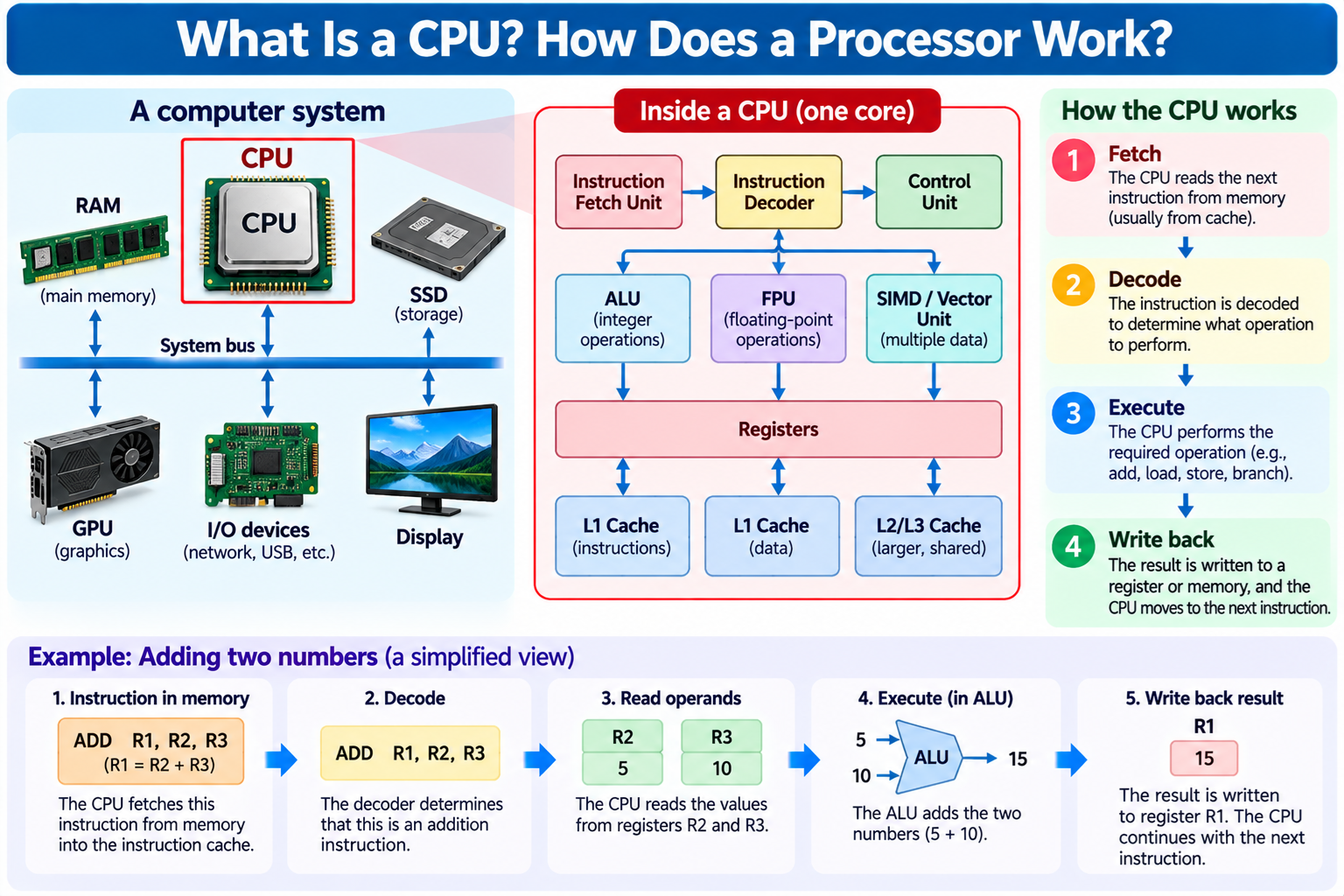
A CPU, or Central Processing Unit, is the main general-purpose processor responsible for executing program instructions and coordinating many of the operations performed by a computer.
It is one of the most important components in desktops, laptops, servers, smartphones, and embedded computing systems.
When you open a web browser, edit a document, run a program, or start an operating system, the CPU executes instructions that help perform these tasks.
It processes data, performs calculations, makes logical decisions, and communicates with memory and other hardware components.
A modern CPU is an integrated circuit containing millions or billions of transistors.
These transistors are organized into logic gates, registers, arithmetic units, caches, control circuits, and other functional blocks.
The CPU does not understand human language or software instructions in the way a person does.
It responds to machine instructions encoded as binary information.
Its electronic circuits implement the operations defined by the processor’s instruction set architecture.
For example, a program may request that two numbers be added.
The CPU executes an appropriate instruction, obtains the required operands, performs the arithmetic operation, and makes the result available to the program.
Modern CPUs are much more complicated than simple electronic calculators.
They support operating systems, virtual memory, multitasking, multiple processor cores, and sophisticated techniques for improving execution performance.
Understanding how a CPU works is an essential foundation for learning computer architecture, operating systems, assembly language, programming, digital logic, and semiconductor technology.
2. What Does CPU Stand For?
CPU stands for Central Processing Unit.
The term describes the processor responsible for executing a computer’s general-purpose machine instructions.
In a traditional computer architecture, the CPU performs arithmetic and logical operations, controls instruction execution, and coordinates communication with memory and other components.
However, the word central should not be interpreted as meaning that the CPU performs every operation in a modern computer.
A GPU can perform graphics and parallel numerical calculations. A storage controller manages storage-related operations.
Network interfaces process communication data, and other dedicated devices perform specialized functions.
The CPU coordinates many activities through software and hardware interfaces, but it does not personally process every bit transferred by every device.
In modern systems, a processor chip may contain multiple CPU cores and additional functional components.
Therefore, the CPU can refer to a processing unit or core in an architectural discussion, while everyday computer terminology often uses CPU to describe the entire processor package installed in the system.
3. What Is the Difference Between a CPU and a Processor?
The words CPU and processor are often used interchangeably, but processor is a broader term.
A CPU is a general-purpose processor designed to execute instructions from an instruction set architecture.
Other processors are designed for different workloads.
For example, a GPU is a graphics processing unit designed for graphics and high-throughput parallel computation.
A DSP, or Digital Signal Processor, is optimized for certain signal-processing operations.
An NPU, or Neural Processing Unit, is designed to accelerate selected neural network operations.
A microcontroller contains a processor core together with memory and peripheral functions.
Therefore, every CPU is a processor, but not every processor is a CPU.
The distinction is important because modern computing systems increasingly contain several kinds of processors working together.
4. What Is Inside a CPU?
A modern CPU contains many functional blocks that work together to execute instructions.
One important component is the arithmetic logic unit, or ALU. It performs integer arithmetic and logical operations.
Registers hold values that the processor needs during execution.
Instruction fetch and decode circuitry obtains instructions and determines which operations they represent.
Control logic coordinates the execution process.
Caches store frequently accessed instructions and data close to the processing units.
A floating-point unit performs operations on floating-point numerical values.
Many modern CPUs also contain vector or SIMD execution units that perform operations across multiple data elements.
Branch prediction hardware helps anticipate instruction flow.
Memory management hardware supports virtual addresses and memory protection.
Multicore processors contain multiple CPU cores, often sharing portions of the cache hierarchy and other resources.
The exact internal organization depends on the processor’s microarchitecture.
Not every CPU contains the same number or type of execution units.
For example, a small embedded processor may use a relatively simple design, while a high-performance desktop CPU may support out-of-order execution and several instructions in flight simultaneously.
5. How Does a CPU Actually Work?
At a simplified level, CPU operation can be described using three main activities: fetch, decode, and execute.
First, the CPU fetches an instruction.
The instruction is obtained from the memory hierarchy, often through an instruction cache.
Next, the CPU decodes the instruction.
The decoder determines what operation is required and identifies the relevant operands or control information.
Finally, the CPU executes the instruction.
For example, an addition instruction may direct the CPU to add two register values and store the result.
A load instruction may retrieve data from memory.
A store instruction may write data to memory.
A branch instruction may change the flow of program execution.
Modern processors commonly divide these activities into more detailed pipeline stages.
They may also fetch, decode, execute, and retire different instructions concurrently.
Nevertheless, the fetch-decode-execute model remains a useful starting point for understanding CPU behavior.
6. What Is a Machine Instruction?
A machine instruction is an encoded command that a CPU can execute according to its instruction set architecture.
Machine instructions are represented as binary information.
Different instruction sets use different instruction formats and operations.
For example, an instruction may request addition, subtraction, comparison, memory access, or a branch.
A simple instruction might add the values stored in two registers and write the result into another register.
Another instruction might load a value from memory into a register.
A conditional branch instruction may change the next instruction address if a particular condition is satisfied.
A CPU does not normally execute a high-level programming statement directly.
Programs written in languages such as C or Rust are typically compiled into machine instructions for the target architecture.
Other languages may use interpreters, virtual machines, or just-in-time compilation.
Regardless of the software execution approach, the CPU ultimately performs operations using machine instructions.
7. What Is an Instruction Set Architecture?
An Instruction Set Architecture, commonly abbreviated ISA, defines the interface between software and the processor’s machine-level behavior.
An ISA specifies important features such as supported instructions, architectural registers, data types, memory access rules, and exception behavior.
Examples of instruction set architectures include x86, Arm, and RISC-V.
These architectures have different histories, instruction encodings, and design characteristics.
For example, RISC-V provides an open standard instruction set architecture with a modular extension system.
Arm architectures are widely used in mobile and embedded computing, while x86 architectures are common in desktop and server systems.
The ISA does not fully describe how the processor is physically implemented.
Two CPUs can support the same ISA while using different internal architectures, execution pipelines, cache designs, and manufacturing processes.
This distinction separates the software-visible instruction interface from the physical CPU implementation.
8. What Is CPU Microarchitecture?
Microarchitecture describes how a processor implements its instruction set.
For example, two CPUs may execute the same machine instructions but use different internal hardware structures.
One processor may have a short execution pipeline.
Another may have a deeper pipeline and more complex branch prediction.
One CPU may execute instructions in program order.
Another may use out-of-order execution to improve utilization of its functional units.
Cache sizes, register structures, execution resources, and memory access mechanisms also differ among microarchitectures.
These design choices strongly influence performance, power consumption, area, and complexity.
The ISA determines what the CPU must do from the software’s perspective.
The microarchitecture determines how the hardware accomplishes that behavior.
9. What Is an ALU?
ALU stands for Arithmetic Logic Unit.
An ALU is a hardware component that performs integer arithmetic and logical operations.
Typical operations include addition, subtraction, bitwise AND, OR, and XOR, shifts, and comparisons.
For example, when a CPU executes an integer addition instruction, operands may be supplied to an ALU.
The ALU processes the values through electronic circuits and produces the result.
A basic binary adder can be constructed from logic gates.
Larger adders combine multiple bit-level operations to process wider numbers.
Modern CPUs may contain several integer execution units.
Some operations may also use specialized hardware rather than a general-purpose ALU.
The ALU is therefore an important processor component, but it is only one part of the complete CPU.
10. What Are CPU Registers?
Registers are small, fast storage locations used by a processor.
They hold values that instructions operate on, such as integers, memory addresses, and intermediate results.
For example, an addition instruction may read two source registers and write the result into a destination register.
Registers are typically implemented using transistor-based storage structures.
They are located within the processor and can be accessed much more directly than data stored in external memory.
Different instruction set architectures define different architectural registers.
For example, the RISC-V base integer architecture defines 32 integer registers, with register x0 always reading as zero.
Other architectures use different register organizations.
Modern out-of-order CPUs may also contain physical registers beyond the architecturally visible register set.
These support techniques such as register renaming.
Registers are essential because arithmetic units need fast access to operands and results.
11. What Is the Program Counter?
The program counter, commonly abbreviated PC, identifies the instruction address associated with the processor’s execution flow.
In a simplified CPU, the program counter points to the next instruction to fetch.
After an ordinary sequential instruction, the processor advances to the following instruction.
If a branch or jump occurs, the instruction address may change to another location.
For example, a loop in a program repeatedly executes a group of instructions.
The CPU uses branch instructions to return to an earlier instruction address until the loop condition changes.
Modern pipelined processors may maintain multiple internal instruction addresses and speculative execution state.
Nevertheless, the architectural concept of a program counter remains fundamental.
It allows the processor to follow a sequence of instructions rather than performing only one fixed operation.
12. What Is the Control Unit?
The control unit refers to circuitry responsible for coordinating instruction execution and other processor operations.
It interprets instruction-related information and generates control signals for the required hardware activities.
For example, an instruction may require register operands to be read, an arithmetic operation to be selected, and a result to be written.
Control logic coordinates these actions.
In a simple processor, the control unit may be implemented as a relatively straightforward state machine and decoding logic.
In a modern CPU, instruction control is distributed across many specialized structures.
These may include instruction decoders, schedulers, retirement logic, branch handling circuits, and exception control mechanisms.
Therefore, the control unit is a useful educational concept, but a modern high-performance CPU does not necessarily have one simple centralized block controlling every operation.
13. How Does a CPU Perform Addition?
A CPU performs binary arithmetic using electronic circuits.
For example, consider adding two small binary values.
Binary addition follows rules similar to decimal addition, but each digit can contain only 0 or 1.
The sum of binary 1 and binary 1 is binary 10, representing decimal 2.
A half adder uses logical operations to produce a sum bit and a carry bit.
A full adder also accepts an incoming carry.
Multiple full adders can be combined to add wider binary numbers.
Modern processor arithmetic units may use advanced carry propagation structures to reduce delay.
When software requests addition, the CPU directs the relevant operands through an appropriate execution unit.
The result is then made available to subsequent instructions.
The CPU does not perform arithmetic by interpreting the mathematical meaning of numbers as a human would.
Its circuits implement the rules of binary arithmetic through electrical behavior.
14. How Does a CPU Store and Retrieve Data?
The CPU uses registers and a memory hierarchy to access information.
Registers provide very fast storage for values currently involved in computation.
Caches store frequently needed instructions and data.
Main memory, usually DRAM in conventional computers, stores larger quantities of active program data.
Storage devices such as SSDs preserve files and software when power is removed.
These components have different characteristics.
Registers are extremely fast but limited in capacity.
Caches offer larger capacity than registers while remaining relatively close to the CPU.
DRAM provides much larger working memory but typically has higher access latency.
SSDs provide nonvolatile storage but generally require more time to access than DRAM.
The CPU uses load and store operations to communicate with memory according to its instruction set and microarchitecture.
The exact path of a memory request depends on caches, address translation, memory controllers, and other system components.
15. What Is CPU Cache?
CPU cache is a relatively small, fast memory structure used to reduce the average time required to access instructions and data.
Programs often reuse the same data or access nearby memory locations.
Caches take advantage of these patterns, commonly described as temporal and spatial locality.
When requested data is present in a cache, the CPU can often access it more quickly than if it must retrieve the data from external DRAM.
This is called a cache hit.
When the data is not present, a cache miss occurs.
The processor may need to retrieve the information from another cache level or main memory.
Modern CPUs commonly use multiple cache levels, such as L1, L2, and L3.
L1 caches are usually small and designed for very low latency.
L2 caches generally provide greater capacity.
L3 caches may be shared among multiple cores, depending on the processor design.
Cache organization strongly influences real-world CPU performance.
16. What Is the Difference Between L1, L2, and L3 Cache?
L1, L2, and L3 refer to different levels of the cache hierarchy.
L1 cache is typically closest to the execution resources of a CPU core.
It is generally small and fast.
Many CPUs separate L1 instruction cache and L1 data cache.
L2 cache commonly provides additional capacity and may serve one core or a group of cores.
L3 cache is often larger and may be shared among several cores.
However, cache arrangements differ among CPU architectures.
Some processors have additional cache levels, while small embedded CPUs may have simpler caches or none at all.
Larger caches are not automatically better in every situation.
Cache access latency, associativity, bandwidth, replacement policies, and workload behavior also matter.
The purpose of the hierarchy is to balance storage capacity, access speed, power consumption, and chip area.
17. What Happens When the CPU Needs Data from RAM?
When a CPU executes a memory load instruction, it must obtain the requested data.
The processor first determines the relevant memory address and performs any required address translation.
It then checks the appropriate cache structures.
If the data is available in a nearby cache, the request may complete quickly.
If the data is not present, the request may continue through additional cache levels.
Eventually, a request may reach the memory controller and external DRAM.
DRAM access generally takes much longer than accessing a CPU register or a nearby cache.
During this delay, an in-order processor may stall, while an out-of-order processor may continue executing other independent instructions when possible.
Once the data arrives, it can be made available to the requesting instruction.
This explains why memory latency is an important part of CPU performance.
A processor can have powerful arithmetic units but still spend substantial time waiting for data.
18. What Is CPU Clock Speed?
CPU clock speed describes the frequency of a clock signal used to coordinate certain processor operations.
It is commonly measured in hertz.
For example, 1 GHz means one billion clock cycles per second.
A processor operating at 3 GHz has a clock period of approximately one-third of a nanosecond.
However, clock speed does not directly indicate how many software instructions the CPU completes per second.
Some instructions require multiple operations or cycles.
Modern CPUs can also execute and retire multiple instructions during a cycle under suitable conditions.
A processor may additionally change its operating frequency according to workload, temperature, and power limits.
Therefore, CPU clock speed is one performance-related characteristic rather than a complete measure of processor speed.
19. What Is the Difference Between GHz and CPU Performance?
GHz measures frequency, not the total amount of useful computation completed.
Consider two CPUs operating at the same clock frequency.
One may have a more efficient instruction execution architecture.
It may process more instructions per cycle, predict branches more accurately, or avoid certain memory delays.
As a result, it may complete a program faster despite having the same clock frequency.
Conversely, a CPU operating at a higher clock frequency may still perform worse if its architecture or memory system is less effective for the workload.
CPU performance depends on several factors, including instructions per cycle, clock frequency, core count, cache behavior, and software parallelism.
This is why comparing processors based only on GHz can be misleading.
20. What Is IPC?
IPC stands for Instructions Per Cycle.
It describes how many instructions a processor completes or retires per clock cycle under a particular definition and workload.
IPC is influenced by the processor microarchitecture and the software being executed.
For example, a CPU with strong branch prediction and multiple execution units may achieve relatively high IPC on suitable workloads.
However, instruction dependencies and memory misses can reduce IPC.
IPC also varies significantly among applications.
A program performing regular arithmetic operations may behave differently from one with unpredictable branches and frequent memory accesses.
The instruction set also matters when interpreting instruction counts.
Therefore, IPC comparisons are most meaningful when the measurement conditions and architecture context are clearly understood.
21. What Is CPU Pipelining?
Pipelining is a technique that divides instruction processing into multiple stages.
A simple educational pipeline may contain instruction fetch, decode, execute, memory access, and write-back stages.
Instead of completing one instruction before starting another, the CPU allows different instructions to occupy different pipeline stages simultaneously.
For example, one instruction may be executing while another is being decoded and a third is being fetched.
This increases instruction throughput when the pipeline operates efficiently.
However, pipelining introduces challenges.
Data dependencies may require an instruction to wait for a previous result.
Branches may change which instructions should be executed.
Memory operations may experience unpredictable delays.
Modern CPUs use various mechanisms to manage these situations.
Pipelining is an important reason processors can execute instructions efficiently without requiring every instruction to finish within one clock cycle.
22. What Are Pipeline Hazards?
Pipeline hazards are conditions that interfere with the normal flow of instructions through a processor pipeline.
One category is a data hazard.
For example, an instruction may need a result produced by an earlier instruction.
If the result is not yet available, the dependent instruction may need to wait.
Another category involves control hazards.
A conditional branch can change the program’s instruction path.
The processor may not immediately know which instruction should execute next.
Structural hazards occur when instructions compete for limited hardware resources.
Processors use techniques such as forwarding, stalling, scheduling, and branch prediction to manage these problems.
The specific solutions depend on the microarchitecture.
Understanding pipeline hazards helps explain why instruction throughput varies even when CPU clock speed remains constant.
23. What Is Branch Prediction?
Branch prediction is a technique used by many modern CPUs to anticipate the direction or target of branch instructions.
A conditional branch may cause execution to continue at one of several instruction addresses.
Waiting until the branch is fully resolved can reduce pipeline efficiency.
A branch predictor uses information about prior execution behavior and other signals to estimate the likely next instruction path.
The CPU can then fetch and potentially execute instructions speculatively.
If the prediction is correct, the processor may avoid significant delays.
If the prediction is wrong, speculative work may need to be discarded and execution redirected.
A misprediction can therefore reduce performance.
Modern branch predictors are sophisticated hardware structures, and their effectiveness depends on workload behavior.
Branch prediction is especially important in deeply pipelined, high-performance processors.
24. What Is Out-of-Order Execution?
Out-of-order execution allows a processor to execute certain instructions in an order different from their original program order when doing so preserves the required architectural behavior.
For example, suppose one instruction is waiting for data from memory.
Other instructions that do not depend on that data may be ready to execute.
An out-of-order CPU can schedule those independent instructions while the memory operation is pending.
This helps keep execution units busy.
Modern out-of-order processors use structures such as instruction schedulers, register renaming, and reorder buffers or related retirement mechanisms.
These structures add complexity and consume power and chip area.
Many embedded CPUs therefore use simpler in-order designs.
Out-of-order execution can provide significant performance benefits for workloads with sufficient instruction-level parallelism.
However, it does not remove true data dependencies or eliminate memory latency.
25. What Is Speculative Execution?
Speculative execution refers to performing work before the processor knows with certainty that the work will be required.
For example, after predicting a branch direction, a CPU may begin executing instructions along the predicted path.
If the prediction is correct, the work contributes to progress.
If the prediction is incorrect, the processor must discard the speculative architectural results.
Speculative execution can improve performance by reducing idle time.
However, it also introduces complexity.
Certain microarchitectural side effects of speculative execution can create security concerns, as demonstrated by classes of vulnerabilities involving transient execution and side channels.
Modern CPU security therefore involves both architectural protections and careful management of speculative behavior.
The exact mitigations depend on the processor design and software environment.
26. What Is a CPU Core?
A CPU core is a processing unit capable of executing an instruction stream.
A core typically contains instruction processing logic, registers, arithmetic execution resources, and other circuitry.
A processor may contain one core or multiple cores.
For example, a quad-core CPU contains four CPU cores.
Each core can execute its own instruction stream, allowing the system to perform multiple tasks concurrently.
However, cores often share certain resources.
These may include parts of the cache hierarchy, memory controllers, power delivery, and other system functions.
The exact sharing arrangement depends on the processor.
Multiple cores can improve performance for workloads that can execute in parallel.
However, adding more cores does not automatically accelerate a single-threaded program.
27. What Is the Difference Between Single-Core and Multi-Core CPUs?
A single-core CPU contains one processing core.
It can still run multiple software tasks by switching among them over time.
The operating system scheduler determines which task receives processor time.
A multicore CPU contains multiple processing cores that can execute different instruction streams simultaneously.
For example, one core may execute a web browser task while another processes a background application.
Multicore processors can also accelerate programs designed to divide work into parallel tasks.
However, the performance improvement depends on the application.
A program that performs mostly serial operations may not benefit much from additional cores.
Multicore systems also introduce challenges involving synchronization, shared memory, cache coherence, and scheduling.
The benefit of multicore computing comes from parallel execution, not merely from the presence of more hardware.
28. What Is a CPU Thread?
The term thread has two related meanings in computing.
A software thread is a sequence of execution managed by a program and the operating system.
A hardware thread refers to an architectural execution context supported by a processor core.
Some CPU cores support simultaneous multithreading, or SMT.
SMT allows one physical core to maintain multiple hardware execution contexts and issue instructions from more than one thread under suitable conditions.
For example, a processor may have eight physical cores and support sixteen hardware threads.
However, sixteen hardware threads are not equivalent to sixteen independent physical cores.
Hardware threads may share execution units, caches, and other core resources.
SMT can improve resource utilization, but its benefits vary by workload.
In some situations, sharing resources may provide little improvement or even reduce performance.
29. What Is Hyper-Threading?
Hyper-Threading is Intel’s branding for certain implementations of simultaneous multithreading.
In a traditional two-way Hyper-Threading implementation, one physical CPU core supports two logical processors visible to the operating system.
The operating system can schedule separate software threads on those logical processors.
The physical core shares many of its execution resources between them.
This can improve throughput when one thread cannot fully utilize the core.
However, Hyper-Threading does not double the physical execution hardware.
It also does not guarantee a doubling of performance.
Not every Intel processor supports Hyper-Threading, and SMT implementations vary among processor families.
The general architectural concept is simultaneous multithreading.
30. What Is the Difference Between CPU Cores and Threads?
A CPU core is a physical processing structure containing execution hardware.
A hardware thread is an execution context that uses processor resources.
For example, a CPU with six physical cores and two hardware threads per core may present twelve logical processors to the operating system.
However, the twelve logical processors share six physical cores.
For workloads that fully utilize the execution units, the benefits of additional hardware threads may be limited.
For workloads with execution stalls or underutilized resources, SMT may improve throughput.
Therefore, core count and thread count describe different aspects of CPU design.
When comparing processors, both should be considered along with architecture, clock behavior, and actual performance.
31. How Does the CPU Communicate with RAM?
The CPU communicates with system memory through a memory subsystem.
In many modern systems, the memory controller is integrated into the processor or SoC.
The processor generates memory requests using load and store operations.
These requests pass through appropriate cache and memory management structures.
When an access requires external DRAM, the memory controller coordinates the necessary memory commands and data transfers.
Modern desktop and server systems commonly use DDR-family memory technologies.
The memory interface has specific electrical and timing requirements.
The CPU does not directly read arbitrary DRAM storage capacitors one at a time.
Instead, memory controllers and DRAM internal circuits cooperate to access organized memory structures.
The effectiveness of this system influences overall processor performance.
32. What Is Virtual Memory?
Virtual memory is a mechanism that allows programs to use virtual addresses rather than directly managing physical memory addresses.
The operating system establishes mappings between virtual address spaces and physical memory resources.
The CPU’s memory management hardware performs address translation according to the relevant architecture.
A Memory Management Unit, or MMU, is responsible for important parts of this translation and protection mechanism.
Virtual memory supports process isolation, flexible memory allocation, and other operating system functions.
For example, two applications may use the same virtual address value while that address maps to different physical memory locations.
The operating system controls the mappings and permissions.
Virtual memory is not the same as a page file or swap space.
Disk-backed paging is one possible operating system memory management mechanism, while virtual addressing itself is a broader architectural concept.
33. What Is a TLB?
TLB stands for Translation Lookaside Buffer.
It is a cache used by memory management hardware to accelerate virtual-to-physical address translation.
Without a TLB, translating virtual addresses could require additional memory accesses to examine page tables.
A TLB stores recently used translation information.
When a required translation is present, the CPU can often avoid a more expensive page-table walk.
A missing translation may require hardware or software mechanisms to obtain the necessary information.
The exact behavior depends on the instruction set architecture and operating system.
TLB performance can influence workloads that access large or irregular memory regions.
It is one of the less visible but important structures inside modern CPUs.
34. How Does a CPU Run an Operating System?
An operating system is software that manages hardware resources and provides services to applications.
The CPU executes the operating system’s machine instructions in the same general way that it executes application instructions.
However, modern CPUs provide privilege mechanisms that allow the operating system to perform protected operations.
For example, user applications normally execute with restricted privileges.
The operating system kernel executes with higher privileges required to manage memory, hardware, and other resources.
A program can request operating system services through a system call.
The CPU and operating system cooperate to change the execution context and invoke the requested kernel operation.
The kernel may then return control to the application.
Interrupts, exceptions, timers, and memory protection mechanisms also help the operating system manage the computer.
The CPU provides the hardware mechanisms, while the operating system supplies the software policies and resource management.
35. What Is a System Call?
A system call is a controlled interface through which an application requests a service from the operating system kernel.
For example, a program may need to open a file, create a process, or communicate through a network socket.
These operations often require resources managed by the operating system.
The application executes a suitable instruction or follows a defined calling mechanism to enter the kernel.
The kernel validates the request and performs the appropriate operation when permitted.
The result is then returned to the application.
System call mechanisms differ among instruction set architectures and operating systems.
For example, Linux supports system call interfaces on x86-64, Arm, and RISC-V.
Understanding system calls helps explain how applications interact with hardware without directly controlling every device.
36. What Is an Interrupt?
An interrupt is a mechanism that notifies the processor that an event requires attention.
For example, a hardware device may signal that an operation has completed or new data is available.
A timer can also generate interrupts used by the operating system.
When an interrupt is accepted, the CPU follows an architecture-defined mechanism to transfer control to an appropriate handler.
The handler performs the required work and eventually allows execution to continue.
Interrupt mechanisms enable a computer to respond to events without continuously checking every device in a simple polling loop.
However, not every hardware interaction requires an interrupt.
Systems may also use polling, direct memory access, and other communication methods.
Interrupts are an important part of the relationship between CPUs, operating systems, and external hardware.
37. What Is CPU Scheduling?
CPU scheduling is the operating system process of deciding which runnable software threads or tasks receive processor time.
For example, a computer may have many programs running simultaneously.
The operating system scheduler selects tasks for available logical CPUs.
On a multicore system, several tasks can execute concurrently.
When there are more runnable tasks than available execution contexts, the operating system shares processor time among them.
Scheduling decisions may consider task priority, fairness, responsiveness, processor affinity, and other factors.
A context switch occurs when execution changes from one task to another.
The operating system must preserve and restore appropriate execution state.
The CPU provides hardware support, while the scheduler determines how computational resources are allocated.
38. What Is a Context Switch?
A context switch occurs when a processor changes the software execution context it is running.
For example, the operating system may stop one thread temporarily and begin executing another.
The system must preserve the relevant architectural state of the first thread.
This may include register values, instruction state, and other context information.
The next thread’s state is restored so execution can continue correctly.
A context switch is not the same as switching a transistor.
It is an operating system and processor operation involving the state of software execution.
Context switching allows multiple applications to share processing resources.
However, frequent context switches can create overhead and affect cache behavior.
The exact cost depends on the operating system, processor architecture, and workload.
39. What Is the Difference Between a CPU and GPU?
A CPU is optimized for flexible general-purpose instruction execution.
A GPU is designed to provide high throughput for suitable parallel computations.
Modern CPUs commonly contain a relatively limited number of sophisticated cores, although core counts vary widely.
GPUs often contain many arithmetic processing resources organized for highly parallel workloads.
For example, a CPU is well suited for operating system tasks, application control logic, and workloads involving complex instruction flow.
A GPU is particularly effective for graphics rendering, matrix operations, and computations that can be divided into many parallel tasks.
However, GPUs are programmable processors, and CPUs can also perform parallel computation.
The distinction is primarily architectural rather than absolute.
Many modern systems use both CPUs and GPUs.
40. What Is the Difference Between a CPU and MCU?
A CPU is a processing unit that executes instructions.
An MCU, or Microcontroller Unit, is an integrated device that typically combines a CPU core, memory, and peripheral functions.
For example, a microcontroller may contain flash memory, SRAM, timers, GPIO, serial communication interfaces, and analog converters.
A microcontroller can operate as the main controller of a small embedded system.
A desktop CPU generally relies on additional system components for memory, storage, and other functions, although many modern processors integrate substantial supporting hardware.
Microcontrollers are commonly used in appliances, industrial controllers, sensors, and embedded electronics.
They often prioritize low cost, predictable behavior, power efficiency, and direct hardware control.
A CPU and MCU are therefore not mutually exclusive categories. A microcontroller contains a CPU core as one of its components.
41. What Is the Difference Between a CPU and SoC?
SoC stands for System on Chip.
An SoC integrates multiple system functions into one chip or integrated semiconductor system.
For example, a smartphone SoC may contain CPU cores, GPU resources, memory controllers, multimedia processing hardware, and communication interfaces.
The CPU is one component within the SoC.
A desktop or server processor may also integrate many functions traditionally associated with separate chips.
Therefore, the distinction between CPU products and SoCs is not always based on a strict physical boundary.
The CPU describes general-purpose instruction execution hardware.
The SoC describes a broader level of system integration.
42. What Is the Difference Between a CPU and FPGA?
An FPGA, or Field-Programmable Gate Array, is an integrated circuit containing configurable digital logic and interconnect resources.
An FPGA can be programmed at the hardware configuration level to implement different digital circuits.
For example, an FPGA may implement a UART controller, digital filter, custom accelerator, or a soft-core CPU.
A conventional CPU executes different software programs using its existing instruction execution hardware.
An FPGA can change the configuration of its logic resources within the limits of the device.
This provides flexibility for digital hardware development and specialized processing.
However, FPGAs and CPUs have different trade-offs involving development methods, power consumption, performance, and cost.
They are often used together rather than as direct replacements.
43. What Is the Difference Between a CPU and ASIC?
ASIC stands for Application-Specific Integrated Circuit.
An ASIC is designed for a particular application or class of functions.
A CPU is designed to execute many different instruction sequences.
For example, a general-purpose CPU can run a web browser, database server, compiler, or operating system.
A specialized ASIC may implement selected processing operations directly in hardware.
This can provide efficiency advantages for suitable workloads.
However, ASICs may also contain embedded CPU cores.
Therefore, the categories are not completely separate.
A CPU refers to a general-purpose processing function, while ASIC describes an application-oriented chip design approach.
44. What Is an Integrated GPU?
An integrated GPU is a graphics processing unit incorporated into the same processor chip, die, or package-level system as other major computing functions.
Many laptops, desktops, and mobile devices include integrated graphics capabilities.
An integrated GPU may share the system’s main memory with the CPU.
This reduces the need for a separate graphics card in many applications.
However, integrated GPU performance depends on the architecture, memory bandwidth, power limits, and other design factors.
A discrete GPU is a separate graphics processor product, often with its own dedicated memory.
Discrete GPUs may provide greater graphics or computational performance in suitable systems, but they also introduce additional power, cooling, and cost requirements.
Both integrated and discrete GPUs use semiconductor circuits to perform graphics and parallel computation.
45. Why Do CPUs Have Multiple Cores?
Multiple CPU cores allow a processor to execute several instruction streams concurrently.
This helps support multitasking and parallel software.
For example, a web browser may use multiple threads for rendering, scripting, and background operations.
A software compiler may process several independent source files concurrently.
A server may handle multiple requests using parallel worker threads.
However, adding cores also increases architectural complexity.
Cores may need to share memory and maintain consistent views of shared data.
They can also compete for cache capacity, memory bandwidth, and power resources.
The benefit of additional cores depends on how effectively the workload can be parallelized.
This is why an eight-core processor is not automatically twice as fast as a four-core processor for every program.
46. What Is Cache Coherence?
Cache coherence refers to mechanisms that help maintain consistent behavior when multiple processor cores cache shared memory data.
Consider two CPU cores accessing the same memory location.
If one core modifies the data, another core may still have an older cached copy.
Without appropriate coordination, the cores could observe inconsistent values in ways that violate the system’s memory model.
Cache coherence protocols manage ownership and sharing of cache lines.
Common protocol families include MESI and related variants.
These mechanisms use hardware communication to coordinate cached data.
However, cache coherence is not the same as complete synchronization between software threads.
Programs still need appropriate atomic operations, locks, and memory ordering rules when sharing data.
Cache coherence is an essential part of modern multicore processor architecture.
47. What Is CPU Power Consumption?
CPU power consumption depends on several factors.
These include operating voltage, clock frequency, circuit activity, leakage current, and microarchitecture.
A CPU performing intensive computation may activate more execution resources than one waiting for input.
Modern processors therefore use power management techniques to adjust operating conditions.
For example, unused functional blocks may enter lower-power states.
Clock gating can reduce unnecessary switching activity.
Power gating can disconnect selected circuitry from its power supply under suitable conditions.
Dynamic voltage and frequency scaling adjusts operating conditions according to performance and power requirements.
The result is a balance among speed, energy consumption, and thermal constraints.
CPU power is especially important in laptops, smartphones, servers, and other systems where energy efficiency affects operating cost or battery life.
48. Why Does a CPU Generate Heat?
A CPU generates heat because its electronic circuits dissipate electrical energy during operation.
In CMOS logic, switching electrical capacitances consumes dynamic power.
Leakage currents and other effects also contribute.
A simplified dynamic power relationship is:
P ≈ αCV²f
Here, α represents switching activity, C represents effective switched capacitance, V represents voltage, and f represents frequency.
This equation demonstrates why higher voltage and increased switching activity can raise power consumption.
The dissipated energy becomes heat that must be removed from the processor.
The processor package provides a thermal path toward a heatsink or another cooling system.
High-performance CPUs may require fans or liquid cooling to maintain suitable operating temperatures.
Thermal design is therefore an important part of computer system engineering.
49. What Is CPU Thermal Throttling?
Thermal throttling occurs when a processor reduces its operating activity or performance to manage excessive temperature.
Modern CPUs contain temperature monitoring and power management mechanisms.
When thermal limits are approached, the processor may reduce clock frequency, voltage, or other operating parameters.
This helps prevent the device from exceeding specified temperature limits.
Thermal throttling can occur during sustained demanding workloads, especially when cooling capacity is insufficient.
For example, a compact laptop may have a smaller cooling system than a large desktop computer.
Even if both use similar processor technology, their sustained performance may differ.
Thermal throttling does not necessarily indicate a defective CPU.
It is often a normal protective mechanism.
However, excessive throttling may indicate inadequate cooling, blocked airflow, or unsuitable power settings.
50. What Is CPU Turbo Boost?
Many modern processors support dynamic frequency boosting.
This allows the CPU to operate above a specified base frequency when power, temperature, current, and other conditions permit.
Intel commonly uses Turbo Boost terminology for relevant technologies.
Other manufacturers use different names for similar dynamic frequency management features.
Boost frequency is not necessarily sustained during every workload.
For example, a processor may reach a high frequency briefly when only one or two cores are active.
During sustained multicore workloads, power and thermal limits may reduce the operating frequency.
The actual behavior depends on the processor, cooling system, firmware settings, and workload.
Therefore, advertised maximum boost frequency should not be interpreted as the constant operating speed of every core.
51. What Is CPU Architecture: x86, Arm, and RISC-V?
x86, Arm, and RISC-V are important instruction set architecture families.
They define machine-level programming interfaces supported by compatible processors.
x86 has a long history in personal computers and servers.
Arm architectures are widely used in mobile devices, embedded systems, and increasingly in other computing categories.
RISC-V is an open standard instruction set architecture designed with a modular extension system.
Processors implementing these architectures may use very different microarchitectures.
For example, a small RISC-V microcontroller core may have a simple pipeline, while a high-performance RISC-V core may use out-of-order execution.
The same principle applies to Arm and x86 processors.
The instruction set does not by itself determine the processor’s speed, power efficiency, or manufacturing node.
These characteristics depend on the actual implementation.
52. What Is the Difference Between RISC and CISC?
RISC stands for Reduced Instruction Set Computer.
CISC stands for Complex Instruction Set Computer.
Historically, these terms described different approaches to instruction set design.
RISC architectures generally emphasized relatively regular instructions and load/store principles.
CISC architectures often included more varied instruction forms and addressing capabilities.
However, modern processors are more complicated than this simple distinction suggests.
For example, many x86 CPUs translate architectural instructions into internal micro-operations.
Modern RISC processors can also have sophisticated execution engines and complex optional extensions.
Therefore, RISC and CISC are useful historical and architectural concepts, but they are not reliable shortcuts for predicting performance.
The actual processor microarchitecture and workload are more important.
53. What Is 32-Bit and 64-Bit CPU Architecture?
The terms 32-bit and 64-bit describe aspects of a processor’s architectural data and address handling capabilities.
For example, a 64-bit ISA commonly provides 64-bit general-purpose registers and operations.
However, the term does not mean that every internal structure is exactly 64 bits wide.
Some processors have wider vector units, narrower control structures, and different internal buses.
A 64-bit architecture may support much larger virtual address spaces than a 32-bit architecture, although actual implemented address widths are often smaller than 64 bits.
Software compatibility also depends on the operating system and instruction set.
A 64-bit processor does not automatically make every program faster.
Performance depends on the application’s data requirements, instruction behavior, and system architecture.
54. How Does a CPU Start When You Turn On a Computer?
When a computer receives power, its hardware must be initialized before the operating system can run.
The exact startup process depends on the platform.
In a conventional PC, firmware such as UEFI performs important initialization tasks.
The CPU begins execution from an architecture-defined reset state.
The firmware configures essential hardware and helps locate the software needed for the next startup stage.
A bootloader or another startup mechanism then loads the operating system kernel.
The kernel initializes its own data structures, memory management, device support, and other subsystems.
Finally, the operating system starts user services and applications.
This process demonstrates that the CPU can execute instructions before the operating system is running.
Firmware provides the initial execution environment.
55. How Does a CPU Run Multiple Programs?
A modern operating system allows many programs to remain active at the same time.
The CPU executes instructions from runnable software threads.
If multiple cores are available, several threads may execute concurrently.
If there are more runnable threads than available logical processors, the operating system scheduler shares execution time.
For example, a computer may run a web browser, text editor, background synchronization service, and media player.
The scheduler determines when each thread receives processor time.
The CPU’s hardware mechanisms support context switching, interrupts, memory protection, and privileged execution.
The operating system uses these capabilities to manage multitasking.
The CPU does not need a separate physical circuit for every application.
It repeatedly executes instructions from different programs using reusable hardware resources.
56. Why Is CPU Performance Sometimes Limited by Memory?
A CPU may contain fast execution units capable of performing many calculations.
However, those units need operands and instructions.
If the required data is not available in registers or caches, the processor may need to wait for slower memory.
For example, accessing DRAM can take substantially longer than an ALU operation.
An out-of-order CPU may hide part of this delay by executing independent instructions.
However, some workloads have dependencies that prevent useful work from continuing.
Applications that frequently access large, irregular data structures may therefore become memory-latency limited.
Other workloads may be limited by memory bandwidth when they transfer large quantities of data.
This explains why CPU performance depends on both computation and data movement.
A faster processor does not automatically make every memory-intensive application proportionally faster.
57. What Is the Difference Between CPU Latency and Throughput?
Latency describes the time required to complete an operation.
Throughput describes how many operations can be completed during a period of time.
For example, an arithmetic unit may have a latency of several clock cycles for a particular operation.
However, a pipelined execution unit may accept a new operation every cycle.
This means its throughput can be higher than one operation per latency interval.
The same distinction applies to processors and memory systems.
A CPU may complete individual operations with relatively low latency while also supporting high throughput through parallel execution.
Different workloads prioritize different characteristics.
Interactive applications may be sensitive to latency.
Large parallel workloads may benefit from high throughput.
Processor performance analysis therefore requires more than one speed measurement.
58. Why Can’t We Measure CPU Performance Only by Core Count?
Core count describes the number of physical processing cores, but not their individual capabilities.
For example, two processors may each contain eight cores.
One may have higher per-core performance, larger caches, or a more efficient architecture.
The other may prioritize energy efficiency.
Even if the cores are similar, the processors may have different memory bandwidth, clock behavior, or thermal limits.
Software parallelism also matters.
A single-threaded application may not benefit from additional cores.
A highly parallel application may scale across several cores, but it can still encounter synchronization or memory limitations.
Therefore, core count should be considered alongside architecture, IPC, frequency, memory performance, and workload measurements.
59. Why Can’t We Measure CPU Performance Only by Transistor Count?
Transistor count indicates the scale of semiconductor integration.
However, the transistors may be used for different purposes.
Some form CPU execution units.
Others form caches, control structures, graphics hardware, communication interfaces, or other functional blocks.
For example, a processor with a very large cache may contain more transistors than another processor without delivering proportionally higher performance in every workload.
A specialized accelerator may also contain many transistors that are not used for general-purpose CPU instructions.
Therefore, transistor count is not a universal performance measure.
The usefulness of the hardware depends on how the transistors are organized and used.
60. What Is CPU Manufacturing Technology?
CPUs are manufactured using semiconductor fabrication processes.
These processes create transistors and interconnections on silicon wafers.
Manufacturing technologies are commonly identified using node names such as 7nm, 5nm, or 3nm.
However, modern process node names are technology generation labels rather than exact measurements of one transistor dimension.
Newer processes may provide opportunities for improved density, performance, or power efficiency.
However, they also involve trade-offs concerning cost, yield, and design complexity.
After fabrication, processor dies are tested and packaged.
Some CPU products use a single die, while others use multiple chiplets.
The finished processor package is then installed into a computer or electronic system.
Manufacturing technology is important, but CPU performance also depends heavily on microarchitecture and system design.
61. What Is a CPU Chiplet?
A chiplet is a semiconductor die designed to function as part of a larger multi-die system.
Some modern CPUs divide processing functions among several dies.
For example, compute chiplets may contain CPU cores, while another die contains memory controllers or external interfaces.
These dies communicate through advanced package interconnections.
Chiplet designs can provide advantages in manufacturing flexibility and product scalability.
Different dies may use different semiconductor process technologies.
However, moving communication across die boundaries creates considerations involving latency, bandwidth, power consumption, and packaging cost.
A chiplet processor is not automatically better than a monolithic processor.
The value depends on the complete architecture.
62. What Is the Difference Between a Monolithic CPU and a Chiplet CPU?
A monolithic CPU places its major processor circuitry on one continuous semiconductor die.
A chiplet CPU divides selected functions among multiple dies assembled into one package.
A monolithic design may provide advantages in integration and certain communication paths.
A chiplet design may provide manufacturing flexibility and support reuse of smaller functional dies.
However, die-to-die communication requires suitable interconnections and control mechanisms.
The chiplet package may also have more complex thermal and assembly requirements.
Both approaches can produce high-performance processors.
Their relative advantages depend on product requirements, manufacturing economics, and architectural design.
63. How Is a CPU Different from a Simple Calculator?
A calculator is designed to perform particular mathematical operations.
A CPU is a programmable processor capable of executing a general-purpose instruction set.
For example, a CPU can perform arithmetic, compare data, change instruction flow, access memory, and interact with operating system services.
A software program combines these capabilities into more complex behavior.
A calculator may also contain a programmable processor internally, depending on its design.
The essential difference is not simply arithmetic capability.
It is the range of operations and programmability supported by the computing system.
A general-purpose CPU can execute many different programs using the same underlying hardware.
64. How Can Beginners Observe CPU Behavior?
Beginners can learn about CPU operation using tools already available on a computer.
On Windows, Task Manager provides information about CPU utilization, logical processors, operating frequency, and system activity.
To open it, press Ctrl + Shift + Esc.
Select the Performance section and choose CPU.
You can observe how CPU utilization changes when applications start or perform intensive work.
For example, opening several applications may temporarily increase CPU activity.
Running a computational task may cause sustained utilization.
However, Task Manager does not directly show individual instruction execution or internal pipeline stages.
For more detailed observation, programmers can write small programs and inspect generated assembly language.
Instruction simulators and emulators can also demonstrate registers, memory operations, and instruction sequencing.
These tools provide a practical connection between CPU architecture and actual software execution.
65. How Can Beginners Learn CPU Architecture?
A useful learning path begins with binary numbers and digital logic.
Learn how binary values represent numbers and how logic gates perform AND, OR, NOT, and XOR operations.
Next, study combinational circuits such as adders, multiplexers, and comparators.
Then learn sequential circuits, including flip-flops, registers, counters, and finite state machines.
These concepts explain how digital hardware stores state and performs operations over time.
After that, study a simple processor architecture.
Important components include the program counter, register file, ALU, control logic, and memory interface.
RISC-V is a useful instruction set for educational projects because its specifications are openly available and its base integer instructions can be studied systematically.
For practical hardware design, Verilog or SystemVerilog can be used to implement a basic CPU.
An FPGA can then provide configurable hardware for testing the design.
Once a simple CPU is understood, advanced subjects such as caches, pipelining, branch prediction, out-of-order execution, virtual memory, and multicore coherence become easier to learn.
66. Common Misunderstandings About CPUs
One common misunderstanding is that the CPU performs every operation in a computer.
In reality, GPUs, storage controllers, network interfaces, and other hardware devices perform specialized work.
Another misconception is that CPU clock frequency directly determines overall performance.
Architecture, instructions per cycle, memory behavior, and software characteristics also matter.
Some people assume that a processor with more cores is always faster.
Additional cores help workloads that can use parallel execution, but they may provide little benefit for serial tasks.
Another misunderstanding is that hardware threads are equivalent to physical cores.
SMT threads share processor resources and do not duplicate the entire core.
It is also incorrect to assume that newer semiconductor process nodes automatically guarantee better CPU performance.
Finally, the simple fetch-decode-execute model should not be interpreted as a complete description of every modern processor.
High-performance CPUs use sophisticated pipelines, speculation, scheduling, and memory systems.
These mechanisms expand on the basic instructional model rather than replacing the fundamental purpose of executing machine instructions.
67. The Complete Journey from Transistors to CPU Software
The operation of a modern CPU can be understood as a hierarchy.
At the physical level, semiconductor materials allow electrical charge to be controlled.
Transistors use these properties to implement switching and other electronic functions.
Groups of transistors form logic gates and storage elements.
Logic gates form adders, multiplexers, comparators, and control circuits.
Storage elements form registers and memory structures.
These components are combined into CPU execution units, instruction processing pipelines, caches, and memory management hardware.
The processor implements an instruction set architecture.
Compilers translate high-level programs into suitable machine instructions.
The operating system manages processor time, memory, devices, and other resources.
Applications execute instructions through this hardware and software environment.
A program may appear to be an abstract collection of commands, but its execution ultimately depends on coordinated electronic activity within semiconductor circuits.
68. Conclusion: How Does a CPU Actually Work?
A CPU is a general-purpose processor that executes machine instructions and coordinates many important computing operations.
Its internal hardware includes registers, arithmetic units, instruction processing circuitry, caches, control logic, and memory management structures.
At a basic level, the processor fetches instructions, decodes their meaning, and executes the required operations.
Modern CPUs extend this model through techniques such as pipelining, branch prediction, out-of-order execution, caching, and multicore processing.
Registers provide fast access to working values.
Caches reduce the average cost of memory access.
The ALU and other execution units perform arithmetic and logical operations.
Memory management hardware supports virtual addressing and protection.
The operating system uses CPU mechanisms to schedule tasks, handle interrupts, manage memory, and provide services to applications.
CPU performance depends on architecture, instructions per cycle, clock frequency, memory behavior, available parallelism, power consumption, and thermal conditions.
A processor with more cores, a higher frequency, or a newer manufacturing node is not automatically superior for every application.
The most important principle is simple: a CPU is a programmable electronic machine that repeatedly executes instructions. Billions of transistors form the logic, registers, memory structures, and control circuits that allow software programs to run.
Understanding the CPU provides a foundation for learning operating systems, assembly language, computer architecture, RISC-V, digital logic, FPGA development, and modern processor design.