Linux is not a single operating system with one installer and one desktop interface. When you explore Linux, you will encounter names such as Ubuntu, Debian, Fedora, Linux Mint, and Arch Linux. They all use the Linux kernel, but they can provide different desktop environments, software management tools, update policies, and support options.
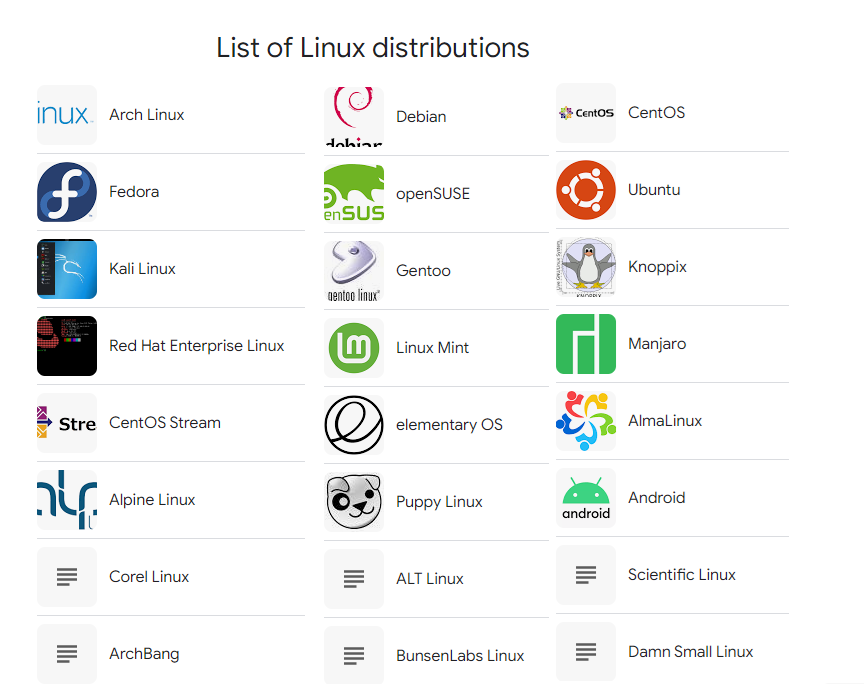
These operating systems are called Linux distributions, often shortened to Linux distros. Some focus on everyday computing and software development. Others serve enterprise servers, older computers, security testing, routers, or embedded devices.
This guide introduces common Linux distributions by their families and main uses. Understanding these differences will help you narrow your options without having to guess your way through a long list of names.
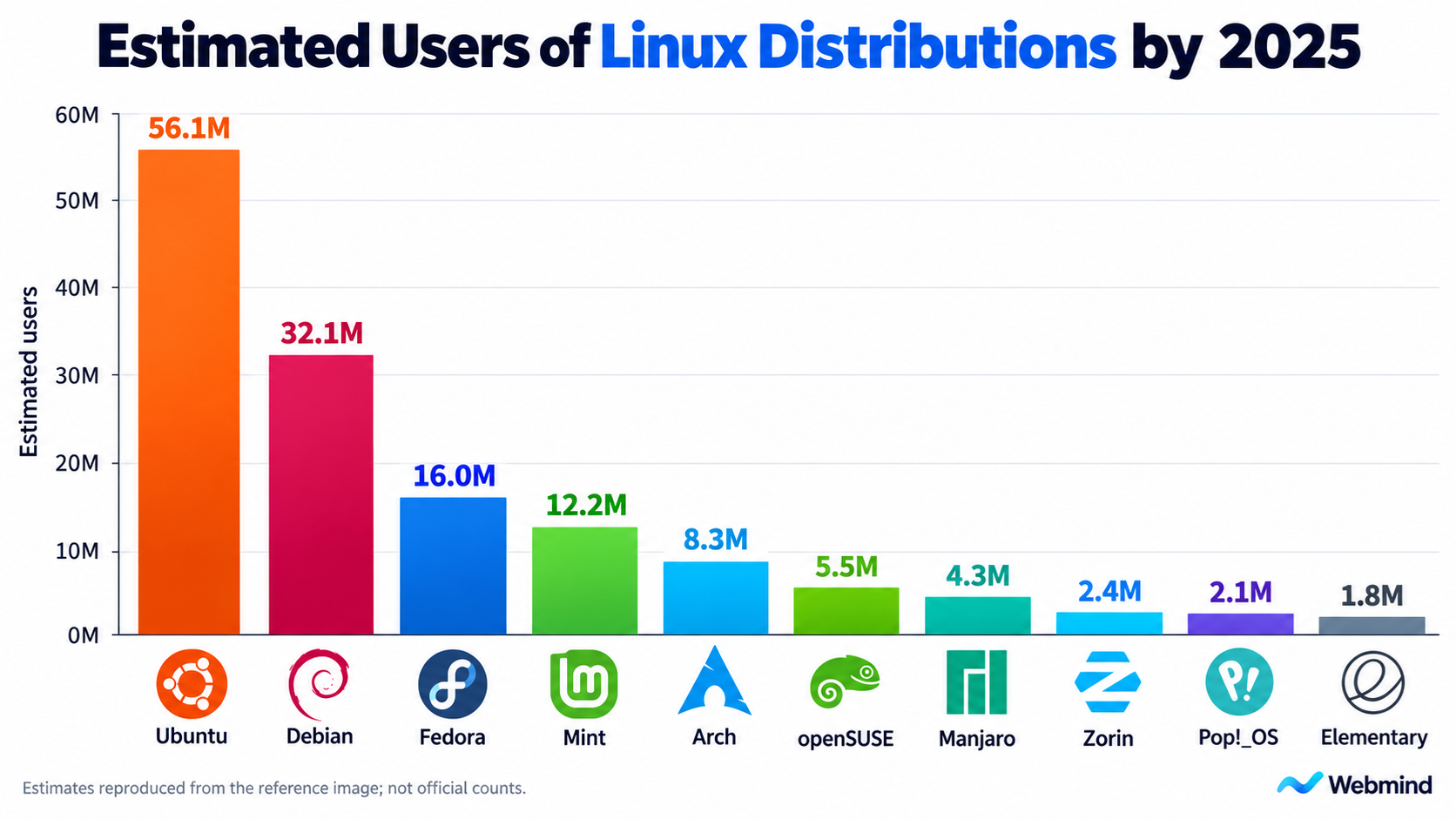
1. What Is a Linux Distribution?
Strictly speaking, Linux is an operating system kernel. The kernel manages processors, memory, and devices, and provides the interfaces that programs use to access system resources. However, a kernel alone is not the complete system most people expect to install and use.
A Linux distribution combines the kernel with system utilities, software libraries, a package manager, installation tools, and software repositories. Desktop distributions typically add a graphical interface, a file manager, a browser, and other applications.
Distribution maintainers also build, test, update, and deliver software. Choosing a distribution therefore means choosing a system for obtaining and maintaining software over time.
The differences go beyond wallpaper and icons. Some distributions emphasize long support periods and predictable behavior. Others prioritize newer software. Some simplify installation and configuration, while others give users more responsibility for selecting individual components.
It is also important to distinguish a distribution from a desktop environment. Ubuntu, Debian, and Fedora are distributions. GNOME, KDE Plasma, and Xfce are desktop environments. One distribution can offer several desktops, and the same desktop can run on multiple distributions.
2. Linux Distribution Families
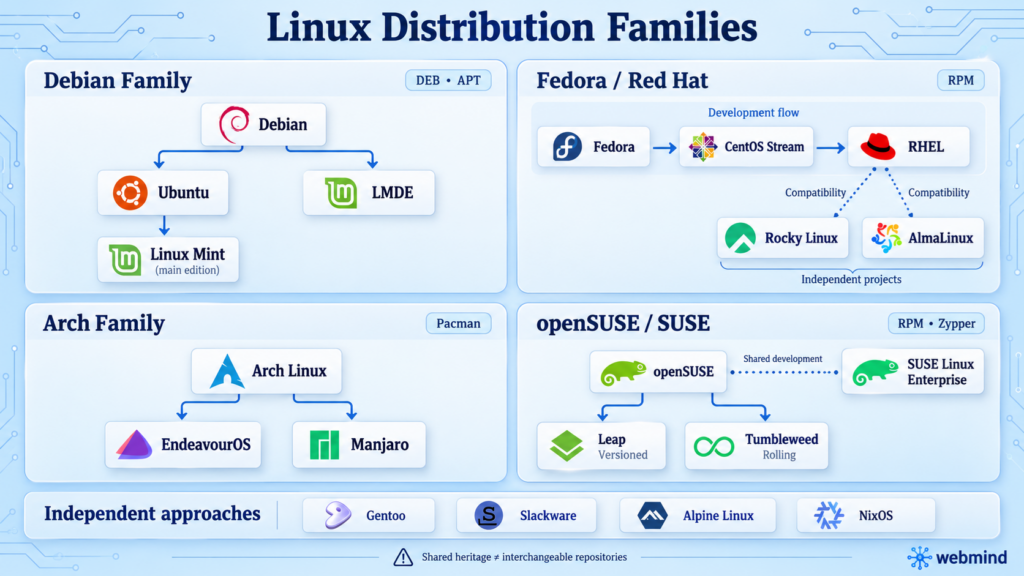
Many Linux distributions build on an existing project rather than starting from scratch. They may inherit package formats, management tools, and parts of the software ecosystem, then add their own applications, configuration, and desktop design.
Family relationships help explain why knowledge transfers between systems. However, belonging to the same family does not mean their software repositories can safely be mixed.
The Debian Family
Debian is a community-developed distribution and the foundation for many other projects. Ubuntu is based on Debian, while the main edition of Linux Mint is based on Ubuntu. Linux Mint also offers LMDE, an edition based directly on Debian.
This family generally uses DEB packages and APT package management tools. Software installation commands therefore often look similar across Debian, Ubuntu, and Linux Mint.
However, these distributions have separate release schedules, package versions, and maintenance policies. A DEB package built for one system is not automatically compatible with every other Debian-based distribution.
The Fedora and Red Hat Ecosystem
Fedora, CentOS Stream, and Red Hat Enterprise Linux, or RHEL, occupy different positions in a connected development ecosystem.
Fedora adopts many new technologies relatively early. CentOS Stream serves as an upstream development platform for upcoming RHEL updates. RHEL focuses on the long-term maintenance, compatibility, and support expected in enterprise environments.
Rocky Linux and AlmaLinux are independent enterprise distributions closely associated with RHEL compatibility. They are not official free editions of Red Hat Enterprise Linux.
The Arch Family
Arch Linux emphasizes simplicity, user control, and rolling updates. It uses the Pacman package manager and provides extensive documentation through the ArchWiki.
Arch-based distributions such as EndeavourOS and Manjaro offer different installation experiences and default configurations. However, they may also have their own repositories and update policies, so they should not be treated as identical to Arch.
The openSUSE and SUSE Ecosystem
openSUSE is a community project, while SUSE Linux Enterprise targets business environments. They share development connections and technologies, but their product goals and support arrangements differ.
Within openSUSE, Leap and Tumbleweed represent different release approaches. Leap follows a versioned release model, while Tumbleweed follows a rolling-release model.
Other Independent Distributions
Not every distribution belongs to these families. Gentoo, Slackware, Alpine Linux, and NixOS have their own approaches to system organization and software management.
A distribution family describes technical heritage, not a fixed purpose. A Debian-based system can run a desktop or a server, and an independent distribution can support several types of workloads.
3. Linux Distros for Everyday Desktop Use
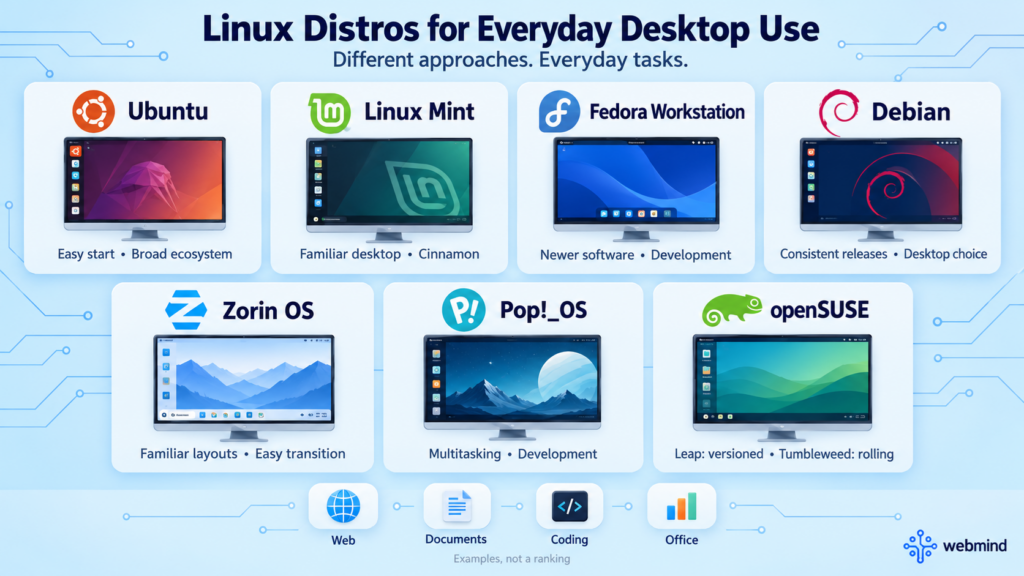
Desktop distributions usually provide a graphical installer, a desktop environment, and common applications. They support activities such as browsing, writing documents, learning programming, and general office work.
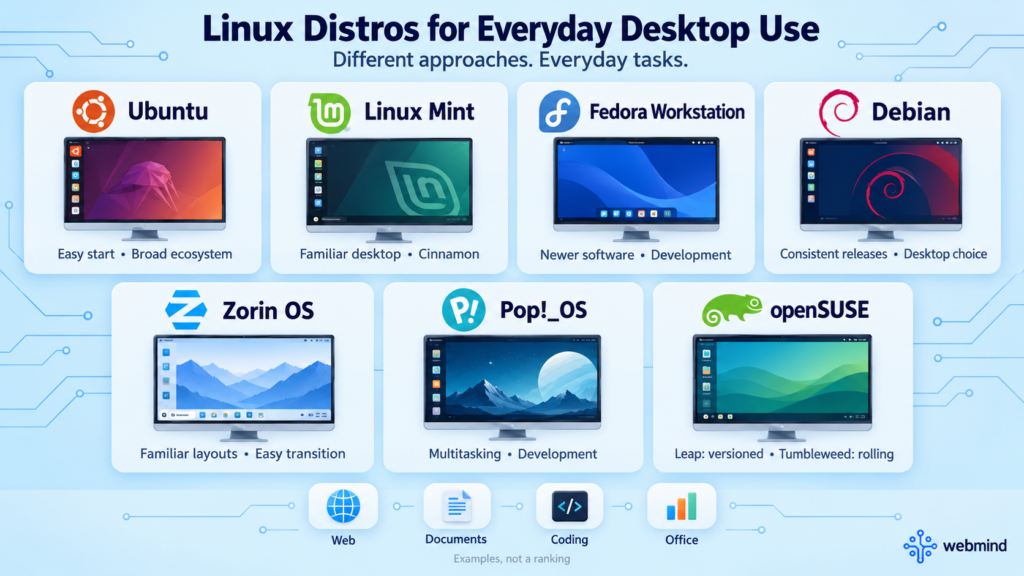
The following projects represent different approaches to the Linux desktop. Their order is not a ranking.
Ubuntu
Ubuntu is supported by Canonical and is available for desktops, servers, and other environments. It has extensive documentation, and many third-party development tools provide installation instructions specifically for Ubuntu.
Ubuntu suits users who want to get started relatively quickly, including people learning Linux, developing software, or preparing to manage servers. It offers both long-term support releases and interim releases, with different maintenance periods.
Users should also understand where applications come from. Software may be installed through APT, Snap, or other methods, each with different update mechanisms and application access rules.
Linux Mint
Linux Mint emphasizes a familiar, traditional desktop experience. Its menus, taskbar, and window controls can feel approachable to users accustomed to Windows. Cinnamon is its signature desktop, although other desktop editions are available.
The main edition is based on Ubuntu and benefits from much of that software ecosystem. Mint suits users who mainly need a browser, office applications, and everyday desktop tools with relatively little initial configuration.
However, a familiar interface does not make Windows applications automatically compatible. Check essential software and peripherals before switching.
Fedora Workstation
Fedora Workstation targets desktop users and developers. It generally introduces newer kernels, desktop software, and development tools relatively quickly.
Its connections to the Red Hat ecosystem also make it useful for developers interested in that technology stack. DNF is its standard command-line package management tool.
Fedora has a faster release cycle than enterprise systems designed for many years of maintenance. Regular operating system upgrades should therefore be part of the maintenance plan.
Debian
Debian works as both a desktop and a server distribution. Users can select a desktop environment and software packages during installation.
Debian Stable emphasizes consistency within a release. In this context, “stable” primarily means that package versions and system behavior do not change dramatically or frequently. It does not mean software can never fail.
Debian suits users who prefer fewer changes and are comfortable consulting documentation. Users who need very recent applications or support for new hardware should check whether the selected release meets those requirements.
Zorin OS
Zorin OS is based on Ubuntu and aims to make Linux more approachable for people coming from other desktop operating systems. Its layouts and defaults help users find familiar functions.
This can reduce the adjustment needed for browsing, office work, and everyday applications. However, it remains a Linux system, so application compatibility must be evaluated separately from visual familiarity.
Pop!_OS
Pop!_OS is developed by computer manufacturer System76 and is based on Ubuntu. It focuses on desktop workflows, development, and the experience of using supported hardware.
It appeals to users who want an integrated desktop environment for multitasking and development. Before installing, check the desktop environment, graphics support, and upgrade instructions for the chosen release rather than relying entirely on older tutorials.
openSUSE
openSUSE offers different release paths. Leap provides a versioned release approach, while Tumbleweed delivers continuously updated software through a rolling-release model.
Tumbleweed updates go through integration and testing processes. It suits users who want newer software and are willing to update regularly and investigate occasional compatibility issues.
The openSUSE ecosystem also provides system administration and snapshot tools. Whether a particular recovery feature is available depends on the installation’s filesystem and configuration.
4. Linux Distros for Servers and Enterprise Systems
Servers often operate without a full graphical desktop. Their selection criteria typically include maintenance periods, security updates, application compatibility, automation, and access to technical support.
Ubuntu Server
Ubuntu Server is commonly used for web hosting, cloud servers, container hosts, and application deployment. Much of the knowledge gained on Ubuntu Desktop transfers naturally to server administration.
Long-term support releases suit deployments that aim to avoid frequent major upgrades. However, standard and extended maintenance can differ in duration and package coverage, so support policies should be checked before deployment.
Debian
Debian is a common choice for websites, databases, network services, and other general server workloads. It can be installed with a relatively small set of packages and only the services required for the task.
Debian Stable does not continuously track the newest upstream software versions. Instead, maintainers provide applicable fixes within the supported release. An older-looking version number alone does not establish whether a package is secure.
Red Hat Enterprise Linux
Red Hat Enterprise Linux, usually called RHEL, targets organizations that need commercial support, certified software, and long-term maintenance.
Businesses often choose it for more than the operating system itself. Vendor support, hardware and software certifications, management tools, and defined maintenance arrangements can be important for critical services.
Rocky Linux and AlmaLinux
Rocky Linux and AlmaLinux are enterprise distributions that focus on compatibility with the RHEL ecosystem. They support many applications and workflows designed around that environment.
They suit organizations that want this technology base while arranging support and maintenance according to their own needs. However, compatibility does not guarantee identical vendor certification. Always check the application supplier’s supported operating systems.
SUSE Linux Enterprise Server
SUSE Linux Enterprise Server, or SLES, targets enterprise servers and business-critical applications. It emphasizes long-term maintenance, commercial support, and integration with enterprise hardware and software.
SLES is particularly relevant when existing applications, administration tools, and support relationships are built around the SUSE ecosystem. Server selection should consider the complete business environment.
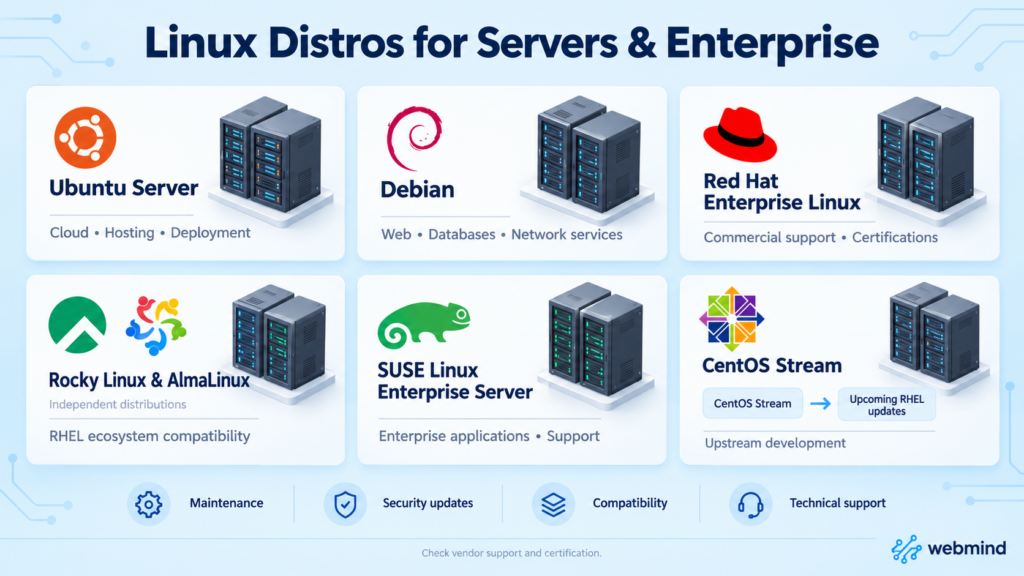
Understanding CentOS Stream
CentOS Stream is not simply the old CentOS Linux under a different name. CentOS Linux followed a model of rebuilding released RHEL versions. CentOS Stream sits upstream of upcoming RHEL updates.
It can serve users who want to observe development, contribute changes, test compatibility, or use its continuous delivery model. Deployments that depend on commercial software certification should confirm that the vendor explicitly supports CentOS Stream.
5. Linux Distros for Learning and Customization
These distributions are not restricted to experts. However, they generally require users to take more responsibility for configuration and maintenance, or to learn a different system management approach.
Arch Linux
Arch Linux starts with a relatively minimal base and lets users add the desktop, services, and applications they need. Its rolling-release model delivers new software through ongoing updates.
Much of its learning value comes from understanding which components are installed, why they are needed, and which configuration files or logs to inspect when something goes wrong. The ArchWiki is also useful beyond Arch itself.
The Arch User Repository, or AUR, provides community-maintained build recipes. It is separate from the official repositories. Users should review package sources, build instructions, and maintenance activity before installing software from it.
Gentoo
Gentoo uses the Portage package management system and offers detailed control over software features and builds. Mechanisms such as USE flags let users choose which optional capabilities are enabled.
Although Gentoo is closely associated with compiling software from source, it also supports binary packages. Not every package must be compiled locally.
Gentoo suits users interested in dependencies, build options, and system customization. It requires additional learning and maintenance, and local compilation does not automatically make every application noticeably faster.
Slackware
Slackware is a long-established distribution that preserves many traditional Unix-style administration practices. It leaves more configuration visible to the user instead of placing extensive automation around it.
This appeals to people who want to understand configuration files and system behavior directly. Compared with more automated desktop distributions, its package and dependency management approach requires more user judgment.
NixOS
NixOS uses declarative system configuration. Users describe packages, services, and settings in configuration files, then use its tools to build the corresponding system environment.
This approach helps record configuration, rebuild environments, and switch between system configurations. It appeals to users interested in reproducible deployment, development environments, and version-controlled administration.
However, its software organization differs from that of many traditional distributions. Rolling back a system configuration also does not restore every personal file or database. Data still needs a separate backup strategy.
6. Lightweight Linux Distros for Older Computers
A distribution’s name alone does not determine whether an older computer will run well. Processor architecture, memory, storage speed, graphics support, and the intended applications all matter.
Lubuntu
Lubuntu is an official Ubuntu flavor using the LXQt desktop environment. It aims to provide a relatively lightweight desktop experience while retaining access to the Ubuntu ecosystem.
It can suit users who want to reduce desktop resource consumption. However, suitability for a particular older computer depends on the requirements of the selected release.
Xubuntu
Xubuntu is another official Ubuntu flavor and uses the Xfce desktop environment. It balances familiar desktop features with relatively modest resource usage.
It is worth evaluating when a computer struggles with a more demanding desktop but still needs a complete graphical working environment.
antiX
antiX is based on Debian and emphasizes lightweight operation. It uses a different combination of components from many mainstream desktop distributions, including operating without systemd.
It can suit resource-constrained systems, although its interface and administration tools may take some adjustment. For very old hardware, confirm that an available installation image supports the processor architecture.
Puppy Linux
Puppy Linux is better understood as a collection of lightweight systems with related design goals than as one system with a single fixed package base. Different variants can draw on different distribution ecosystems.
It can serve portable boot environments, lightweight desktops, and some older computers. Software sources, persistence options, and maintenance activity should be checked for the specific variant.
A Lightweight Desktop Has Limits
A lightweight Linux installation can reduce the operating system’s own resource usage. However, modern browsers, complex websites, and online video can still consume substantial memory and processing power.
Test the applications you actually need. Successfully reaching the desktop does not guarantee smooth operation with many browser tabs or high-resolution video.
7. Linux Distros for Specific Purposes
Special-purpose distributions are built around particular tasks. Their tools and default settings may differ substantially from those of general desktop systems.
Kali Linux: Security Testing
Kali Linux is based on Debian and provides tools for security auditing, penetration testing, and related research. It is intended for professionals and learners working in authorized environments.
A large collection of security tools does not automatically make it the best everyday desktop. Effective use still requires an understanding of networking, operating systems, and the tools themselves.
Tails: Privacy and Temporary Sessions
Tails focuses on privacy and is typically started from a USB drive. It routes supported internet connections through the Tor network and is designed to limit traces left on the host computer.
However, persistent storage, user behavior, and online accounts still affect privacy. Signing in to an account associated with your identity does not become anonymous simply because you are using Tails.
Alpine Linux: Minimal Systems and Containers
Alpine Linux emphasizes a small system footprint and uses components such as the musl C library and BusyBox. It is frequently used for container images and resource-constrained environments.
Its small size is useful, but its environment differs from distributions built around glibc. Some precompiled applications will not run directly. A container base image should therefore be chosen for application compatibility as well as size.
Raspberry Pi OS: Raspberry Pi Computers
Raspberry Pi OS is based on Debian and integrates software and tools for Raspberry Pi hardware. It supports programming education, hardware projects, and small computing systems.
It can reduce the initial configuration work for beginners using a Raspberry Pi. The image should still be selected according to the device model, processor architecture, and intended workload.
OpenWrt: Routers and Network Devices
OpenWrt is a Linux-based operating system for routers and embedded network devices. It provides package management and flexible configuration for routing, firewalls, wireless networking, and other services.
It cannot be installed on every router. Even devices sold under the same product name may have different hardware revisions. The exact model and revision must be checked before flashing an image.
8. How to Choose a Linux Distro
Start with the task rather than a list of distribution names. For most users, repeatedly reinstalling systems in search of a theoretically perfect distribution provides less value than learning to use one suitable system well.
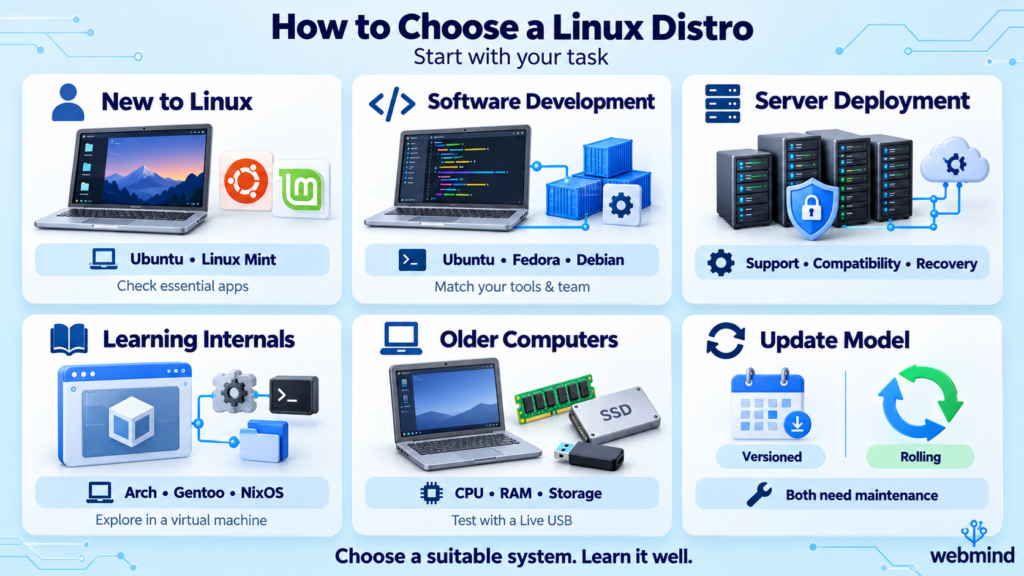
If You Are New to Linux
Ubuntu and Linux Mint are reasonable starting points for users who want complete desktops and extensive learning resources. First confirm that essential applications work, then learn file management, package installation, permissions, and basic terminal use.
Your first choice does not have to be permanent. Once you understand the common foundations, moving to another distribution becomes easier.
If You Mainly Write Software
Ubuntu, Fedora, and Debian can all support development work. Compare project dependencies, development tools, container requirements, and the systems used by your team.
If production uses a particular distribution ecosystem, matching that environment locally or in a virtual machine may matter more than having the newest desktop.
If You Are Deploying a Server
Check maintenance periods, application support, backup and recovery procedures, and the experience of the people managing the system.
When vendor accountability is required, include commercial support and certification in the decision. A familiar system with a clear maintenance process is often a better business choice than an unfamiliar one with attractive features.
If You Want to Learn Linux Internals
Trying Arch Linux, Gentoo, or NixOS in a virtual machine can reveal different approaches to packages, services, and configuration.
However, learning Linux deeply does not require immediately replacing your main operating system. Ubuntu and Debian also provide opportunities to study processes, permissions, filesystems, networking, kernel interfaces, and service management.
If You Are Reusing an Older Computer
Check the processor architecture, memory, and storage before choosing a distribution and desktop environment. An SSD upgrade or additional memory may improve the experience more than repeatedly switching distributions.
A Live USB session can help test networking, audio, graphics, sleep behavior, and applications before installation. Keep in mind that USB performance may differ from performance after installation.
If the Update Model Matters to You
Versioned distributions organize their releases around defined operating system versions. Rolling distributions deliver software changes through ongoing updates.
Both require maintenance. Long-term support does not remove the need to install updates, and rolling releases are not automatically unreliable. The right model depends on your available time, application requirements, and ability to troubleshoot problems.
Linux distributions organize a shared kernel and a broad collection of open-source software around different needs. Once you understand those differences, choosing a distro becomes a practical decision about how you want to work, maintain software, and use your computer.