Linux File System — Core Structure Explained
Linux file systems are designed to organize and manage data efficiently across the entire operating system.
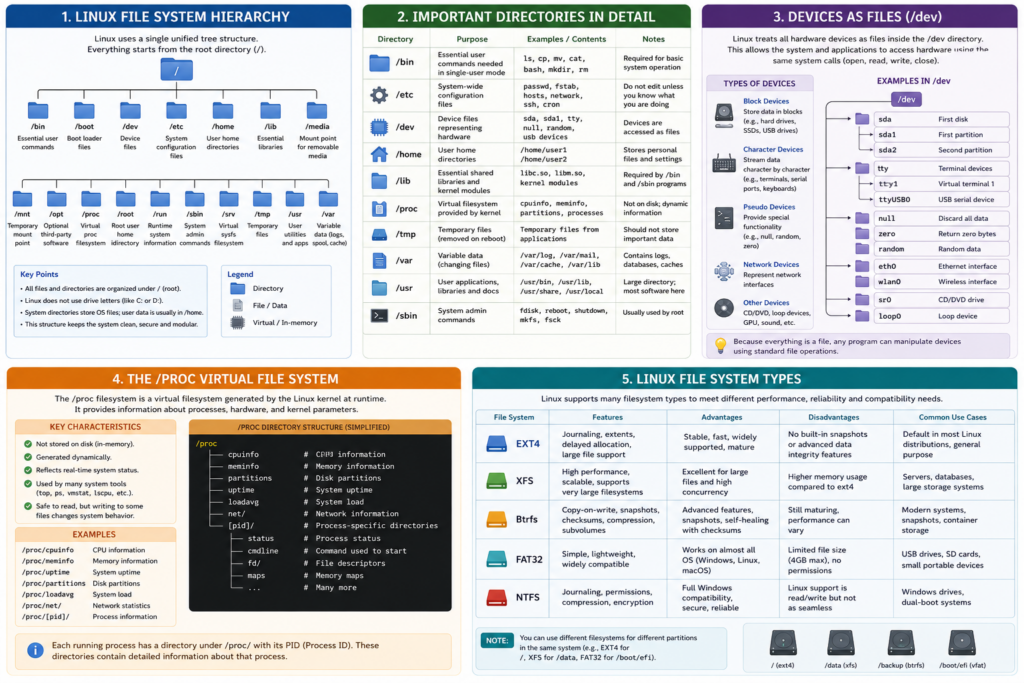
Unlike Windows, Linux treats almost everything as a file:
- Regular files
- Directories
- Hard drives
- USB devices
- Processes
- System information
This unified design is one reason Linux is powerful, modular, and scalable.
1. The Linux File System Tree
Everything in Linux starts from the root directory:
/
All directories branch out from this single root.
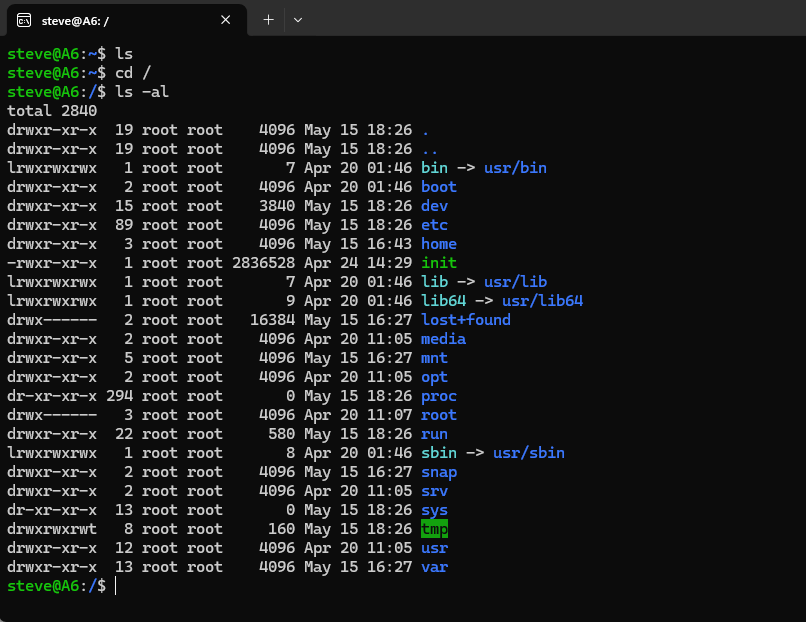
Linux File System Layout
/
├── bin
├── boot
├── dev
├── etc
├── home
├── lib
├── proc
├── root
├── tmp
├── usr
└── var
2. /bin — Essential User Commands
The /bin directory contains critical command-line programs required for basic system operation.
Examples:
- ls
- cp
- mv
- cat
- bash
Without /bin, basic Linux commands would not work.
3. /etc — System Configuration
The /etc directory stores system configuration files.
Examples:
- Network configuration
- User account settings
- Service configuration
- Mount settings
Important files:
/etc/passwd
/etc/fstab
/etc/hosts
System administrators frequently work inside /etc.
4. /dev — Devices as Files
Linux represents hardware devices as files.
Examples:
/dev/sda
/dev/sda1
/dev/tty
/dev/null
Hard drives, USB devices, and terminals all appear inside /dev.
Linux Device File Concept
This abstraction layer allows applications to interact with hardware using standard file operations.
5. /proc — Virtual Kernel File System
The /proc directory is not stored on disk.
It is generated dynamically by the Linux kernel.
It contains:
- CPU information
- Memory statistics
- Running process data
- Kernel parameters
Examples:
/proc/cpuinfo
/proc/meminfo
Linux tools like top and ps rely heavily on /proc.
6. /var — Variable Data
The /var directory stores changing system data.
Examples:
- System logs
- Web server logs
- Mail queues
- Databases
- Cache files
Important location:
/var/log
Most Linux troubleshooting starts with logs inside /var/log.
7. /home — User Data
The /home directory stores personal user files.
Example:
/home/gary
This typically contains:
- Documents
- Downloads
- Desktop files
- Application settings
Linux separates user files from system files for better security and organization.
8. /usr — User Applications and Libraries
The /usr directory contains:
- Applications
- Libraries
- Shared resources
- Documentation
Examples:
/usr/bin
/usr/lib
/usr/share
Most installed software resides under /usr.
9. /tmp — Temporary Storage
The /tmp directory stores temporary files created by applications and the system.
Files here are usually removed automatically after reboot.
10. Linux File System Architecture
How Everything Connects
Linux uses a Virtual File System (VFS) layer.
The VFS allows Linux to support many different file systems:
- EXT4
- XFS
- Btrfs
- FAT32
- NTFS
Applications interact with a unified interface while the kernel handles the underlying filesystem details.
11. Common Linux File Systems
| File System | Purpose |
|---|---|
| EXT4 | Standard Linux filesystem |
| XFS | Enterprise/server workloads |
| Btrfs | Snapshots and advanced features |
| FAT32 | Portable USB compatibility |
| NTFS | Windows compatibility |
12. Why Linux File Systems Matter
Linux file systems are optimized for:
- Stability
- Security
- Multi-user environments
- Server workloads
- Scalability
That is why Linux powers:
- Most cloud servers
- Web hosting infrastructure
- Supercomputers
- Embedded systems
- Android devices
Final Thoughts
Understanding the Linux file system is fundamental to:
- Linux administration
- DevOps
- Cybersecurity
- Cloud computing
- Server management
Once you understand how Linux organizes data internally, the entire operating system becomes much easier to understand.