Introduction
What exactly is Linux?
When most people hear the word Linux, they think about a command line, servers, hacking, or programming.
But Linux is much more than that.
Linux is a complete operating system architecture.
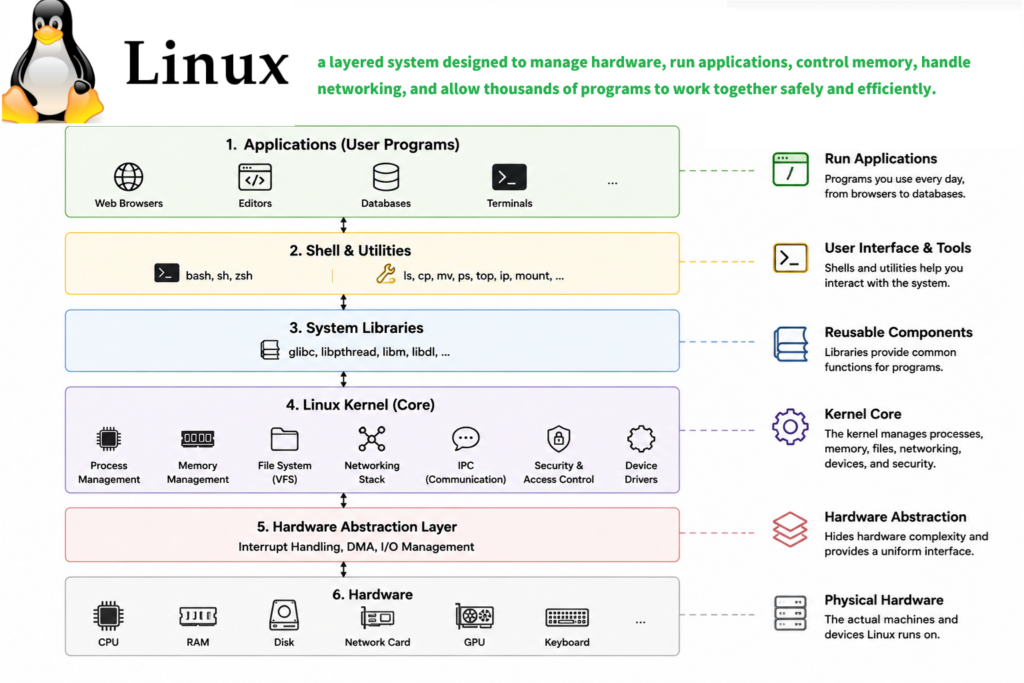
It is a layered system designed to manage hardware, run applications, control memory, handle networking, and allow thousands of programs to work together safely and efficiently.
Today, Linux powers:
- Most internet servers
- Cloud computing platforms
- Android smartphones
- Supercomputers
- Embedded systems
- Routers
- AI infrastructure
- Kubernetes clusters
- Data centers
And in this video, we are going to understand how Linux actually works internally.
We will explore:
- Linux architecture
- User space and kernel space
- The Linux kernel
- Process scheduling
- Memory management
- File systems
- Device drivers
- The shell
- System calls
- And how Linux communicates with hardware
This video is designed for beginners, but we will also go deeper into the internal structure of Linux.
So let’s begin.
1. The Basic Linux Architecture
Linux uses a layered architecture.
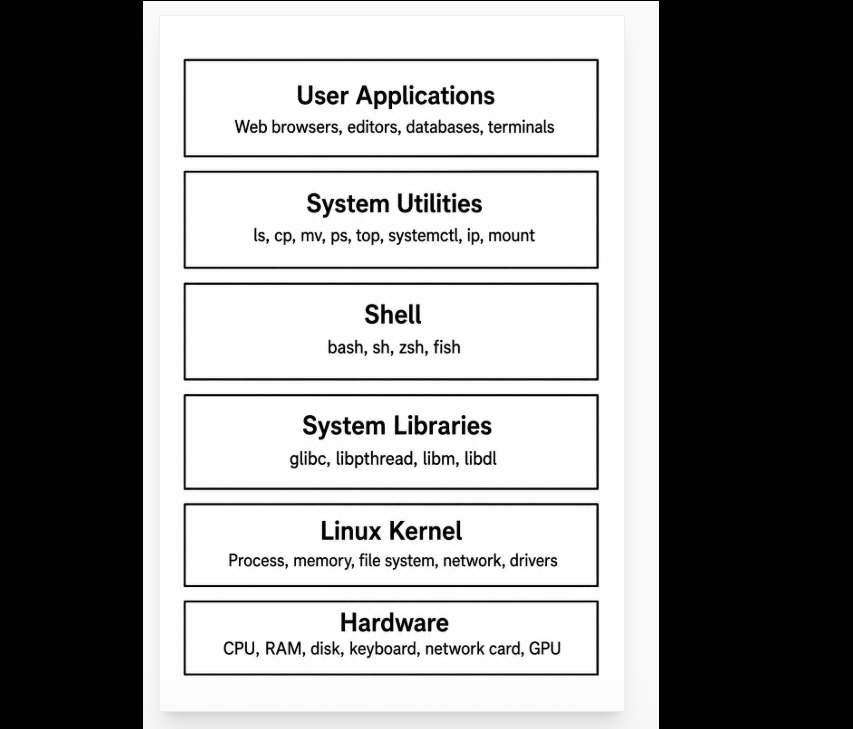
Each layer has a different responsibility.
At the top are applications.
At the bottom is hardware.
Between them is the Linux kernel.
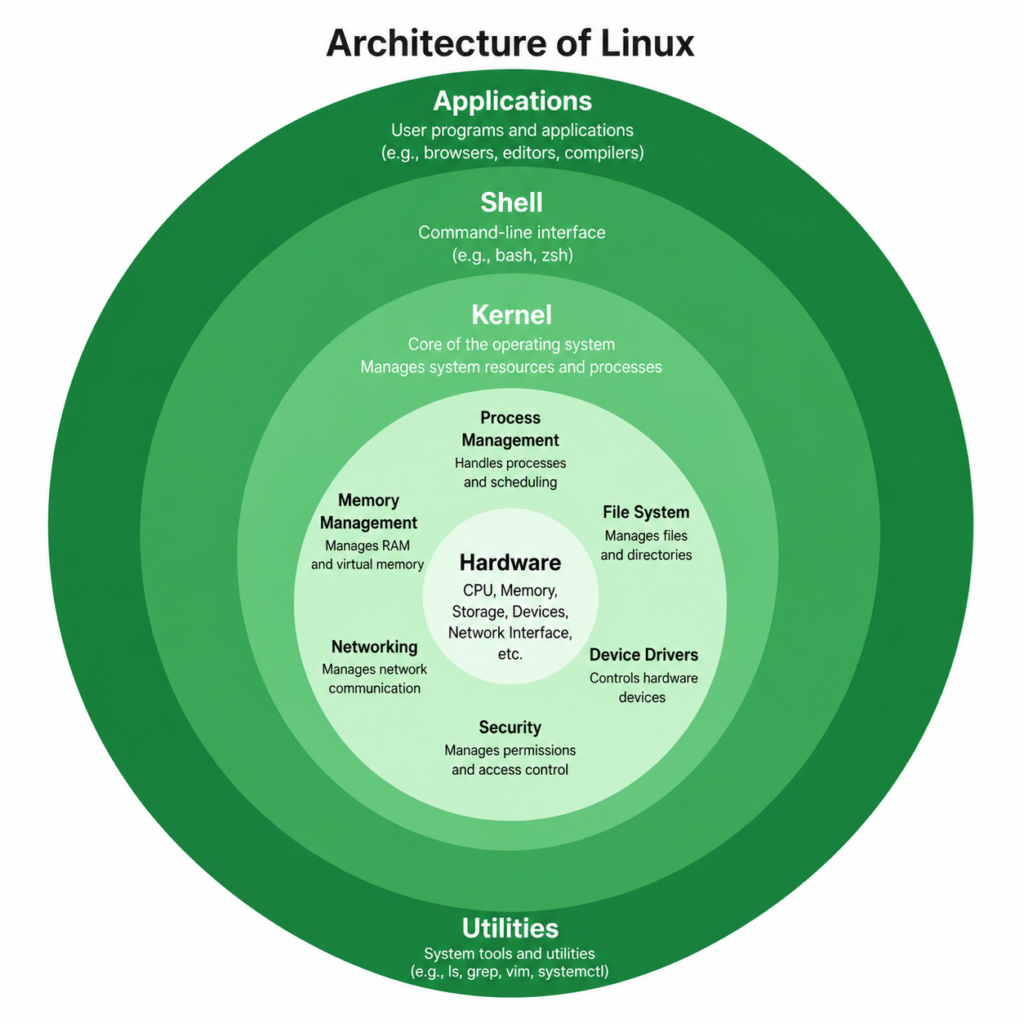
The architecture looks like this:
Applications
System Utilities
Shell
System Libraries
Linux Kernel
Hardware
Each layer communicates with the layer below it.
This separation is very important.
Because applications should not directly control hardware.
If every application could directly access memory, disks, or the CPU, the system would become unstable and unsafe.
Instead, Linux uses the kernel as a control center.
Applications request services from the kernel.
The kernel then safely interacts with the hardware.
This design improves:
- Stability
- Security
- Portability
- Performance
- Scalability
And this is one reason Linux became so successful.
2. User Space vs Kernel Space
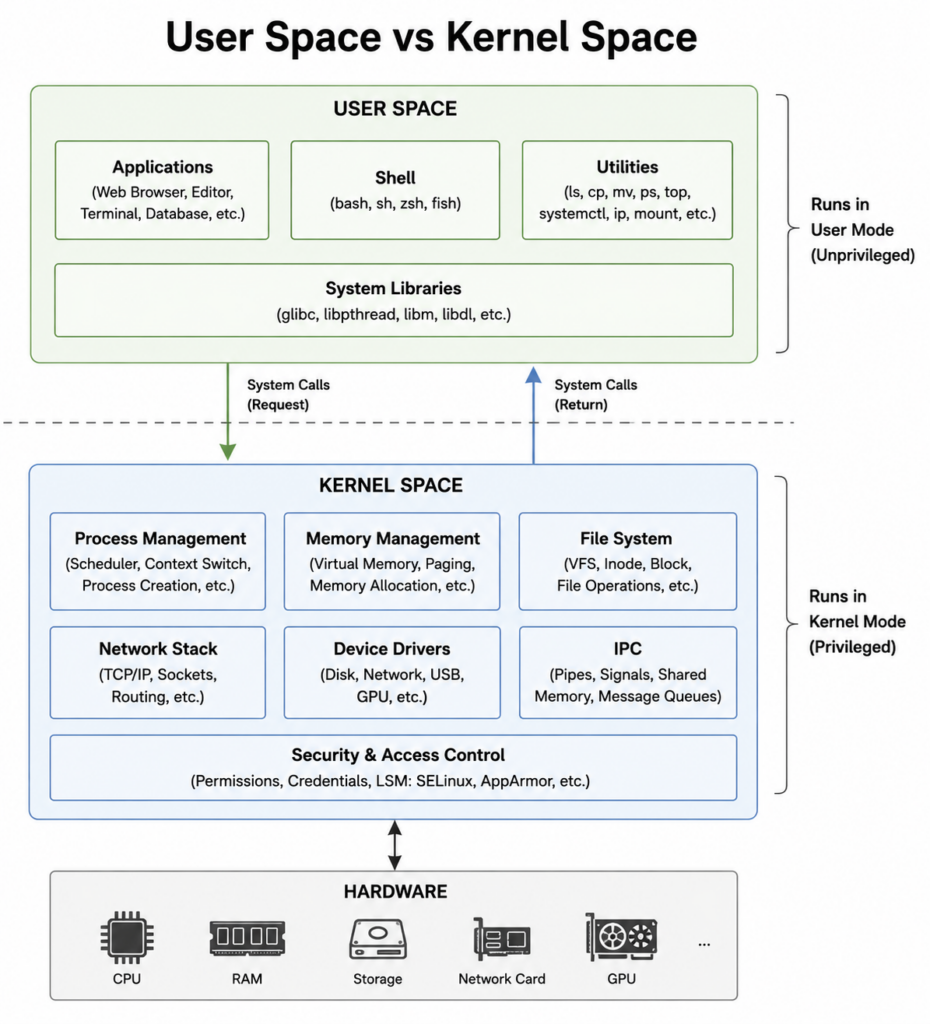
One of the most important concepts in Linux is the separation between:
- User Space
- Kernel Space
User space is where normal applications run.
Examples include:
- Browsers
- Editors
- Databases
- Shells
- Utilities
Applications running in user space have limited privileges.
They cannot directly:
- Access hardware
- Control memory freely
- Read kernel memory
- Execute privileged CPU instructions
This restriction protects the operating system.
Kernel space is different.
Kernel space contains the Linux kernel itself.
It has full control over the system.
The kernel can:
- Access all memory
- Control hardware
- Schedule processes
- Manage devices
- Handle interrupts
The kernel runs in privileged mode.
Applications run in unprivileged mode.
When an application needs a service from the kernel, it must use something called a system call.
This creates a safe boundary between applications and the operating system.
This separation is one reason Linux systems are stable.
If a browser crashes, usually the entire operating system does not crash.
Because the browser is isolated in user space.
3. What Is the Linux Kernel?
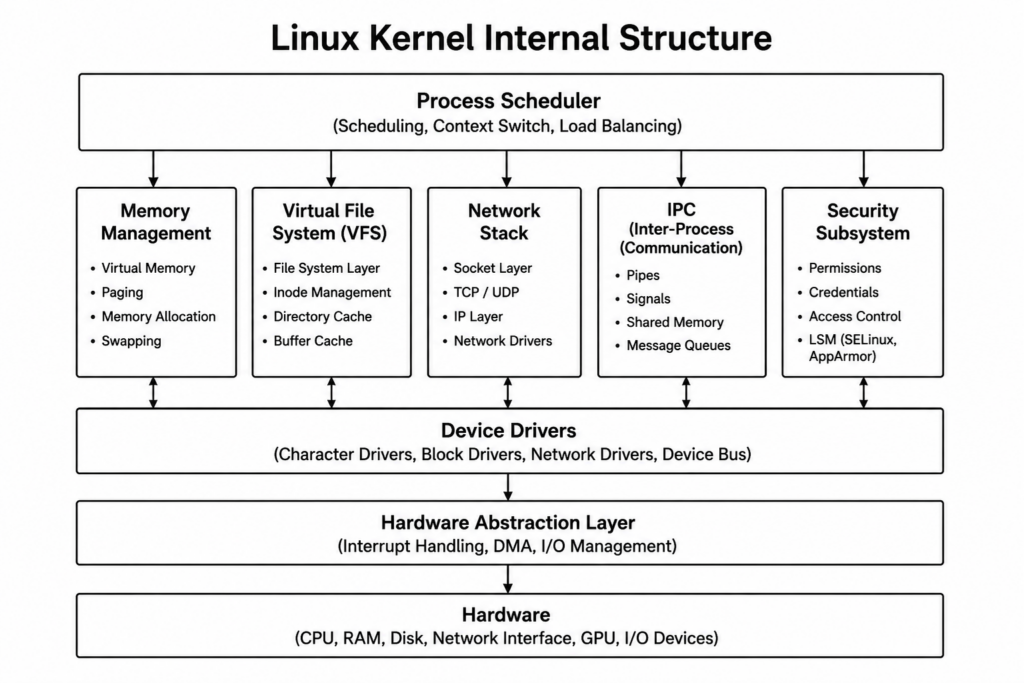
The Linux kernel is the core of the operating system.
You can think of it as the manager of the entire computer.
The kernel sits between software and hardware.
Applications communicate with the kernel.
The kernel communicates with hardware.
The kernel controls:
- CPU scheduling
- Memory allocation
- File systems
- Networking
- Security
- Device drivers
- Process management
Without the kernel, applications would not know how to use the hardware.
The kernel provides abstraction.
For example:
A program does not need to know how a specific SSD works internally.
The kernel handles that complexity.
This abstraction allows Linux to support many different hardware platforms.
Linux can run on:
- Intel CPUs
- AMD CPUs
- ARM processors
- RISC-V processors
- Embedded boards
- Supercomputers
All because the kernel hides hardware complexity.
4. Process Scheduler
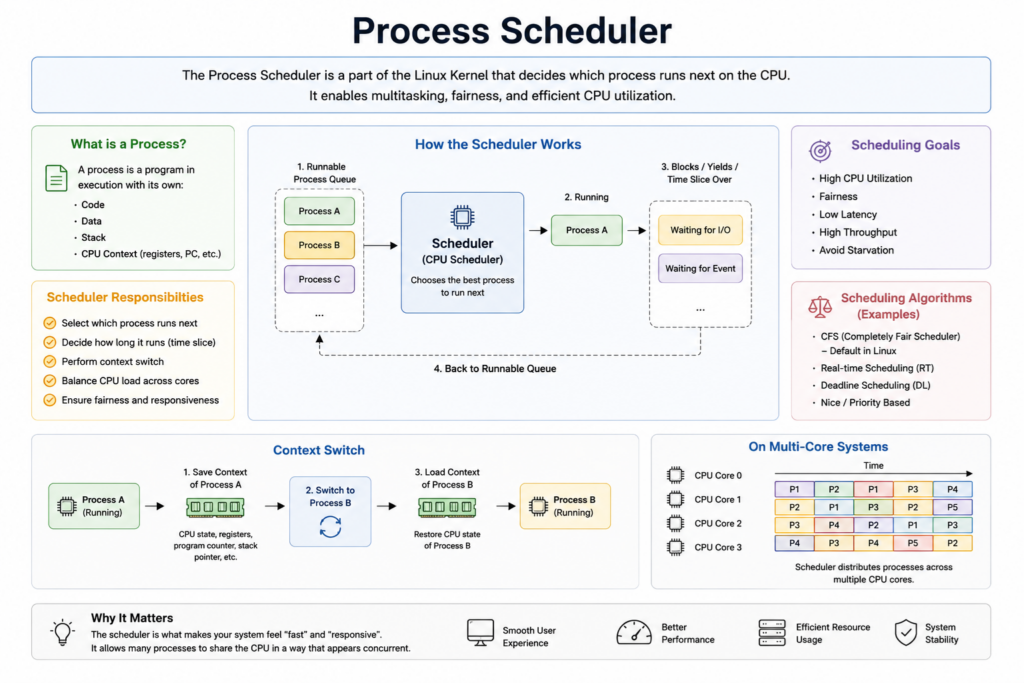
Now let’s look at one of the most important parts of the Linux kernel.
The process scheduler.
A process is simply a running program.
For example:
- A browser is a process
- A terminal is a process
- A web server is a process
- A music player is a process
Modern Linux systems may run hundreds or thousands of processes simultaneously.
But the CPU cannot truly run unlimited programs at the exact same moment.
So how does Linux solve this problem?
The scheduler rapidly switches between tasks.
This process is called multitasking.
The scheduler decides:
- Which process runs next
- How long it runs
- Which CPU core it uses
- When to pause or resume a task
Linux divides CPU time into small slices.
For example:
Process 1 runs briefly.
Then Process 2.
Then Process 3.
Then back to Process 1.
This happens extremely quickly.
So users feel like many programs are running at the same time.
The scheduler is critical for:
- Responsiveness
- Performance
- Fairness
- Server workloads
- Multitasking
Without scheduling, modern operating systems would not function properly.
5. Memory Management
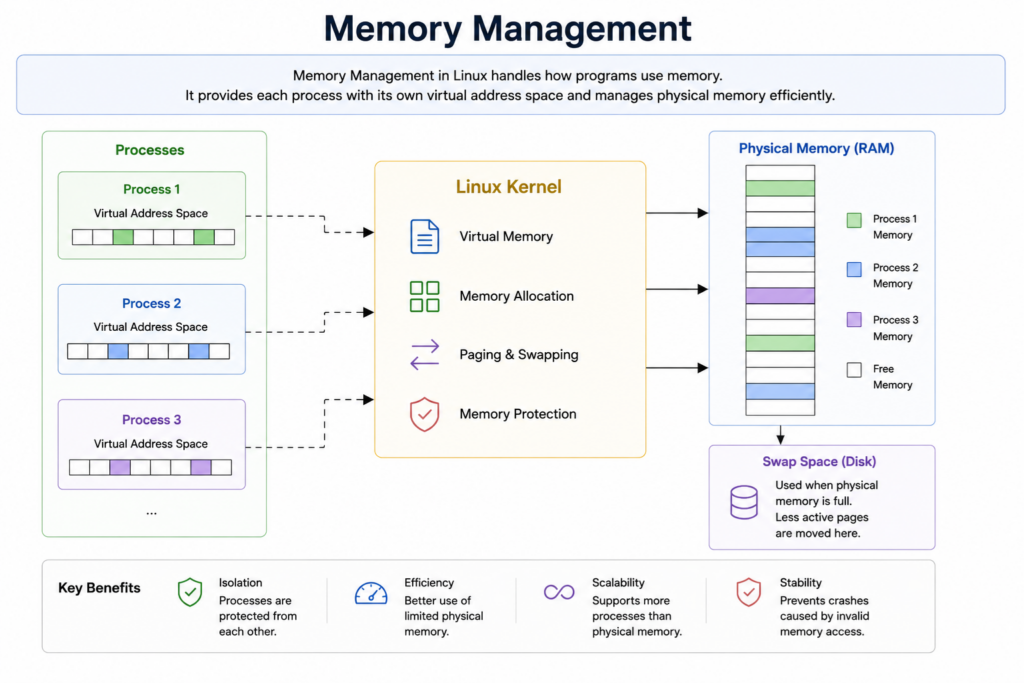
Memory management is another major responsibility of the Linux kernel.
Every running process needs memory.
Programs need memory to store:
- Instructions
- Variables
- Data
- Stack
- Heap
- Shared libraries
Linux uses virtual memory.
This is a very important concept.
Each process sees its own private memory space.
Even if two programs use the same memory address, Linux maps them to different physical locations in RAM.
This provides:
- Isolation
- Stability
- Security
The Memory Management subsystem handles:
- Memory allocation
- Virtual memory
- Paging
- Swapping
- RAM protection
Linux can also move inactive memory pages to disk.
This is called swapping.
Virtual memory is one reason modern systems can run many applications safely.
Without memory protection, one faulty application could destroy the entire operating system.
6. Virtual File System
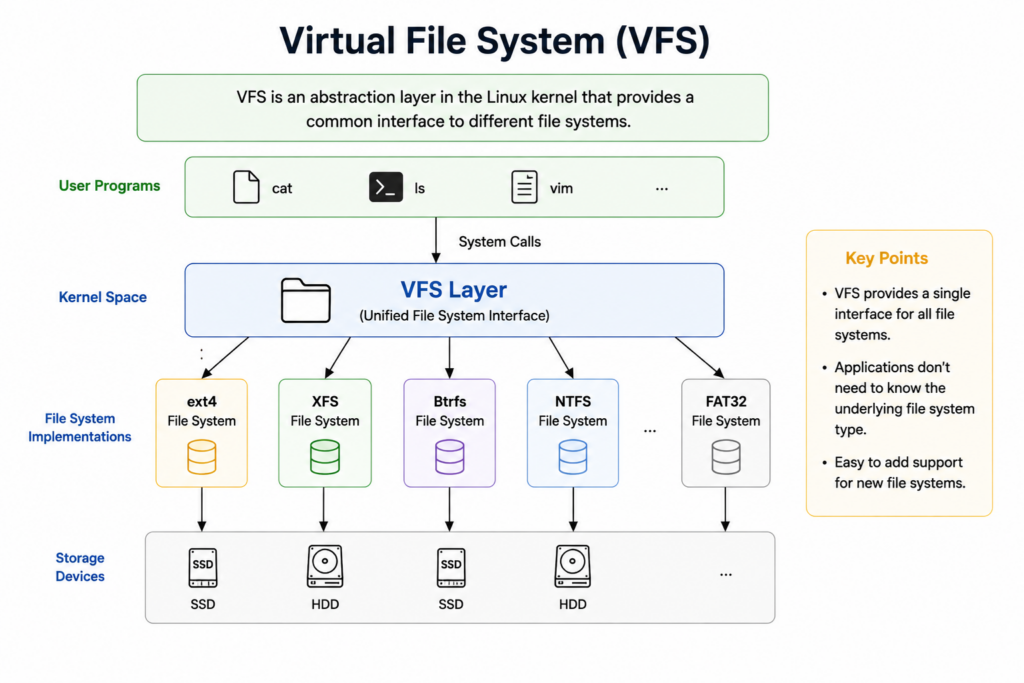
Linux treats many things as files.
Regular files.
Directories.
Devices.
Sockets.
Pipes.
All of them can appear as file-like objects.
Linux supports many file systems:
- ext4
- XFS
- Btrfs
- FAT32
- NTFS
But applications should not need to understand every file system type.
So Linux uses something called the Virtual File System.
Or VFS.
The VFS provides a common interface.
Applications use standard operations such as:
- open
- read
- write
- close
The kernel then translates these operations into the correct file system operations.
This makes Linux flexible.
The same application can work across many storage systems.
Whether the data is stored on:
- SSD
- Hard disk
- USB drive
- Network storage
- RAM file system
The interface remains consistent.
7. Device Drivers
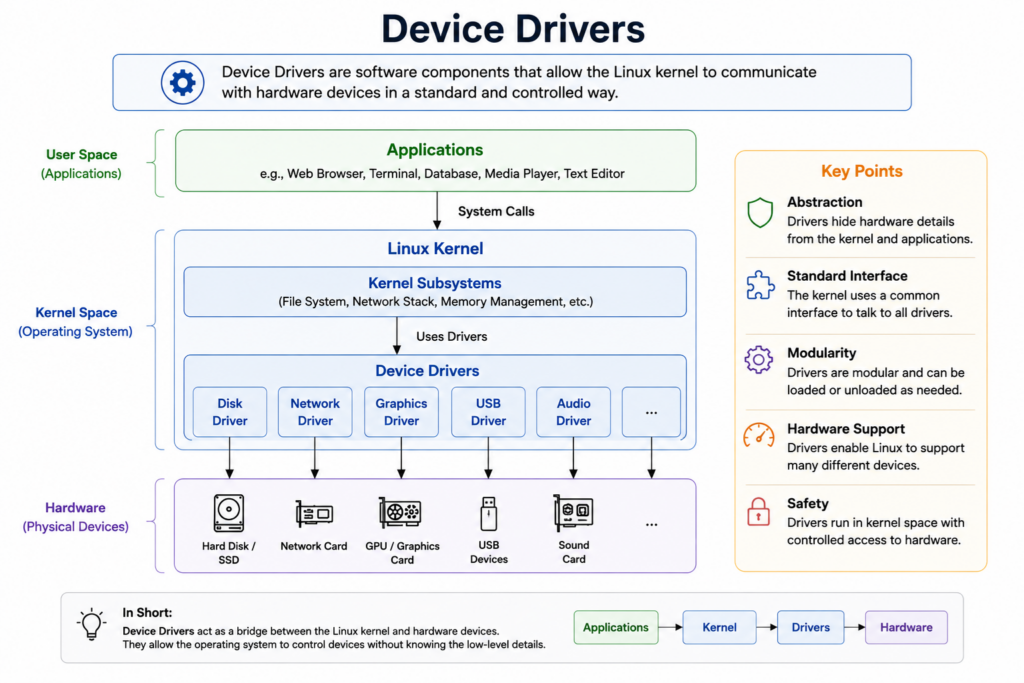
Now let’s talk about device drivers.
Drivers are extremely important in Linux.
A device driver is software that allows the kernel to communicate with hardware.
Examples include drivers for:
- GPUs
- Network cards
- USB devices
- Storage controllers
- Keyboards
- Mice
- Audio devices
Applications do not directly communicate with hardware.
Instead:
Application.
Kernel.
Driver.
Hardware.
This layered design simplifies development.
Applications do not need to understand hardware details.
The driver handles those details.
This is also why Linux can support many different hardware devices.
The driver acts as a translator between the operating system and the physical device.
8. Linux Networking Stack
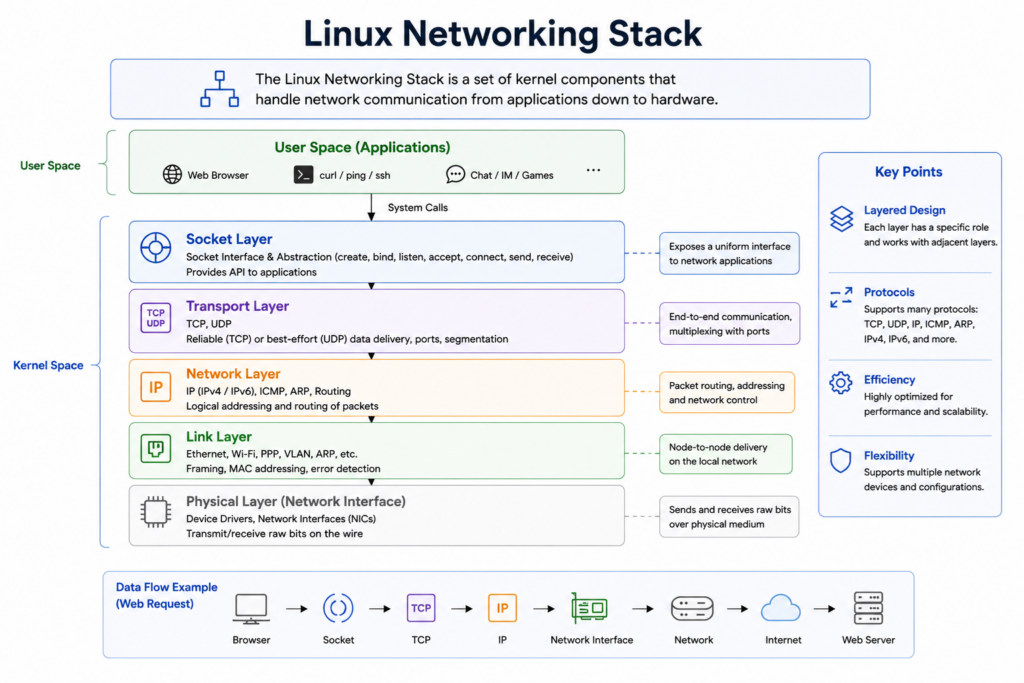
Linux has one of the most powerful networking systems in the world.
This is one reason Linux dominates:
- Servers
- Cloud computing
- Internet infrastructure
- Kubernetes
- Data centers
The Linux networking stack handles:
- TCP/IP
- UDP
- Routing
- Sockets
- Packet transmission
- Firewalls
When a browser opens a website, the request travels through several layers.
The browser uses socket APIs.
The request enters the TCP/IP stack.
The kernel processes packets.
The network driver communicates with the network card.
The hardware sends data to the internet.
Linux networking is designed for:
- Performance
- Scalability
- Reliability
This is why many of the world’s largest websites use Linux servers.
9. IPC — Inter-Process Communication
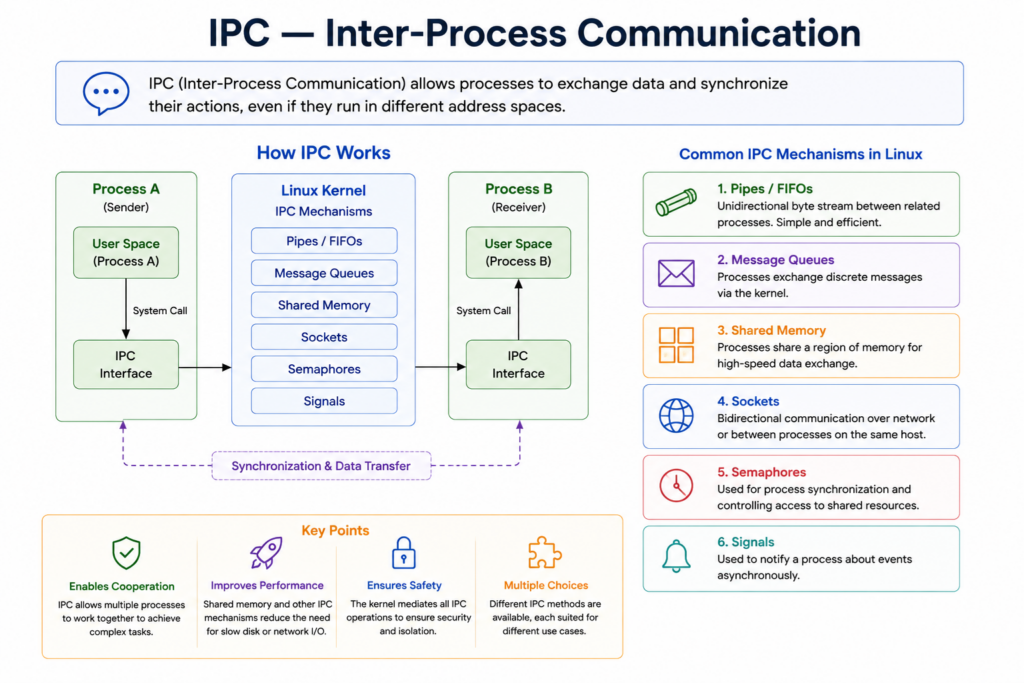
Linux systems run many processes simultaneously.
Often, these processes need to communicate with each other.
This communication system is called IPC.
Inter-Process Communication.
Linux supports several IPC mechanisms.
Including:
- Pipes
- Signals
- Shared memory
- Message queues
For example:
ls pipe grep txt
In this command, the output of one process becomes the input of another process.
This is a pipe.
IPC is very important for:
- Shell pipelines
- Daemons
- Servers
- Databases
- Multitasking
Without IPC, Linux programs would not cooperate efficiently.
10. Linux Security
Linux has a strong security model.
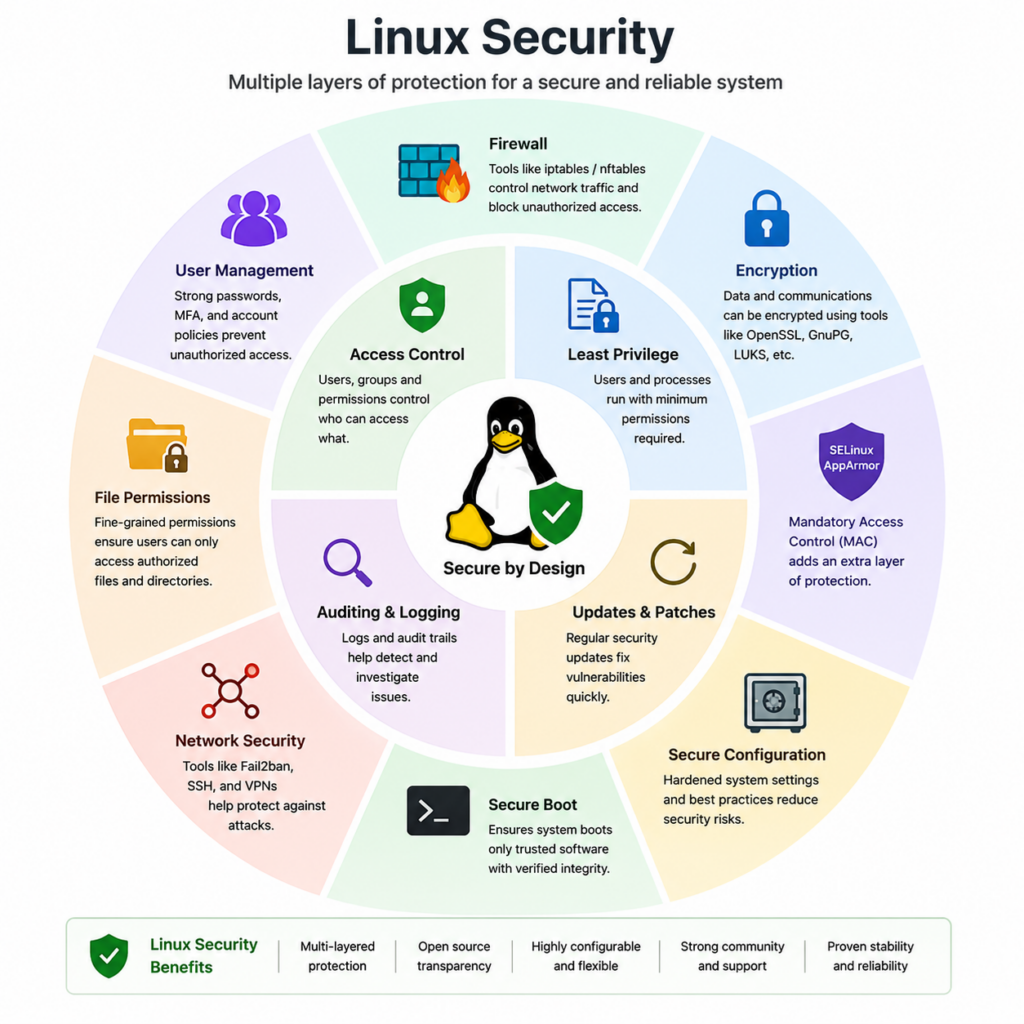
Every file has permissions.
Permissions control:
- Who can read a file
- Who can modify it
- Who can execute it
Linux uses:
- Users
- Groups
- Ownership
- Access control
For example:
Read.
Write.
Execute.
Linux also supports advanced security systems such as:
- SELinux
- AppArmor
- Capabilities
- Namespaces
- cgroups
Modern technologies like Docker rely heavily on Linux kernel security features.
Containers use namespaces and cgroups for isolation.
This is another reason Linux became the foundation of cloud computing.
11. What Is Shell?
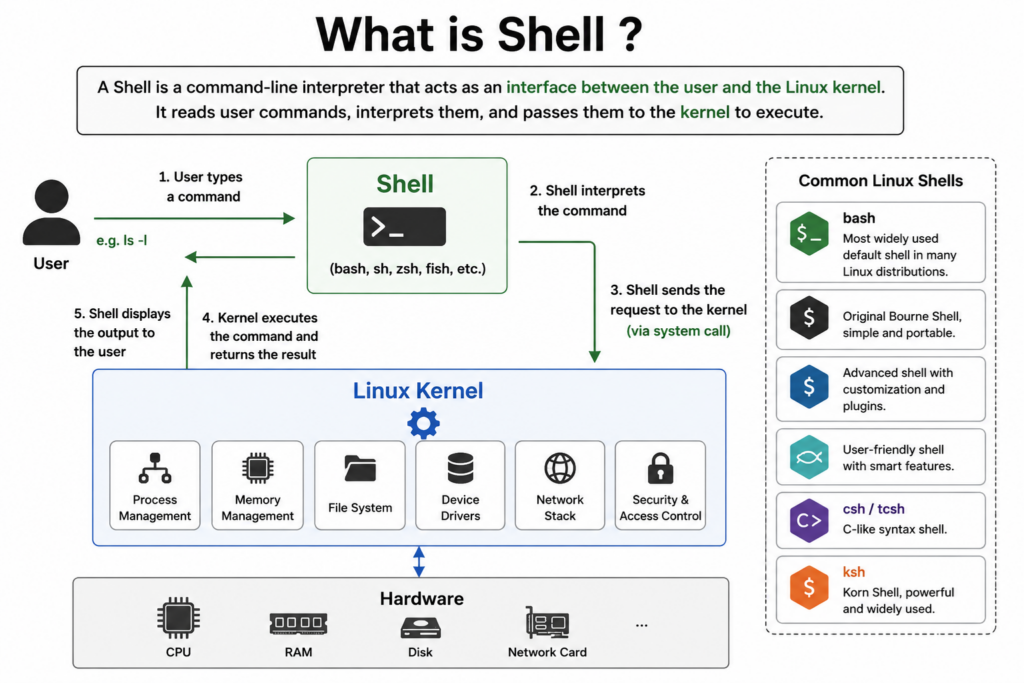
Now let’s talk about the shell.
The shell is a command interpreter.
It acts as an interface between the user and the Linux kernel.
The shell reads commands.
Interprets them.
Then requests services from the kernel.
Popular Linux shells include:
- bash
- zsh
- fish
- sh
- ksh
For example:
ls
mkdir test
cp file1 file2
When you type a command:
The shell reads the command.
Finds the program.
Creates a process.
Requests services from the kernel.
Then displays the result.
The shell is extremely important in Linux.
Because Linux was heavily designed around command-line tools and scripting.
The shell allows:
- Automation
- Scripting
- System administration
- Development workflows
This is one reason Linux is so powerful for developers and server administrators.
12. System Calls
System calls are the official interface between applications and the kernel.
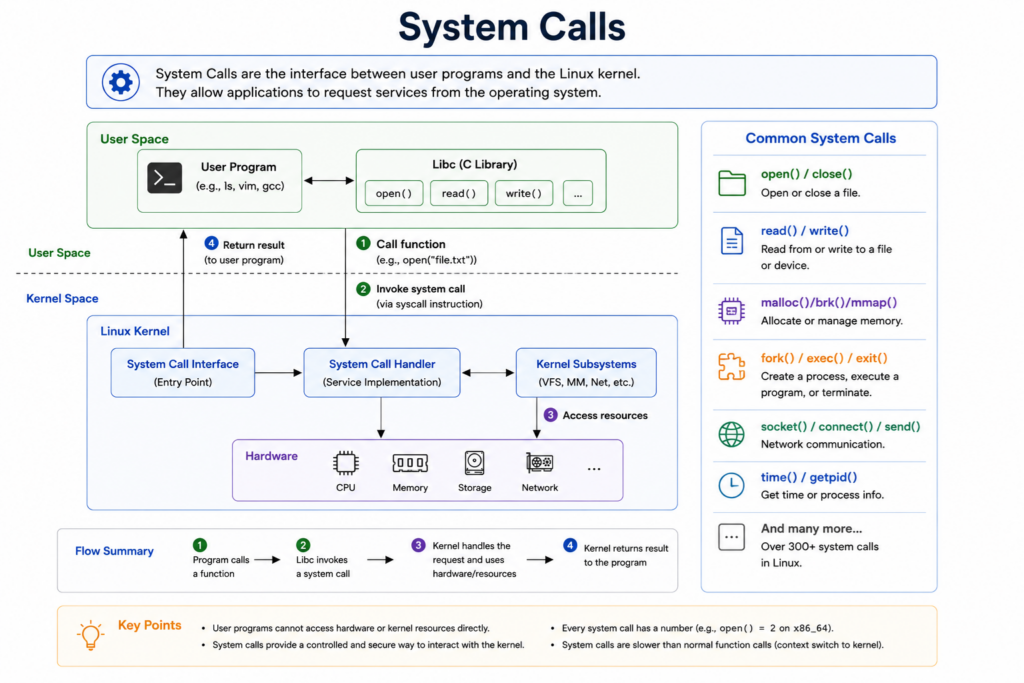
Applications cannot directly access kernel functions.
Instead, they use system calls.
Examples include:
- open
- read
- write
- fork
- exec
- socket
For example:
When a program reads a file.
The process usually looks like this:
Application.
System Library.
System Call.
Kernel.
File System.
Disk Driver.
Hardware.
Then the result returns back through the same layers.
System calls are extremely important because they provide controlled access to kernel functionality.
Without system calls, applications could not safely interact with the operating system.
13. Example — What Happens When You Run “ls”
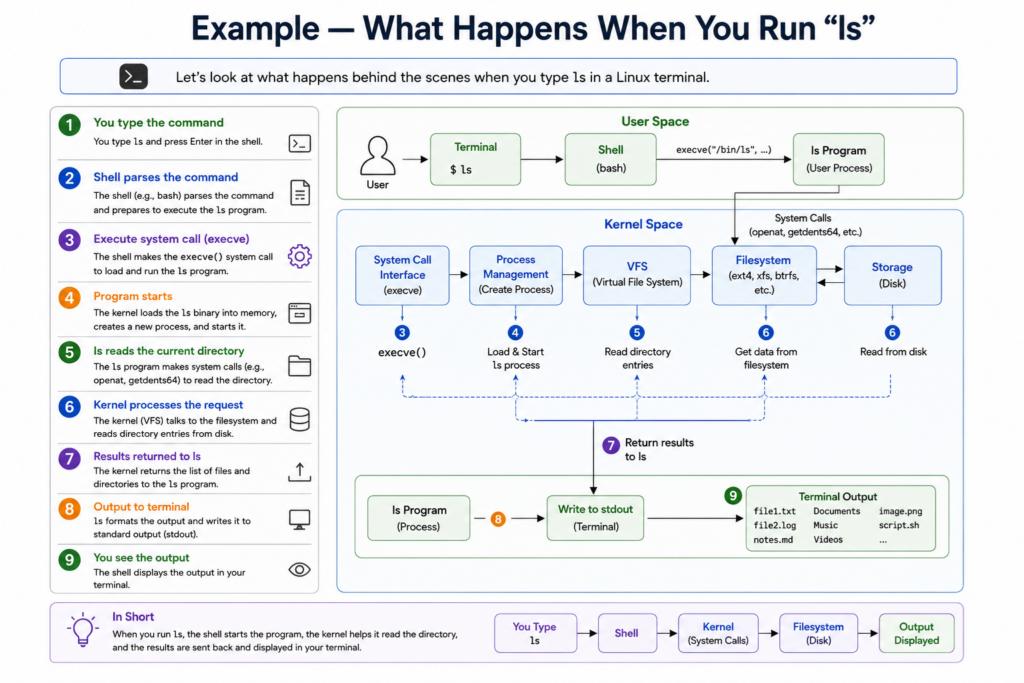
Now let’s combine everything together.
Suppose you type:
ls
What happens internally?
First, the shell reads the command.
Then the shell finds the ls program.
The shell asks the kernel to create a new process.
The kernel loads the program into memory.
The ls process requests directory information.
The request enters the Virtual File System.
The file system communicates with the storage driver.
The driver talks to the hardware.
The hardware returns the data.
The kernel passes the result back to the ls process.
The shell displays the output.
This simple command actually involves many Linux subsystems.
- Shell
- Process scheduler
- Memory manager
- VFS
- Device driver
- Hardware
This shows how Linux architecture works together.
14. Why Linux Is So Powerful
Linux became dominant because of its architecture.
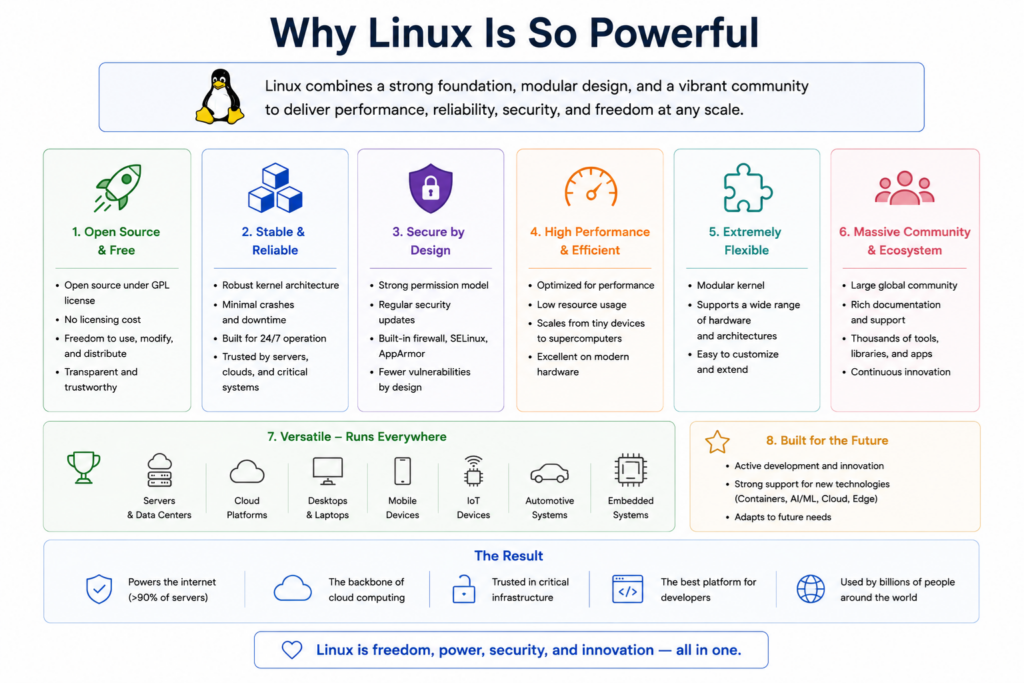
Its layered design provides:
- Stability
- Security
- Flexibility
- Scalability
- Hardware support
- Performance
Linux can scale from:
- Tiny embedded boards
- Raspberry Pi devices
- Smartphones
- Laptops
- Servers
- AI clusters
- Supercomputers
Very few operating systems can scale this widely.
Linux also became extremely important because it is open source.
Developers can:
- Study the code
- Modify the kernel
- Build custom systems
- Optimize performance
- Create new drivers
This open ecosystem accelerated Linux adoption across the entire technology industry.
Conclusion
Linux architecture is built around a powerful idea.
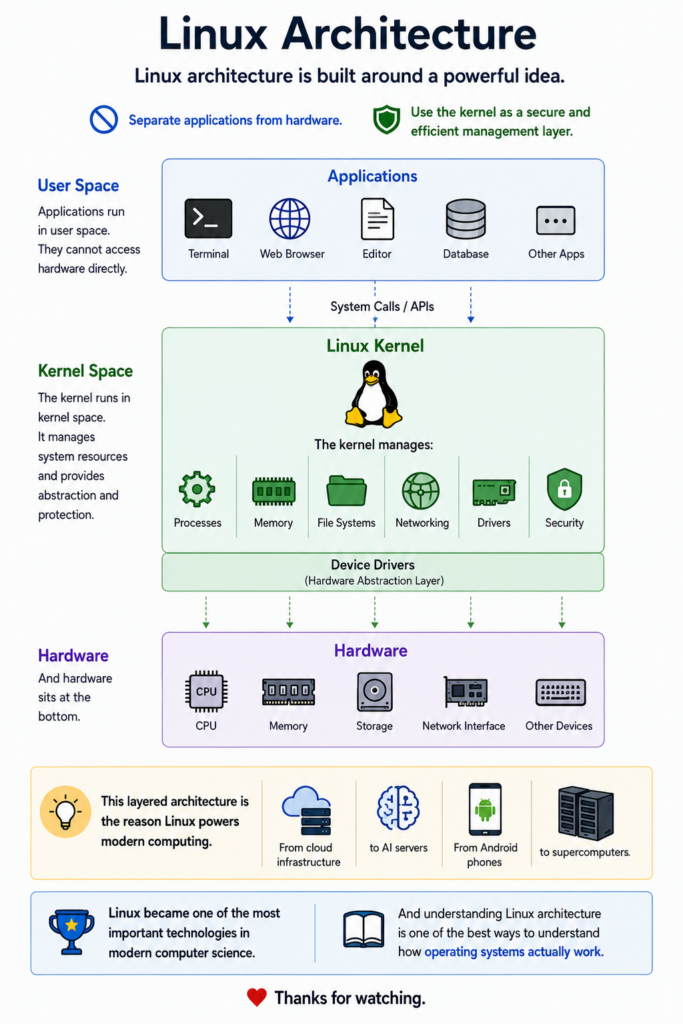
Separate applications from hardware.
Use the kernel as a secure and efficient management layer.
Applications run in user space.
The kernel runs in kernel space.
The kernel manages:
- Processes
- Memory
- File systems
- Networking
- Drivers
- Security
And hardware sits at the bottom.
This layered architecture is the reason Linux powers modern computing.
From cloud infrastructure to AI servers.
From Android phones to supercomputers.
Linux became one of the most important technologies in modern computer science.
And understanding Linux architecture is one of the best ways to understand how operating systems actually work.
Thanks for watching.