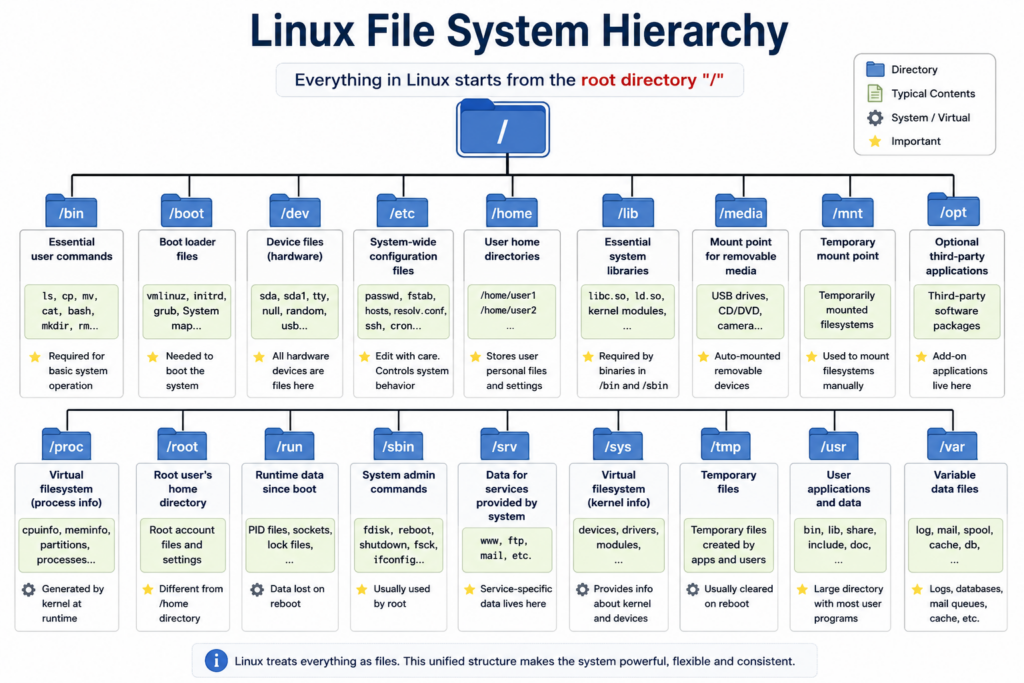
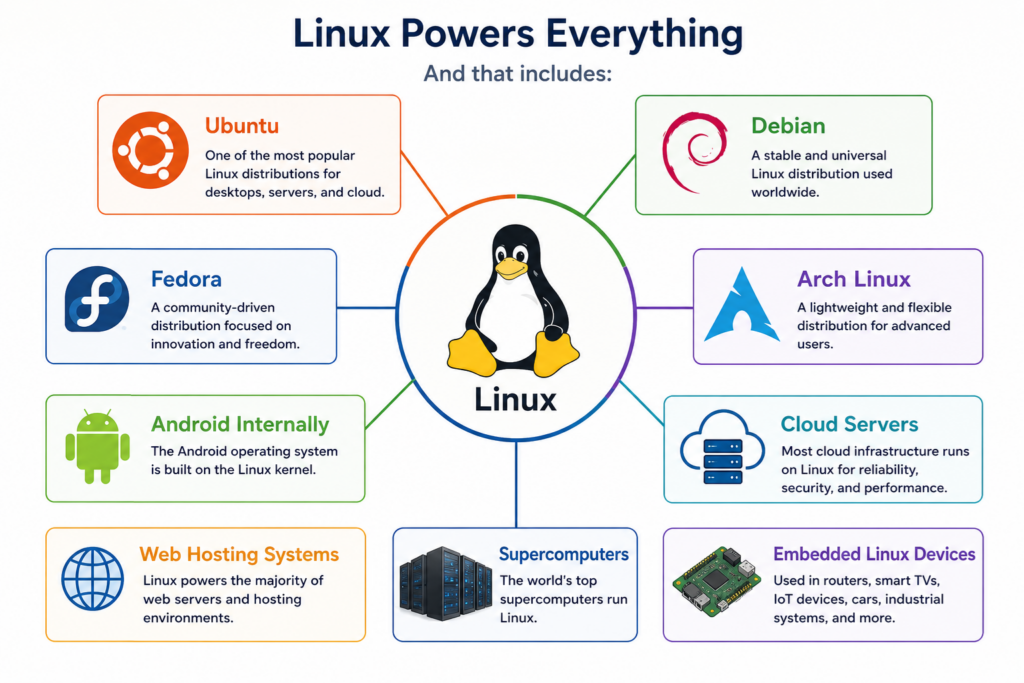
Linux powers cloud servers, AI infrastructure, Android phones, web hosting systems, embedded devices, and most supercomputers on Earth.
And underneath all of it is one surprisingly elegant design.
The Linux file system hierarchy.
At first glance, it may look like a random collection of folders.
/bin.
/etc.
/proc.
/var.
But once you understand the logic behind these directories, you begin to understand how Linux itself was designed.
This is not just a collection of folders.
It is an operating system philosophy.
A philosophy inherited from Unix decades ago.
A philosophy based on simplicity, abstraction, modularity, and standardization.
And this design became one of the reasons Linux conquered modern infrastructure.
In this video, we are going to slowly explore the Linux filesystem hierarchy.
We will explain:
- Why Linux starts from a single root directory
- Why Linux treats devices as files
- Why configuration files live in /etc
- Why logs live in /var log
- Why Linux separates user data from system data
- How virtual filesystems like /proc and /sys work
- And why this hierarchy matters when managing thousands of servers
By the end of this video, you will not only understand Linux folders.
You will understand the design philosophy behind Linux itself.
Chapter 1 — The Root Directory
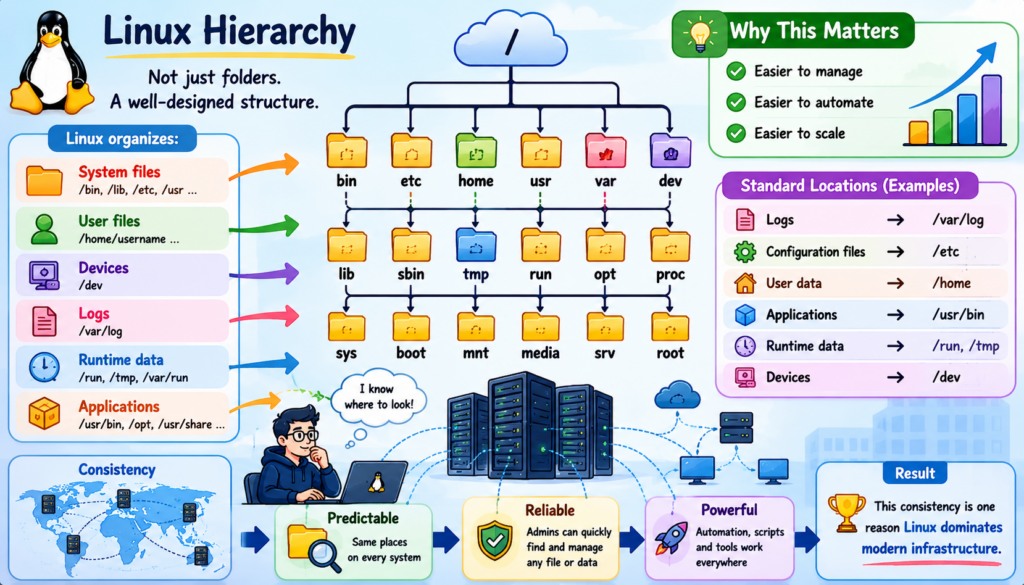
Everything in Linux begins with a single directory.
The root directory.
Represented by a single slash.
/
Every file.
Every folder.
Every device.
Every application.
Every process.
Everything exists somewhere under this hierarchy.
This is very different from Windows.
Windows uses separate drive letters.
C drive.
D drive.
E drive.
Linux does not think that way.
Linux creates one unified filesystem tree.
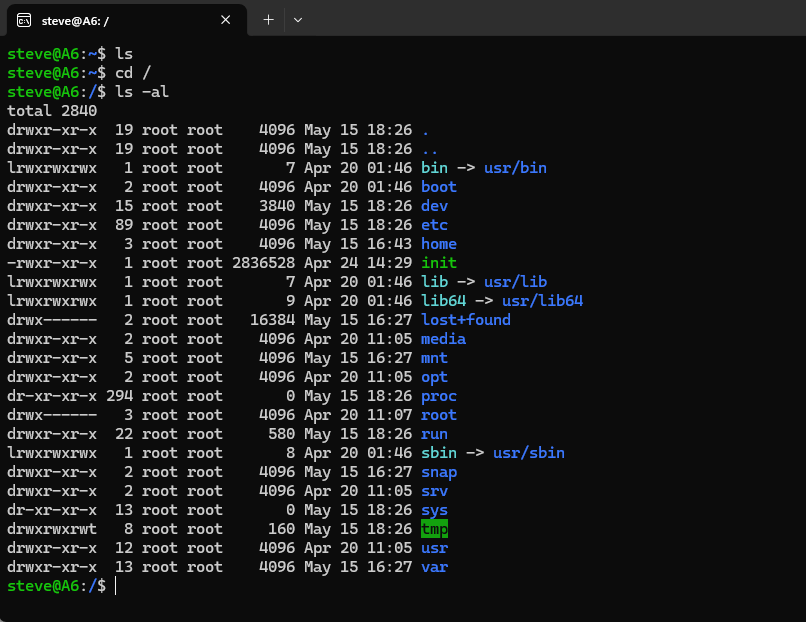
Hard drives, USB devices, network storage, and system resources all become part of one hierarchy.
This abstraction is extremely important.
Applications do not need to know where storage physically exists.
Everything appears somewhere under the same root.
This creates consistency.
And consistency is one of the biggest reasons Linux scales so well.
A tiny embedded Linux device and a massive cloud server both follow the same filesystem philosophy.
That is powerful.
Chapter 2 — Why the Linux Hierarchy Matters
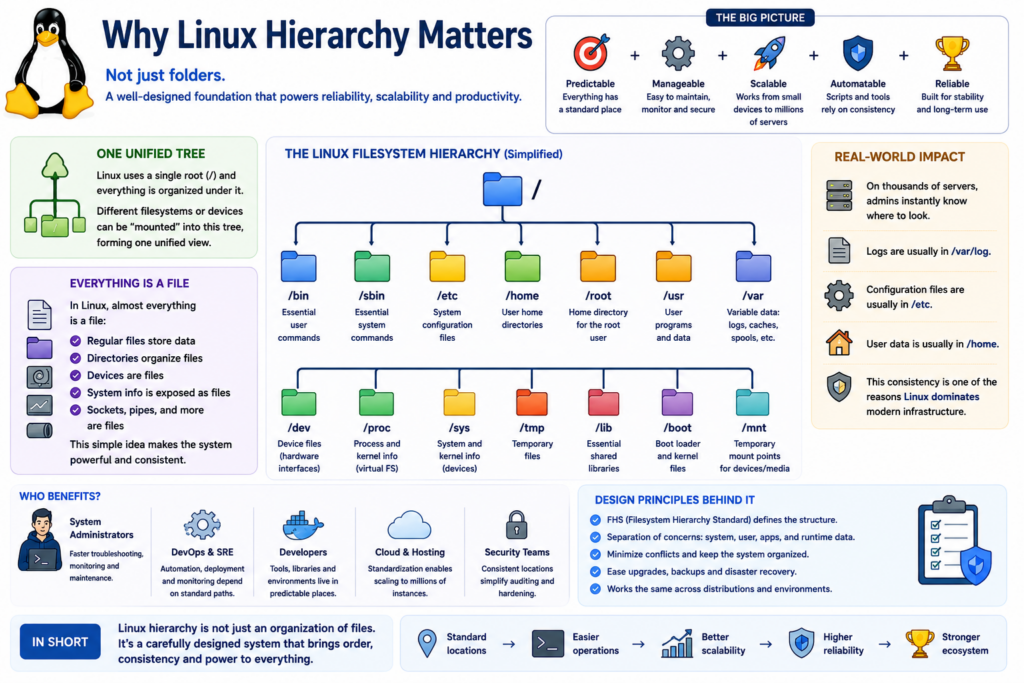
At first glance, the Linux hierarchy may seem like just a collection of folders.
But the hierarchy reflects deep design principles.
Linux organizes:
- System files
- User files
- Devices
- Runtime data
- Logs
- Applications
- Hardware interfaces
Into predictable standardized locations.
This standardization makes Linux:
- Easier to manage
- Easier to automate
- Easier to scale
Imagine managing thousands of servers.
Administrators need consistency.
They need to know where logs are stored.
Where configuration files exist.
Where user data lives.
Where applications install themselves.
Linux solves this using hierarchy standards.
For example:
Logs are usually in slash var slash log.
Configuration files are usually in slash etc.
User data is usually in slash home.
This predictability became one of the reasons Linux dominates cloud computing and server infrastructure.
Chapter 3 — /bin and /sbin
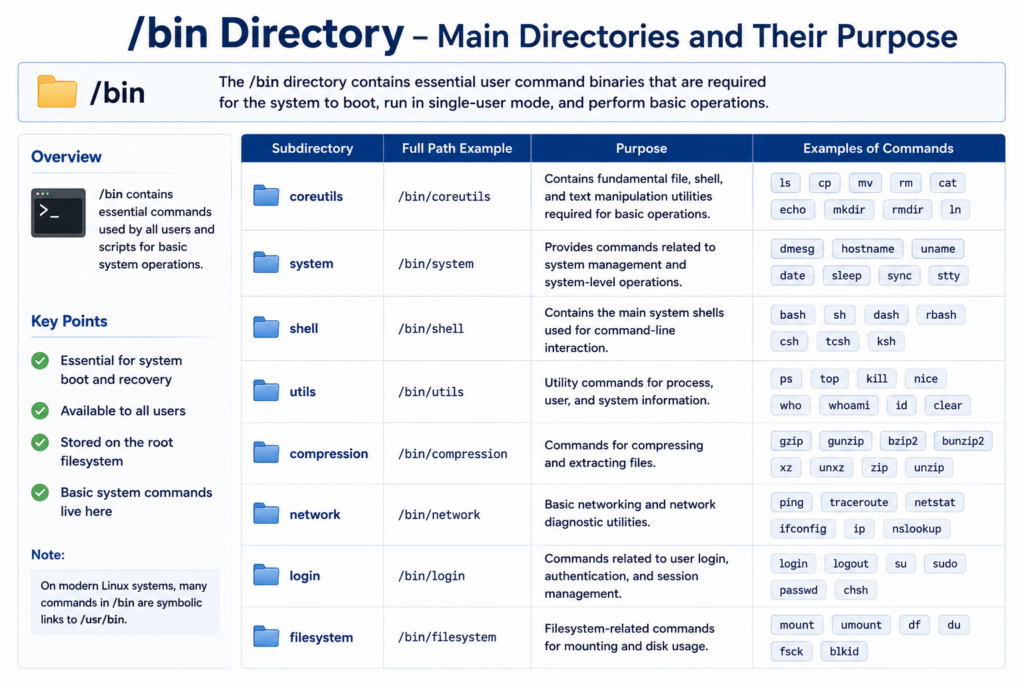
The slash bin directory contains essential command-line programs.
The word bin comes from binary.
These are commands required for the operating system to function.
Examples include:
ls
cp
mv
cat
bash
Without slash bin, basic Linux operation would be impossible.
Historically, these commands needed to exist even if other filesystems were unavailable during boot.
That is why slash bin became so important.
Now let’s look at /sbin.
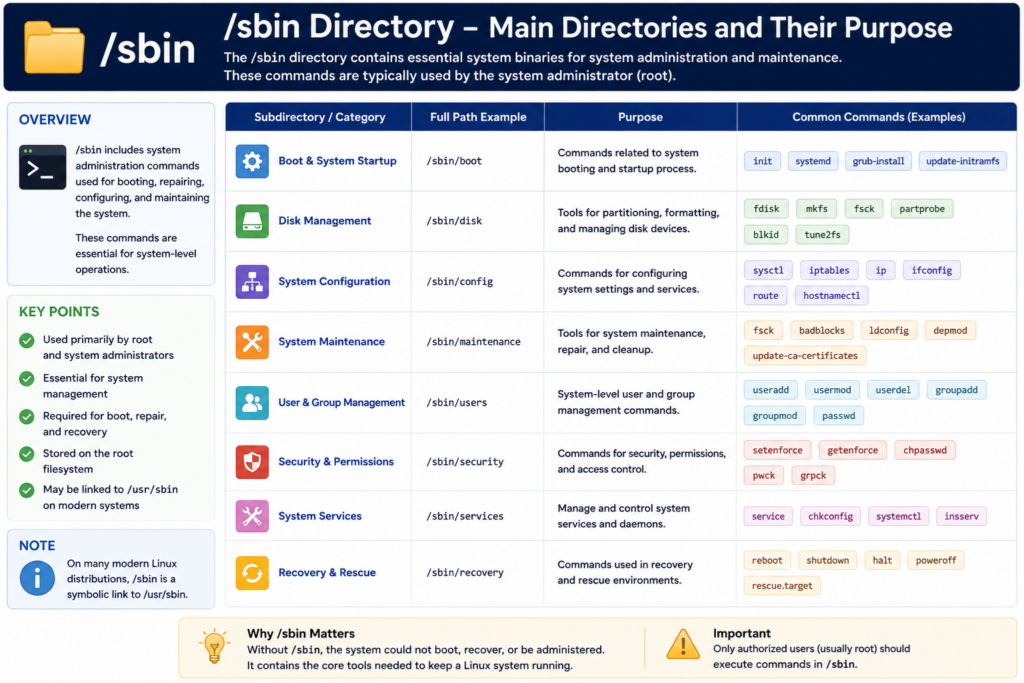
The s stands for system.
/sbin contains administrative commands used mostly by the root user.
Examples include:
fdisk
mkfs
reboot
shutdown
fsck
These tools manage disks, filesystems, and system maintenance.
This separation between user commands and system administration commands reflects Linux’s multi-user design.
Linux was built for shared systems from the very beginning.
Chapter 4 — /etc Configuration Philosophy
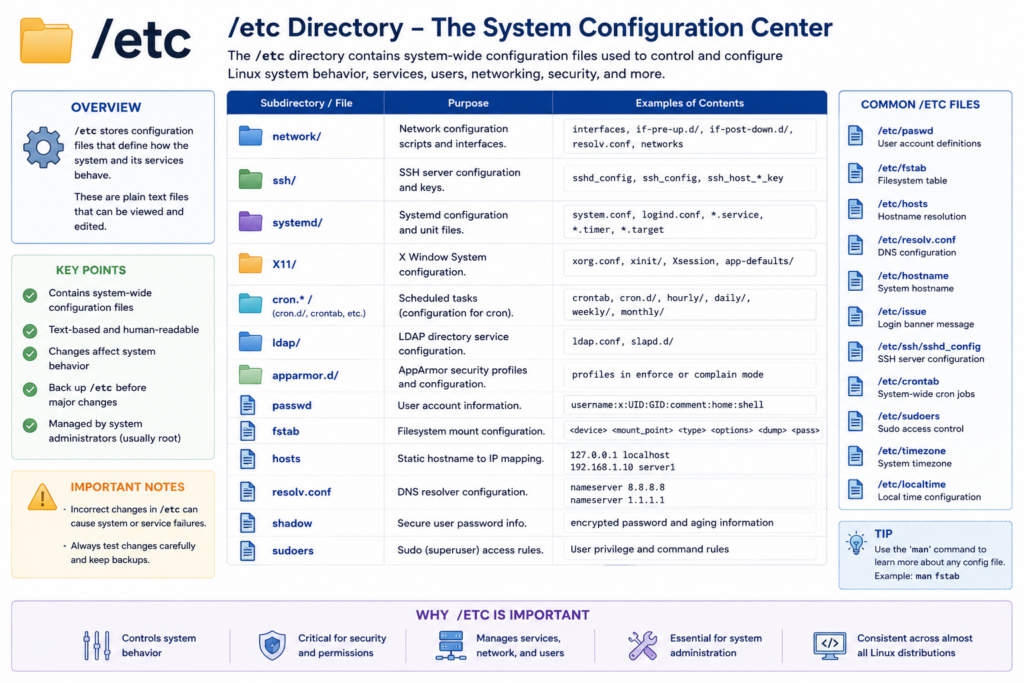
One of the most important directories in Linux is slash etc.
This directory stores system configuration files.
If Linux were a machine, slash etc would be its control panel.
Inside /etc are files controlling:
- Network settings
- DNS configuration
- User accounts
- Services
- File system mounting
- Security policies
- Startup behavior
Important examples include:
/etc/passwd
/etc/fstab
/etc/hosts
Linux administrators spend huge amounts of time inside slash etc.
And this reveals one of Linux’s greatest strengths.
Linux uses plain text configuration files.
That means configurations can be:
- edited remotely
- automated with scripts
- version controlled
- backed up easily
- searched with command-line tools
This flexibility helped Linux become dominant in servers and DevOps.
Because when you manage thousands of systems, automation becomes essential.
And Linux was designed for automation.
Chapter 5 — /home and /root
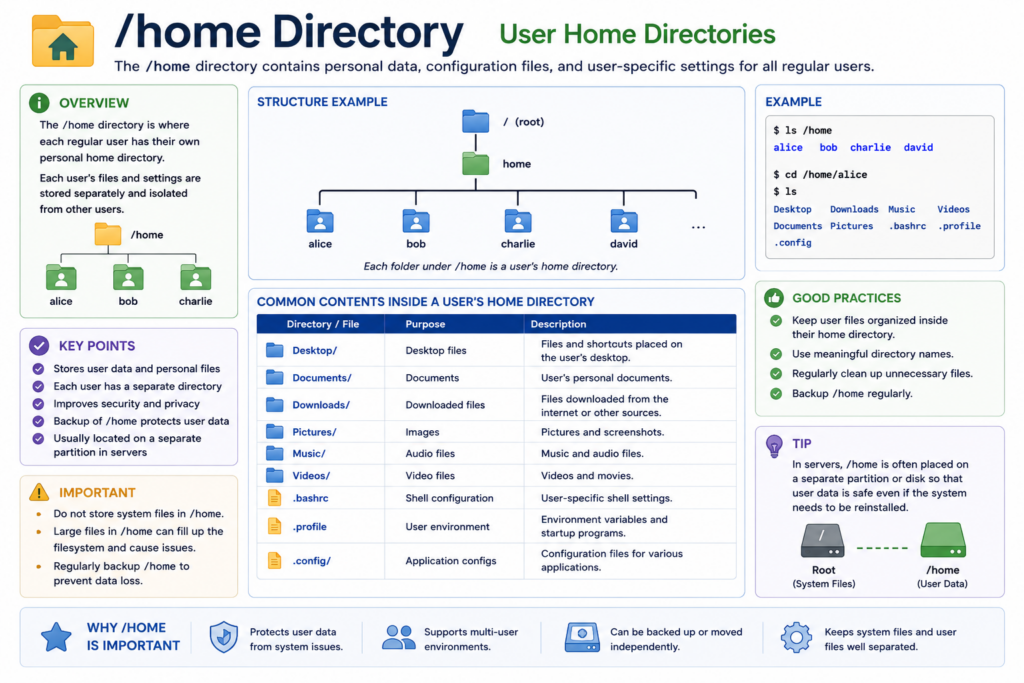
The /home directory stores user data.
Each user gets a separate personal directory.
For example:
/home/gary
/home/alice
/home/bob
Inside these directories are:
- Documents
- Downloads
- Desktop files
- Videos
- Pictures
- User application settings
Linux carefully separates user data from system files.
This improves:
- security
- stability
- multi-user support
If one user damages files inside their own home directory, the operating system itself can still remain intact.
This separation became extremely important in enterprise systems.
Now let’s look at /root.
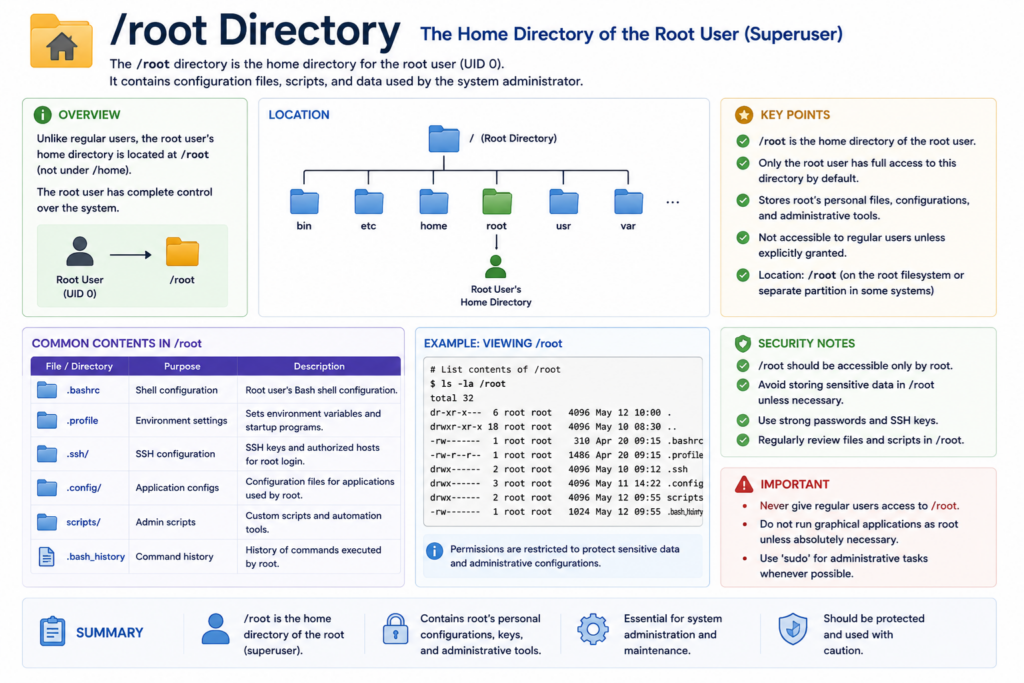
This is the home directory for the root administrator account.
It is different from the root filesystem itself.
Remember:
/ means the root filesystem.
/root means the administrator’s personal home directory.
The root account has unrestricted privileges.
Separating its environment improves security and organization.
Chapter 6 — Everything Is a File
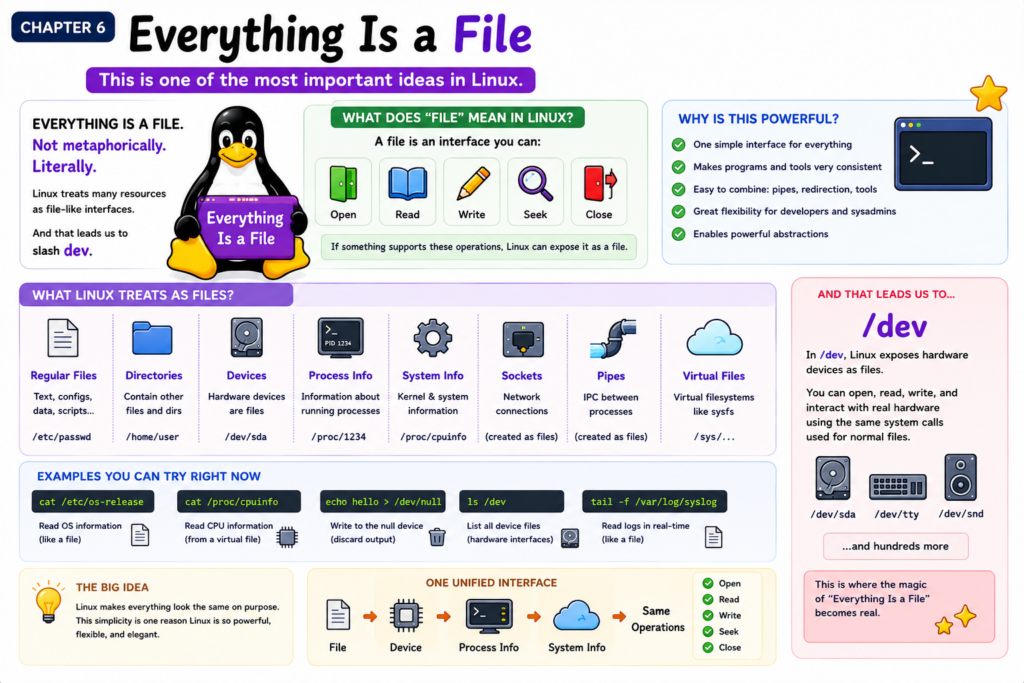
This is one of the most important ideas in Linux.
Everything is a file.
Not metaphorically.
Literally.
Linux treats many resources as file-like interfaces.
And that leads us to /dev.
Chapter 7 — /dev and Device Files
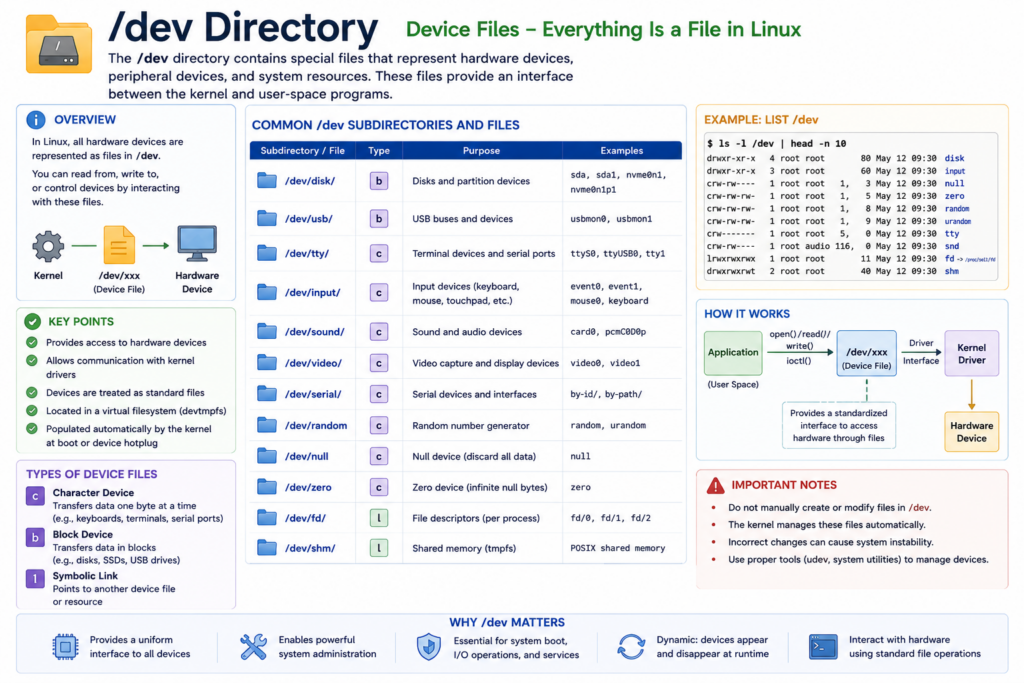
In Linux, hardware devices appear as files.
Examples include:
/dev/sda
/dev/sda1
/dev/null
/dev/random
/dev/tty
Hard drives become files.
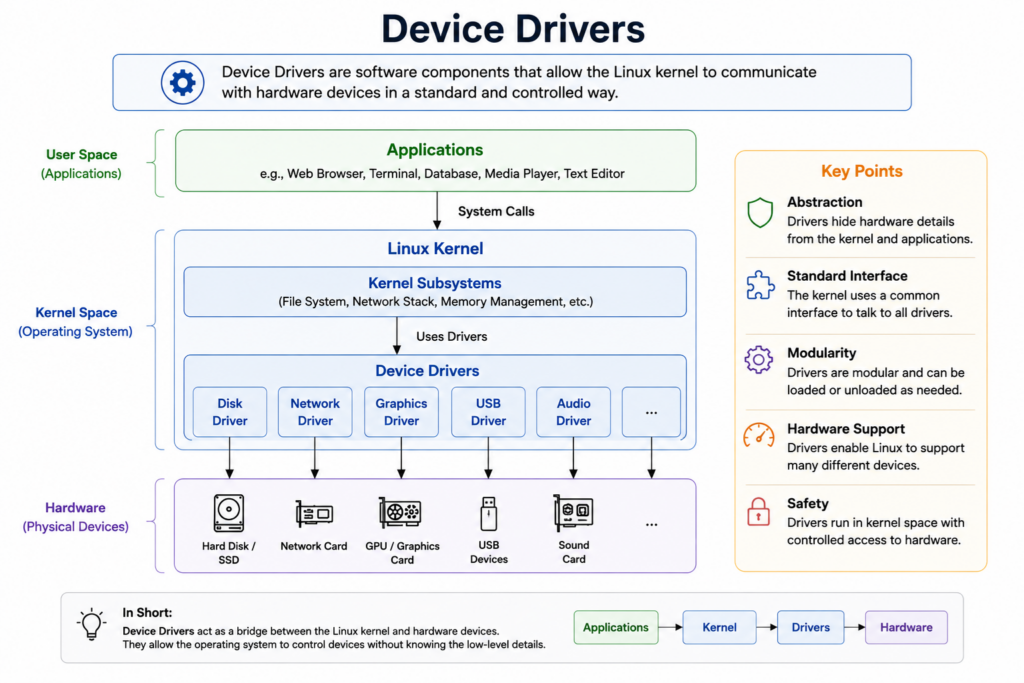
USB devices become files.
Terminals become files.
Random number generators become files.
This design is incredibly elegant.
Instead of creating separate systems for interacting with hardware, Linux allows programs to use standard file operations.
Programs can:
- open devices
- read devices
- write devices
- close devices
Using the same interfaces used for ordinary files.
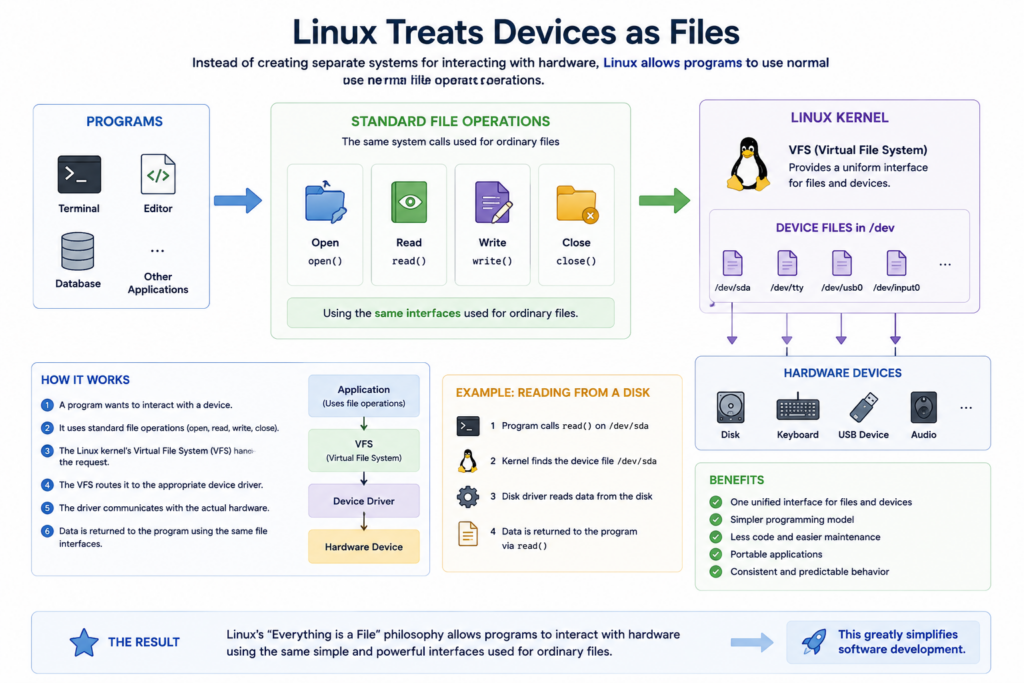
This greatly simplifies software development.
Applications do not need to learn entirely different hardware communication systems.
Everything uses a unified abstraction model.
This is one of the deepest Unix ideas ever created.
Chapter 8 — /proc Virtual File System
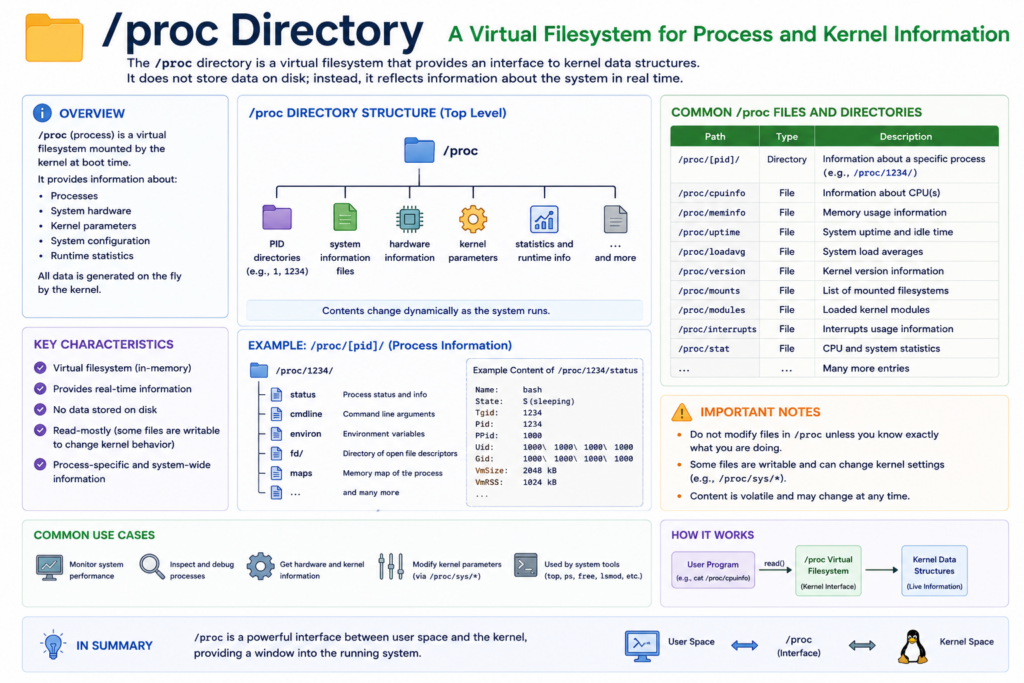
The slash proc directory is not a normal filesystem stored on disk.
It is a virtual filesystem generated dynamically by the Linux kernel.
Slash proc exposes real-time system information.
Examples include:
/proc/cpuinfo
/proc/meminfo
/proc/uptime
Linux monitoring tools rely heavily on slash proc.
Commands like:
ps
top
vmstat
Internally read information from this virtual filesystem.
And again, Linux exposes operating system internals using file interfaces.
This consistency is one reason Linux feels elegant to engineers.
Chapter 9 — /var and Runtime Data
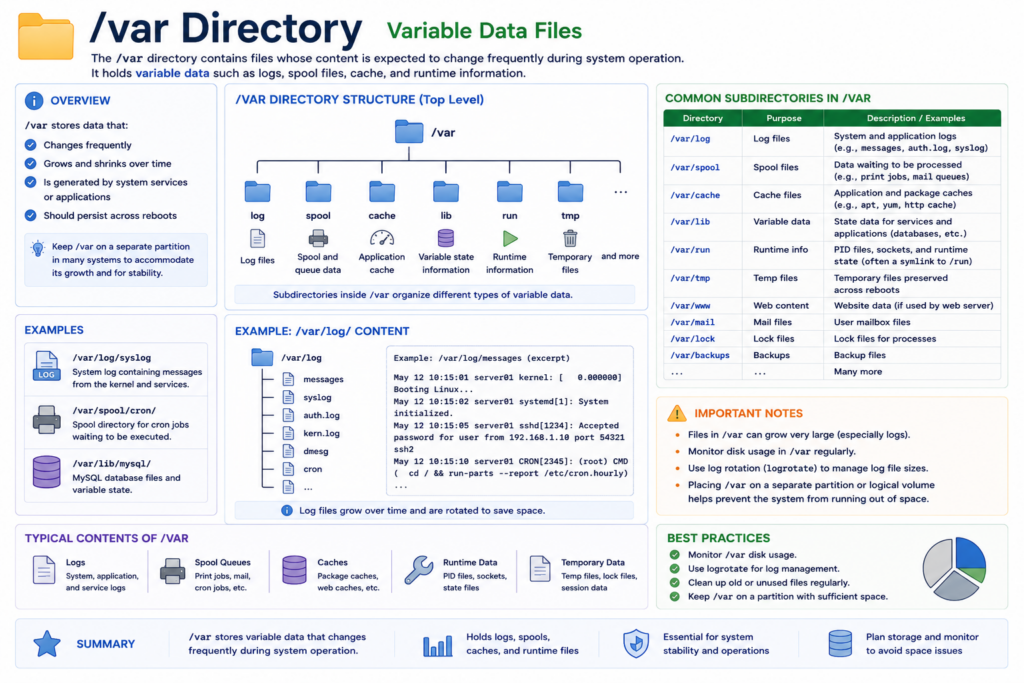
The /var directory stores changing runtime data.
The word var means variable.
This directory contains:
- logs
- caches
- mail queues
- databases
- temporary application data
One especially important location is:
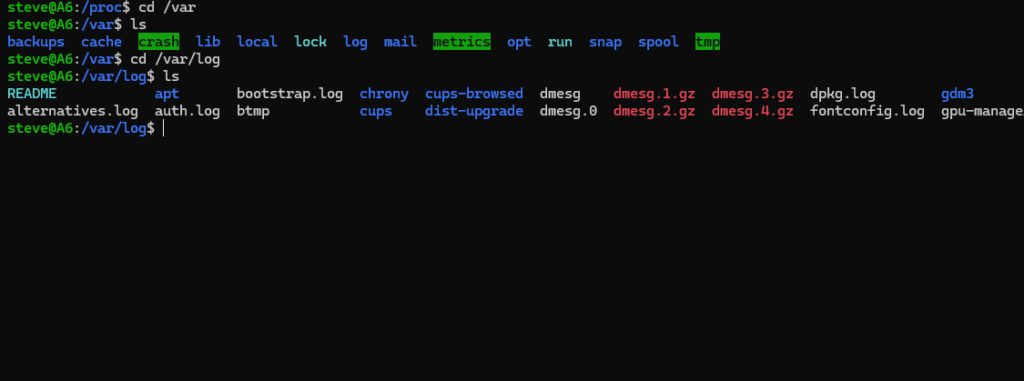
/var/log
This is where Linux logs are stored.
If a server crashes, administrators often investigate slash var log first.
Logs are critical for:
- troubleshooting
- security analysis
- auditing
- monitoring
- debugging
Modern DevOps infrastructure depends heavily on logs.
Massive cloud systems generate enormous amounts of runtime data every second.
And /var became the standardized place to organize that information.
Chapter 10 — /tmp Temporary Files
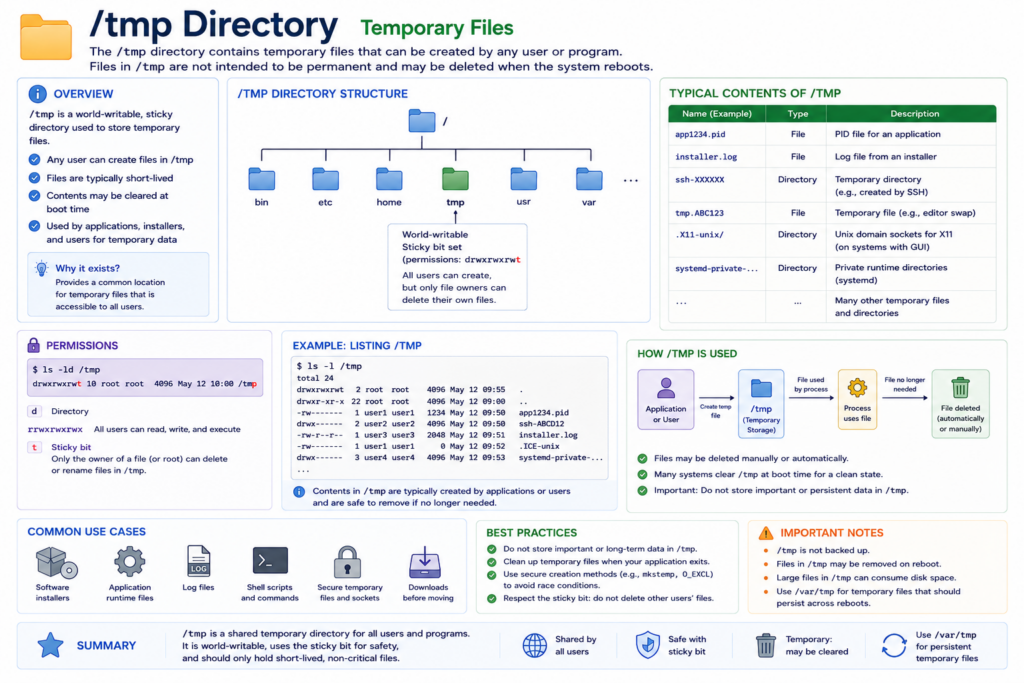
The /tmp directory stores temporary files.
Applications use it for:
- installers
- temporary scripts
- session files
- caches
- intermediate data
Many systems automatically clear /tmp during reboot.
Linux also uses special permissions called the sticky bit on /tmp.
This allows multiple users to share the same temporary workspace while preventing them from deleting each other’s files.
Even a simple temporary directory reflects thoughtful multi-user system design.
Chapter 11 — /usr User Applications
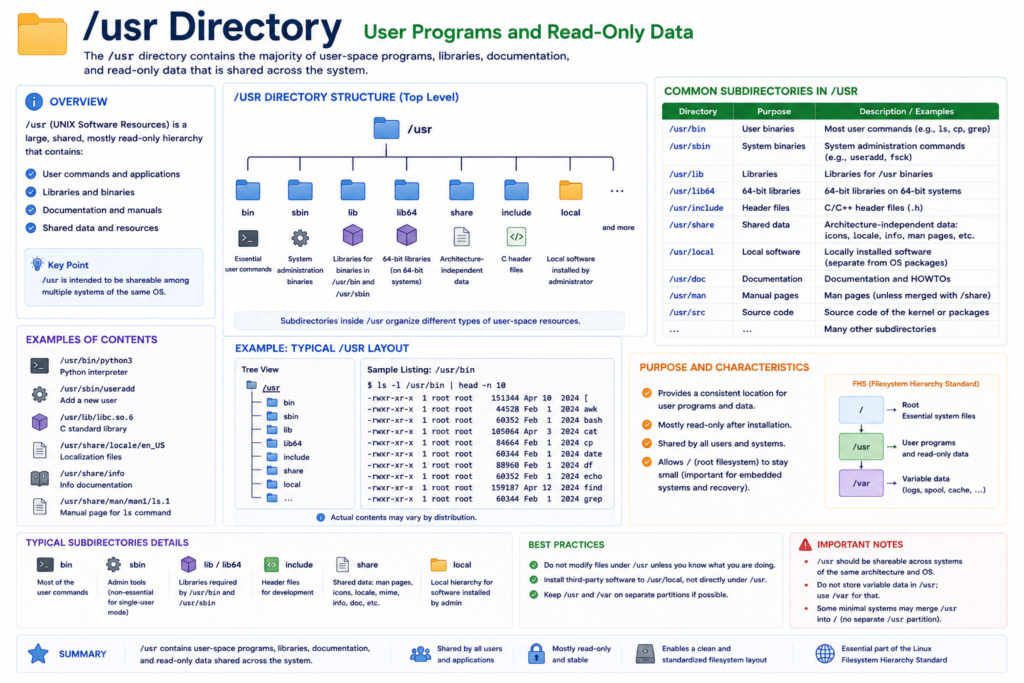
The slash usr directory contains:
- applications
- shared resources
- libraries
- documentation
- utilities
Examples include:
/usr/bin
/usr/lib
/usr/share
Historically, /usr stood for user system resources.
Over time it evolved into one of the largest parts of Linux systems.
Most installed software eventually ends up somewhere under slash usr.
Modern Linux distributions rely heavily on this structure.
Chapter 12 — /lib Shared Libraries
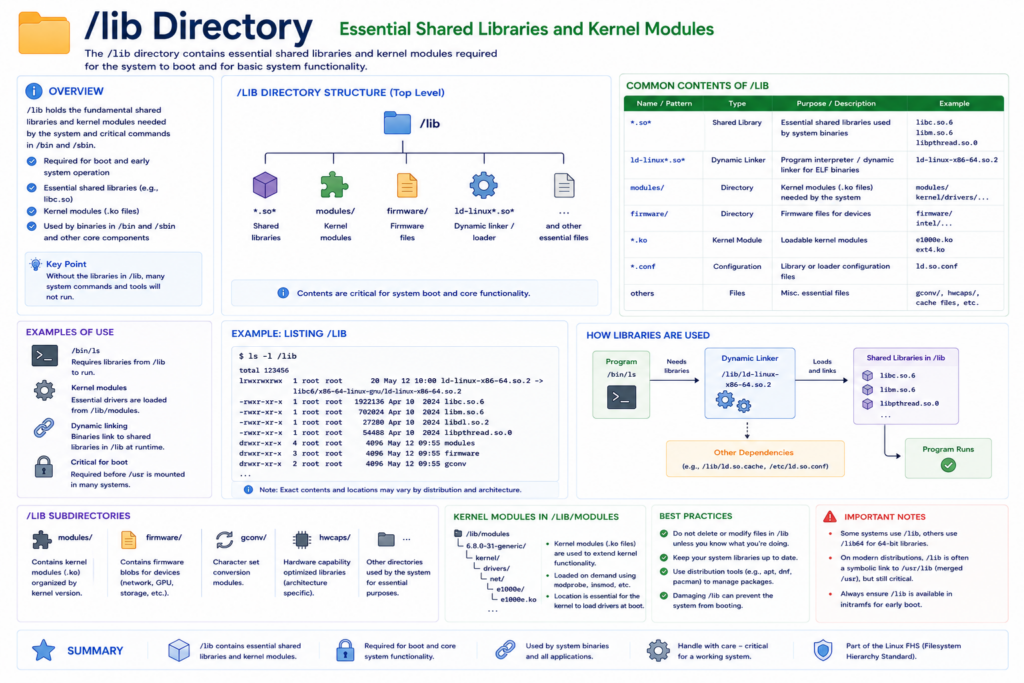
The /lib directory stores essential shared libraries.
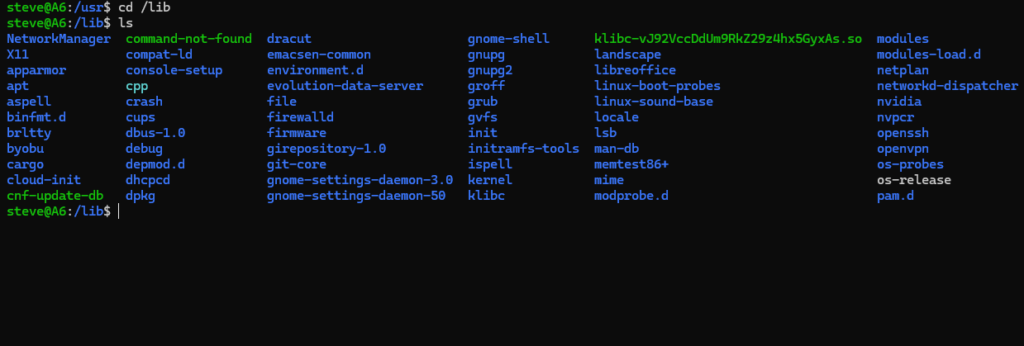
Libraries are reusable code modules used by applications.
Instead of every program containing duplicate code, Linux allows programs to share common libraries.
This reduces:
- disk usage
- memory usage
- software duplication
Examples include:
- C standard libraries
- dynamic loaders
- boot-critical modules
Without these libraries, many Linux applications would fail immediately.
This is one of the hidden engineering layers underneath the operating system.
Chapter 13 — /boot and the Startup Process
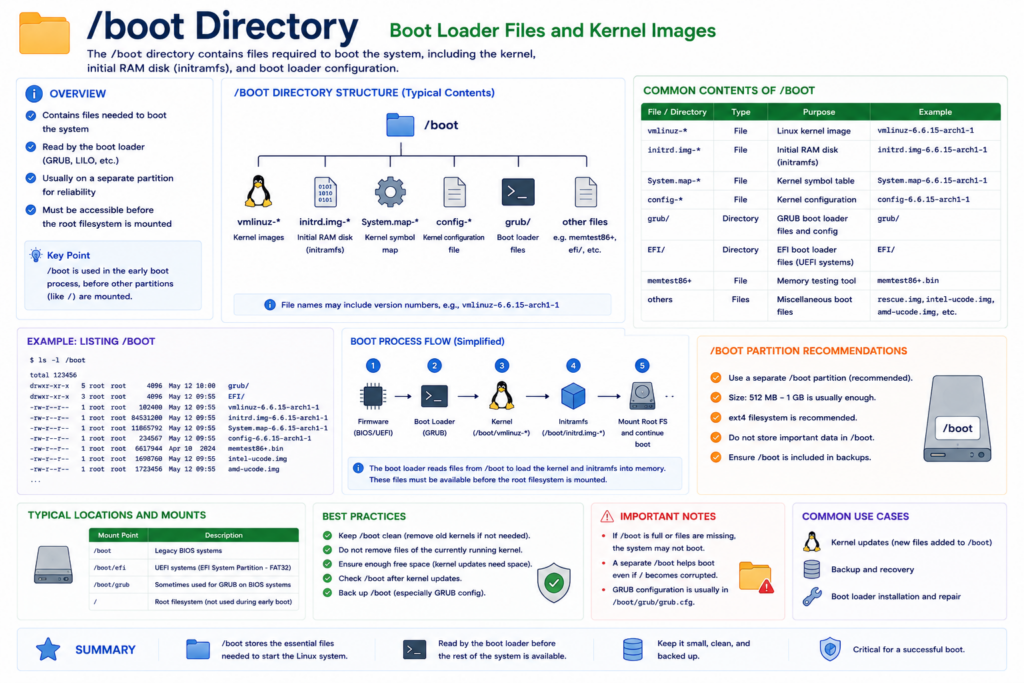
The /boot directory contains files required during startup.
Examples include:
- Linux kernel images
- GRUB bootloader files
- initramfs images
When the computer powers on, the bootloader loads the Linux kernel from slash boot.
Without this directory, Linux cannot start.
This chapter connects the filesystem directly to the operating system boot process.
Chapter 14 — /mnt and Mount Philosophy
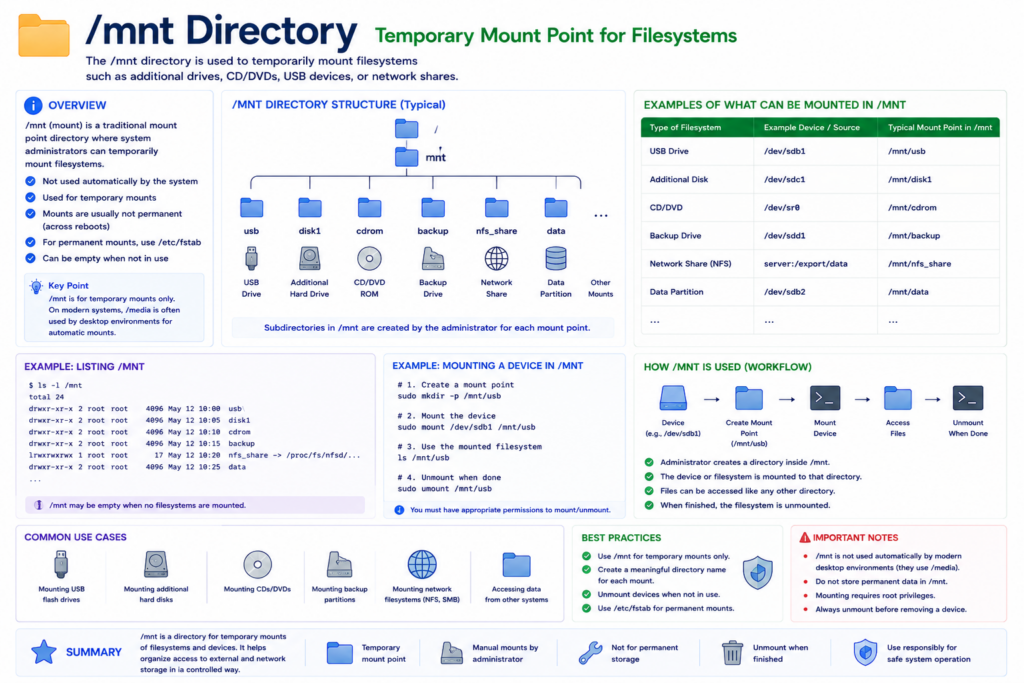
One of the deepest Unix concepts is mounting.
Linux does not use separate drive letters.
Instead, storage devices become attached somewhere inside the filesystem tree.
For example:
A USB drive may appear under /mnt /usb.
This unified design means:
Everything belongs somewhere under root.
Hard drives.
Network storage.
External devices.
All integrated into the same hierarchy.
This abstraction makes Linux extremely flexible.
Chapter 15 — /sys and Modern Kernel Interfaces
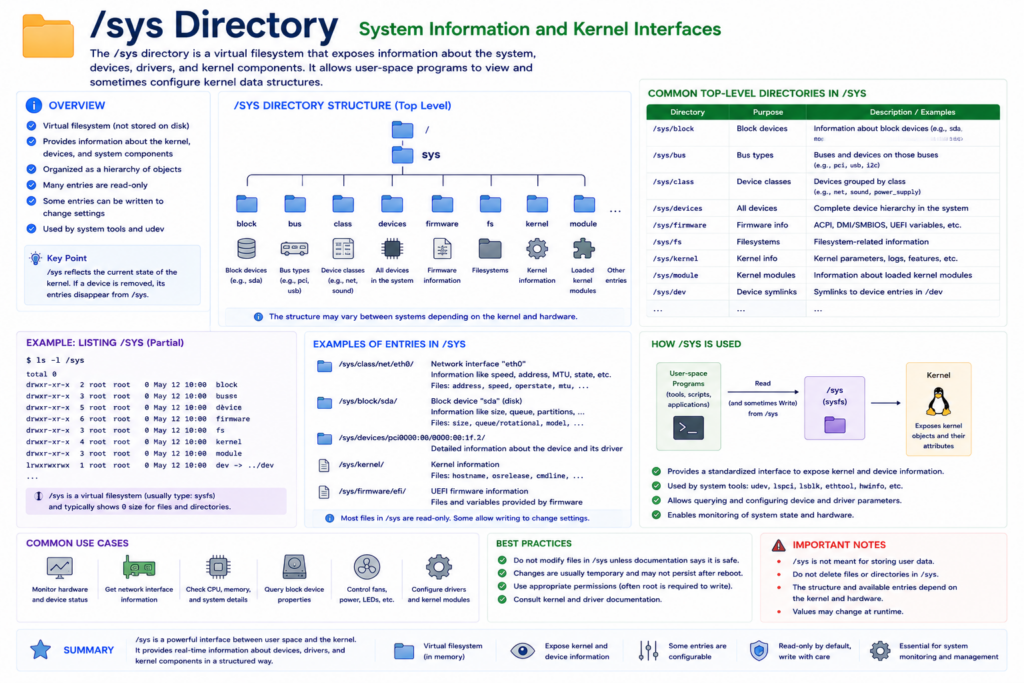
The /sys directory is another virtual filesystem.
It exposes structured information about:
- hardware
- drivers
- buses
- power systems
- kernel subsystems
Modern Linux hardware management depends heavily on /sys.
Like /proc, it reflects Linux’s philosophy of exposing system internals using filesystem interfaces.
Final Chapter — Why Linux Won
Linux did not become dominant by accident.
Its filesystem hierarchy helped create:
- consistency
- predictability
- automation
- scalability
- modularity
A Linux administrator can log into thousands of servers and immediately understand where things are.
Logs are stored in predictable locations.
Configuration files follow standards.
Applications organize themselves consistently.
Devices expose unified interfaces.
This standardization made Linux easier to automate.
And automation became one of the foundations of modern cloud computing.
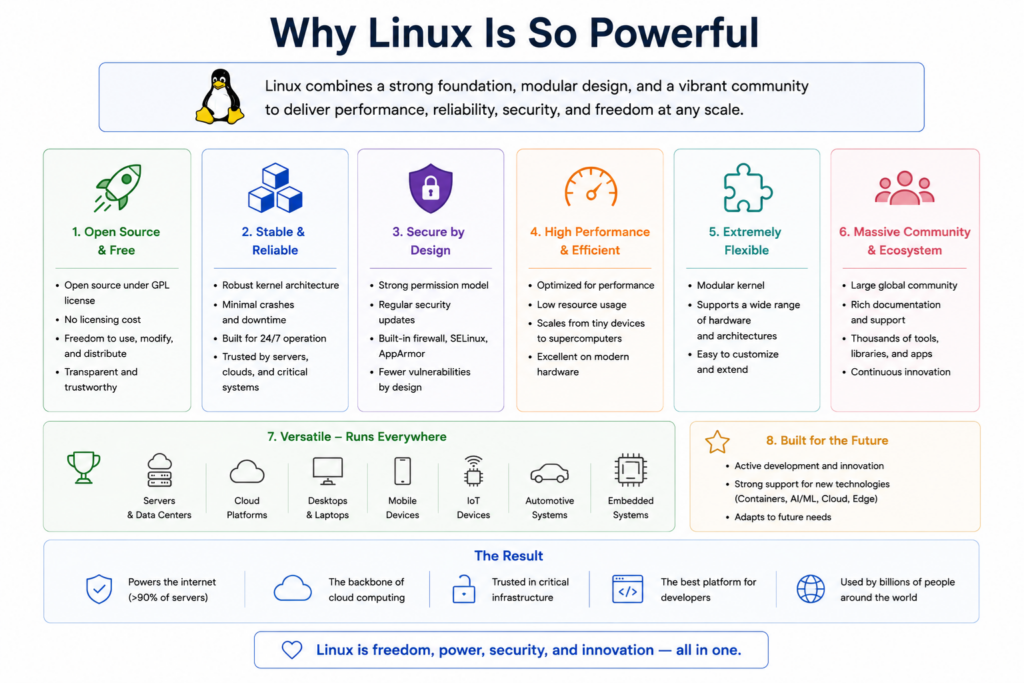
Today Linux powers:
- cloud infrastructure
- AI servers
- web hosting systems
- Android internally
- enterprise systems
- embedded devices
- supercomputers
And underneath all of it is this filesystem philosophy.
Simple.
Consistent.
Modular.
Powerful.
The Linux filesystem hierarchy is not just a collection of folders.
It is one of the foundational designs of modern computing.
And once you understand it, Linux itself begins to make much more sense.