Characteristics of a File System
A file system defines how data is organized, stored, managed, and accessed on a storage device such as a hard disk, SSD, or USB drive.
It provides the structure and rules that allow the operating system to locate files efficiently, manage storage space, and maintain data integrity.
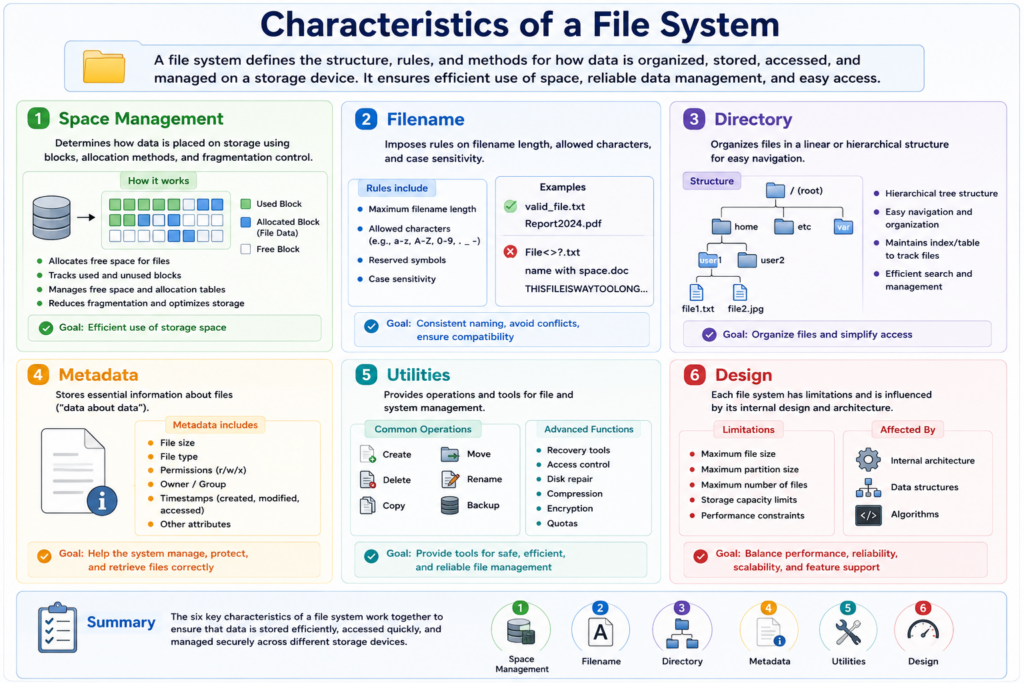
1. Space Management
A file system controls how storage space is allocated and utilized.
It divides storage into blocks or clusters and determines where files are physically stored on the disk.
Key responsibilities include:
- Allocating free storage space
- Tracking used and unused blocks
- Reducing fragmentation
- Optimizing storage efficiency
Efficient space management improves performance and minimizes wasted disk space.
2. Filename Management
A file system defines the rules for naming files and directories.
These rules may include:
- Maximum filename length
- Allowed characters
- Reserved symbols
- Case sensitivity
For example:
- Linux is usually case-sensitive
- Windows is generally case-insensitive
Consistent filename rules help prevent conflicts and improve compatibility between systems.
3. Directory Structure
A file system organizes files using directories and subdirectories.
Most modern operating systems use a hierarchical tree structure that allows users to navigate files easily.
The directory system helps:
- Group related files
- Improve organization
- Simplify file searching
- Manage large amounts of data efficiently
Directories also maintain indexes or tables that track file locations and relationships.
4. Metadata Management
Metadata is information about a file rather than the file’s actual content.
The file system stores metadata such as:
- File size
- File type
- Ownership
- Permissions
- Creation time
- Modification time
- Access timestamps
Metadata enables the operating system to manage, protect, and retrieve files correctly.
5. File System Utilities
File systems provide utilities and operations for managing data.
Common operations include:
- Creating files
- Deleting files
- Copying files
- Moving files
- Renaming files
- Backing up data
Advanced utilities may also support:
- Disk repair
- Data recovery
- Access control
- Compression
- Encryption
These tools help maintain system reliability and data security.
6. File System Design and Limitations
Each file system has its own internal design and technical limitations.
These limitations may include:
- Maximum file size
- Maximum partition size
- Maximum number of files
- Performance constraints
The internal architecture affects:
- Speed
- Reliability
- Scalability
- Fault tolerance
For example:
- EXT4 is optimized for Linux stability and performance
- XFS is designed for large-scale storage systems
- Btrfs supports snapshots and advanced storage features
Different file systems are optimized for different workloads and environments.
Summary
A file system is a critical component of an operating system because it manages how data is stored and accessed.
Its main characteristics include:
- Space management
- Filename rules
- Directory organization
- Metadata handling
- File management utilities
- Internal design and limitations
Together, these features ensure that files can be stored securely, accessed efficiently, and managed reliably across the system.