Introduction
A motherboard is the main printed circuit board (PCB) of a computer.
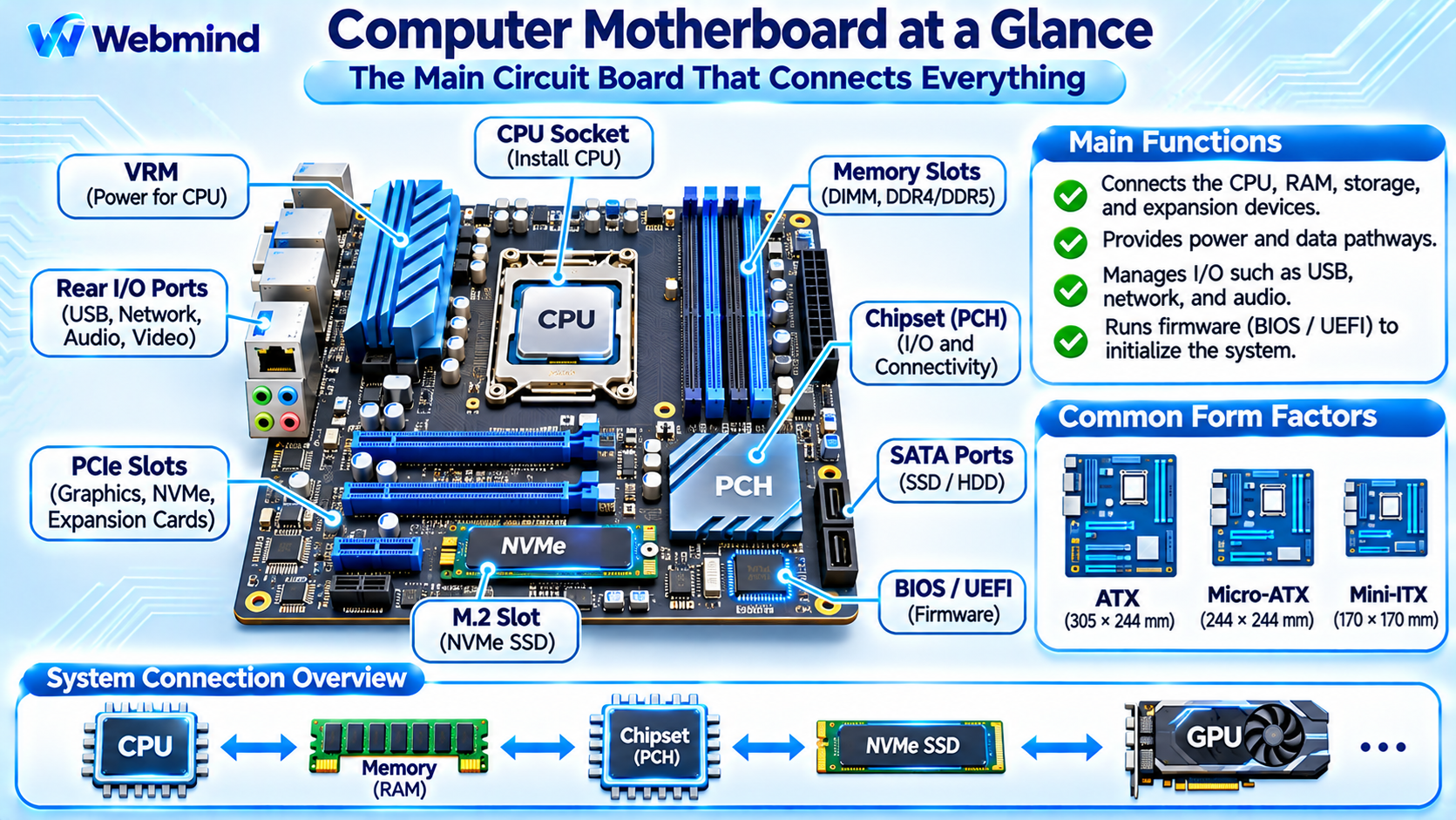
It connects essential hardware components, including the Central Processing Unit (CPU), Random Access Memory (RAM), storage devices, graphics cards, and peripheral interfaces.
The motherboard provides electrical connections, power distribution, and communication pathways that allow these components to operate together as a complete computer system.
Modern motherboards are used in desktop computers, laptops, servers, workstations, and embedded systems.
Their design determines which processors, memory technologies, expansion devices, and connectivity options a computer can support.
How Does a Motherboard Work?
A motherboard connects hardware components through conductive copper traces, connectors, sockets, and specialized electronic circuits.
When a computer starts, the motherboard’s power-management circuits help provide the voltages required by the CPU, memory, and other components.
The processor then begins executing firmware instructions, which initialize and configure essential hardware.
During normal operation, the CPU communicates with RAM through its integrated memory controller.
Expansion devices exchange information through interfaces such as PCI Express (PCIe), while storage devices communicate through PCIe or SATA connections.
The motherboard also provides communication paths for USB controllers, audio devices, network interfaces, and other peripherals.
Although the motherboard connects these components, most actual computing operations are performed by processors, memory systems, and specialized hardware devices.
Main Components of a Motherboard
A modern motherboard contains several important hardware components.
CPU Socket: Provides the mechanical and electrical connection for a compatible processor. Different processor families require specific socket types.
Memory Slots (DIMM): Allow RAM modules to connect to the processor’s memory controller. Modern desktop systems commonly use DDR4 or DDR5 memory, depending on platform support.
Chipset or Platform Controller Hub (PCH): Manages selected input/output functions, such as USB ports, SATA connections, and additional PCIe interfaces. Its responsibilities vary by processor platform.
PCI Express Slots: Connect expansion devices such as graphics cards, network adapters, capture cards, and storage controllers.
M.2 Connectors: Support compact devices, commonly NVMe SSDs. Some M.2 connectors also support other interfaces, depending on motherboard design.
Voltage Regulator Module (VRM): Converts incoming power into the stable, lower voltages required by the CPU and other components.
Firmware Flash Memory: Stores UEFI firmware used to initialize hardware and begin the computer’s boot process.
Power Connectors: Receive electrical power from the computer’s power supply, including common 24-pin motherboard and CPU power connections.
I/O Ports and Headers: Provide connections for USB devices, networking, audio, cooling fans, front-panel controls, and other peripherals.
The exact number and arrangement of components depend on the motherboard model.
What Is a Motherboard Chipset?
A chipset is a collection of hardware functions responsible for managing communication with selected devices and peripheral interfaces.
Older computers commonly used two major chipset components: the Northbridge and Southbridge.
The Northbridge traditionally managed high-speed communication involving the CPU, memory, and graphics interfaces. The Southbridge handled lower-speed interfaces such as USB, storage controllers, and other peripherals.
Modern processors have integrated many former Northbridge functions, including memory controllers and primary PCIe connectivity.
As a result, contemporary motherboard chipsets mainly provide additional input/output capabilities and platform-management functions.
Some highly integrated systems require little or no separate motherboard chipset.
How Does the CPU Communicate with Other Components?
Modern motherboards use several high-speed communication technologies.
CPU to RAM: The processor’s integrated memory controller communicates with system memory through dedicated DDR memory channels.
CPU to GPU: Discrete graphics cards typically communicate with the CPU through PCI Express connections.
CPU to NVMe SSD: NVMe storage devices use PCIe links, which may connect directly to the CPU or through chipset-provided lanes.
CPU to Chipset: A dedicated interconnect connects the processor to the chipset on platforms that use one.
Chipset to Peripherals: The chipset provides connections to selected USB controllers, SATA devices, network interfaces, and expansion slots.
These communication paths have different bandwidth and latency characteristics.
Motherboard design must account for the number of available PCIe lanes, memory channels, and shared connections.
Motherboard Form Factors
Motherboards are manufactured in different sizes, commonly called form factors.
ATX: A standard desktop motherboard format, typically measuring 305 × 244 mm. It provides room for multiple expansion slots and connectors.
Micro-ATX: A smaller format, typically measuring 244 × 244 mm at its maximum standard dimensions. It is common in compact and budget desktop computers.
Mini-ITX: A compact motherboard format measuring 170 × 170 mm, often used for small-form-factor computers.
E-ATX: A term commonly used for larger enthusiast and workstation motherboards. Exact dimensions and mounting requirements can vary between manufacturers.
Laptop and server motherboards frequently use proprietary or specialized designs.
Choosing a motherboard form factor affects case compatibility, expansion capacity, cooling options, and system size.
What Are VRMs and Why Are They Important?
A Voltage Regulator Module (VRM) supplies controlled electrical power to major motherboard components, especially the CPU.
Computer power supplies deliver standard voltage rails, but modern processors require much lower operating voltages that can change dynamically.
The VRM uses switching regulators, power stages, inductors, capacitors, and control circuitry to convert and regulate these voltages.
High-performance processors can draw substantial current, making VRM design and cooling important for stable operation.
A well-designed VRM helps maintain voltage stability during rapidly changing workloads.
However, more advertised VRM phases do not automatically guarantee better performance. Component quality, thermal design, electrical efficiency, and control implementation also matter.
What Is BIOS and UEFI?
Motherboards contain non-volatile memory that stores firmware responsible for initializing the computer during startup.
Traditional PC systems used the Basic Input/Output System (BIOS).
Modern computers generally use Unified Extensible Firmware Interface (UEFI) firmware, which provides more advanced initialization, boot management, and configuration capabilities.
When the computer powers on, firmware performs essential hardware initialization and begins the boot process.
UEFI firmware can configure processor settings, memory parameters, boot devices, and certain security features.
After initialization, the firmware launches a bootloader or operating system boot mechanism.
The firmware is typically stored in a Flash memory chip on the motherboard and can be updated using manufacturer-provided procedures.
How Does a Motherboard Support RAM and Storage?
Motherboards provide physical connections and electrical interfaces for system memory and storage devices.
Desktop motherboards commonly include DIMM slots for DDR memory modules. The supported memory generation, capacity, and operating speeds depend on both the motherboard and processor.
For storage, modern motherboards typically provide M.2 connectors for NVMe SSDs and may include SATA ports for additional SSDs and hard drives.
NVMe SSDs communicate over PCI Express and can provide substantially higher transfer rates than conventional SATA devices.
However, M.2 describes a physical connector and module format, not a storage protocol. The supported interface must be checked before installing a device.
How to Choose a Motherboard
Selecting a motherboard requires checking compatibility and system requirements.
Processor Compatibility: Confirm that the CPU socket, chipset, firmware, and motherboard support the intended processor.
Memory Support: Check the supported DDR generation, memory capacity, number of slots, and validated operating speeds.
Expansion Options: Consider PCIe slot sizes, available lanes, and compatibility with graphics cards or other devices.
Storage Interfaces: Check the number of M.2 and SATA connections and whether certain ports share bandwidth or resources.
Connectivity: Evaluate USB ports, Ethernet, Wi-Fi, Bluetooth, audio interfaces, and other required connections.
Power Delivery: Select a motherboard with suitable VRM capabilities and cooling for the intended CPU.
Form Factor: Ensure the motherboard fits the computer case and supports the required expansion and cooling configuration.
A more expensive motherboard does not necessarily improve application performance if a less expensive model already provides the required features and adequate power delivery.
Motherboards in Embedded Systems and SoCs
Motherboards are not limited to traditional desktop computers.
Embedded systems also use printed circuit boards to connect processors, memory, communication interfaces, sensors, and peripheral hardware.
For example, a Single-Board Computer (SBC), such as a Raspberry Pi, integrates many computing components onto one compact circuit board.
Unlike a traditional desktop motherboard with a removable CPU, an SBC often contains a soldered System-on-Chip (SoC), integrated communication interfaces, and onboard memory.
Industrial computers and robotics controllers may use specialized boards designed for reliability, compact dimensions, and direct hardware interfacing.
The underlying principle remains the same: a circuit board provides the electrical and communication infrastructure required for a computing system.
Conclusion
A motherboard is the central circuit board that connects a computer’s processor, memory, storage, expansion devices, and peripheral interfaces.
Its sockets, connectors, power circuits, firmware, and communication pathways allow different hardware components to function together.
Modern motherboard designs rely on technologies such as PCI Express, DDR memory, NVMe storage, UEFI firmware, and integrated processor memory controllers.
Understanding motherboard architecture provides an important foundation for studying computer hardware, system assembly, CPU architecture, memory systems, embedded computing, and computer troubleshooting.