How Virtual Memory Works(1): Virtual Addresses, Pages, Page Tables, and the MMU
Virtual memory is one of the most important ideas in modern computer systems.
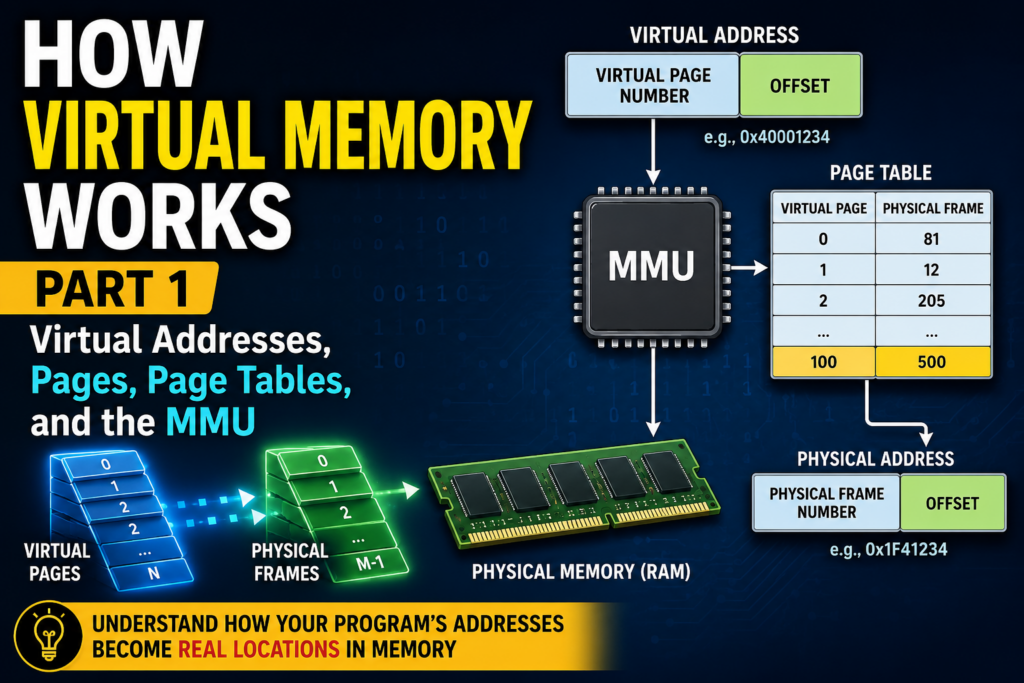
When a program runs, it appears to have its own large and continuous memory space.
A program may access an address such as:
0x00401000
But that address usually does not refer directly to a location in physical RAM.
Instead, modern CPUs and operating systems use a translation system between the addresses used by programs and the actual locations in memory.
That system is called virtual memory.
At a high level:
Program
   ↓
Virtual Address
   ↓
MMU
   ↓
Page Table
   ↓
Physical Address
   ↓
Cache / RAM
Virtual memory allows programs to use memory without needing to know where their data is physically stored.
It also creates the foundation for process isolation, memory protection, shared memory, and many other operating-system features.
In Part 1, we will focus on one fundamental question:
How does a virtual address become a physical address?
1. Why Do Computers Need Virtual Memory?
Imagine a computer where programs directly use physical RAM addresses.
Program A might occupy:
0x00000000 – 0x0FFFFFFF
while Program B occupies:
0x10000000 – 0x1FFFFFFF
Every program would need to know exactly where it had been loaded.
Programs would also need to avoid overwriting each other’s memory.
A programming error could potentially write into another application’s data.
This would make memory management extremely difficult.
Virtual memory adds an abstraction layer.
Instead of giving programs direct control over physical addresses, the operating system gives each process its own virtual address space.
The process works with virtual addresses.
The CPU and operating system translate those addresses into physical locations behind the scenes.
2. Virtual Address vs Physical Address
There are two important kinds of addresses.
A virtual address is the address used by a running program.
A physical address identifies an actual location in physical memory.
For example:
Virtual Address
0x40001000

        ↓

Physical Address
0x18A32000
The program sees:
0x40001000
but the data may actually be stored somewhere completely different in RAM.
Another process could use exactly the same virtual address:
0x40001000
while that address maps to another physical location.
For example:
Process A

0x40001000
     ↓
0x18A32000


Process B

0x40001000
     ↓
0x72B11000
The same virtual address can therefore mean different physical locations for different processes.
3. Each Process Has Its Own Address Space
When an operating system creates a process, it gives that process its own virtual address space.
A simplified layout might contain:
High Address

+----------------------+
| Stack                |
+----------------------+
|                      |
|     Free Space       |
|                      |
+----------------------+
| Heap                 |
+----------------------+
| Global Data          |
+----------------------+
| Program Code         |
+----------------------+

Low Address
The exact layout depends on the operating system and processor architecture.
But the important idea is that the program sees a clean virtual layout.
The underlying physical memory does not need to look anything like this.
The operating system may place different parts of the process in completely different areas of RAM.
4. Virtual Memory Is Divided Into Pages
Virtual memory is normally managed in fixed-size blocks called pages.
A common page size is:
4 KB
Physical memory is also divided into blocks of the same basic size, usually called page frames or physical pages.
Conceptually:
Virtual Memory

Page 0
Page 1
Page 2
Page 3
...
and:
Physical RAM

Frame 0
Frame 1
Frame 2
Frame 3
...
The operating system maps virtual pages to physical frames.
For example:
Virtual Page 0 → Physical Frame 81

Virtual Page 1 → Physical Frame 12

Virtual Page 2 → Physical Frame 205
Notice something important.
The physical frames do not need to be next to each other.
A program can see continuous virtual memory even though the corresponding data is scattered throughout RAM.
5. A Virtual Address Contains a Page Number and an Offset
With paging, a virtual address can conceptually be divided into two parts:
Virtual Page Number | Page Offset
The virtual page number identifies the page.
The offset identifies the exact byte inside that page.
Suppose the page size is 4 KB.
That means:
4 KB = 4096 bytes = 2^12 bytes
Therefore, the lower 12 bits of the address can be used as the page offset.
Conceptually:
Virtual Address

+----------------------+-------------+
| Virtual Page Number  | Page Offset |
+----------------------+-------------+
                             12 bits
During address translation, the virtual page number changes.
The offset usually remains the same.
After translation:
Physical Address

+----------------------+-------------+
| Physical Frame No.   | Page Offset |
+----------------------+-------------+
This is the basic principle behind paging.
6. Page Tables Store the Mapping
The CPU needs to know which physical frame belongs to each virtual page.
The operating system stores this information in a structure called a page table.
A simplified page table might contain:
Virtual Page 0 → Physical Frame 81

Virtual Page 1 → Physical Frame 12

Virtual Page 2 → Physical Frame 205
Each mapping is stored in a Page Table Entry, usually abbreviated as:
PTE
A PTE contains information about the mapping between a virtual page and a physical page.
It can also contain additional control information.
For example:
physical frame number
read permission
write permission
execute permission
user or kernel access
For now, the most important part is the physical frame number.
That is what allows the CPU to translate an address.
7. The MMU Performs the Translation
The CPU contains hardware specifically designed to handle virtual memory.
This hardware is called the:
Memory Management Unit
or:
MMU
Suppose a program executes:
value = array[i];
Eventually, the CPU calculates a memory address.
That address is normally virtual.
The process looks roughly like this:
CPU
 ↓
Virtual Address
 ↓
MMU
 ↓
Page Table
 ↓
Physical Address
 ↓
Memory
The MMU takes the virtual page number, finds the corresponding physical frame, and combines that frame number with the original page offset.
Conceptually:
Virtual Page Number
        ↓
   Translation
        ↓
Physical Frame Number
while:
Page Offset
     ↓
 stays the same
The result is a physical address.
8. Why Page Tables Can Become Very Large
Modern computers support very large virtual address spaces.
A simple approach would be to create one giant page table containing an entry for every possible virtual page.
But this would waste enormous amounts of memory.
Most programs use only a small portion of the virtual address space available to them.
Modern processors therefore usually use multi-level page tables.
Conceptually:
Virtual Address
      ↓
Level 1 Table
      ↓
Level 2 Table
      ↓
Level 3 Table
      ↓
Level 4 Table
      ↓
Page Table Entry
      ↓
Physical Frame
Instead of allocating one enormous table, the system creates only the parts of the hierarchy that are actually needed.
Different CPU architectures use different formats and numbers of levels.
But the basic idea is similar.
9. What Is a Page Table Walk?
When the CPU needs a translation, it may have to follow the page-table hierarchy.
This process is called a:
page table walk
Conceptually:
Virtual Address
       ↓
Page Table Level 1
       ↓
Page Table Level 2
       ↓
Page Table Level 3
       ↓
Final Page Table Entry
       ↓
Physical Address
The problem is that page tables themselves are stored in memory.
If every memory access required several additional memory accesses just to translate the address, the CPU would become much slower.
Modern processors solve this problem with another small but extremely important hardware structure.
10. The TLB Makes Translation Fast
The Translation Lookaside Buffer, or TLB, is a small, very fast cache inside the processor.
It stores recently used virtual-to-physical address translations.
Before performing a full page-table walk, the processor checks the TLB.
Conceptually:
Virtual Address
      ↓
     TLB
   ↙     ↘

 Hit      Miss
  ↓         ↓

Use       Walk
Mapping   Page Tables
  ↓         ↓

Physical Address
If the translation is found, this is called a:
TLB hit
The CPU can continue quickly.
If the translation is not found, this is called a:
TLB miss
The processor must obtain the translation from the page-table hierarchy.
Once the translation is found, it can usually be placed into the TLB so future accesses are faster.
11. The TLB and CPU Cache Are Not the Same Thing
The TLB is sometimes confused with the CPU cache.
They serve different purposes.
The TLB stores:
Virtual Address
→
Physical Address
CPU caches store:
Instructions
and
Data
A simplified memory access may therefore look like:
CPU
 ↓
Virtual Address
 ↓
TLB / MMU
 ↓
Physical Address
 ↓
L1 Cache
 ↓
L2 Cache
 ↓
L3 Cache
 ↓
RAM
Modern CPUs may optimize and overlap some of these operations.
But conceptually:
The TLB caches address translations.
L1, L2, and L3 caches hold instructions and data.
These are two different jobs.
12. A Complete Address Translation Example
Now we can put everything together.
Suppose the CPU executes an instruction that reads from memory.
Step 1: The CPU calculates a virtual address
For example:
Virtual Address
0x40001234
Step 2: The address is divided
Conceptually:
Virtual Page Number
+
Page Offset
Step 3: The TLB is checked
If the translation is already cached:
TLB Hit
the CPU can quickly determine the physical frame.
If not:
TLB Miss
a page-table walk may be required.
Step 4: The page table provides the mapping
For example:
Virtual Page 100
        ↓
Physical Frame 500
Step 5: The physical frame and offset are combined
Conceptually:
Physical Frame Number
+
Page Offset
=
Physical Address
Step 6: The CPU accesses the memory hierarchy
The resulting physical address can then be used to locate the required data through the cache and memory system.
The entire path looks roughly like:
Program
   ↓
Virtual Address
   ↓
TLB
   ↓
MMU
   ↓
Page Table
   ↓
Physical Address
   ↓
CPU Cache
   ↓
RAM
The program normally sees none of this complexity.
It simply accesses a memory address.
13. Why Virtual Memory Is So Powerful
Virtual memory separates two things that would otherwise be tightly connected:
What memory looks like to a program
and:
Where the data actually exists in RAM
This separation gives the operating system much more control.
A process can have a simple and predictable address space even when its physical memory is scattered across RAM.
Different processes can use the same virtual addresses without interfering with one another.
The operating system can also control which memory regions a process is allowed to access.
Virtual memory is therefore not simply a trick for creating more memory.
It is one of the fundamental mechanisms that allows modern multitasking operating systems to work.
14. Conclusion
A program normally does not access physical memory addresses directly.
Instead, it works with virtual addresses.
Virtual memory divides the address space into pages.
Physical memory is divided into page frames.
The operating system creates page tables that describe how virtual pages map to physical frames.
The CPU’s MMU performs address translation.
And the TLB stores recently used translations so that the CPU does not need to walk the page tables for every memory access.
The basic process can be summarized as:
Program
   ↓
Virtual Address
   ↓
TLB / MMU
   ↓
Page Tables
   ↓
Physical Address
   ↓
Cache / RAM
This explains how a normal memory address used by a program can eventually reach a real location in physical memory.
But one major question remains.
What happens if the virtual page does not currently have the physical memory that the CPU needs?
And what happens if a program attempts to read or write memory that it is not allowed to access?
That is where the operating system kernel becomes much more involved.
In Part 2, we will look at:
Page Faults, Demand Paging, Memory Protection, Shared Memory, Copy-on-Write, and how the operating system manages virtual memory when simple address translation is no longer enough.