Introduction
When you open a terminal on Ubuntu and type a command such as ls or cp, are you using Linux?
In everyday conversation, the answer is yes. Technically, however, several different pieces of software are working together. The terminal provides the interface, a shell interprets your command, a utility performs the requested task, and the Linux kernel manages the underlying resources.
Many of these familiar tools come from the GNU Project. This is why you sometimes see the name GNU/Linux instead of simply Linux.
Understanding this relationship makes the entire system easier to understand. It explains why Linux is called a kernel, why GNU matters, and why distributions such as Ubuntu and Debian contain software from many different projects.
You do not need programming experience to follow this article. We will begin with the kernel, introduce GNU, and then connect the pieces through a simple command-line example.
Chapter 1: Linux Is the Kernel
Linux, in its precise technical meaning, is an operating system kernel. The kernel is the central software component responsible for managing hardware resources and providing essential services to running programs.
When several applications need processor time, the kernel schedules their execution. When a program needs memory, the kernel manages its address space and access to physical memory. When software reads a file or sends data over a network, the kernel coordinates the relevant filesystem, networking, and device operations.
Applications normally request these services through system calls, which provide controlled entry points into the kernel.
The kernel is essential, but it does not provide everything a person expects from a usable computer system. A kernel alone does not give you a familiar command prompt, a collection of file-management commands, a software installer, or a desktop environment.
Those capabilities come from additional software.
This leads to an important distinction: the kernel manages the system’s resources, while other software provides much of the environment in which people and applications work.
Chapter 2: GNU Began as a Complete Operating System Project
Richard Stallman announced the GNU Project in September 1983, and development began in January 1984. Its goal was to build a complete Unix-like operating system that users could freely use, study, modify, and share.
The name GNU stands for GNU’s Not Unix. It is a recursive acronym because the expanded name contains the acronym itself.
The name reflects the project’s direction. GNU would follow many of Unix’s useful design ideas and familiar interfaces, while being developed as a separate free software system.
“Unix-like” describes an approach to system design and behavior. It does not mean that GNU was simply a renamed copy of a proprietary Unix system.
Another important distinction is the meaning of free software. Here, “free” refers to users’ freedoms rather than a requirement that software cost nothing. GNU’s goal included allowing users to inspect and change the software controlling their computers, rather than merely receiving permission to run it.
GNU was therefore more than a collection of convenient commands. Those programs were parts of a larger effort to create a complete operating system.
Chapter 3: What GNU Contributes to a Linux System
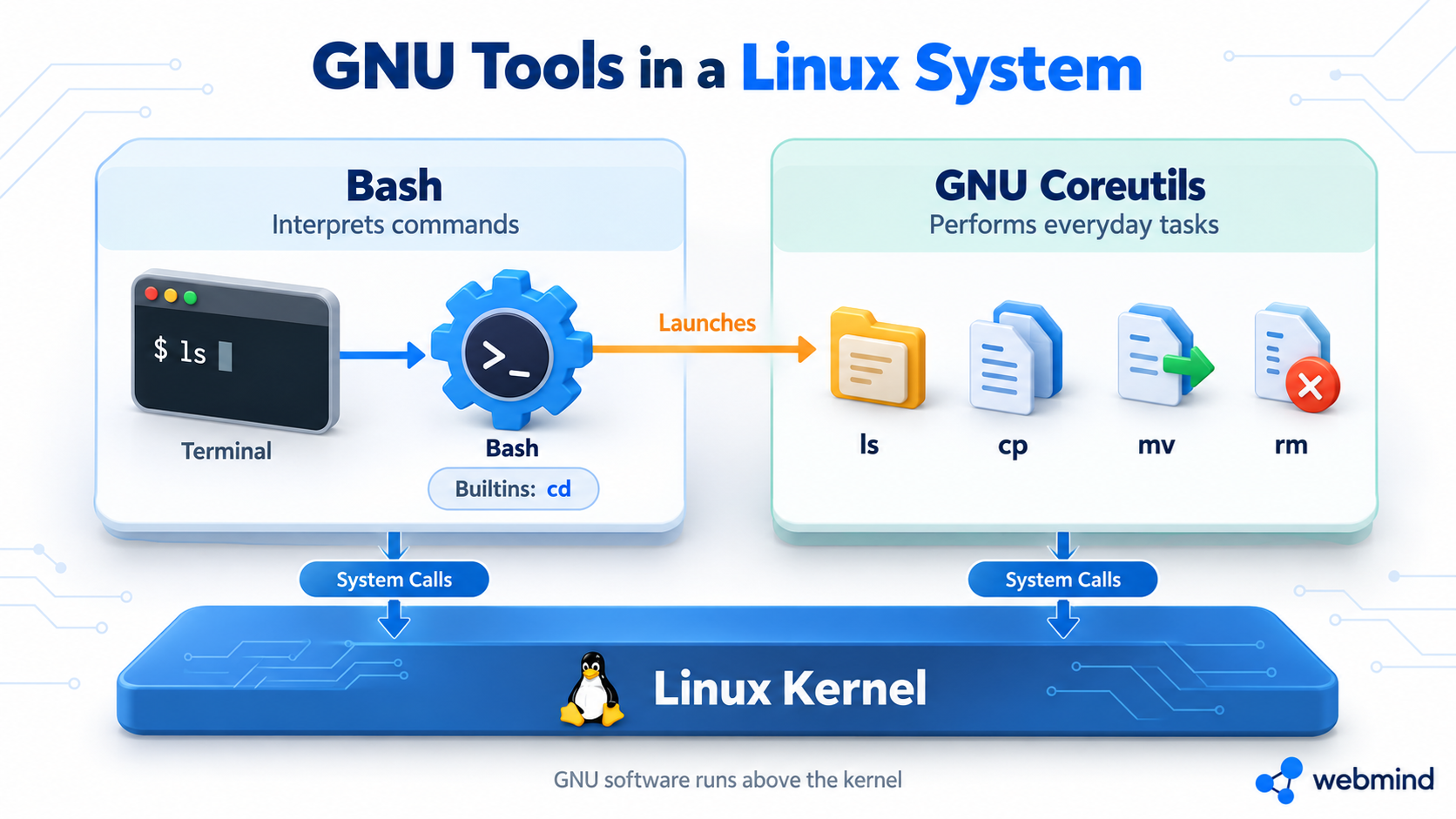
On a typical GNU/Linux distribution, GNU software appears throughout the command-line environment and development tools. Some components are directly visible to users; others work quietly behind the scenes.
Bash: Interpreting Commands
Bash is a command-line shell developed by the GNU Project. A shell interprets commands, launches programs, and supports features such as variables, redirection, pipelines, and scripting.
The terminal window and the shell are different components. The terminal handles text input and output, while the shell interprets the commands entered through it.
Bash is widely used, but it is not the only shell available. A Linux system can use other shells without changing its kernel.
GNU Coreutils: Performing Everyday Tasks
GNU Coreutils supplies many familiar utilities for working with files, directories, and text. Examples include ls for listing directory contents, cp for copying files, mv for moving or renaming files, and rm for removing files.
These utilities are programs that run above the kernel. They are not commands built into the Linux kernel itself.
There is also a distinction between external utilities and shell builtins. For example, cd is normally executed inside the shell because it must change the shell’s own working directory. Some command names, including pwd and echo, can have both a shell builtin and a separate executable implementation.
glibc: Supporting Running Programs
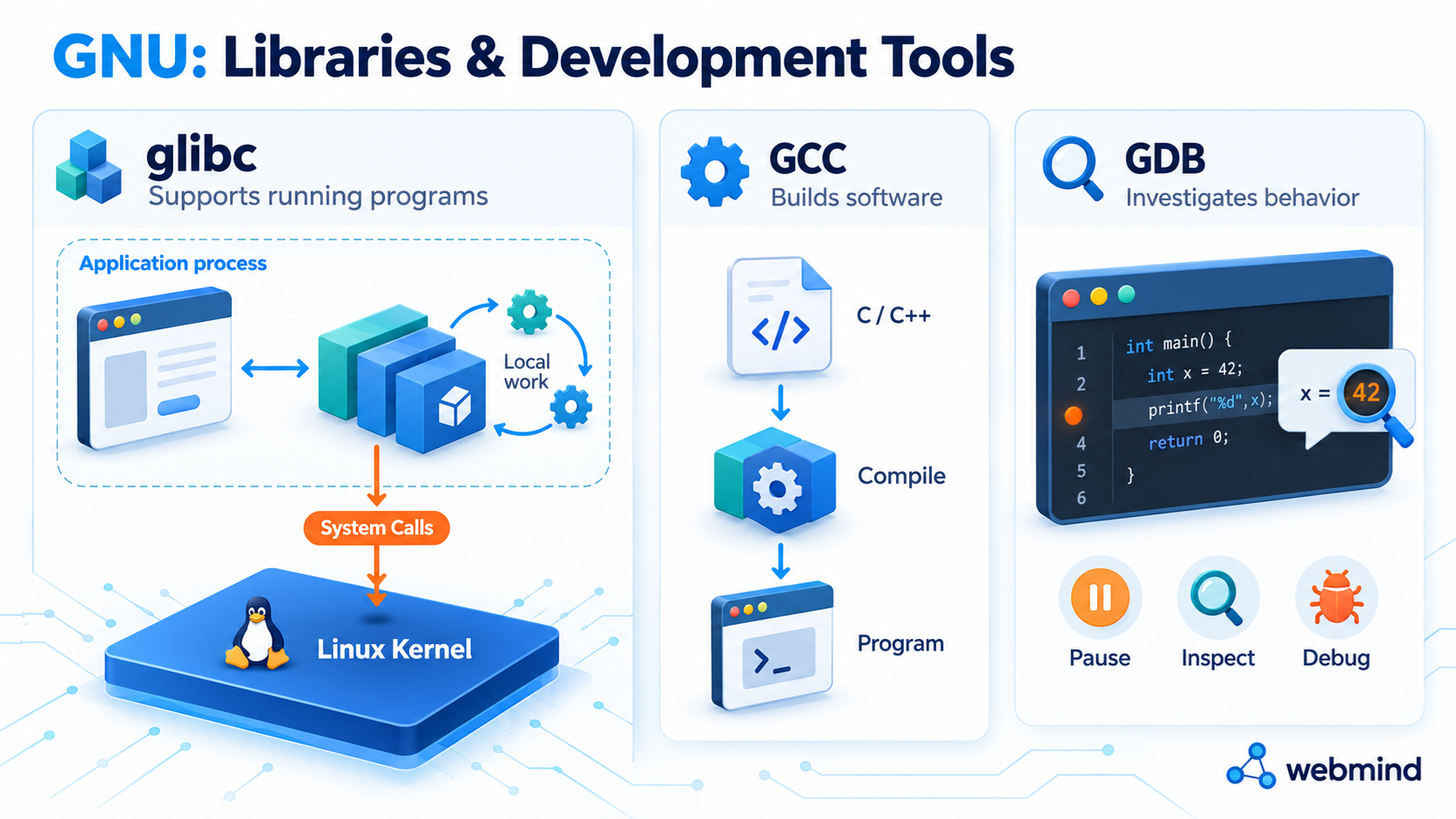
The GNU C Library, usually called glibc, provides functions used by many programs. These include facilities for handling strings, managing memory allocations, performing input and output, and accessing operating system services.
A library is reusable code that applications can call instead of implementing every operation themselves.
Some library functions perform their work entirely within the application’s process. Others request services from the kernel through system calls. Consequently, calling a library function does not always mean entering the kernel.
GCC: Building Software
GCC, the GNU Compiler Collection, provides compilers for languages including C and C++. It helps turn source code written by developers into code that can run on a target machine.
A compiler is essential for building many kinds of software, but it does not need to be installed on every computer that runs the finished programs. A server or desktop can run applications that were compiled elsewhere.
GDB: Investigating Program Behavior
GDB, the GNU Debugger, helps developers examine running programs, pause execution, inspect values, and investigate failures.
Together, these examples show the breadth of GNU’s contribution: interactive tools, basic utilities, runtime libraries, and software development tools.
Chapter 4: How GNU and Linux Came Together
By the early 1990s, GNU had developed many important operating system components. A practical kernel remained a major missing piece in the intended GNU system.
GNU had its own kernel effort, GNU Hurd, whose development began in 1990. Hurd uses a different design from Linux, with operating system services implemented through servers above a microkernel. It would therefore be inaccurate to say that GNU never had a kernel project.
In 1991, Linus Torvalds began developing the Linux kernel. In 1992, Linux became free software under the GNU General Public License, allowing it to be combined and redistributed with GNU software as part of a free operating system.
The combination brought together complementary work: Linux supplied the kernel, while GNU supplied many of the tools and libraries needed for a useful operating environment.
Making everything work together still required substantial engineering. Developers had to adapt software, resolve compatibility problems, build installation tools, and maintain working collections of packages.
Linux also remained a separate project. Its use alongside GNU software did not make it a GNU-owned kernel or merge the two projects into one organization.
The Linux kernel today is licensed under GPL version 2 only, with an explicit system-call exception. Its licensing is not simply interchangeable with the latest GPL version.
Chapter 5: What Happens When You Type ls?
A concrete example makes the relationship easier to see.
Imagine you are using Bash in a terminal on a typical Ubuntu or Debian installation. You type ls and press Enter.
First, the terminal passes your input to Bash. Bash interprets the command. For this simplified example, assume there is no alias or shell function changing what ls means.
Next, Bash locates and launches the ls executable. On a typical GNU/Linux installation, this program comes from GNU Coreutils. Bash requests that the kernel create and execute the process.
The ls program requests directory information. It uses library functions and system calls to obtain directory entries and, where necessary, information about the files.
The Linux kernel handles the underlying filesystem operations. It checks access permissions and obtains the requested information through its filesystem infrastructure. Some information may already be cached in memory, so displaying a directory does not necessarily require a fresh physical storage access.
Finally, ls formats the results and writes them to its output. The terminal displays the text, and Bash presents another prompt after the command finishes.
The work is shared across distinct components:
- The terminal handles text interaction.
- Bash interprets the command and launches the program.
- GNU ls performs the directory-listing task.
- The C library provides supporting functions and interfaces.
- The Linux kernel manages the process and the required system resources.
This is why calling ls a “Linux command” is convenient in everyday language, even though the program itself is not part of the Linux kernel.
Chapter 6: What Ubuntu and Debian Add
Most people do not assemble their own operating system by downloading a kernel and collecting individual tools. They install a distribution, often shortened to distro.
A distribution selects, builds, integrates, tests, and delivers software as a usable system. Debian, for example, describes itself as a complete operating system, with much of its basic tooling coming from GNU.
Ubuntu and Debian combine the Linux kernel, GNU components, and software from many other projects. Depending on the installation, this can include system services, networking tools, a package manager, an installer, a graphical environment, and applications.
The distribution also provides repositories and an update process. These make it possible to install compatible packages and receive fixes without manually rebuilding the entire system.
A distribution is more than a different appearance placed on the same kernel. Distributions can make different choices about package formats, default software, configuration, release schedules, and maintenance policies.
A desktop installation and a minimal server installation can also contain very different software while belonging to the same distribution.
For this reason, “GNU plus Linux” is a useful starting explanation, but a complete modern distribution contains contributions from a much wider community.
Chapter 7: Why Some People Say GNU/Linux
The name GNU/Linux recognizes the combination of GNU software and the Linux kernel. The GNU Project promotes this name to acknowledge GNU’s contribution and the free software goals behind its development.
The shorter name Linux is widely used for complete operating systems, distributions, and the broader ecosystem. Its meaning depends on context.
If someone discusses Linux memory management or device drivers, they are probably referring to the kernel. If they say they installed Linux on a laptop, they usually mean a complete distribution.
For beginners, the useful lesson is to recognize these different meanings:
Linux kernel identifies the core resource-management component.
GNU/Linux identifies a system combining the Linux kernel with substantial GNU system software.
Ubuntu, Debian, and other distribution names identify particular integrated operating systems.
Understanding the components matters more than treating every informal use of “Linux” as a technical mistake.
Chapter 8: Not Every Linux-Based System Uses the Same GNU Components
The relationship becomes clearer when we look at systems that make different choices above the kernel.
Android: Linux with a Different Software Environment
Android uses a Linux-based kernel, but its standard application environment differs substantially from a conventional GNU/Linux desktop. Android uses Bionic as its C library rather than glibc, alongside its own runtime, framework, and system services.
This illustrates an important principle: using the Linux kernel does not require a system to use the traditional GNU user environment.
Alpine Linux: Alternative Libraries and Utilities
Alpine Linux is built around musl libc and BusyBox. These provide alternatives to glibc and many GNU command-line utilities in its base environment. GNU packages can still be installed when needed.
This also explains why a familiar command name may behave differently across systems. A command provided by BusyBox may support a different set of options from its GNU counterpart.
Why This Matters in Practice
When following a tutorial, the instruction “run this on Linux” may not tell you enough. You may also need to know the distribution, shell, library environment, and implementation of a particular utility.
The kernel is only one part of software compatibility. Two systems can both use Linux while offering different tools and application environments.
Conclusion
GNU and Linux are closely connected, but they describe different projects and different parts of the system.
GNU began as an effort to build a complete free Unix-like operating system. It produced many important tools and libraries, including Bash, GNU Coreutils, GCC, glibc, and GDB. Linux supplied a kernel that could manage hardware resources and provide the system services those programs needed.
Distributions such as Ubuntu and Debian bring these components together with software from many other projects, then provide installation, package management, configuration, and ongoing updates.
When you enter a command, you are seeing these contributions cooperate: a shell interprets your request, a program performs the task, libraries support its execution, and the kernel provides access to system resources.
Linux is the kernel. GNU supplies many essential components. A distribution brings them and other software together into the operating system you use.