File System Implementations
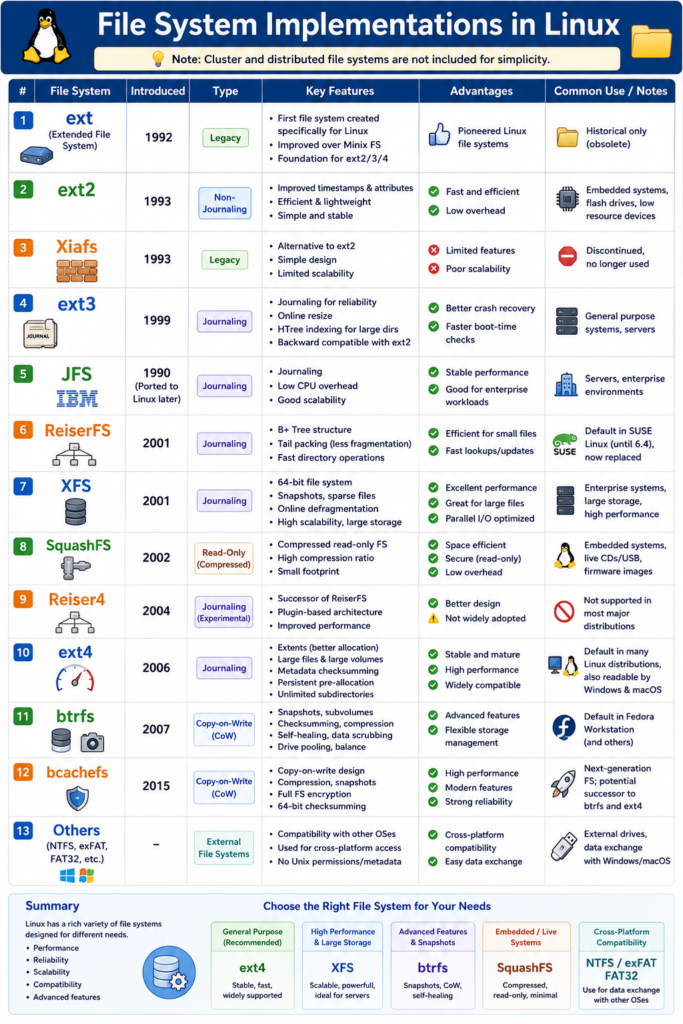
Linux supports many different file systems, each designed with different goals such as performance, reliability, scalability, compatibility, or storage efficiency.
Over the years, Linux file systems evolved from simple designs into advanced storage platforms with features like journaling, snapshots, compression, and self-healing.
Note: For simplicity, cluster and distributed file systems are not included here.
1. ext (Extended File System)
The original Extended File System, commonly called ext, was introduced in 1992 as the first file system designed specifically for Linux.
It replaced the older Minix file system and became the foundation for the entire ext family.
Key features:
- First native Linux file system
- Improved filename and partition limits over Minix
- Foundation for ext2, ext3, and ext4
Although ext is obsolete today, it played an important historical role in early Linux development.
2. ext2
The Second Extended File System (ext2) was introduced in 1993 as a major improvement over ext.
Unlike modern file systems, ext2 does not use journaling.
Features:
- Better performance and stability
- Improved metadata handling
- Efficient directory structure
- Low overhead
Advantages:
- Lightweight and fast
- Suitable for flash drives and embedded systems
Disadvantages:
- No journaling
- Longer recovery times after crashes or power failures
Because of its simplicity, ext2 is still occasionally used in low-resource environments.
3. Xiafs
Xiafs was introduced in 1993 as another Linux file system alternative.
It attempted to improve reliability and scalability compared to early Linux file systems.
However, Xiafs had limited features and could not compete with ext2.
Characteristics:
- Simple design
- Limited scalability
- Smaller maximum file sizes
- Eventually abandoned
Today, Xiafs is considered historically important but obsolete.
4. ext3
The Third Extended File System (ext3) was released in 1999.
Its most important improvement was the addition of journaling.
A journal records pending file system changes before they are fully written to disk, greatly improving crash recovery.
Major features:
- Journaling support
- Faster recovery after improper shutdowns
- Backward compatibility with ext2
- Online file system resizing
- HTree indexing for large directories
ext3 became one of the most widely used Linux file systems for many years because of its stability and reliability.
5. JFS (Journaled File System)
JFS was originally developed by IBM and later ported to Linux.
It focuses on efficient CPU usage and stable performance under heavy workloads.
Features:
- Journaling
- Low CPU overhead
- Good scalability
- Efficient large-file handling
Advantages:
- Stable performance
- Good for servers and enterprise systems
Disadvantages:
- Smaller community support
- Less popular after ext4 became dominant
Although less common today, JFS is still respected for its efficiency.
6. ReiserFS
ReiserFS was introduced in 2001 and became known for its innovative internal structure.
It used B+ Trees for fast file and directory operations.
Features:
- Efficient small-file storage
- Tail packing technology
- Fast directory lookups
- Journaling support
ReiserFS was once the default file system in early SUSE Linux releases.
However, development slowed over time and it was eventually replaced by ext3 and ext4.
7. XFS
XFS is a high-performance 64-bit journaling file system originally developed by SGI and later ported to Linux in 2001.
It is optimized for large-scale storage systems and parallel I/O workloads.
Features:
- Journaling
- Online defragmentation
- Large file and partition support
- High scalability
- Parallel I/O optimization
- Sparse file support
Advantages:
- Excellent performance for large files
- Highly scalable
- Efficient for servers and data centers
XFS is now the default file system in several enterprise Linux distributions.
8. SquashFS
SquashFS is a compressed, read-only file system introduced in 2002.
It is widely used in embedded systems and Linux live environments.
Features:
- High compression ratio
- Read-only design
- Low storage overhead
- Small footprint
Common uses:
- Embedded Linux devices
- Live CDs and live USB systems
- Firmware images
Because it is read-only, SquashFS is very secure and space-efficient.
9. Reiser4
Reiser4 was designed as the successor to ReiserFS.
It introduced a more advanced architecture and improved performance.
Features:
- Better scalability
- Plugin-based architecture
- Improved performance
- Advanced storage design
Despite its technical strengths, Reiser4 never gained widespread adoption and is not officially supported by most major Linux distributions.
10. ext4
ext4 was released in 2006 as the successor to ext3 and quickly became the standard Linux file system.
It combines high performance, reliability, and backward compatibility.
Major features:
- Journaling
- Large file support
- Extents for efficient storage allocation
- Metadata checksumming
- Persistent pre-allocation
- Unlimited subdirectories
- Faster fsck operations
Advantages:
- Stable and mature
- Excellent general-purpose performance
- Widely supported
Today, ext4 remains the default file system for many Linux distributions.
11. btrfs (B-tree File System)
btrfs was introduced in 2007 as a modern Linux file system with advanced storage management features.
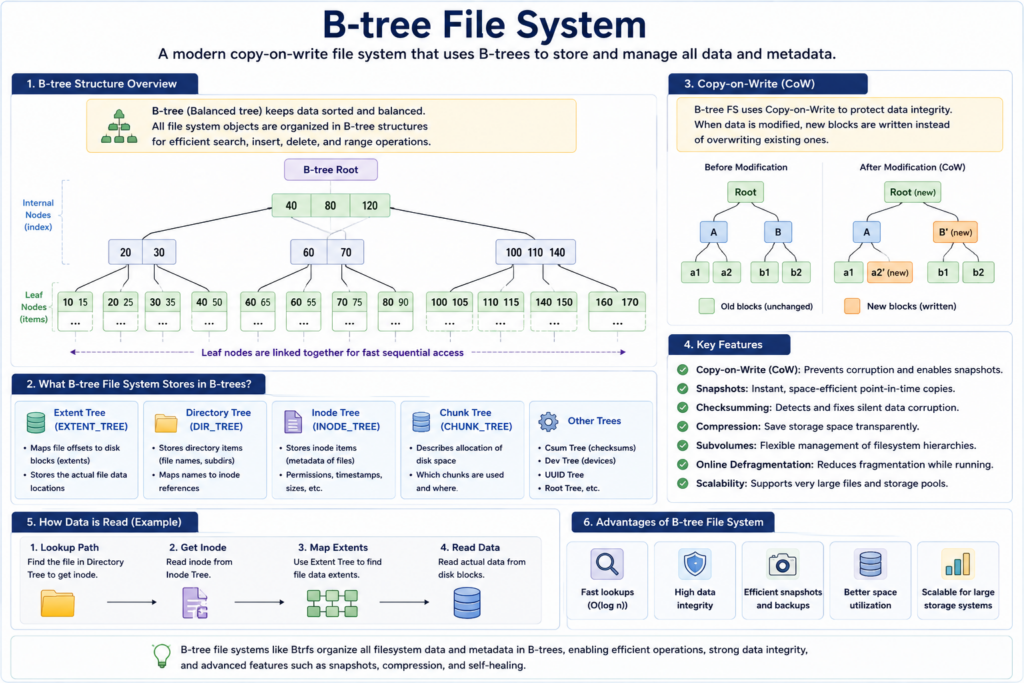
It uses a copy-on-write (CoW) design.
Features:
- Snapshots
- Self-healing
- Checksumming
- Compression
- Drive pooling
- Subvolumes
- Online defragmentation
Advantages:
- Advanced storage capabilities
- Excellent backup and recovery features
- Flexible storage management
btrfs is increasingly popular for modern Linux desktops and servers.
12. bcachefs
bcachefs is a newer Linux file system announced in 2015.
It combines high performance with modern copy-on-write features.
Features:
- Native compression
- Snapshots
- Full filesystem encryption
- 64-bit checksumming
- Copy-on-write architecture
Goals:
- Combine the simplicity of ext4 with the advanced features of btrfs
- Deliver high performance with strong reliability
bcachefs is still relatively new but considered highly promising.
13. Other File Systems (NTFS, exFAT, FAT32)
Linux also supports file systems developed for other operating systems.
NTFS
Originally developed for Windows.
Features:
- Journaling
- Permissions
- Large file support
Common use:
- Dual-boot systems
- External drives shared with Windows
exFAT
Designed for flash storage and removable devices.
Advantages:
- Large file support
- Cross-platform compatibility
Common use:
- USB flash drives
- SD cards
FAT32
An older but widely compatible file system.
Advantages:
- Works on almost every operating system
Limitations:
- 4 GB maximum file size
- No journaling
Often used for portable storage devices.
Summary
Linux file systems evolved from simple storage structures into advanced platforms capable of handling:
- Massive storage systems
- High-speed servers
- Snapshots and backups
- Compression
- Self-healing
- Enterprise workloads
Different file systems are optimized for different purposes:
| File System | Best Use |
|---|---|
| ext4 | General Linux systems |
| XFS | Large servers and storage |
| btrfs | Advanced storage features |
| SquashFS | Embedded and live systems |
| FAT32/exFAT | Portable storage |
| NTFS | Windows compatibility |
Choosing the right file system depends on the balance between:
- Performance
- Reliability
- Compatibility
- Scalability
- Advanced storage features