Introduction
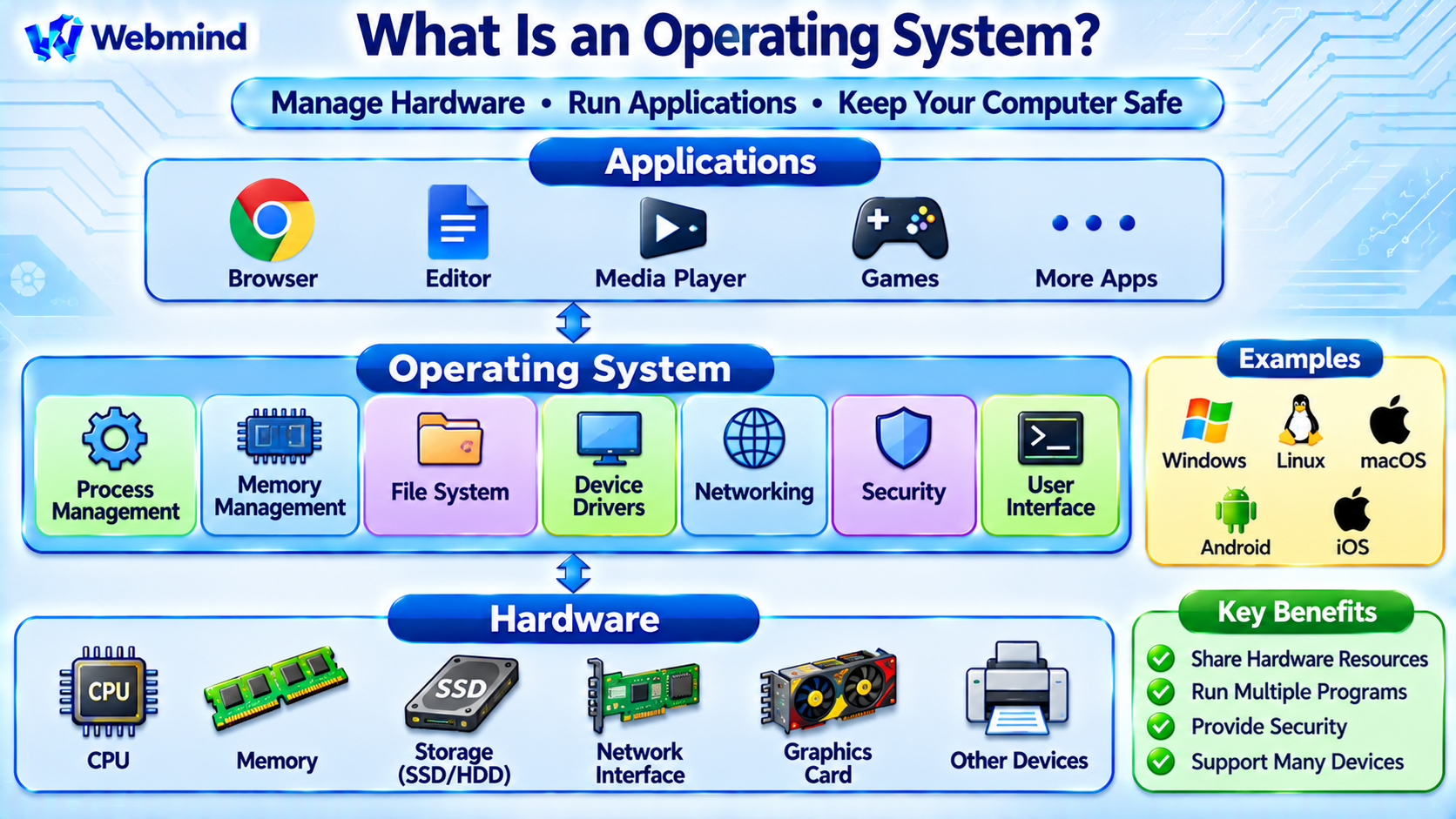
An Operating System (OS) is system software that manages a computer’s hardware resources and provides services for application programs.
It acts as an intermediary between applications and hardware components such as the CPU, memory, storage devices, and network interfaces.
Common operating systems include Microsoft Windows, Linux, macOS, Android, and iOS.
Without an operating system, most general-purpose computers would be difficult to use because individual applications would need to manage hardware access and many essential system functions themselves.
Operating systems provide the foundation for desktops, laptops, servers, smartphones, embedded devices, and cloud computing systems.
How Does an Operating System Work?
An operating system coordinates hardware resources and software execution.
For example, when a user opens a web browser, the OS creates or manages the required processes, allocates memory, schedules CPU execution, and provides access to files and network connections.
When the browser needs data from storage, it requests the operation through operating-system interfaces rather than directly controlling the storage hardware.
The operating system processes these requests and communicates with the appropriate device drivers.
This architecture allows applications to use hardware through consistent interfaces while the OS manages resource sharing, protection, and reliability.
Main Components of an Operating System
A modern operating system includes several major components.
Kernel: The core component responsible for managing processes, memory, devices, and other fundamental system resources.
Process Scheduler: Determines which runnable tasks receive CPU execution time.
Memory Manager: Allocates memory, manages virtual memory, and helps isolate processes.
File System: Organizes files and directories and provides mechanisms for storing and retrieving data.
Device Drivers: Allow the operating system to communicate with hardware devices.
Networking Stack: Implements networking protocols and provides communication services.
System Libraries: Offer reusable programming interfaces for applications.
User Interface: Provides ways for users to interact with the system through graphical desktops, command-line shells, or other interfaces.
These components work together to provide a usable computing environment.
What Is the Kernel?
The kernel is the central component of an operating system.
It operates with elevated hardware privileges and manages essential system resources.
For example, the kernel controls process scheduling, memory management, device access, and many input/output operations.
Applications normally execute in user mode, where access to protected hardware resources is restricted.
When an application needs an operating-system service, it may use a system call to request assistance from the kernel.
This separation helps protect the operating system and other processes from accidental or unauthorized interference.
Different operating systems use different kernel architectures, including monolithic, microkernel, and hybrid approaches.
What Is Process Management?
A process is a running instance of a program with its own execution context and associated resources.
An operating system may manage hundreds or thousands of processes.
Because CPU resources are limited, the scheduler determines when each runnable process or thread executes.
On a multi-core processor, multiple threads can run simultaneously on different CPU cores.
The OS also provides mechanisms for creating, terminating, and coordinating processes.
Process isolation helps prevent one application from freely accessing another application’s protected memory.
These capabilities support multitasking and reliable application execution.
What Is Memory Management?
Memory management controls how programs use a computer’s memory resources.
Modern operating systems typically provide virtual memory, allowing each process to operate within its own virtual address space.
The Memory Management Unit (MMU) helps translate virtual addresses into physical memory addresses according to mappings configured by the OS.
This allows memory protection, controlled sharing, and flexible allocation.
The operating system can also move certain memory pages between RAM and secondary storage when necessary, although the exact mechanisms depend on the system.
Memory management is essential for running multiple applications safely and efficiently.
What Is a File System?
A file system organizes data into files and directories.
It provides methods for creating, reading, writing, renaming, and deleting stored information.
Different operating systems support different file systems.
For example, Windows commonly uses NTFS, while Linux systems frequently use ext4, XFS, or Btrfs.
macOS commonly uses APFS.
The operating system’s file-system interfaces allow applications to access stored information without directly managing physical disk sectors.
File permissions and access-control mechanisms help protect data from unauthorized use.
What Are Device Drivers?
A device driver is software that allows an operating system to control or communicate with a hardware device.
Examples include storage controllers, network adapters, graphics devices, keyboards, and USB controllers.
Drivers translate operating-system requests into operations understood by the hardware.
For example, when an application sends data over a network, the operating system uses its networking stack and the appropriate network-device driver to transmit information.
Driver architecture varies between operating systems.
Some drivers execute inside the kernel, while others may operate partly or entirely in user space.
What Are System Calls?
System calls provide controlled entry points through which applications request services from the operating-system kernel.
For example, an application may request that the OS open a file, read data, allocate certain memory resources, or create a new process.
On Linux, common system calls include openat, read, write, and execve.
Applications frequently access these operations through system libraries rather than invoking raw system calls directly.
System calls form an important boundary between user-space programs and privileged operating-system functions.
This boundary supports resource management and system protection.
What Is a Shell?
A shell is a program that provides an interface for interacting with the operating system.
A command-line shell accepts commands and executes programs or built-in operations.
For example, Linux commonly uses Bash, while Windows provides PowerShell and other command environments.
A user may type pwd to display the current directory or ls to list files in a Unix-like environment.
A shell is not the same as the kernel.
The shell operates as a user-facing program, while the kernel manages core system resources.
Graphical interfaces provide another way to interact with the OS.
What Is Multitasking?
Multitasking allows an operating system to manage multiple running tasks.
For example, a computer may run a browser, text editor, music player, and background network services at the same time.
The operating system schedules threads across available CPU cores.
When there are more runnable threads than CPU execution resources, the scheduler switches between them.
This switching creates the appearance of simultaneous progress even on systems with a limited number of cores.
Multitasking requires scheduling, memory protection, interrupt handling, and other operating-system mechanisms.
How Does an OS Manage Networking?
Modern operating systems include networking software that allows applications to communicate across networks.
The networking stack commonly implements protocols such as IP, TCP, and UDP.
Applications use sockets and other operating-system interfaces to send and receive data.
For example, a web browser may establish a TCP connection to a server for HTTPS communication, or use QUIC over UDP for HTTP/3.
The OS manages network interfaces, packet processing, routing decisions, and related communication functions.
Firewalls and other security mechanisms may also control which network traffic is permitted.
Operating System vs. Application Software
An operating system provides the environment in which application software runs.
Operating System: Manages hardware resources, processes, memory, files, devices, and essential system services.
Application Software: Performs tasks such as web browsing, document editing, video processing, or software development.
For example, Microsoft Windows is an operating system, while a web browser running on Windows is an application.
Applications depend on operating-system interfaces to access many hardware and system resources.
Although some applications interact with hardware through specialized mechanisms, the OS generally coordinates and protects access to shared resources.
What Is the Difference Between Linux, Windows, and macOS?
Linux, Windows, and macOS are widely used operating-system platforms, but their architectures and ecosystems differ.
Linux: Uses the Linux kernel and is commonly combined with GNU or other user-space tools. It is widely used in servers, embedded systems, cloud infrastructure, and desktop computing.
Windows: Microsoft’s operating-system family, widely used on personal computers, business systems, and enterprise servers.
macOS: Apple’s Unix-based desktop operating system, built on Darwin and using the XNU kernel.
All three provide process management, memory management, file systems, device drivers, networking, and application interfaces.
However, they differ in system architecture, software distribution, user interfaces, administration tools, and hardware support.
What Are Real-Time Operating Systems?
A Real-Time Operating System (RTOS) is designed to provide predictable responses to events within defined timing constraints.
Real-time systems are important in applications where meeting a deadline matters as much as producing the correct result.
Examples include industrial controllers, automotive electronics, robotics, and certain medical devices.
Real-time operating systems commonly provide priority-based scheduling, interrupt handling, and synchronization mechanisms intended to support predictable timing.
Examples include FreeRTOS, Zephyr, and QNX.
A real-time operating system is not necessarily faster than a general-purpose operating system. Its primary goal is predictable timing behavior.
Why Is Operating System Security Important?
Operating systems control access to critical computing resources.
They provide security mechanisms such as user permissions, process isolation, memory protection, authentication, and access controls.
Modern systems may also support secure boot, application sandboxing, encryption, and hardware-assisted security features.
For example, memory protection helps prevent an ordinary application from accessing arbitrary kernel memory.
Security updates correct vulnerabilities in operating-system components and related software.
Because the OS manages hardware and application execution, its security is essential to the overall security of the computer.
Where Are Operating Systems Used?
Operating systems are used in many types of computing devices.
Personal Computers: Run desktop applications and manage user interaction.
Servers: Support websites, databases, file sharing, and network services.
Smartphones: Manage mobile applications, wireless communication, and device resources.
Cloud Computing: Provide the software foundation for virtual machines, containers, and infrastructure services.
Embedded Systems: Control specialized devices, industrial equipment, and consumer electronics.
Real-Time Systems: Support applications requiring predictable responses to external events.
Some simple embedded devices operate without a general-purpose operating system, using firmware that directly controls the hardware.
Conclusion
An operating system is system software that manages computer hardware and provides services for applications.
Its major responsibilities include process scheduling, memory management, file systems, device control, networking, and security.
The kernel performs essential low-level operations, while system libraries, shells, and graphical interfaces provide ways for programs and users to interact with the system.
Operating systems such as Windows, Linux, macOS, Android, and iOS form the foundation of modern computing.
Understanding operating systems provides an essential foundation for studying Linux architecture, CPU scheduling, virtual memory, system calls, file systems, computer security, and software development.