Introduction
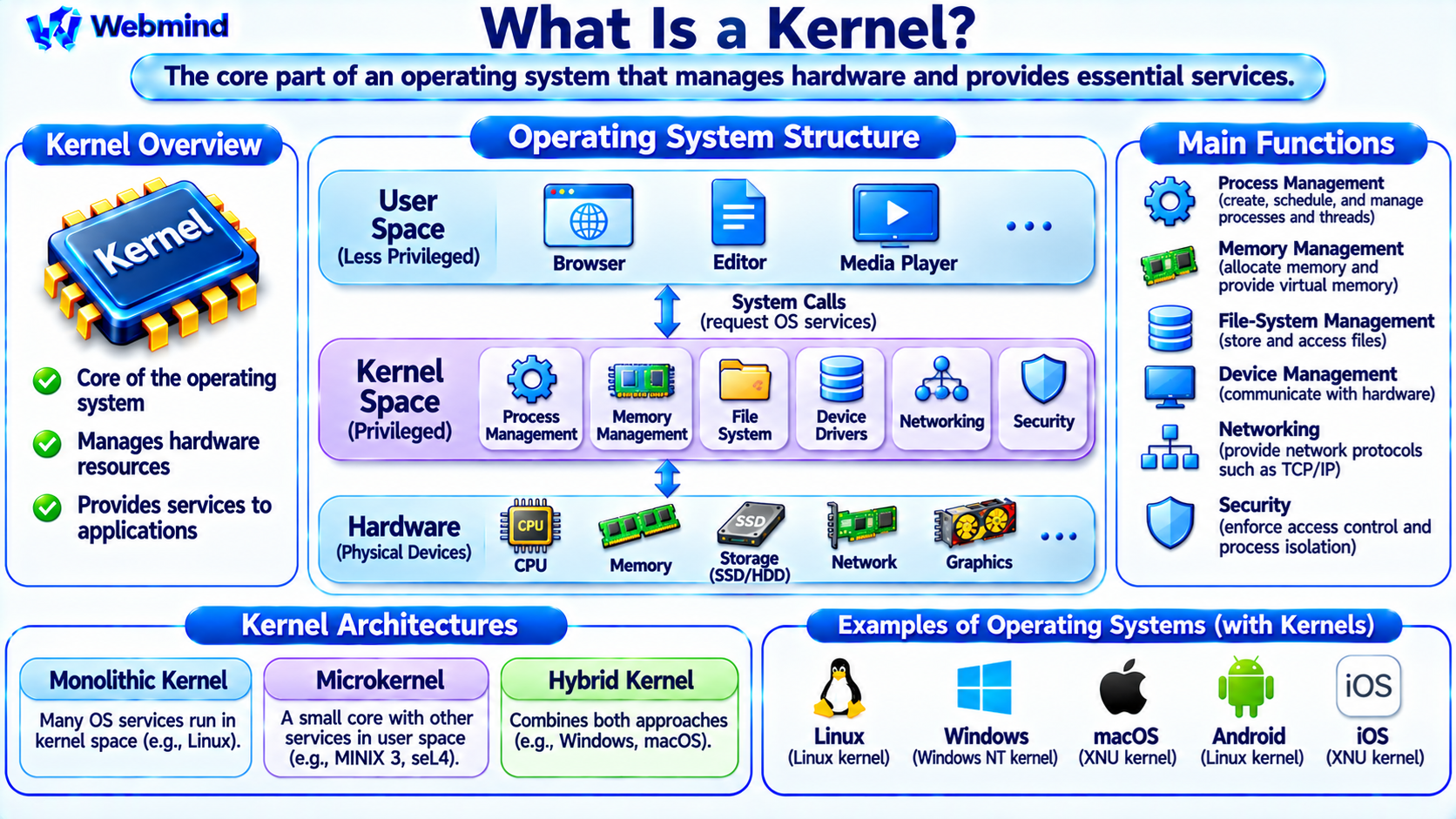
A kernel is the core component of an operating system that manages computer hardware resources and provides essential services to software applications.
It controls how programs access the CPU, memory, storage devices, and other hardware components.
The kernel operates with elevated system privileges and provides a controlled interface between applications and hardware.
Modern operating systems such as Linux, Windows, macOS, Android, and iOS all use kernels, although their internal architectures differ.
Understanding the kernel is essential for learning operating systems, Linux architecture, process management, memory management, device drivers, and computer security.
How Does a Kernel Work?
When an application runs, it frequently needs services that require access to hardware or protected system resources.
For example, a program may need to read a file, allocate memory, send network data, or create another process.
Instead of directly controlling the hardware, the program normally requests these services through operating-system interfaces.
The kernel receives the request, checks the relevant conditions and permissions, and coordinates the required operations.
For example, when an application reads a file, the kernel may use the file-system layer, memory cache, and storage-device driver to obtain the requested data.
The kernel then makes the result available to the application.
This arrangement allows multiple programs to share hardware resources while maintaining isolation and protection.
Main Functions of a Kernel
A modern operating system kernel performs several important functions.
Process Management: Creates, schedules, and manages processes and threads.
Memory Management: Manages virtual memory, physical memory allocation, and memory protection.
Device Management: Communicates with hardware through device drivers and related interfaces.
File-System Management: Provides mechanisms for accessing files, directories, and storage devices.
Interrupt Handling: Responds to hardware events that require processor attention.
System Calls: Provides controlled interfaces for applications to request kernel services.
Networking: Implements core networking functions such as IP routing, TCP, UDP, and socket operations.
Security: Enforces access permissions, process isolation, and other system protection mechanisms.
These functions form the foundation of a general-purpose operating system.
What Is Kernel Space?
Modern processors support different privilege levels that separate ordinary applications from sensitive operating-system code.
Kernel space refers to the privileged execution environment in which the kernel operates.
In this environment, the kernel can execute privileged instructions and manage protected hardware resources.
User space is the less-privileged environment in which most applications run.
For example, a web browser normally executes in user space, while the kernel manages protected memory mappings and hardware access.
This separation prevents ordinary applications from directly modifying critical operating-system structures.
The precise privilege mechanisms depend on the processor architecture and operating system.
What Is a System Call?
A system call is a controlled mechanism through which a user-space program requests a service from the kernel.
For example, a Linux application may use system calls such as read, write, openat, or execve.
When a program requests a system call, the processor transfers execution into the appropriate privileged kernel entry point.
The kernel processes the request and returns a result or error information.
Applications usually access system calls through programming libraries rather than invoking the low-level instruction interface directly.
System calls provide an important boundary between application software and protected operating-system resources.
How Does the Kernel Manage Processes?
A process is a running instance of a program with its own execution context and associated resources.
The kernel manages process creation, termination, scheduling, and resource allocation.
A process may contain one or more threads, which are execution units that can be scheduled independently.
The scheduler determines which runnable threads receive CPU time.
For example, when a computer runs a browser, text editor, and background services, the kernel coordinates their execution across available CPU cores.
On a single core, the scheduler switches between runnable tasks. On a multi-core processor, multiple threads may execute simultaneously.
This enables multitasking and efficient hardware utilization.
How Does the Kernel Manage Memory?
The kernel controls how applications use memory.
Modern operating systems generally use virtual memory, allowing processes to operate within separate virtual address spaces.
The Memory Management Unit (MMU) translates virtual addresses into physical addresses using mappings configured by the operating system.
The kernel manages these mappings, physical memory allocation, page faults, and memory protection.
For example, two applications may use the same virtual address while accessing different physical memory locations.
This separation helps prevent one process from accidentally reading or modifying another process’s private memory.
The kernel may also reclaim memory or move eligible memory pages to secondary storage when necessary.
What Are Kernel Device Drivers?
A device driver is software that allows an operating system to communicate with a hardware device.
Examples include network adapters, storage controllers, graphics devices, and USB peripherals.
When an application requests a hardware operation, the kernel may use the appropriate driver to communicate with the device.
For example, sending a network packet may involve the kernel networking stack and a network interface driver.
Many Linux device drivers execute in kernel space, although some operating systems and device architectures also support user-space drivers.
Drivers are important because different hardware devices require different control procedures.
A faulty kernel-mode driver can potentially affect the stability or security of the entire operating system.
How Does the Kernel Handle Interrupts?
An interrupt is a mechanism that allows hardware or software events to request processor attention.
For example, a network interface may generate an interrupt when new data arrives.
The processor temporarily transfers control to an appropriate interrupt-handling routine.
The kernel identifies the event and performs the required processing or schedules additional work.
Interrupts allow the system to respond to hardware events without continuously checking every device.
However, excessive interrupt activity can increase CPU overhead.
Modern kernels use techniques such as interrupt moderation and deferred processing to improve efficiency.
Monolithic Kernel vs. Microkernel
Operating-system kernels can use different architectural designs.
Monolithic Kernel
A monolithic kernel places many operating-system services, including scheduling, memory management, file systems, and device drivers, within the privileged kernel environment.
Linux is commonly classified as a monolithic kernel, although it supports dynamically loadable kernel modules.
This architecture can provide efficient communication between kernel components.
However, bugs in privileged kernel code can have system-wide consequences.
Microkernel
A microkernel keeps a smaller set of essential mechanisms inside the privileged kernel.
Other services, such as certain drivers or file-system components, may operate as separate user-space processes.
Examples of microkernel-based systems include MINIX 3 and seL4-based systems.
This architecture can improve fault isolation and modularity, although communication between components introduces design and performance considerations.
Hybrid Kernel
A hybrid kernel combines architectural ideas associated with monolithic kernels and microkernels.
Windows NT and Apple’s XNU are commonly described as hybrid-kernel architectures.
The distinctions between these categories are not always absolute because operating systems adopt different implementation techniques.
What Is the Linux Kernel?
The Linux kernel is an open-source operating-system kernel originally created by Linus Torvalds in 1991.
It manages processes, memory, device drivers, networking, file systems, and other essential operating-system functions.
The Linux kernel is used in desktop computers, servers, cloud platforms, embedded systems, and Android devices.
Linux distributions combine the kernel with user-space software, system libraries, utilities, package managers, and other components.
For example, Ubuntu, Debian, Fedora, and Arch Linux use the Linux kernel but provide different software environments.
The Linux kernel itself is not a complete desktop operating-system distribution.
Kernel vs. Operating System: What Is the Difference?
A kernel is the central component of an operating system, but it is not necessarily the complete operating system.
Kernel: Manages essential hardware resources and provides privileged system services.
Operating System: Includes the kernel together with other system software needed to provide a usable computing environment.
For example, a Linux distribution may include the Linux kernel, system libraries, a shell, system services, and graphical desktop software.
The kernel manages protected resources, while user-space components provide many administrative and application-level functions.
This distinction is important when studying Linux and other operating-system architectures.
Kernel vs. Shell
A kernel and a shell perform different functions.
The kernel is responsible for core operating-system functions such as process scheduling, memory management, and device access.
A shell is a user-space program that interprets commands and launches other programs.
For example, Bash is a common command-line shell on Linux systems.
When a user executes a command such as ls, the shell launches the appropriate program or performs a built-in operation.
The program interacts with operating-system services through libraries and system calls.
The shell therefore provides an interface for users, while the kernel manages protected system resources.
What Is a Kernel Module?
A kernel module is a component that can be loaded into a running kernel to extend its functionality.
Linux supports loadable kernel modules for many device drivers, file systems, and other features.
For example, a module may provide support for a particular network adapter.
Administrators can inspect loaded Linux modules using the lsmod command.
The modprobe utility can load supported modules and manage their dependencies.
Kernel modules normally execute with kernel privileges, so they must be compatible with the running kernel and should come from trusted sources.
Not every kernel feature is implemented as a module. Many components are compiled directly into the kernel.
What Is Kernel Mode vs. User Mode?
Kernel mode and user mode are processor execution modes with different privilege levels.
Kernel Mode: Allows execution of privileged instructions and access to protected system resources.
User Mode: Restricts ordinary programs from performing operations that could compromise the operating system.
For example, a user-space application cannot normally modify kernel page tables directly.
It must request appropriate services from the operating system.
Modern hardware helps enforce these boundaries through privilege levels, memory protection, and related mechanisms.
This separation is a fundamental part of operating-system security and stability.
How Does the Kernel Affect Performance?
Kernel performance can influence the responsiveness and efficiency of a computer.
Important areas include CPU scheduling, memory management, storage input/output, networking, and interrupt handling.
For example, inefficient scheduling may increase the time runnable tasks spend waiting for CPU resources.
Excessive disk activity or memory pressure may also reduce application performance.
Kernel developers optimize data structures, scheduling policies, memory allocation, and device communication to improve performance.
However, overall system performance depends on hardware, applications, drivers, and workload characteristics as well as the kernel.
How Can You Check the Linux Kernel Version?
Linux provides several ways to inspect kernel information.
The command:
uname -r
displays the running kernel release.
The command:
uname -a
displays additional system information, including the kernel release and architecture-related details.
The file /proc/version also provides information about the running kernel build.
These tools are useful when checking driver compatibility, troubleshooting operating-system problems, or identifying the kernel used by a Linux distribution.
The running kernel version should not be confused with the Linux distribution version.
For example, Ubuntu has its own release version, while the Linux kernel has a separate release number.
Why Is Kernel Security Important?
The kernel operates with extensive system privileges.
A vulnerability in kernel code may allow an attacker to bypass security boundaries, access protected information, or interfere with system operation.
Operating systems therefore use security techniques such as memory protection, access controls, code-signing policies, and hardware-assisted isolation.
Linux also supports security mechanisms such as capabilities, namespaces, seccomp, and Linux Security Modules.
Kernel updates frequently include bug fixes, hardware improvements, and security patches.
Maintaining a supported and updated kernel is important for system reliability and security.
Where Are Kernels Used?
Kernels are essential components of many computing systems.
Desktop Computers: Coordinate applications, memory, devices, and user interaction.
Servers: Manage network services, storage, processes, and system resources.
Cloud Computing: Support virtual machines, containers, and large-scale infrastructure.
Smartphones: Manage mobile hardware, applications, and communication interfaces.
Embedded Systems: Control specialized devices and hardware resources.
Real-Time Systems: Provide scheduling and interrupt mechanisms designed for predictable timing.
Some small embedded systems run directly on hardware without a traditional operating-system kernel.
Conclusion
A kernel is the core component of an operating system responsible for managing hardware resources and providing essential services to software.
Its major functions include process scheduling, memory management, device control, file-system access, networking, interrupt handling, and security enforcement.
Different kernel architectures include monolithic kernels, microkernels, and hybrid kernels.
Linux, Windows, macOS, Android, and iOS all rely on kernels to coordinate hardware and software operations.
Understanding the kernel provides an essential foundation for studying operating systems, Linux architecture, system calls, virtual memory, device drivers, CPU scheduling, and computer security.