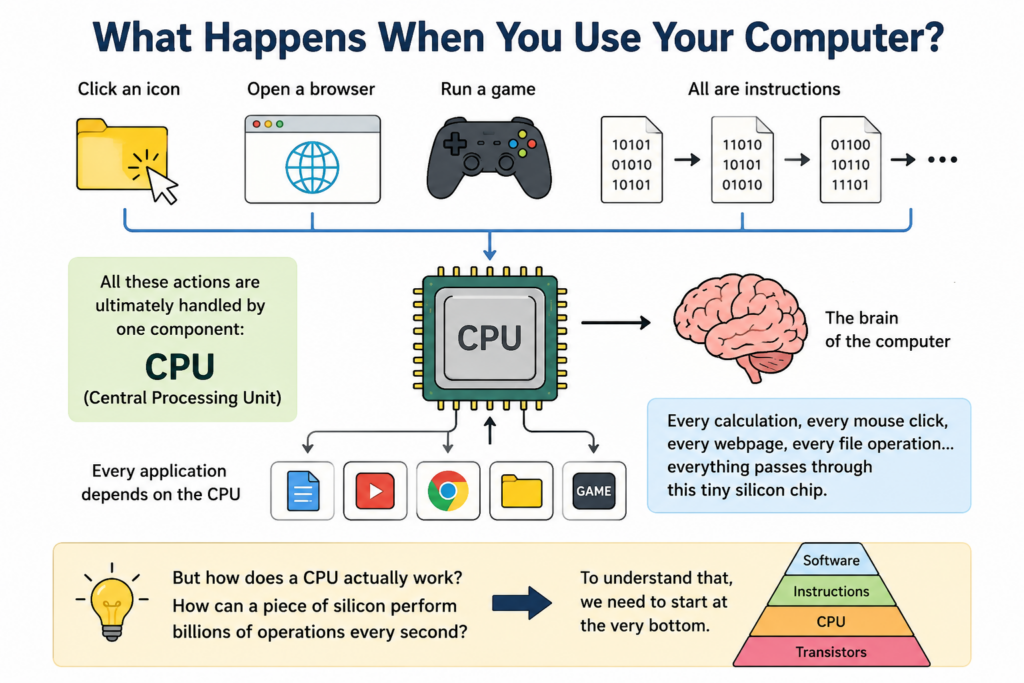
Have you ever wondered what actually happens inside your computer when you click an icon, open a browser, or run a game?
Your computer may seem intelligent.
But deep inside, it is simply following instructions.
The component responsible for executing those instructions is called the CPU.
CPU stands for Central Processing Unit.
It is often called the brain of the computer.
Every application you run eventually depends on the CPU.
Every calculation, every mouse click, every webpage, and every file operation eventually passes through this tiny silicon chip.
But how does a CPU actually work?
How can a piece of silicon perform billions of operations every second?
To understand that, we need to start at the very bottom.
Chapter 1
Everything Starts With Transistors
At the lowest level, a CPU is built from transistors.
A transistor is a tiny electronic switch.
It has only two states.
On.
Or off.
You can think of it like a light switch.
When the switch is on, electricity flows.
When the switch is off, electricity stops.
Modern CPUs contain billions of these switches.
A high-end processor today may contain tens of billions of transistors packed into a small silicon chip.
Individually, a transistor is not very impressive.
It can only represent a binary value.
One.
Or zero.
But when billions of transistors are connected together, something remarkable happens.
They can perform calculations.
Store information.
Make decisions.
And execute programs.
Everything inside a computer ultimately comes from combinations of zeros and ones.
Chapter 2
Logic Gates
A single transistor is useful.
But logic gates are where computation begins.
Logic gates are electronic circuits built from multiple transistors.
They perform simple logical operations.
For example:
AND
OR
NOT
XOR
Each gate receives inputs and produces an output.
Imagine an AND gate.
The output becomes one only when both inputs are one.
Otherwise the output remains zero.
This may seem trivial.
But all computer operations can ultimately be reduced to combinations of logic gates.
Addition.
Subtraction.
Comparison.
Branching.
Everything starts here.
Logic gates are the building blocks of digital computing.
Chapter 3
Building an Arithmetic Unit
Now let’s combine many logic gates together.
Suppose we want to add two binary numbers.
For example:
0011
plus
0101
To perform addition, engineers create circuits called adders.
A simple adder can add two bits.
A larger adder can add multiple bits simultaneously.
By combining many adders together, we can build an Arithmetic Logic Unit.
Usually called the ALU.
The ALU is one of the most important parts of a CPU.
Its job is to perform calculations.
Addition.
Subtraction.
Bitwise operations.
Comparisons.
Whenever software performs math, the ALU is doing the actual work.
Chapter 4
Memory and Registers
A CPU must do more than calculate.
It must also remember things.
This is where registers come in.
Registers are tiny storage locations located directly inside the CPU.
Think of registers as the CPU’s working desk.
They hold data that is actively being processed.
Because registers are located inside the processor, they are extremely fast.
Much faster than system memory.
When the CPU performs an operation such as:
A plus B
The values are first loaded into registers.
The ALU performs the calculation.
Then the result is stored back into a register.
Modern CPUs may contain dozens or even hundreds of internal registers.
Without registers, every calculation would become much slower.
Chapter 5
Instructions
So far we have transistors.
Logic gates.
An ALU.
And registers.
Now we need to tell the CPU what to do.
This is accomplished through instructions.
An instruction is simply a command.
For example:
Add two numbers.
Move data.
Compare values.
Jump to another location.
Every CPU architecture defines its own instruction set.
For example:
x86
ARM
RISC-V
Each instruction is represented as binary data.
To humans, instructions appear as assembly language.
For example:
MOV
ADD
SUB
JMP
But inside the CPU, they are simply patterns of ones and zeros.
Chapter 6
The Fetch Decode Execute Cycle
Now we reach the heart of CPU operation.
The Fetch Decode Execute Cycle.
This cycle repeats continuously billions of times every second.
Step one.
Fetch.
The CPU reads the next instruction from memory.
Step two.
Decode.
The CPU determines what the instruction means.
Step three.
Execute.
The instruction is carried out.
Then the cycle repeats.
Again.
And again.
And again.
Every program running on your computer is ultimately executed through this repeating cycle.
No matter how complex the software appears, the CPU is simply fetching, decoding, and executing instructions.
Chapter 7
Program Counter
But how does the CPU know which instruction comes next?
The answer is the Program Counter.
Usually called the PC.
The Program Counter stores the address of the next instruction to execute.
After an instruction completes, the Program Counter moves forward.
The CPU then fetches the next instruction.
If a branch or jump instruction occurs, the Program Counter changes accordingly.
This allows programs to make decisions.
Create loops.
And execute different code paths.
Without the Program Counter, software could not exist.
Chapter 8
Pipelines
Early CPUs executed one instruction at a time.
This worked.
But it was inefficient.
Engineers discovered a better approach.
Pipelining.
Imagine an automobile assembly line.
One worker installs wheels.
Another installs doors.
Another installs the engine.
Multiple stages work simultaneously.
Modern CPUs use the same idea.
One instruction may be fetched.
Another decoded.
Another executed.
All at the same time.
This dramatically increases performance.
Most modern processors rely heavily on pipelining.
Chapter 9
Cache Memory
The CPU operates incredibly fast.
But main memory is much slower.
If the CPU waited for RAM every time it needed data, performance would collapse.
To solve this problem, engineers created cache memory.
Cache is a small amount of extremely fast memory located close to the CPU.
Frequently used data is stored here.
When the CPU needs information, it first checks the cache.
If the data exists, it can be accessed almost instantly.
Modern processors usually contain multiple cache levels.
L1 Cache.
L2 Cache.
L3 Cache.
The closer the cache is to the CPU, the faster it becomes.
Cache is one of the most important reasons modern CPUs achieve such high performance.
Chapter 10
Multi-Core CPUs
For many years, engineers increased performance by raising clock speeds.
Eventually physical limits appeared.
Heat became a major problem.
Instead of making one core faster, manufacturers began adding more cores.
A modern CPU may contain:
4 cores
8 cores
16 cores
Or even more.
Each core can execute instructions independently.
This allows multiple tasks to run simultaneously.
When you browse the web, play music, and download files at the same time, different CPU cores may handle different workloads.
Multi-core design revolutionized computing.
Chapter 11
Modern CPUs Are Incredibly Complex
Everything we discussed so far is actually a simplified view.
Modern CPUs include many advanced technologies.
Out-of-order execution.
Branch prediction.
Speculative execution.
SIMD instructions.
Virtual memory support.
Hardware security features.
Power management systems.
And much more.
A modern processor may contain tens of billions of transistors working together.
It is one of the most sophisticated machines ever created by humanity.
Conclusion
At its core, a CPU is surprisingly simple.
Transistors create logic gates.
Logic gates create circuits.
Circuits create registers and arithmetic units.
Instructions tell the CPU what to do.
The CPU continuously fetches, decodes, and executes instructions.
Everything from operating systems to web browsers to artificial intelligence ultimately depends on this process.
The next time you open an application or click a button, remember what is happening underneath.
Billions of tiny transistors are switching on and off.
Performing calculations.
Moving data.
And bringing software to life.
That is how a CPU works.