From Electricity to Modern Software
Hello everyone.
Today we’re going to answer one of the most important questions in technology.
How does a computer actually work?
When you press a key on your keyboard, open a browser, or watch a video, millions of operations happen inside the machine every second.
But surprisingly, everything starts with something very simple.
Electricity.
Let’s begin at the very bottom.
1. Everything Starts with Electricity
Inside a computer, billions of tiny electronic switches constantly turn on and off.
An electrical signal can exist in two states.
On.
Or off.
High voltage.
Or low voltage.
Because there are only two possible states, computers use a numbering system based on two symbols.
Zero and one.
This system is called binary.
A binary digit is called a bit.
A bit can only be:
0
or
1
Nothing else.
At first this may seem very limiting.
How can a machine that only understands zeros and ones do something as complex as artificial intelligence?
The answer is that enormous complexity can emerge from very simple building blocks.
Just like every book is made from a small alphabet, every computer operation is built from bits.
2. How Transistors Become Switches
The fundamental building block of modern computers is the transistor.
A transistor is a tiny electronic switch.
When electricity is applied, the switch can turn on.
When electricity is removed, it turns off.
Modern processors contain billions of transistors packed onto a single chip.
Each transistor is extremely small.
Thousands of them could fit inside the width of a human hair.
Individually, a transistor is not very interesting.
But when we connect many transistors together, something powerful appears.
Logic gates.
3. What Are Logic Gates?
Logic gates are small electronic circuits that perform simple decisions.
They take binary inputs and produce binary outputs.
Think of them as the basic decision-making units of a computer.
The three most important gates are:
AND
OR
NOT
Let’s look at them.
An AND gate only outputs a 1 when both inputs are 1.
If either input is 0, the output is 0.
An OR gate outputs a 1 if at least one input is 1.
A NOT gate simply reverses a signal.
If the input is 1, the output becomes 0.
If the input is 0, the output becomes 1.
These rules seem simple.
But they are the foundation of every computer ever built.
4. Building Complex Circuits from Gates
Now imagine connecting thousands or millions of gates together.
Suddenly the computer can perform arithmetic.
It can compare values.
It can make decisions.
It can remember information.
For example, adding two binary numbers requires several gates working together.
Special circuits called adders are built from AND, OR, and XOR gates.
By combining many adders, computers can perform mathematical calculations.
The calculator on your phone.
The graphics in a game.
The recommendation system on YouTube.
All of them ultimately rely on logic gates performing billions of tiny calculations every second.
5. How Binary Represents Everything
You might wonder how computers can store text, pictures, music, and videos using only zeros and ones.
The trick is representation.
Everything is converted into binary numbers.
For example, the letter A is represented by the number 65 in ASCII.
The number 65 becomes:
01000001
in binary.
Every letter on your keyboard has a numerical code.
Images work similarly.
Each pixel is stored as numbers representing colors.
Music is stored as numbers representing sound waves.
Videos are simply huge collections of images and sounds represented by binary data.
To a computer, everything becomes numbers.
And every number becomes bits.
6. Memory: Storing Information
Computers need a place to store data.
This is where memory comes in.
RAM, or Random Access Memory, stores information that is currently being used.
When you open a program, it is loaded into RAM.
RAM is extremely fast.
But it is temporary.
When power is removed, the data disappears.
For long-term storage, computers use SSDs or hard drives.
These devices remember information even when the computer is turned off.
Think of RAM as your desk.
Think of an SSD as your filing cabinet.
The desk is faster.
The filing cabinet stores much more information.
7. The CPU: The Brain of the Computer
Now let’s talk about the CPU.
The Central Processing Unit.
The CPU is often called the brain of the computer.
Its job is to execute instructions.
Every program consists of instructions.
The CPU repeatedly performs a cycle called:
Fetch
Decode
Execute
First, it fetches an instruction from memory.
Then it decodes what the instruction means.
Finally, it executes the instruction.
This process repeats billions of times per second.
For example, when calculating:
2 + 3
the CPU fetches the instruction.
Decodes it as an addition operation.
Executes the addition.
And stores the result.
Modern CPUs perform this process incredibly fast.
A processor running at 4 gigahertz performs roughly four billion clock cycles every second.
8. What Is a Clock?
Computers need synchronization.
Every component must work together in the correct order.
This is the job of the clock.
The clock produces regular pulses.
Like the ticking of a metronome.
Each pulse tells the CPU when to move to the next step.
The faster the clock runs, the more operations can potentially be completed each second.
That is why processor speeds are often measured in gigahertz.
Billions of clock ticks per second.
9. How Software Talks to Hardware
At this point we have:
Transistors
Logic gates
Memory
And a CPU
But how do applications actually use them?
This is where the operating system comes in.
Operating systems like Linux, Windows, and macOS act as managers.
Applications do not directly control hardware.
Instead, they ask the operating system for services.
For example:
A browser wants to read a file.
A game wants to access the graphics card.
A music player wants to play audio.
The operating system coordinates all these requests and ensures programs do not interfere with one another.
Without an operating system, using a computer would be extremely difficult.
10. How Linux Fits Into the Picture
Let’s use Linux as an example.
Applications run in user space.
The Linux kernel runs in kernel space.
When an application needs access to hardware, it makes a system call.
The kernel receives the request.
The kernel communicates with device drivers.
The drivers communicate with hardware.
The hardware performs the operation.
Then the result travels back up the chain.
Application
System Call
Kernel
Driver
Hardware
This layered design makes modern computers secure, stable, and efficient.
11. What Happens When You Click an Icon?
Let’s follow a simple example.
You click a web browser icon.
The operating system loads the browser program from the SSD into RAM.
The CPU begins executing the browser’s instructions.
The browser requests network access.
The operating system passes the request to the network driver.
Data arrives from the internet.
The CPU processes the data.
The graphics system draws the webpage.
Millions of binary operations occur behind the scenes.
Yet all you see is a webpage appearing on your screen.
Conclusion
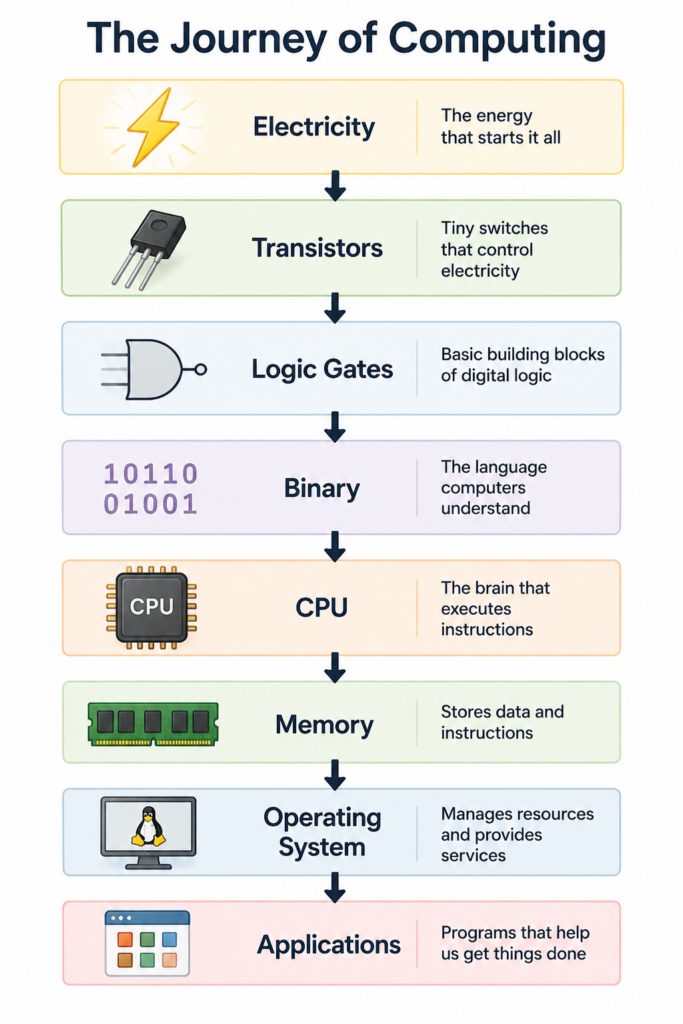
So how does a computer work?
At the lowest level, electricity creates binary signals.
Binary signals control transistors.
Transistors form logic gates.
Logic gates create circuits.
Circuits form CPUs and memory.
CPUs execute instructions.
Operating systems manage resources.
Applications use operating system services.
And together, all of these layers create the digital world we use every day.
Every website you visit.
Every video you watch.
Every message you send.
Ultimately comes down to billions of tiny switches turning on and off.
And that is the amazing story of how computers work.
Thanks for watching.
And in the next video, we’ll dive deeper into one of the most important components inside every computer:
How CPUs Actually Work.