Introduction
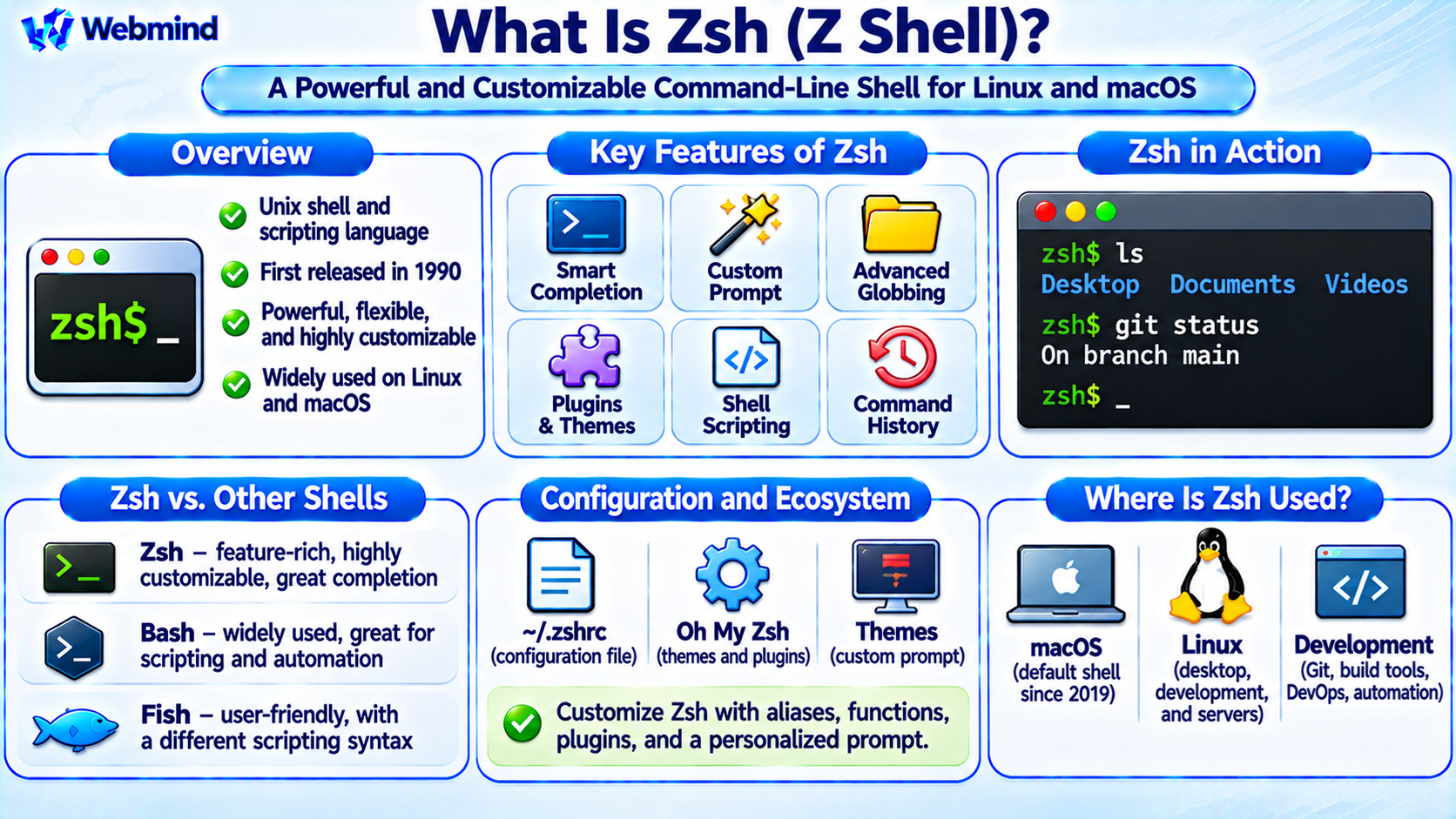
Zsh, short for Z Shell, is a Unix command-line shell and scripting language used to execute commands, manage files, launch programs, and automate tasks.
It is known for its powerful command completion, customization options, and interactive features.
Zsh was originally developed by Paul Falstad in 1990.
It combines features found in traditional Unix shells with additional tools designed to improve command-line productivity.
Today, Zsh is widely used by software developers, Linux administrators, and macOS users.
Apple made Zsh the default interactive shell for new user accounts beginning with macOS Catalina in 2019.
Like Bash, Zsh is a command interpreter that runs in user space and communicates with the operating system through standard system interfaces.
How Does Zsh Work?
Zsh accepts commands entered by a user or read from a script.
It interprets the commands, performs shell operations, and launches external programs when necessary.
For example, entering ls causes Zsh to locate and execute the appropriate file-listing utility.
The operating-system kernel provides the underlying services required to access files and hardware resources.
Zsh also includes built-in commands such as cd, alias, and export.
These commands allow users to change directories, create command shortcuts, and manage environment variables.
The shell can additionally combine programs through pipes, redirection, and scripting constructs.
What Are the Main Features of Zsh?
Zsh includes several features that make interactive command-line work convenient.
Advanced Command Completion: Suggests commands, filenames, directories, options, and other possible arguments.
Command-Line Editing: Supports interactive editing, history navigation, and configurable keyboard shortcuts.
Spelling Correction: Can suggest corrections for certain mistyped commands or arguments when enabled.
Powerful Globbing: Provides advanced filename pattern matching and recursive file selection.
Customizable Prompts: Allows users to display information such as the current directory, Git branch, or command status.
Shell Scripting: Supports variables, functions, conditional statements, loops, and automation.
Plugin and Theme Support: Works with community frameworks that extend interactive functionality.
These capabilities make Zsh particularly popular among developers who spend significant time working in terminals.
What Is Zsh Command Completion?
Command completion helps users enter commands and arguments more efficiently.
When a user presses the Tab key, Zsh can suggest possible completions based on the current command.
For example, typing part of a directory name and pressing Tab may complete the remaining characters.
Zsh can also provide context-aware completions for many command-line programs.
For instance, completion definitions may suggest Git subcommands, available branches, or supported command options.
The completion system is highly configurable and can display menus containing multiple possible matches.
This reduces typing and helps users discover command options.
What Is Zsh Globbing?
Globbing is a mechanism for matching filenames using patterns.
Like other Unix shells, Zsh supports wildcard characters such as * and ?.
For example, *.txt can match filenames ending in .txt.
Zsh also provides more advanced pattern-matching features.
With appropriate options, a recursive pattern such as **/*.txt can match text files located in subdirectories.
Zsh supports additional qualifiers and extended patterns for selecting files according to specific conditions.
These capabilities are useful when managing large directory structures or processing collections of files.
However, some Zsh pattern-matching behavior differs from Bash, so scripts should not assume identical wildcard rules.
What Is the .zshrc File?
The ~/.zshrc file is a user configuration file commonly read when an interactive Zsh session starts.
It can contain aliases, functions, prompt settings, completion configuration, and other shell preferences.
For example, a user may define:
alias ll='ls -l'
This creates a shortcut that runs ls -l when the user enters ll.
Zsh also supports startup files such as .zshenv, .zprofile, and .zlogin.
These files serve different purposes depending on whether the shell is interactive or operating as a login shell.
Understanding Zsh startup files helps users configure their command-line environment correctly.
What Is Oh My Zsh?
Oh My Zsh is a community-maintained framework for managing Zsh configuration.
It provides collections of themes, plugins, and configuration helpers.
For example, plugins can improve command completion or provide shortcuts for tools such as Git.
Themes can change the appearance of the command prompt.
Oh My Zsh is not part of the Zsh shell itself. It is an optional framework that runs on top of Zsh.
Users can customize Zsh without installing Oh My Zsh, but the framework can simplify common configuration tasks.
Other popular Zsh configuration tools include Prezto and prompt themes such as Powerlevel10k.
Zsh vs. Bash: What Is the Difference?
Zsh and Bash are both powerful Unix shells, but they differ in interactive features and scripting behavior.
Bash: Widely used in Linux environments, server administration, and shell scripting. It is particularly common in automation scripts and development workflows.
Zsh: Emphasizes interactive usability, advanced completion, configurable prompts, and powerful filename expansion.
Both support variables, functions, loops, conditions, pipelines, and command execution.
However, their scripting syntax and default behaviors are not identical.
For example, array indexing and some filename-expansion rules differ between the two shells.
A Bash script may require modification before it works correctly in Zsh.
For portable shell scripting, developers often target POSIX sh rather than relying on shell-specific features.
Zsh vs. Fish
Fish, or Friendly Interactive Shell, is another command-line shell designed for interactive usability.
Both Zsh and Fish offer convenient completion and command-line editing features.
Fish provides autosuggestions and syntax highlighting as standard interactive features.
Zsh provides a highly configurable completion and editing system, while additional plugins can supply similar enhancements.
An important difference is scripting compatibility.
Fish uses its own scripting syntax and does not aim to be POSIX shell compatible.
Zsh shares more syntax and concepts with traditional Bourne-style shells, although it also includes many extensions.
The best choice depends on the user’s preferences and scripting requirements.
How Does Zsh Scripting Work?
Zsh can execute commands stored in script files.
A Zsh script may begin with:
#!/bin/zsh
This shebang identifies the Zsh interpreter when the script is executed directly on a compatible system.
A simple script can contain:
#!/bin/zsh
echo "Hello from Zsh!"
Zsh scripts support variables, functions, loops, and conditional statements.
They can automate file processing, application builds, backups, and other system tasks.
However, scripts that use Zsh-specific features should explicitly run under Zsh rather than assuming another shell will interpret them correctly.
What Are Zsh Variables and Arrays?
Zsh supports ordinary variables, environment variables, and arrays.
For example:
name="Linux"
The value can be displayed using:
echo "$name"
Zsh also supports indexed and associative arrays.
Indexed arrays commonly use one-based indexing in standard Zsh behavior, unlike Bash arrays, which normally use zero-based indexing.
This distinction is important when translating scripts between the two shells.
Zsh also provides parameter expansion features that can manipulate strings, arrays, and variable values.
These capabilities are useful for advanced scripting and automation.
What Are Zsh Plugins?
Zsh plugins extend or customize shell behavior.
Plugins may provide command completion, Git integration, syntax highlighting, suggestions, or additional command-line shortcuts.
For example, a Git-related plugin may offer aliases for frequently used Git commands.
A syntax-highlighting plugin may visually distinguish valid commands, arguments, and other shell elements.
Some functionality is built directly into Zsh, while other features require external plugins.
Plugin frameworks simplify installation and configuration, but users should review third-party scripts before executing them.
Because shell plugins run within the user’s environment, untrusted plugins can create security risks.
Why Does macOS Use Zsh?
Apple changed the default interactive shell for new macOS user accounts from Bash to Zsh beginning with macOS Catalina.
Zsh provides modern interactive capabilities while retaining many familiar Unix shell concepts.
macOS still includes Bash and other command-line tools.
Users can select a different login shell if they prefer.
For example, opening Terminal on a modern macOS installation commonly starts a Zsh session.
The user can then run Unix commands, shell scripts, development tools, and system utilities.
This change contributed to Zsh’s popularity among macOS developers.
How Can You Check Whether You Are Using Zsh?
On Linux or macOS, the following command commonly displays the configured login shell:
echo $SHELL
If Zsh is configured as the login shell, the output may contain a path such as /bin/zsh or /usr/bin/zsh.
However, the SHELL environment variable does not necessarily identify the shell currently running.
To display the Zsh version from within an active Zsh session, use:
echo $ZSH_VERSION
If Zsh is installed, you can also run:
zsh --version
These commands help identify the available shell environment.
Where Is Zsh Used?
Zsh is useful in many computing environments.
Linux Desktops: Provides an interactive command-line environment for everyday tasks.
macOS: Serves as the default interactive shell for modern user accounts.
Software Development: Supports Git workflows, compilers, programming tools, and build automation.
System Administration: Allows administrators to execute commands and automate maintenance tasks.
DevOps: Supports command-line workflows involving containers, servers, and deployment tools.
Education: Helps students learn Unix commands, shell scripting, and operating-system concepts.
Zsh is primarily a command-line environment rather than a replacement for the operating-system kernel.
Advantages of Zsh
Zsh provides several benefits for command-line users.
Powerful Completion: Reduces typing and helps users discover available command options.
Customization: Supports flexible prompts, themes, aliases, and shell functions.
Advanced File Matching: Makes complex filename selection easier.
Interactive Productivity: Provides convenient history navigation and command editing.
Scripting Capabilities: Supports automation through a complete shell programming language.
Unix Compatibility: Works with many familiar Unix commands and programming tools.
These features make Zsh an attractive choice for interactive terminal use.
Limitations of Zsh
Zsh also has some limitations.
Scripting Differences: Zsh scripts are not always compatible with Bash or POSIX shell scripts.
Configuration Complexity: Advanced customization can require substantial configuration.
Plugin Overhead: Large plugin frameworks may increase shell startup time.
Portability: Zsh may not be installed by default on minimal Linux systems or containers.
Learning Curve: Advanced completion, globbing, and parameter expansion features require practice.
For simple, portable automation, POSIX-compatible shell scripts may be a better choice.
Conclusion
Zsh, or Z Shell, is a Unix command-line shell and scripting language known for its advanced completion, customization, and interactive capabilities.
It allows users to execute commands, manage files, launch programs, and automate tasks through shell scripts.
Zsh is widely used in Linux and macOS environments and supports popular configuration frameworks such as Oh My Zsh.
Although Zsh shares many concepts with Bash, the two shells have important differences in scripting syntax and interactive behavior.
Understanding Zsh provides a useful foundation for learning Linux, Unix, shell scripting, macOS command-line tools, system administration, and software development.