Introduction
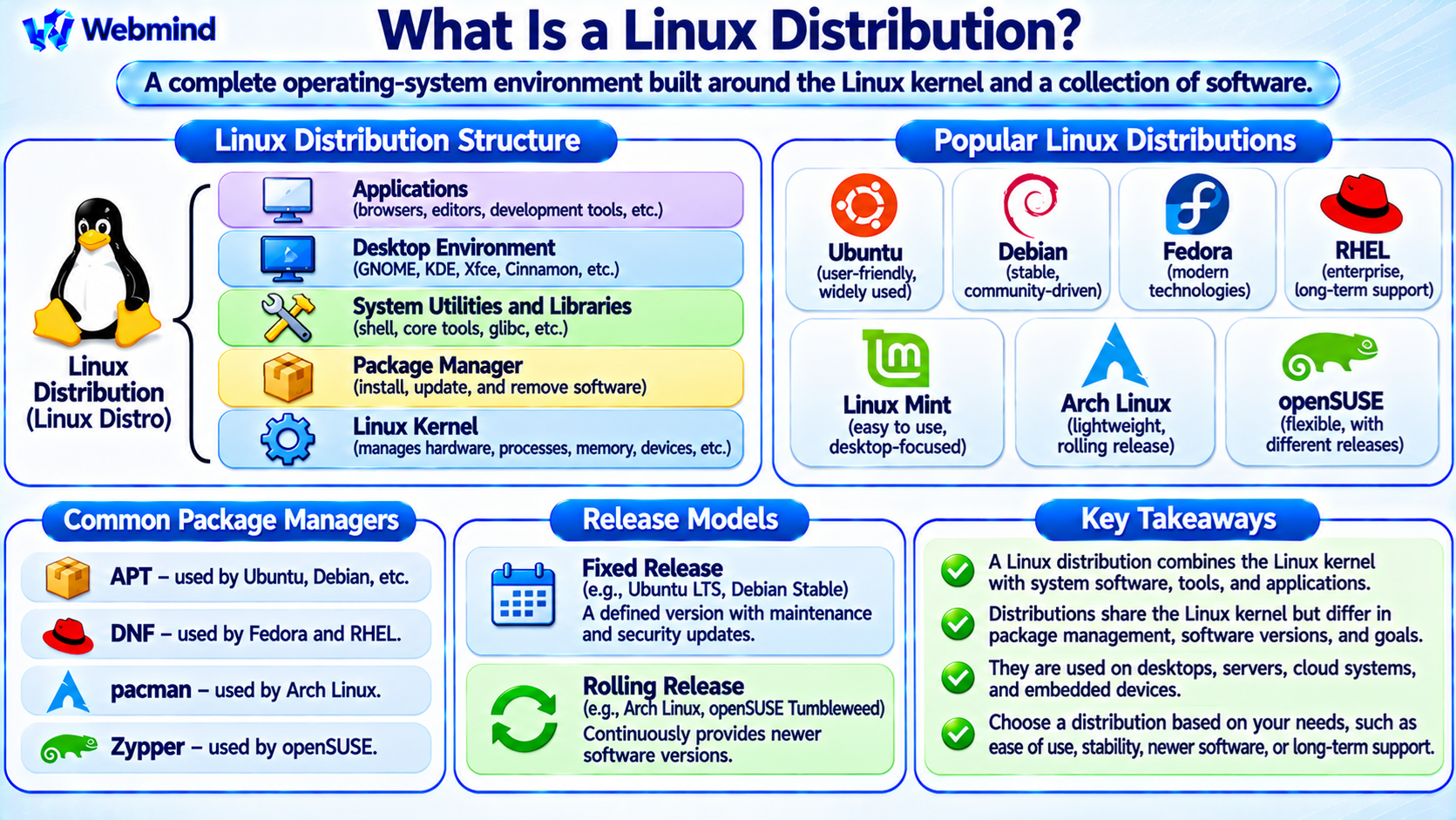
A Linux distribution, commonly called a Linux distro, is a complete operating-system environment built around the Linux kernel and a collection of system software, libraries, utilities, and applications.
The Linux kernel manages hardware resources, processes, memory, and device communication.
A Linux distribution combines this kernel with the additional software needed to create a usable operating system.
Popular Linux distributions include Ubuntu, Debian, Fedora, Red Hat Enterprise Linux (RHEL), Linux Mint, Arch Linux, and openSUSE.
Although these distributions share the Linux kernel, they differ in package management, software versions, desktop environments, system configuration, security policies, and release schedules.
What Does a Linux Distribution Contain?
A typical Linux distribution contains several important components.
Linux Kernel: Manages processes, memory, hardware devices, networking, and essential system operations.
System Libraries: Provide programming interfaces used by applications. Many distributions use the GNU C Library (glibc), while others use alternatives such as musl.
System Utilities: Include tools for managing files, processes, users, storage, and networking.
Package Manager: Installs, updates, and removes software packages.
Init and Service Manager: Starts system services and manages their operation. Many distributions use systemd, while others use alternative systems.
Shell: Provides a command-line interface, commonly using Bash or another shell.
Desktop Environment: Provides a graphical interface on desktop-oriented distributions.
Applications: Include browsers, editors, development tools, and other software.
Not every Linux distribution contains all these components.
Minimal server and embedded distributions may omit graphical interfaces and other optional software.
How Does a Linux Distribution Work?
When a Linux computer starts, its firmware initializes the hardware and loads the bootloader or another supported boot mechanism.
The Linux kernel is then loaded into memory.
The kernel initializes essential hardware and system resources before starting the initial user-space process.
On many modern distributions, systemd operates as the main init and service manager.
It starts services, prepares the operating environment, and manages system startup tasks.
The system may then present a graphical login screen or a command-line interface.
Once the user logs in, applications run in user space and request kernel services through system libraries and system calls.
This general architecture is shared by many Linux distributions.
Linux Kernel vs. Linux Distribution
The Linux kernel and a Linux distribution are not the same thing.
Linux Kernel: The central software component responsible for managing hardware resources and essential operating-system functions.
Linux Distribution: A complete operating environment that combines the Linux kernel with system software, tools, configuration, and applications.
For example, Ubuntu and Fedora both use the Linux kernel, but they have different package management systems, software repositories, release policies, and default configurations.
The Linux kernel is developed independently from the organizations that maintain most Linux distributions.
Distributions integrate kernel releases with their own software packages, updates, and support policies.
Popular Linux Distributions
Ubuntu
Ubuntu is a Debian-based Linux distribution developed by Canonical and the Ubuntu community.
It is widely used for desktop computing, servers, cloud infrastructure, and development.
Ubuntu uses APT for package management and provides Long-Term Support (LTS) releases.
Debian
Debian is a community-developed Linux distribution known for its strong free software tradition and emphasis on stability.
It uses the DEB package format and APT package management tools.
Debian is also the foundation for many other Linux distributions, including Ubuntu.
Fedora
Fedora is a community-driven distribution sponsored by Red Hat.
It is known for integrating modern Linux technologies and providing relatively recent software versions.
Fedora uses RPM packages and the DNF package manager.
Red Hat Enterprise Linux
Red Hat Enterprise Linux, or RHEL, is a commercial enterprise Linux distribution designed for business environments.
It emphasizes long-term maintenance, security updates, support services, and predictable system management.
Arch Linux
Arch Linux is a lightweight, independently developed distribution that emphasizes simplicity, user control, and a rolling-release model.
It uses the pacman package manager.
Linux Mint
Linux Mint is a desktop-focused distribution designed to provide a familiar and accessible computing environment.
Its main edition is based on Ubuntu, while Linux Mint Debian Edition is based directly on Debian.
openSUSE
openSUSE is a Linux distribution family that provides different release models.
It uses RPM packages and the Zypper package manager.
openSUSE Tumbleweed follows a rolling-release model.
What Is a Linux Package Manager?
A package manager installs, updates, and removes software while managing package dependencies.
Different Linux distributions use different package-management systems.
APT: Commonly used by Debian, Ubuntu, and related distributions.
DNF: Used by Fedora and modern RHEL-family distributions.
pacman: Used by Arch Linux and related distributions.
Zypper: Used by openSUSE and SUSE-based systems.
For example, Ubuntu users can install software using the command:
sudo apt install git
On Fedora, a similar operation uses:
sudo dnf install git
Package managers obtain software from configured repositories and help maintain system consistency.
Linux also supports alternative application distribution formats such as Flatpak, Snap, and AppImage.
What Is a Linux Desktop Environment?
A desktop environment provides the graphical interface used to interact with a Linux computer.
It commonly includes a desktop shell, window-management functionality, file manager, settings applications, and other utilities.
Popular Linux desktop environments include GNOME, KDE Plasma, Xfce, Cinnamon, and LXQt.
For example, Ubuntu Desktop commonly uses GNOME, while Linux Mint’s main edition uses Cinnamon.
A Linux distribution may support multiple desktop environments.
Linux servers often operate without a graphical desktop to reduce resource usage and simplify administration.
What Is the Difference Between Fixed and Rolling Releases?
Linux distributions use different software release models.
Fixed Release: Provides a defined distribution version with a selected set of software packages. Updates generally emphasize maintenance, security, and compatibility until the next major release.
Rolling Release: Continuously delivers newer software versions without requiring regular major operating-system upgrades.
Ubuntu LTS and Debian Stable are examples of fixed-release systems.
Arch Linux and openSUSE Tumbleweed are examples of rolling-release distributions.
Fixed-release systems often provide predictable environments, while rolling-release systems provide faster access to newer software.
However, stability and security depend on the distribution’s maintenance practices, not simply its release model.
What Is a Long-Term Support Distribution?
A Long-Term Support distribution provides maintenance and security updates for an extended period.
For example, Ubuntu LTS releases receive five years of standard security maintenance, with additional coverage available through supported programs.
Enterprise distributions such as RHEL also provide extended maintenance lifecycles under their support policies.
Long-term support is particularly valuable for servers, businesses, and production systems where frequent major upgrades may be undesirable.
Distributions may use backporting to apply security fixes to older software versions without upgrading to the newest upstream release.
This means an older package version is not necessarily unpatched or insecure.
What Is the Difference Between GNU/Linux and Other Linux Systems?
Many Linux distributions combine the Linux kernel with GNU components such as Bash, Coreutils, GCC, and glibc.
These systems are often called GNU/Linux.
However, not every Linux-based operating system uses the same GNU components.
For example, Alpine Linux commonly uses musl libc and BusyBox.
Android also uses the Linux kernel but has a substantially different software environment from a conventional GNU/Linux desktop distribution.
This demonstrates that the Linux kernel can support multiple user-space software ecosystems.
The distribution determines which libraries, utilities, and system services are included.
Linux Distributions for Servers
Linux is widely used in server environments because of its flexibility, networking capabilities, and software ecosystem.
Common server distributions include Ubuntu Server, Debian, RHEL, Rocky Linux, AlmaLinux, and SUSE Linux Enterprise Server.
These distributions support web servers, databases, container platforms, virtualization, and cloud applications.
For example, a Linux web server may use Nginx or Apache to serve websites.
System administrators can manage services through command-line tools, configuration files, and automation systems.
Choosing a server distribution often depends on support requirements, application compatibility, maintenance policies, and administrative experience.
Linux Distributions for Embedded Systems
Linux also runs on embedded hardware such as routers, industrial controllers, single-board computers, and networking equipment.
Embedded Linux systems frequently use customized distributions containing only the software required by the device.
Tools such as Yocto Project and Buildroot help developers create specialized Linux-based systems.
These environments may use BusyBox, lightweight libraries, and customized kernels to reduce storage and memory requirements.
Raspberry Pi OS is a familiar example of a Linux distribution designed for a particular family of computing devices.
Embedded Linux demonstrates how the Linux ecosystem can support hardware ranging from small controllers to powerful servers.
How Can You Identify Your Linux Distribution?
Most modern Linux distributions provide information in the /etc/os-release file.
To display this information, use:
cat /etc/os-release
The output normally includes the distribution name, version, and identification fields.
For example, the file may identify the system as Ubuntu, Debian, Fedora, or another distribution.
To check the running Linux kernel version, use:
uname -r
These commands provide different information.
The first identifies the operating-system distribution, while the second identifies the running kernel release.
This distinction is useful when installing software, troubleshooting problems, or checking compatibility.
How Do You Choose a Linux Distribution?
The best Linux distribution depends on its intended use.
For beginners, Ubuntu and Linux Mint provide familiar desktop environments and extensive documentation.
For servers, Ubuntu Server, Debian, RHEL, and related enterprise distributions are common choices.
Developers who prefer newer software versions may choose Fedora or a rolling-release distribution.
Advanced users who want greater control over system configuration may prefer Arch Linux.
Embedded developers may build customized distributions using Yocto Project or Buildroot.
Important factors include hardware compatibility, software availability, security updates, support lifecycle, and system administration requirements.
Why Are There So Many Linux Distributions?
Linux is open-source software, and its licensing allows organizations and communities to modify and distribute software under the applicable license conditions.
Different groups therefore develop distributions for different goals.
Some emphasize stability and long-term support.
Others prioritize recent software, minimal resource requirements, security, privacy, enterprise administration, or specialized hardware.
For example, a desktop distribution may include a complete graphical interface, while a server distribution may provide only essential command-line services.
This diversity is one of the defining characteristics of the Linux ecosystem.
Conclusion
A Linux distribution is a complete operating-system environment built around the Linux kernel and a collection of system software, libraries, utilities, and applications.
Popular distributions include Ubuntu, Debian, Fedora, RHEL, Arch Linux, Linux Mint, and openSUSE.
Although they share the Linux kernel, distributions differ in package management, release schedules, desktop environments, system configuration, and support policies.
Linux distributions support personal computers, servers, cloud infrastructure, embedded systems, and specialized computing devices.
Understanding Linux distributions provides an important foundation for studying Linux architecture, GNU/Linux, package management, system administration, operating systems, and open-source software.