Introduction
Binary is a number system that uses only two digits: 0 and 1. It is also called the base-2 number system and forms the foundation of modern digital computing.
Unlike the decimal system, which uses ten digits from 0 to 9, binary represents all numbers using combinations of zeros and ones.
Computers use binary because digital electronic circuits can reliably distinguish between two logical states, commonly represented by low and high voltage levels.
Binary is essential for understanding CPUs, memory, logic gates, programming, digital electronics, and computer architecture.
How Does the Binary Number System Work?
The binary number system uses powers of two to represent numerical values.
In decimal, each digit position represents a power of ten. In binary, each position represents a power of two.
Starting from the right, binary positions have the following values:
1, 2, 4, 8, 16, 32, 64, 128, and so on.
For example, consider the binary number:
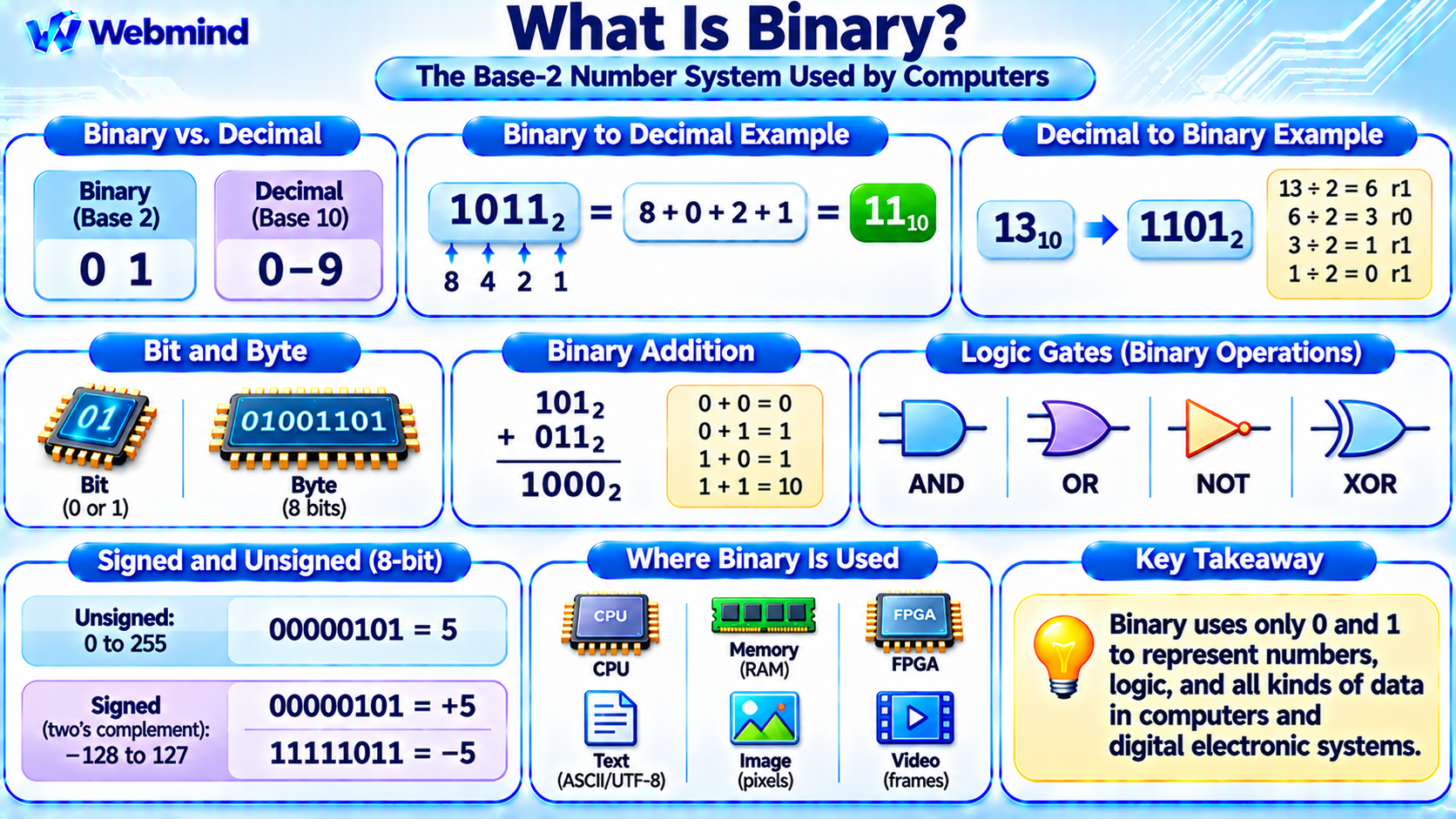
1011₂
Its value can be calculated as:
1 × 8 + 0 × 4 + 1 × 2 + 1 × 1 = 11
Therefore, binary 1011 represents decimal 11.
The small subscript 2 indicates a binary number, while decimal numbers can be identified using base 10.
What Is a Bit?
A bit, short for binary digit, is the smallest unit of binary information.
A bit can have one of two values: 0 or 1.
In digital circuits, these values are represented by physical states, usually voltage ranges.
A group of eight bits is called a byte.
For example:
1 bit: Represents two possible values.
4 bits: Represents 16 possible combinations.
8 bits: Represents 256 possible combinations.
16 bits: Represents 65,536 possible combinations.
In general, a group of n bits can represent 2ⁿ different combinations.
Bits are used to represent numbers, instructions, characters, memory addresses, and other forms of digital information.
How to Convert Binary to Decimal
Converting a binary number to decimal requires adding the values of the positions containing a 1.
Consider:
1101₂
The positional values are 8, 4, 2, and 1.
The calculation is:
1 × 8 + 1 × 4 + 0 × 2 + 1 × 1 = 13
Therefore:
1101₂ = 13₁₀
This method works for binary numbers of any length.
For example, binary 10000000 represents decimal 128 because only the position corresponding to 2⁷ contains a 1.
How to Convert Decimal to Binary
A decimal number can be converted to binary by repeatedly dividing it by two and recording the remainders.
For example, convert decimal 13 into binary.
13 ÷ 2 = 6, remainder 1
6 ÷ 2 = 3, remainder 0
3 ÷ 2 = 1, remainder 1
1 ÷ 2 = 0, remainder 1
Reading the remainders from bottom to top gives:
13₁₀ = 1101₂
Another method is to express the decimal number as a sum of powers of two.
For example, 13 = 8 + 4 + 1, producing binary 1101.
How Does Binary Addition Work?
Binary addition follows rules similar to decimal addition, but it uses only zero and one.
The basic rules are:
0 + 0 = 0
0 + 1 = 1
1 + 0 = 1
1 + 1 = 10
The last result means that adding one and one produces binary 10, which represents decimal 2.
For example:
101₂ + 011₂ = 1000₂
In decimal, this is:
5 + 3 = 8
Binary addition is implemented in hardware using logic circuits called half adders and full adders.
These circuits form part of the Arithmetic Logic Unit (ALU) inside a processor.
How Do Computers Use Binary?
Computers use binary to represent information and control digital circuits.
Modern processors contain billions of transistors arranged into logic gates and other electronic structures.
These circuits operate using electrical signals that represent logical zeros and ones.
For example, when a processor performs addition, its arithmetic circuits manipulate binary values stored in registers.
Computer memory also stores information using physical states that represent binary data.
The exact physical mechanism depends on the memory technology.
SRAM uses transistor-based storage circuits, DRAM stores electrical charge, and Flash memory uses stored charge or related electrical characteristics.
Binary provides a common representation across these different technologies.
Binary and Logic Gates
Logic gates perform operations on binary inputs.
AND Gate: Produces 1 when all inputs are 1.
OR Gate: Produces 1 when at least one input is 1.
NOT Gate: Reverses a binary input, changing 0 to 1 or 1 to 0.
XOR Gate: Produces 1 when two binary inputs differ.
By combining logic gates, engineers create more complex circuits such as adders, multiplexers, counters, and registers.
These circuits are essential building blocks of CPUs, microcontrollers, FPGAs, and other digital systems.
Binary values therefore connect mathematical operations with physical electronic hardware.
What Are Signed and Unsigned Binary Numbers?
Binary numbers can represent both positive and negative integers.
An unsigned binary number represents only nonnegative values.
For example, an unsigned 8-bit number can represent values from 0 to 255.
Signed binary numbers use an encoding that supports negative values.
Most modern processors use a representation called two’s complement for signed integers.
In 8-bit two’s complement:
00000101 represents positive 5.
11111011 represents negative 5.
An 8-bit signed two’s-complement number can represent values from -128 to 127.
Two’s complement is widely used because it allows the same basic binary addition hardware to handle signed and unsigned arithmetic.
Binary, Hexadecimal, and Decimal
Different number systems are useful for different purposes.
Binary (Base 2): Uses digits 0 and 1. It directly represents digital information.
Decimal (Base 10): Uses digits 0 through 9. It is the number system most commonly used in everyday mathematics.
Hexadecimal (Base 16): Uses digits 0 through 9 and letters A through F. It provides a compact way to represent binary values.
One hexadecimal digit corresponds to exactly four binary bits.
For example:
Binary: 11111111
Decimal: 255
Hexadecimal: FF
Hexadecimal is commonly used in programming, memory addresses, machine code, and debugging because it is easier to read than long binary sequences.
How Does Binary Represent Text and Images?
Binary is not limited to numbers.
Computers encode many types of information as sequences of bits.
Text: Character encodings such as ASCII and UTF-8 represent letters, numbers, symbols, and other characters using binary data.
Images: Digital images store pixel information, including color values, dimensions, and other image data.
Audio: Digital audio represents sampled sound using numerical values encoded in binary.
Video: Digital video stores sequences of images and associated information, often using compression techniques.
Machine Instructions: CPUs execute instructions represented by binary machine-code encodings.
Although all these data types ultimately use bits, their meaning depends on the encoding format and software interpreting them.
Why Is Binary Important in Digital Electronics?
Binary is particularly suitable for digital electronics because electronic circuits can distinguish between two voltage ranges.
For example, a digital circuit may interpret a voltage near ground as logical zero and a voltage near its supply level as logical one.
The precise voltage thresholds depend on the logic family and hardware specifications.
Using two logical states provides noise margins that help circuits operate reliably despite small electrical disturbances.
However, electronic signals are physically continuous, and real circuits require finite time to switch between states.
Binary is a logical abstraction that allows complex digital systems to be designed using predictable rules.
Binary in CPUs, Memory, and FPGAs
Binary plays an important role in nearly every major digital hardware component.
CPU: Executes machine instructions and performs arithmetic and logical operations on binary data.
Registers: Store binary values used during instruction execution.
RAM: Stores instructions and data as bit patterns.
ALU: Performs binary arithmetic, comparisons, and logical operations.
FPGA: Uses configurable hardware resources to implement digital logic circuits that process binary signals.
Microcontroller: Processes binary instructions and interacts with digital peripherals, sensors, and communication interfaces.
Understanding binary is therefore a necessary foundation for studying computer architecture and digital hardware.
Conclusion
Binary is a base-2 number system that represents information using only zeros and ones.
Its positional values are powers of two, allowing numbers of any size to be represented using combinations of bits.
Computers use binary to encode numerical values, text, images, machine instructions, and many other types of information.
Digital logic gates, processor registers, memory circuits, and arithmetic units all operate on binary representations.
Understanding binary provides an essential foundation for learning logic gates, Boolean algebra, CPU architecture, programming, microcontrollers, FPGA design, and modern digital electronics.