Chapter 1
The Missing Piece of the CPU
In our previous lessons, we explored how computers work.
We learned how transistors form logic gates.
We learned how logic gates form complex circuits.
We learned how memory stores data.
And we learned that CPUs execute instructions.
But there is still an important question that remains unanswered.
Where does the CPU actually perform calculations?
When a CPU adds two numbers together, where are those numbers stored?
When a program executes millions of instructions per second, where does the CPU keep the data it is actively working on?
Many people assume the answer is RAM.
After all, RAM stores program data.
RAM stores variables.
RAM stores operating systems.
RAM stores applications.
But surprisingly, the CPU usually does not perform calculations directly on RAM.
Instead, almost every calculation inside a CPU revolves around a much smaller and much faster storage system.
That storage system is called the register.
Registers are the CPU’s private workspace.
They are where computation truly happens.
And understanding registers is one of the most important steps toward understanding how a CPU really works.
Chapter 2
What Is a Register?
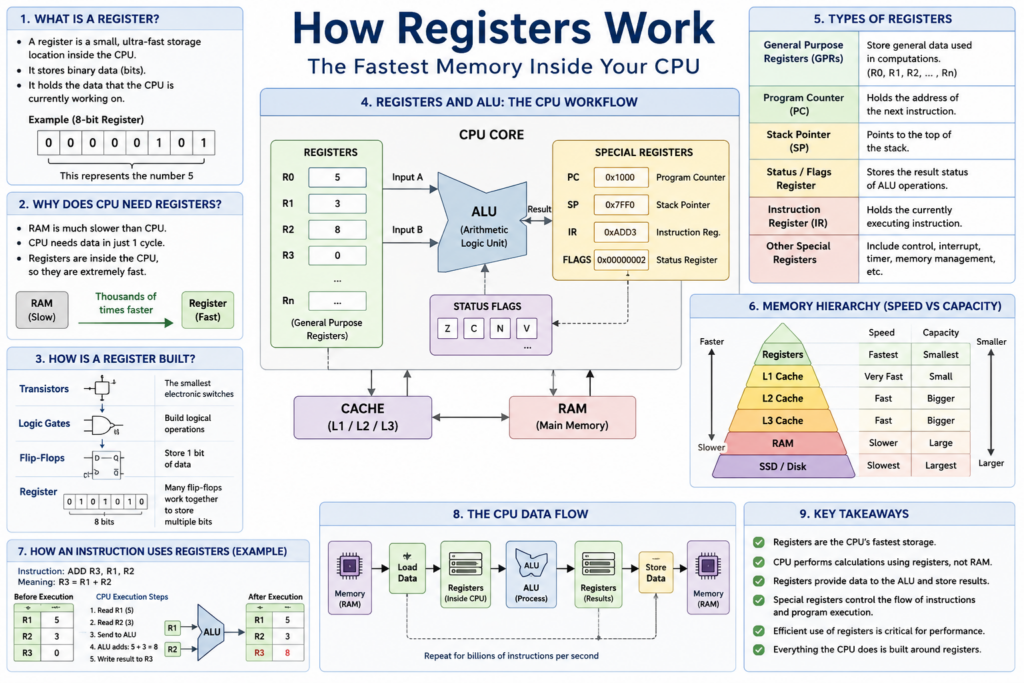
A register is a tiny storage location located directly inside the CPU.
Unlike RAM, which exists outside the processor core, registers are built into the processor itself.
You can think of a register as a small container that holds binary data.
A register may contain:
- Numbers
- Memory addresses
- Instruction pointers
- Function parameters
- Temporary results
Everything stored inside a register is simply bits.
For example:
0000000000000101
might represent the number 5.
Another register might contain:
0000000000000011
which represents the number 3.
The CPU can then use those values for calculations.
Registers are small.
A modern CPU may contain only dozens or hundreds of registers.
Yet these tiny storage locations are among the most important components inside the entire processor.
Chapter 3
Why Can’t the CPU Use RAM Directly?
This is one of the most common beginner questions.
Why not simply perform calculations directly in RAM?
The answer is speed.
RAM is fast compared to storage devices like SSDs.
But RAM is still extremely slow compared to the CPU.
A modern CPU might operate at:
4 GHz
meaning four billion clock cycles every second.
A single RAM access may require dozens or even hundreds of CPU cycles.
If the CPU had to wait for RAM every time it wanted to add two numbers, performance would collapse.
The processor would spend most of its time doing nothing except waiting.
Registers solve this problem.
Because registers are physically located inside the CPU, they can usually be accessed within a single clock cycle.
This makes them thousands of times faster than RAM.
Registers allow the CPU to keep frequently used data immediately available.
Without registers, modern computing would be impossible.
Chapter 4
Registers Are Built from Transistors
Registers are not abstract concepts.
They are physical circuits.
Just like memory cells in RAM, registers are built from transistors.
The hierarchy looks like this:
Transistors
↓
Logic Gates
↓
Flip-Flops
↓
Registers
The key building block is called a flip-flop.
A flip-flop is a circuit capable of storing one bit.
It remembers its state even after the input signal changes.
One flip-flop stores:
0 or 1
A 64-bit register contains sixty-four storage bits.
Which means it contains dozens or hundreds of transistors working together.
Every register inside a CPU is ultimately constructed from these tiny transistor-based memory circuits.
Chapter 5
Registers and the ALU
To understand registers, we must introduce another important component.
The Arithmetic Logic Unit.
Or ALU.
The ALU performs operations such as:
Addition
Subtraction
AND
OR
XOR
Comparison
Shifting
However, the ALU does not permanently store data.
Instead, it receives data from registers.
Consider:
5 + 3
The CPU may perform the operation like this:
Register A = 5
Register B = 3

ALU

Result = 8

Register C = 8
Notice something important.
The ALU reads data from registers.
The ALU writes results back into registers.
Registers are therefore the working area of the ALU.
Without registers, the ALU would have nothing to calculate.
Chapter 6
The CPU’s Real Data Path
Most beginners imagine this:
RAM
↓
ALU
↓
RAM
But that is not how CPUs operate.
The real process is usually:
RAM
↓
Register
↓
ALU
↓
Register
↓
RAM
This is one of the most important concepts in computer architecture.
Data is loaded from memory into registers.
Calculations occur using register values.
Results remain in registers.
Only when necessary are results written back to memory.
This is why programmers, compiler writers, and CPU designers care so much about register usage.
Chapter 7
General-Purpose Registers
Most CPUs contain a set of registers intended for ordinary computation.
These are called general-purpose registers.
In RISC-V:
x0 through x31
In ARM:
x0 through x30
In x86:
RAX
RBX
RCX
RDX
...
These registers hold temporary data used by programs.
Examples include:
- Variables
- Loop counters
- Addresses
- Function parameters
- Intermediate results
General-purpose registers are the workhorses of the processor.
Almost every instruction uses them.
Chapter 8
Special Registers
Not all registers are general-purpose.
Some registers have dedicated jobs.
Examples include:
Program Counter (PC)
Stack Pointer (SP)
Status Register
Instruction Register
Each performs a specific role within the CPU.
Without these special-purpose registers, instruction execution would be impossible.
Chapter 9
Program Counter
The Program Counter, often called the PC, is one of the most important registers in the entire processor.
The PC stores the address of the next instruction.
Example:
PC = 0x1000
The CPU fetches the instruction at that address.
After execution:
PC = 0x1004
The next instruction is fetched.
This process repeats billions of times every second.
Without the PC, the CPU would not know what to execute next.
The Program Counter is essentially the CPU’s navigation system.
Chapter 10
Stack Pointer
Function calls require memory management.
This is where the Stack Pointer comes in.
The Stack Pointer tracks the top of the stack.
When a function is called:
Return Address
Local Variables
Function Parameters
are often stored on the stack.
The Stack Pointer moves as data is pushed and popped.
Every modern operating system relies heavily on stack operations.
Without the Stack Pointer, function calls would be extremely difficult.
Chapter 11
Status Registers and Flags
After every calculation, the CPU often records information about the result.
For example:
Was the result zero?
Was there a carry?
Was there an overflow?
Was the result negative?
These conditions are stored inside status registers.
A branch instruction may later use these flags.
Example:
If Zero Flag == 1
Jump
This mechanism enables decisions inside programs.
Without status registers, conditional execution would be much more complicated.
Chapter 12
Registers and Machine Instructions
Consider the instruction:
ADD R3, R1, R2
Meaning:
R3 = R1 + R2
The CPU performs:
- Read R1
- Read R2
- Send values to ALU
- Perform addition
- Write result into R3
Notice that RAM is not involved at all.
Everything occurs entirely within the CPU.
This is why register-based operations are extremely fast.
Chapter 13
Registers and Compilers
Modern programmers rarely manipulate registers directly.
Instead they write code like:
int c = a + b;
The compiler transforms this into machine instructions.
Those machine instructions use registers.
A major responsibility of a compiler is called:
Register Allocation
The compiler decides which variables remain inside registers.
Efficient register allocation can dramatically improve performance.
Poor allocation can slow programs down.
Chapter 14
Registers and CPU Pipelines
Modern CPUs use pipelines.
Multiple instructions execute simultaneously.
Each instruction moves through stages such as:
Fetch
Decode
Execute
Memory
Write Back
Registers are critical in pipeline design.
The final stage often writes results back into registers.
Pipeline hazards frequently occur because instructions depend on register values.
Managing these dependencies is one of the biggest challenges in CPU design.
Chapter 15
Why Registers Are the Fastest Memory
Registers sit at the very top of the memory hierarchy.
Registers
↓
L1 Cache
↓
L2 Cache
↓
L3 Cache
↓
RAM
↓
SSD
↓
Hard Drive
The closer storage is to the CPU, the faster it becomes.
Registers are physically inside the processor core.
This is why they are the fastest storage available.
They provide the CPU with immediate access to active data.
Everything else exists primarily to keep registers supplied with information.
Conclusion
Registers are the CPU’s private workspace.
They store the data currently being processed.
They supply data to the ALU.
They receive calculation results.
They track instructions through the Program Counter.
They support function calls through the Stack Pointer.
They guide program decisions through status flags.
Although registers are tiny compared to RAM, they are vastly more important to CPU performance.
Every modern computer ultimately follows the same pattern:
Memory
↓
Registers
↓
ALU
↓
Registers
↓
Memory
If memory is where data lives, then registers are where data comes alive.
And now that we understand where computation happens, we are finally ready for the next step:
How the ALU Works — The Engine of Every Calculation.